


2. Before opening the report with the HTML5 viewer, add
interactiveActionExecuting: function (e, args) {
args.cancel = true;
},
to its' initialization
3. Open the report with the HTML5 report viewer.
4. Click the text box with the interactive action
Expected: nothing happens
Actual: The report content becomes hidden
I need SVG background images which are rendered as vectors to PDF (not rasterized) - just like with PictureBoxes.

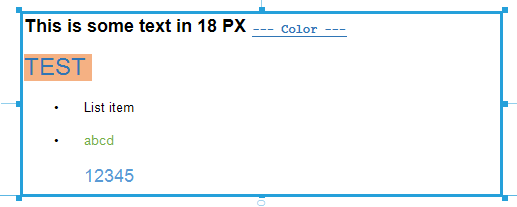
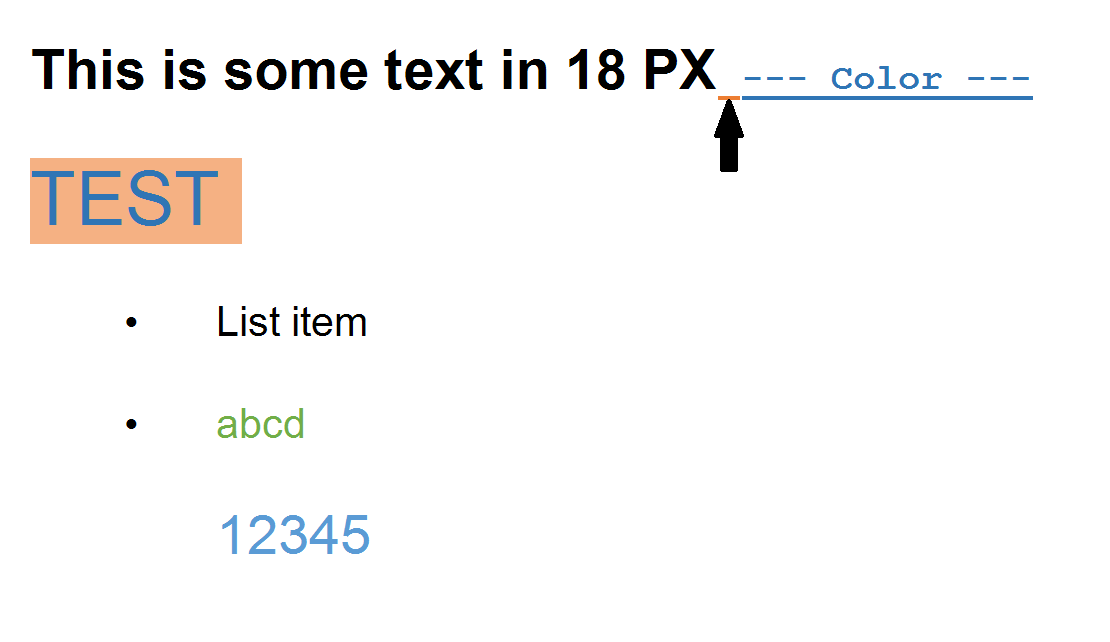
The HtmlTextBox renders less space between the bullet point and text:

Below is the outcome from design time:
And here you see the outcome from the preview:
Cannot provide a valid design-time value for multivalue report parameter and thus cannot preview the data and check whether the query is returning anything. When using a multivalue report parameter of type Int, you may get the following error:
Failed to convert parameter value from a String to a Int32
This does not in any way affect the runtime behavior of the report and if the query is correct, the data is retrieved at runtime, and the report loads as expected.
We use Html Report viewer for rendering reports based on Telerik Reporting.
We observe the following issue with report parameters with AvailableValues configured and Multivalue = true:
When there are one or more items from the available options selected - manually unselecting all of them leads to rendering a report as if the last unselected option is still selected leading to wrong result
All other operations over the multivalue parameter work fine.
The issue occurs only in List type Parameter editors. With ComboBox editors this works as expected.
I want each time a user logs out from my application its session in the Reporting REST Service also to expire. I tried to perform the Unregister Client request with a custom code. However, I need the clientId and there is no straightforward way to get its value from the viewer.
It turns out that the Reporting REST Service keeps its own client sessions that are different from the hosting application sessions. For that reason, the Telerik Reporting REST Service doesn't know whether a user is logged in/out in the main application. Therefore, a Logout functionality in the viewer will be beneficial for scenarios like the described one.
I would like to be able to access the report template layout using the ref so that I can save the report template outside of the designer. Similar to this:
<button type="button"class="btn btn-light btn-sm" @onclick="Save">Save</button>
<WebReportDesigner @ref="designer1"
                   DesignerId="wrd1"
                   ServiceUrl="/api/reportdesigner"
                   Report="Dashboard.trdp"
                   ToolboxArea="new ToolboxAreaOptions() { Layout = ToolboxAreaLayout.Grid }"
                   PropertiesArea="new PropertiesAreaOptions() { Layout = PropertiesAreaLayout.Categorized }" />

@code {
    WebReportDesigner designer1;


    void Test()
    {
        var layout = (byte)designer1.Report.Layout;
    }
}
Generated PDFs do not have bookmarks in R2 2021 unless there is a TOC section in the report.
By setting the device info setting "ProcessItemActions", the generated PDFs have bookmarks again.
var reportProcessor = new Telerik.Reporting.Processing.ReportProcessor();
var reportSource = new Telerik.Reporting.UriReportSource();
reportSource.Uri = "some Uri";
var deviceInfo = new System.Collections.Hashtable();
deviceInfo["ProcessItemActions"] = true;
reportProcessor.RenderReport("PDF", reportSource, deviceInfo);
Hello
I have problem with visual studio auto close when I'm working in reporting designer.
When I'm working in reporting designer and do about 5 changes, Visual studio freezes and after few monents is restarted and I loose all my work.
It is really frequented problem and I can hardly work with reporting designer.
In Windows Event Viewer I everytime find this exception that referes to problem in GetAggregateFunctions().
Application: devenv.exe
Framework Version: v4.0.30319
Description: The process was terminated due to an unhandled exception.
Exception Info: System.NullReferenceException
Server stack trace:
at Telerik.Reporting.Processing.AggregateFunctionHelper.GetAggregateFunctions(IServiceProvider provider)
at Telerik.Reporting.Design.Common.ExpressionBuilder.CategoryAdapter.<GetAggregates>d__1b.MoveNext()
at System.Collections.Generic.List`1..ctor(IEnumerable`1 collection)
at Telerik.Reporting.Design.Common.ExpressionBuilder.CategoryAdapter.FillAggregates(Category funcCategory, IServiceProvider provider)
at Telerik.Reporting.Design.Common.ExpressionBuilder.CategoryAdapter.CreateHierarchy(IServiceProvider provider, Boolean isFieldsTreeVisible)
at Telerik.Reporting.Design.Common.ExpressionBuilder.ExpressionBuilderDialog.LoadCategories(IServiceProvider provider)
at System.Runtime.Remoting.Messaging.StackBuilderSink._PrivateProcessMessage(IntPtr md, Object[] args, Object server, Object[]& outArgs)
at System.Runtime.Remoting.Messaging.StackBuilderSink.AsyncProcessMessage(IMessage msg, IMessageSink replySink)
at System.Runtime.Remoting.Proxies.RealProxy.EndInvokeHelper(System.Runtime.Remoting.Messaging.Message, Boolean)
at System.Runtime.Remoting.Proxies.RemotingProxy.Invoke(System.Object, System.Runtime.Remoting.Proxies.MessageData ByRef)
at Telerik.Reporting.Design.Common.ExpressionBuilder.ExpressionBuilderDialog+LoadCategoriesDelegate.EndInvoke(System.IAsyncResult)
at Telerik.Reporting.Design.Common.ExpressionBuilder.ExpressionBuilderDialog.OnLoadCategoriesComplete(System.IAsyncResult)
at System.Runtime.Remoting.Messaging.AsyncResult.SyncProcessMessage(System.Runtime.Remoting.Messaging.IMessage)
at System.Runtime.Remoting.Messaging.StackBuilderSink.AsyncProcessMessage(System.Runtime.Remoting.Messaging.IMessage, System.Runtime.Remoting.Messaging.IMessageSink)
at System.Runtime.Remoting.Proxies.AgileAsyncWorkerItem.DoAsyncCall()
at System.Runtime.Remoting.Proxies.AgileAsyncWorkerItem.ThreadPoolCallBack(System.Object)
at System.Threading.QueueUserWorkItemCallback.WaitCallback_Context(System.Object)
at System.Threading.ExecutionContext.RunInternal(System.Threading.ExecutionContext, System.Threading.ContextCallback, System.Object, Boolean)
at System.Threading.ExecutionContext.Run(System.Threading.ExecutionContext, System.Threading.ContextCallback, System.Object, Boolean)
at System.Threading.QueueUserWorkItemCallback.System.Threading.IThreadPoolWorkItem.ExecuteWorkItem()
at System.Threading.ThreadPoolWorkQueue.Dispatch()
at System.Threading._ThreadPoolWaitCallback.PerformWaitCallback()