

We use Reporting REST Service to generate our reports. When exporting to BMP, EMF, GIF, JPEG, and PNG which are all multi-document formats, the downloaded documents are corrupted and cannot be opened in Image viewer.
The TIFF image, which is a single document is exported and opened as expected.

My report contains emojis, and they are displayed properly in the designer and in the Html5 Viewer.
When I export to PDF, the emojis disappear. The emoji font is listed as embedded in the PDF file. Even if I embed the full font, the emojis are not displayed.
I am using the HTML Report Viewer and have a report with a parameter that renders as a combobox in the parameter panel of the report viewer. The tab order of the report parameters do not follow the display order of the parameter fields, specifically any parameter fields that use comboboxes.
An example of this behavior is in the "Employee Sales" report on the Telerik Reporting demo site (https://demos.telerik.com/reporting/employee-sales). In the report there are 2 parameters, one for Report Date (using a date picker control) and another for Employee (which uses a combobox). The report viewer is configured to use the combobox option for viewing single and multi selects:
parameters: {
editors: {
singleSelect: telerikReportViewer.ParameterEditorTypes.COMBO_BOX,
multiSelect: telerikReportViewer.ParameterEditorTypes.COMBO_BOX
}
}
When rendered, the Report Date input has a tab index of 301 whereas the Employee combobox has a tabindex of 0. This results in the tab order of the parameter inputs to not follow the order in which they appear.
I have found that if the above settings are commented out, the tab order of the parameter fields works as expected, but results in a list view control instead of a combobox which is not desirable.
Is it possible to override the tabindex of a combobox parameter input to be set to a tabindex value that is relative to its siblings (i.e., 302) so that tabbing through the fields via keyboard is more natural?
We can use Telerik UI components with gRPC service however, Telerik reporting service and HTML 5 viewer do not support gRPC.
With gRPC use growing among the developers, we would like to see Telerik reporting support gRPC out of the box.
I am using the following Telerik configuration section in the Standalone Report Designer:
<Telerik.Reporting>
	<extensions>
        <render>
            <extension name="IMAGE" description="JPEG">
                <parameters>
                    <parameter name="OutputFormat" value="JPEG"/>
                </parameters>
            </extension>
        </render>
    </extensions>
</Telerik.Reporting>
When I try to render a report with multiple pages in JPEG, I receive the error message:
IMAGE rendering extension creates more than one stream. To render, please use the 'bool RenderReport(string format, IReportDocument reportDocument, Hashtable devicelnfo, CreateStream createStreamCallback, out string documentName)' overload instead.
Add the "Not In" operator for the Filter rules - Filter Rules - Telerik Reporting.
The SQL datasource incorrectly recognizes Table Variables in its SQL statement as parameters. The SQL wizard shows the "Configure data source parameter" page and fails to execute the statement.
PROBLEM DESCRIPTION:
A simple statement that uses Table Variables is shown below:
USE AdventureWorks
DECLARE @TestUDTs TABLE(AddressTypeID int NOT NULL, [Name] dbo.Name NOT NULL PRIMARY KEY CLUSTERED(AddressTypeID))
INSERT @TestUDTs(AddressTypeID, [Name]) SELECT AddressTypeID,[Name]
FROM Person.AddressType SELECT * FROM @TestUDTs
Currently, when I create a report with the Standalone Designer and localize it, I can preview it only with the language of the machine where I run the designer.
It would be very helpful to have the option to select one of the languages I have set up during localization when previewing.

In my report, there are multiple stacked Panels. Each of them may fit on a single physical page. They all have KeepTogether set to True and I expected each of the Panels to start on a new page as two of them cannot fit on one page. This may not happen when I have Page sections though.
When I delete the PageHeader and/or PageFooter the Panels are displayed as expected. However, if I set the Visible of the Page sections to False, the problem persists.
It looks like the Page section's Height is taken into account when evaluating the KeepTogether behavior even for the pages where it is hidden. This shrinks the available physical area and the Reporting engine decides that the Panel cannot fit there, hence the next Panel starts from the current page rather than the next page as I think is correct.
I have a table with a dark background. In some scenarios, one or more data source fields may be empty, leaving the corresponding table cells with no content. When I export this report to DOCX, the empty cells contain strange white lines.
In the other export formats, the issue does not occur.
Here is how the table looks like in Word:

Product: Telerik ReportServer 8.1.22.622 ( 2022 R2 SP1 )
I can't delete any report file (.trdp) after being uploaded to Telerik Reports Server (Web Management).
When I click delete an error message says 'An error occurred when trying to delete report, can't connect to agent service'
but the reports agent is running well and other commands like (upload report, rename) also work fine except for Delete.
So I had to delete the reports server's storage folder (~\Data), setup everything again and re-upload all my reports again each time I want to delete a report.
If you would please fix this critical problem in the next versions so I can use Telerik Reports Server again.
Please fix it ASAP. Thanks
- The Report Viewer component is not correctly creating DateTime type fields. It renders them of type textbox.
The current version of the Telerik Reporting library is: 16.2.22.914.
We use Telerik UI for Blazor 3.6.1.
We are using the Telerik.ReportViewer.Blazor library
On the last step of the SqlDataSource Wizard in the Web Report Designer, executing the query to preview the records displays the columns with a lowercase character at the beginning which can be confusing.
After the wizard, the names of the columns are correct and can be used as expected by the designer.


We are using Telerik reporting R2.2022 version in our project. Some of our reports have html link (created with tag “a”). If we preview those reports html link doesn’t act as an actual hyperlink, so it’s not clickable. We know that there is a HtmlTextBox limitation not to be interactive in WinUI report viewer. But this is important for us to be able to click on html link on WinUI and we need that functionality.
I tested WinUI example project (CSharp.WinUIExample.VS2022.sln) and opened SwissQRBill.trdp report. The report has some links to the external source in internet, which is not clickable, but if you open it in Standalone report designer it’s clickable.
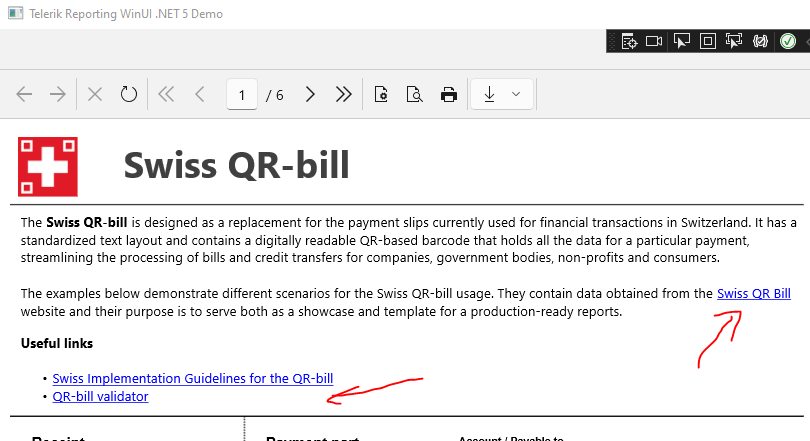
Is it on your roadmap to implement that feature?
Thanks,
Hello
I have a problem with report generating. We use HTML5 report viewer and basic implementation of ReportsControllerBase on server.
I've noticed that we have the CPU/memory recourse consumption after immediately pressing Stop Rendering button. The time of consumption recourses is the same as time without cancelling(about 18-20 second in my example)
There is log with calls of report generating. Last one with cancelling, previous without.
(see
*** ReportProcessor.ProcessReport DONE in 00:00:16.1918150 ***
and
*** ReportProcessor.ProcessReport DONE in 00:00:16.8522950 ***)
I've investigated how cancelation is working.
The Stop Rendering button send DELETE request to ReportsControllerBase.DeleteReport endpoint. It does something and set IsDeleted flag for document.
Then DocumentCancellationController.ThrowIfCancellationRequested() is called in some specific places in app. You can see that method in log.txt, so it was called after pushing the button.
I've profiled the hot path of generation of report. See hotpath.png.
The most CPU intensive work happens in ReportProcessor.ProcessRepourtSource()...
Pay attention to rendering calls.png - the first red dot here - ReportProcessor.ProcessRepourtSource() call.
The second - where the exception and actual cancelation happens.
I'm expecting it should happen much earlier and cancellation of generation of document(and resources consumption) will finish ASAP.
By the way, I see some cancelation checks in ReportProcessor.ProcessRepourtSource() as well - see throwIfCancellation.png
But cancelation request came after these check and most intensive CPU works already started.
Is it possible to fix that?
The issue may be observed with the online demos - see the linked screenshot.
If I go back and add new records, the total rows count gets updated but still doesn't count the initial rows.