

When developing a Telerik report template with the intention of exporting to Excel, I observed the % sign was not displaying for positive numbers in the exported Excel file. The format we were using was {0:N2}%. The results displayed on the HTML report viewer and the Word export document was correct:

However in the excel file result, the cells were formatted without the % for positive numbers, and with the % for negative numbers.
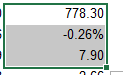
Upon further inspection, I noticed the excel cell formatting was translated as:
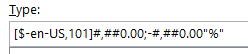
This format would not generate the % symbol for a positive number as the trailing % is missing before the semi-colon.
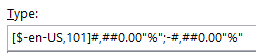
We are fixing this by using the below Format specification directly in the Report Designer:
{0:#,##0.00"%";-#,##0.00"%"}
which is directly retained in the excel custom format:
While I understand that N, C etc. C# number formats are supported according to the design considerations and this bug is also technically resolved by using UseExtendedFormatting (setting this to false translates {0:N2} to #,##0.00"%"), this seems like an unexpected result of translating the format codes that does not match the standard behavior of {0:N2}%. Reporting this behavior for review.
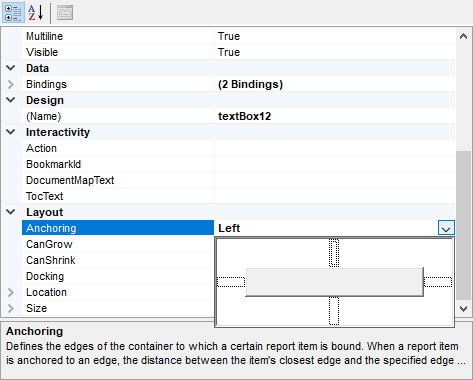
If you set the anchor property and validate it, if I come back on the property, the designer does not show the current anchor.
As you can see, anchoring is defined to left, but it is not shown in the dropdown of the property. The anchoring left should be grey.
When a report has a report parameter using a data source, that is visible and has AllowNull set to True, if the value initial value is invalid, no report parameter widget is loaded at all for this parameter.
If this is the only report parameter, the parameters area is not rendered at all, even though the toolbar indicates that it is active.
The issue can be reproduced by loading the attached report in the native Blazor Report Viewer.

I have designed a report that includes an embedded SubReport. When I render it to PDF, it looks correct. When I render it to CSV, there are two issues that are probably related:
- The heading row columns should contain the main report's detail row textbox names followed by the SubReport 's detail row textbox names. However, the SubReport 's detail textbox names are repeated a few times instead of just included once.
- In the situation where there is no detail row in the SubReport, a CRLF is missing at the end of the main report's detail data. The next main report detail data appears on the same row, following the previous main report's last detail column -- it should begin on the next line.
I understand that CSV Rendering is not recommend for hierarchical output as described in the CSV Design Considerations. However, I am using the Hide the SubReport if no Values to not display the SubReport when there is not data. The hidden SubReport implementation can be seen in the below binding expression.
<Bindings>
    <Binding Expression="=Count(Fields.AP_OPN_CHK_VCH_NO_C)>0" Path="Parent.Parent.Parent.Visible"/>
</Bindings>
Using the above approach, the master report is missing a CRLF when the detail data is not visible. The record shows it appended to the previous record.
I started working with Support on this issue and have discovered that it might be a bug. As a result, I am also attaching their sample to help replicate the issue. For the pdf and csv output see the first attachment in the original ticket.
When HTML entities are used in an embedded expression of the HtmlTextBox, they are parsed.
The same does not happen when the "= ..." expression syntax is used.
For example:
This expression works.
= Replace(Fields.Column2, 'less than','<')This one throws an error.
{Replace(Fields.Column2, 'less than','<')}

Here is a snippet from the file '/@progress/telerik-angular-report-viewer/dist/es/telerik-report-viewer.component.js' in Telerik Reporting NPM repository of the Angular Viewer that hard-codes the message:
TelerikReportViewerComponent.decorators = [
        { type: Component, args: [{
                    selector: 'tr-viewer',
                    template: '<div [ngStyle]="containerStyle" [attr.id]="reportViewerID" #container>Loading Report Viewer...</div>',
                    styleUrls: [],
                    encapsulation: ViewEncapsulation.None,
                },] },
    ];
Currently, there is no easy way for localizing or removing this message in an Angular-wise approach.
I have encountered scenarios where I want to return different results based on fields value or some expression. While I can use nested ternary operations this is not ideal as it can be difficult to read and maintain, particular for newer report designers. It would be helpful to have SWITCH and IFS statements modeled after those provided by Excel.
SWITCH would be helpful for cases where I want to check against a few different literal values and return different results.
IFS would be helpful for cases where I want to evaluate different expressions and return different results.
Modeling these after those in Excel would be sufficient, though, for more advanced cases being able to write C# code inline with the report would be helpful (will submit as a separate request).
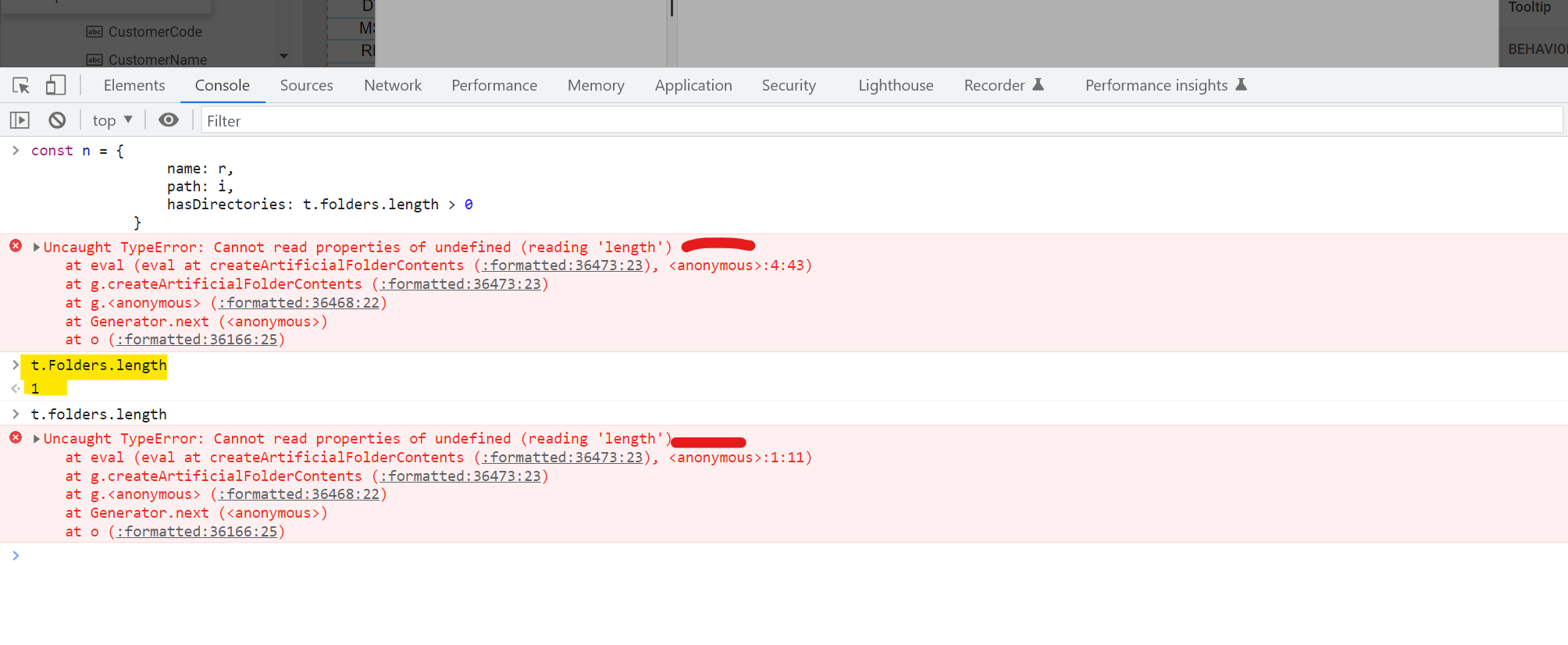
In this file t.folder is lowercase which should be Capital t.Folder
t.folder throws error
t.Folder return value
same or files vs Files
The sub-report can give one or multiple lines as output for a single row in the master report.
However, when a row's height in the master report is too high (due to the output of other cells, not the sub-report), then the sub-report's output doesn't fill the gap in the master report even when I use anchoring to top and bottom.
in the new/current Version "16.2.22.914", when dragging an DataSource-Field on the Report, the resolved expression is wrong.
In the previous Version "16.2.22.622", this worked as expected, see Screenshot.
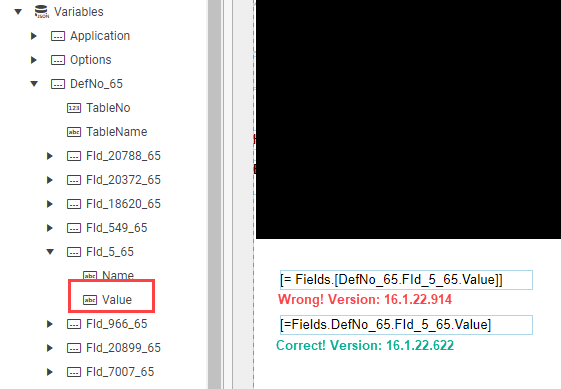
The attached report demonstrates the issue.

I have posted a video that shows the issue. If I use the string builder for a textbox value and select a nested property, such as DayOfWeek, for a date, then it adds:
=Fields.DayOfWeek
which fails on Preview and is wrong. Instead it should add:
=Fields.Birthday.DayOfWeek
Please fix this. I know that I can go type ".Birthday" to fix the issue, but it really should add the nested properties properly.
Using the Npgsql data provider of version 6.0.7 leads to the following error when there is a DateTime SQL parameter:
Can't write CLR type System.String with handler type TimestampTzHandler or Can't write CLR type System.String with handler type TimestampHandler.
This error is thrown only on Design-Time because the Design-Time value for the SQL parameter does not respect its selected DbType and is instead always a string.
For example:
Item("MyProperty",Fields.MyDictionary)This would add a invaluable degree of freedom when considering the structure and usage of report's datasources. For example, the current way of working with ExpandoObject (which are also IDictionaries) is very problematic and in my opinion not a good way of doing it. One such utility function will eliminate almost all of the problems that are present at the moment.
Another way (even better) would be to make something like:
Fields("MyProperty")If both ways are added, this will completely (in my opinion) eliminate all the problems using dictionaries and expando objects in reporting.
Currently, I am using XmlSerializer to deserialize .trdx file, and it returns Telerik.Reporting.Report type object.
Since, for a long time, I need to add my own functions to be available in the report's expressions, and this need becomes larger and larger, it would be great if I could use the Telerik.Reporting.XmlSerialization.ReportXmlSerializer class to deserialize the .trdx file in my derived class.
For example:
var report = new Telerik.Reporting.XmlSerialization.ReportXmlSerializer().Deserialize<MyReportDerivedClass>(TemplateStream);
We need our reports to have editable text fields where data can be entered into the pdf document and printed.
See also the Forum thread export pdf with editable text areas.
Recursive sub-report with hierarchical data. When expanding/collapsing, all nodes get expanded or collapsed.
I would expect only the selected node to be expanded/collapsed.
For reference, the report from the How to represent hierarchical nested data in report recursively - Telerik Reporting KB article was used as a base
Using a Toggle Visibility action to expand/collapse recursive SubReport results in the "Node should be found among parent nodes" error. The recursive SubReport renders fine without the action.
The report from the How to represent hierarchical flat data in report recursively - Telerik Reporting KB article was used as a base.