

running your https://demos.telerik.com/reporting in Chrome 77.0.3865.75, when trying to print the following error is returned:
Refused to execute script from 'https://p.adsymptotic.com/d/px/?_pid=16218&_psign=0aa5badf92527f7732e22463d6fa4dbc&coopa=0&gdpr=0&gdpr_consent=&_puuid=1ddd0495-ceb5-4cd4-b879-03f7c6be269b' because its MIME type ('image/gif') is not executable.
and nothing happens.
wasn't this fixed in your latest update?
is there a workable solution for this issue?
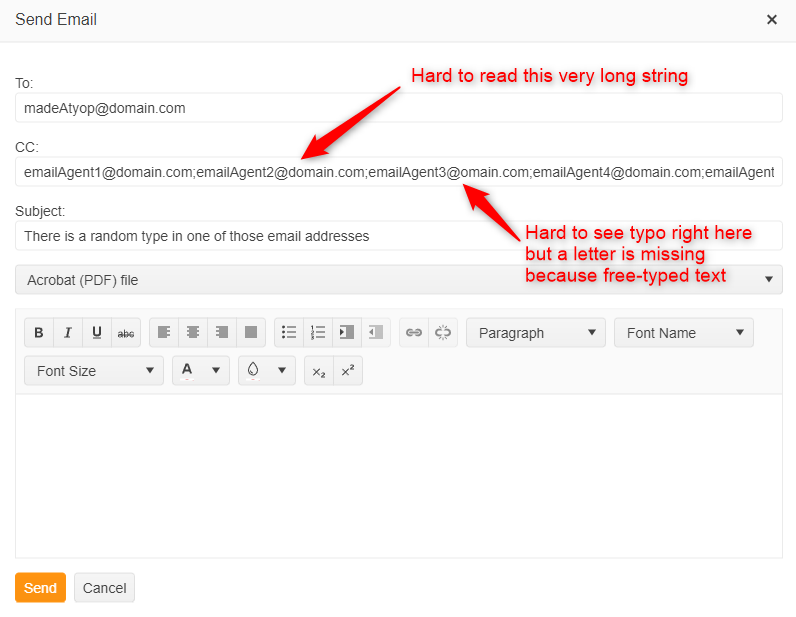
Requesting a feature to allow some sort of selection feature on the "Send Mail Dialog". The issue that we're having is if the user needs to email a report to 5 or 10 people it becomes very daunting, ugly and difficult for them to achieve this without making errors in typing out every single email.
Also, in most cases the user might not know the individuals email official email address in the organization so they have to go look up every single one. If there was a drop down selection or an auto predict while typing then once clicked it grouped up the name to make it look cleaner and easier for them to find the email addresses that would be wonderful. Here's an example of what it looks like right now.
Not sure if you are aware of this but the new property SkipBlankPages in 2021/R1 will result in a corrupt (unopenable) PDF/XLS if the report contains no data.
The output used to be a blank report.
This behaviour is fixed by setting the Value to 'False' but this now requires the developer to remember to set this value on each new report. Perhaps the default should have stayed as 'False' and those who wish to remove blank pages could set it to true.
We are aware the property is set to true by default.
We have now had to modify (and subsequently retest) > 100 reports.
The generator should probably not create a 'corrupt' file in these cases.
Kind regards
I have DataSource assigned to my report, which content is displayed in its Detail section. The Page sections have some static content. The SkipBlankPages property is set to False.
When the data set received by the report is empty, the static content in its Page sections is not displayed in Interactive View. In PrintPreview the Page Header/Footer content is displayed as expected. When the data set returns valid data, the Interactive view displays everything as expected.
The report processing is stopped and the following message is shown when trying to preview a report that uses one of the available DataDirect drivers in a .NET Core application.

The same report can be previewed successfully in a .NET Framework application.
When editing a report that has a watermark of type BackgroundOverlay with Sizing set to TopLeft, the design time preview of the watermark does not scale with the zoom level correctly.
The preview displays correctly only at 100% zoom level.
To prevent questions that I can't answer: I'm an end user for this product. I DO NOT have the ability to look at or update code related to the tools integration. So please ignore my answers to Product Version and Target Framework. They were required before I was allowed to post this ticket.
The uploaded report has 6 components.
Two panels (one containing multiple objects, the other only containing one object [hb2])
4 text boxes each with some bindings.
The two key components to look at for the issue are hb and hb2. Both these objects are identical and both have the same bindings for height and top.
From my math hb2 is correctly positioned and sized by hb has been pushed down. The only difference is that other objects are in the container for hb.
Without any containers, hb and hb2 are positioned incorrectly.
I'm doing all this because the vertical alignment for text boxes was not working, once I exported to PowerPoint.
What I expected was that the Top value would only depend on the container holding the component and the components' top value. I did not expect it to be dependent on a mixture of variables from other components also held within the same container.


Enable retaining editable textboxes when Exporting to PDF.
For example a PDF Re-order form with editable textboxes for order Quantity so the user can enter order Quantities.
Telerik.Reporting.Services.HttpClient version
17.2.23.1114
references a bad version of
Microsoft.IdentityModel.Clients.ActiveDirectory
That has inconsistent references as can been seen from this error (from System.Private.DataContractSerialization 4.1.1)
##[error]src\Cms.Wpf\Cms.Wpf\Cms.Wpf.csproj(0,0): Error NU1605: Warning As Error: Detected package downgrade: System.Text.Encoding.Extensions from 4.3.0 to 4.0.11. Reference the package directly from the project to select a different version.
 Demurrage -> Telerik.Reporting.Services.HttpClient 17.2.23.1114 -> Microsoft.IdentityModel.Clients.ActiveDirectory 3.14.0 -> System.Runtime.Serialization.Json 4.0.2 -> System.Private.DataContractSerialization 4.1.1 -> System.Xml.ReaderWriter 4.0.11 -> System.IO.FileSystem 4.0.1 -> runtime.win.System.IO.FileSystem 4.3.0 -> System.Text.Encoding.Extensions (>= 4.3.0)
 Demurrage -> Telerik.Reporting.Services.HttpClient 17.2.23.1114 -> Microsoft.IdentityModel.Clients.ActiveDirectory 3.14.0 -> System.Runtime.Serialization.Json 4.0.2 -> System.Private.DataContractSerialization 4.1.1 -> System.Text.Encoding.Extensions (>= 4.0.11)
This results in a publish failure with .net 8 where warning are treated as errors by default when publishing.
A workaround is to add<NoWarn>NU1605</NoWarn>

The following exception can be thrown when setting the Value of a PictureBox to an invalid type:
System.ArgumentException: You can assign System.String, IImage, System.Drawing.Image or SkiaImage objects only.
at Telerik.Reporting.PictureBox.set_Value(Object value)
This is misleading because an object of type System.Drawing.Image is not supported when using the Skia graphics engine. Passing an SKImage does not work either due to an error in the processing stage.
If you need to use a System.Drawing.Image object or an SKBitmap instance, you can take advantage of the DrawingFactory class.
After updating the Telerik Reporting packages to v17.2.23.1010 and opting out to still use the Gdi graphics engine, when I attempt to render a report to PDF on Linux, the rendering fails with the following error:
Error: 0 : An error occurred while rendering the report in separate thread: System.NullReferenceException: Object reference not set to an instance of an object.
   at Telerik.Reporting.Paging.PageCompositionBase.<>c__DisplayClass87_0.<CreatePages>b__0()
   at Telerik.Reporting.Paging.PageCompositionBase.CreatePages()
   at Telerik.Reporting.BaseRendering.RenderingExtensionBase.Render(LayoutElement root, Hashtable renderingContext, Hashtable deviceInfo, CreateStream createStreamCallback, EvaluateHeaderFooterExpressions evalHeaderFooterCallback, PageSettings pageSettings)
   at Telerik.Reporting.BaseRendering.RenderingExtensionBase.Render(Report report, Hashtable renderingContext, Hashtable deviceInfo, CreateStream createStreamCallback, EvaluateHeaderFooterExpressions evalHeaderFooterCallback)
   at Telerik.Reporting.Processing.ReportProcessor.RenderCore(ExtensionInfo extensionInfo, IList`1 processingReports, Hashtable deviceInfo, IRenderingContext renderingContext, CreateStream createStreamCallback)
   at Telerik.Reporting.Services.Engine.ReportRenderer.Render(ReportRendererArgs args)
   at Telerik.Reporting.Services.Engine.Rendering.RenderWithCulture(ReportRendererArgs args)
   at Telerik.Reporting.Services.Engine.Rendering.ThreadFunc(Object o)
The native Angular Report Viewer does not expose a 'setReportSource' or similar method that can be used to update the reportSource object of the viewer after initialization.
This means that the parameters or the report loaded by the viewer cannot be changed in code and I have to expose the report parameters and use Navigate To Report actions for loading different reports.

Previously, the Processing.PictureBox property Image required a System.Drawing.Image.
Starting with R3 2023 it requires Telerik.Drawing.IImage, and throws the exception:
Cannot implicitly convert type 'System.Drawing.Image' to 'Telerik.Drawing.IImage'. An explicit conversion exists (are you missing a cast?)

The Upgrade Wizard throws an error when upgrading projects containing reporting-related JS/CSS/etc. report viewer files. For example:
Could not find file 'C:\Program Files (x86)\Progress\Telerik Reporting R3 2023\Html5\ReportViewer\js\telerikReportViewer.kendo-17.2.23.1010.min.js'.The files in question are present in the expected directory but they no longer have the version number suffix in their names ('-17.2.23.1010' in the example above). Copying the files and adding the suffix to the copies resolves the issue.
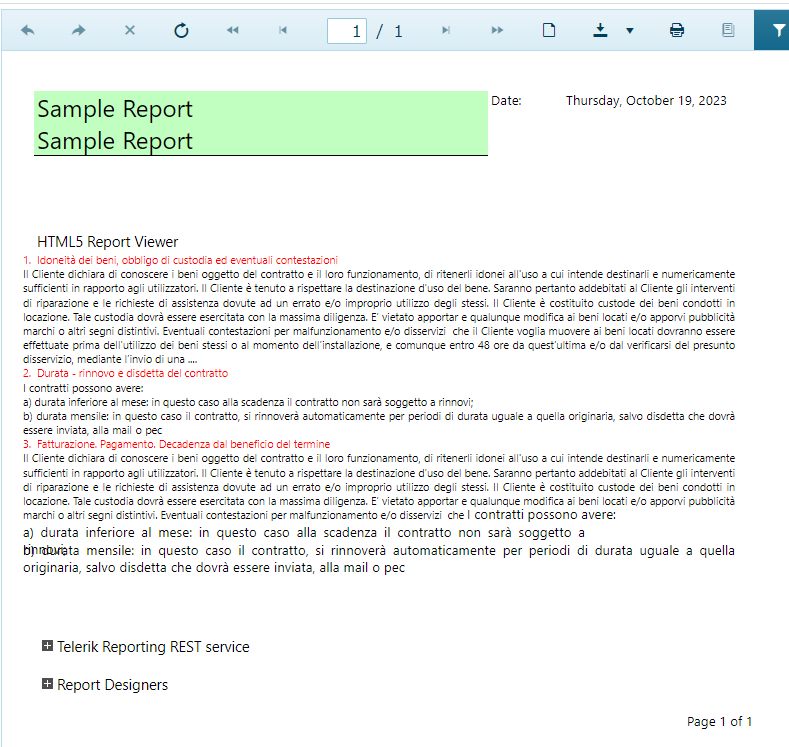
Output with Skia in Linux Docker:
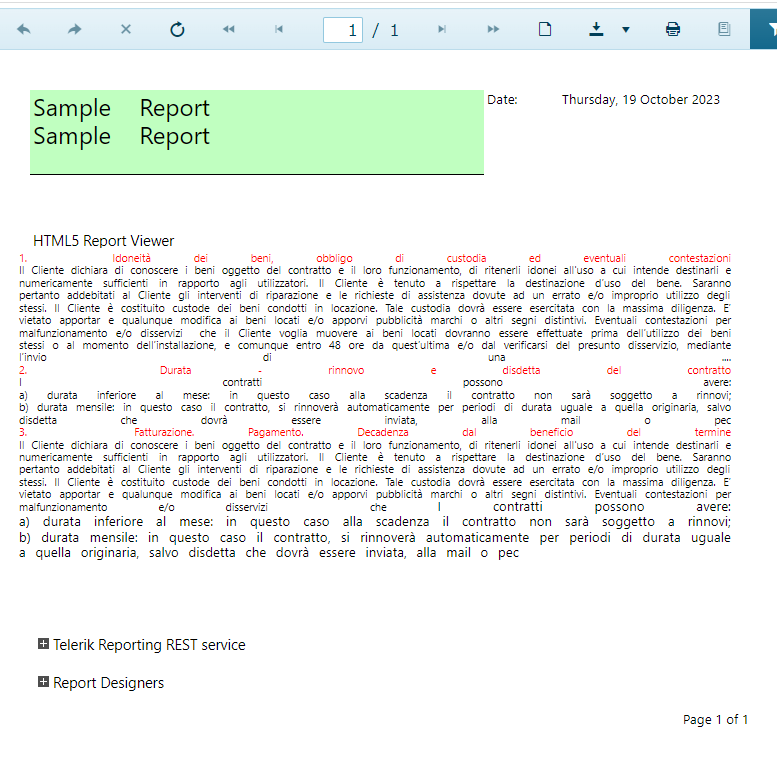
Expected output (Skia/GDI in Windows):
I am rendering Telerik reports (version 17.2.23.1010) with custom code on Linux Docker in .NET 7 with SkiaSharp. When I have Grouping in the Report, I receive the following exception:
An unhandled exception has occurred while executing the request.
      System.PlatformNotSupportedException: System.Drawing.Common is not supported on this platform.
         at System.Drawing.ToolboxBitmapAttribute..ctor(Type t, String name)
         at System.Reflection.CustomAttribute._CreateCaObject(RuntimeModule pModule, RuntimeType type, IRuntimeMethodInfo pCtor, Byte** ppBlob, Byte* pEndBlob, Int32* pcNamedArgs)
         at System.Reflection.CustomAttribute.AddCustomAttributes(ListBuilder`1& attributes, RuntimeModule decoratedModule, Int32 decoratedMetadataToken, RuntimeType attributeFilterType, Boolean mustBeInheritable, ListBuilder`1 derivedAttributes)
         at System.Reflection.CustomAttribute.GetCustomAttributes(RuntimeModule decoratedModule, Int32 decoratedMetadataToken, Int32 pcaCount, RuntimeType attributeFilterType)
         at System.Reflection.CustomAttribute.GetCustomAttributes(RuntimeType type, RuntimeType caType, Boolean inherit)
         at System.Attribute.GetCustomAttributes(MemberInfo element, Type attributeType, Boolean inherit)
         at System.ComponentModel.ReflectTypeDescriptionProvider.ReflectGetAttributes(Type type)
         at System.ComponentModel.ReflectTypeDescriptionProvider.ReflectedTypeData.GetAttributes()
         at System.ComponentModel.TypeDescriptor.DefaultTypeDescriptor.GetAttributes()
         at System.ComponentModel.TypeDescriptor.GetAttributes(Type componentType)
         at System.ComponentModel.ReflectTypeDescriptionProvider.ReflectedTypeData.GetConverter(Object instance)
         at System.ComponentModel.TypeDescriptor.DefaultTypeDescriptor.GetConverter()
         at System.ComponentModel.TypeDescriptor.GetConverter(Type type)
         at System.ComponentModel.PropertyDescriptor.get_Converter()
         at Telerik.Reporting.Serialization.ObjectReader.ReadProperty(Object obj, PropertyDescriptor prop, Type propType)
         at Telerik.Reporting.Serialization.ObjectReader.ReadProperties(Object obj)
         at Telerik.Reporting.Serialization.ObjectReader.ReadObject(Type type)
         at Telerik.Reporting.Serialization.ObjectReader.ReadXmlElement(String name)
         at Telerik.Reporting.Serialization.ObjectReader.ReadCollection(Object collection)
         at Telerik.Reporting.Serialization.ObjectReader.ReadProperties(Object obj)
         at Telerik.Reporting.Serialization.ObjectReader.ReadObject(Type type)
         at Telerik.Reporting.Serialization.ObjectReader.ReadXmlElement(String name)
         at Telerik.Reporting.Serialization.ObjectReader.Deserialize(IResourceHandler handler)
         at Telerik.Reporting.XmlSerialization.XmlSerializerBase.Deserialize(XmlReader reader, IResourceHandler resourceHandler)
         at Telerik.Reporting.XmlSerialization.XmlSerializerBase.Deserialize(Stream stream, IResourceHandler resourceHandler)
         at Telerik.Reporting.XmlSerialization.ReportXmlSerializer.Telerik.Reporting.ReportSerialization.IXmlSerializer.Deserialize(Stream stream, IResourceHandler resourceHandler)
         at Telerik.Reporting.ReportPackager.UnpackageDocument(Stream packageStream)
Without Grouping the report is rendered fine on Linux.
On Windows, everything runs fine as well.
Since R3 2023, all HTML5IntegrationDemo examples found in the Telerik Reporting installation directory (C:\Program Files (x86)\Progress\Telerik Reporting R3 2023\Examples\CSharp) target .NET 6.
To work around the issue, open the .csproj file of each demo and set the target framework to the corresponding version.

Adding a custom font as PrivateFont in the appssettings.json is not respected.
When the font is installed, it works also for the report in the viewer.
The issue may be reproduced with the Reporting WinUI example for .NET 6.
The Stack Trace states:CSharp.Net6.WinUIIntegrationDemo Warning: 0 : A font family for font "MICR" cannot be found. Exception: Font 'MICR' cannot be found. Font 'MICR' is substituted with font 'Microsoft Sans Serif'.
