

I have a table with grouping and GroupPageBreak set to After for the group.
In the detail cell of the table, I have a Panel with a Crosstab in it. The Crosstab has row groups, however, their properties are the default, hence, they don't force any Page Breaks.
When the report is previewed or exported to PDF, each table group is on its own page as expected.
I have set SplitWorksheetOnPageBreak to True for Excel rendering, so that each soft page, i.e. Crosstab in the table group is in a new worksheet.
This works fine, except that the first table group is split into two worksheets.

Currently, I can send only String content when making a POST request with the WebServiceDataSource component.
My Web API requires me to the content as Form URL Encoded and I cannot do that with the WebServiceDataSource component, and have to use the ObjectDataSource component to manually request the data correctly.
Currently, the PDF rendering extension supports three versions of the standard – PDF/A-1b (2005), PDF/A-2b (2011), PDF/A-3b (2013).
I am generating invoice that need to be compliant with the Factur-X standard (similar to ZUGFeRD in Germany)
It is a PDF/A-3u compliant file where the human visible PDF is still there as a main document (like before), but where there is an XML File attached/included, which is standardized.
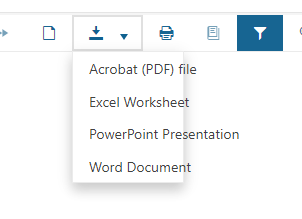
The Export dropdown menu looks like the following image when using Kendo UI 2023.2.606+
The fix to the bug TOC page numbers and total PageCount are incorrect in some scenarios provided in R2 2023 may have led to another bug, as when I render my report with TOC the total page count is not correct in PrintPreview, although the page number is correct.
For example, on the last page, I see page 126 out of 123.
When HtmlTextBox is empty and i click some expression is added like this " = Len("bla")", but when something is already put is added like this "{Len("bla")}
Problem with version " =" is it does not work with neither text.
This is my scenerio, I pick some function for example Len(), and then i want to add some info, and i've got
= Len("numbers") numbers
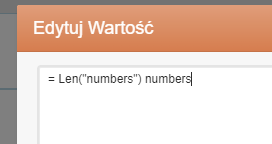
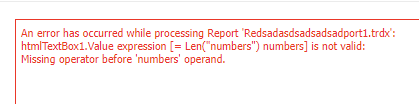
and there is error in viewer
but when i put first "numbers" and click expresion len
expression is added with {} and it works ok in viewer
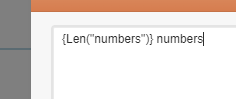
this behavior is annoying, in htmltextbox expressions should always be added with {}
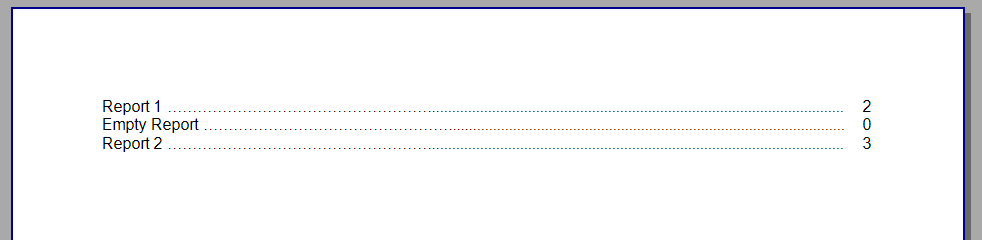
When a report that has no significant content is added to a report book, an invalid entry inside the report book's ToC is added. The page number shown is zero and trying to navigate to the page throws an error "Resource with name ... not found."
We upgrade to 17.2.23.1010 and after going through the report Upgrade Wizard we are getting this error for the CheckBox item:
Error CS0266 Cannot implicitly convert type 'System.Drawing.ContentAlignment' to 'Telerik.Drawing.ContentAlignment'. An explicit conversion exists (are you missing a cast?)
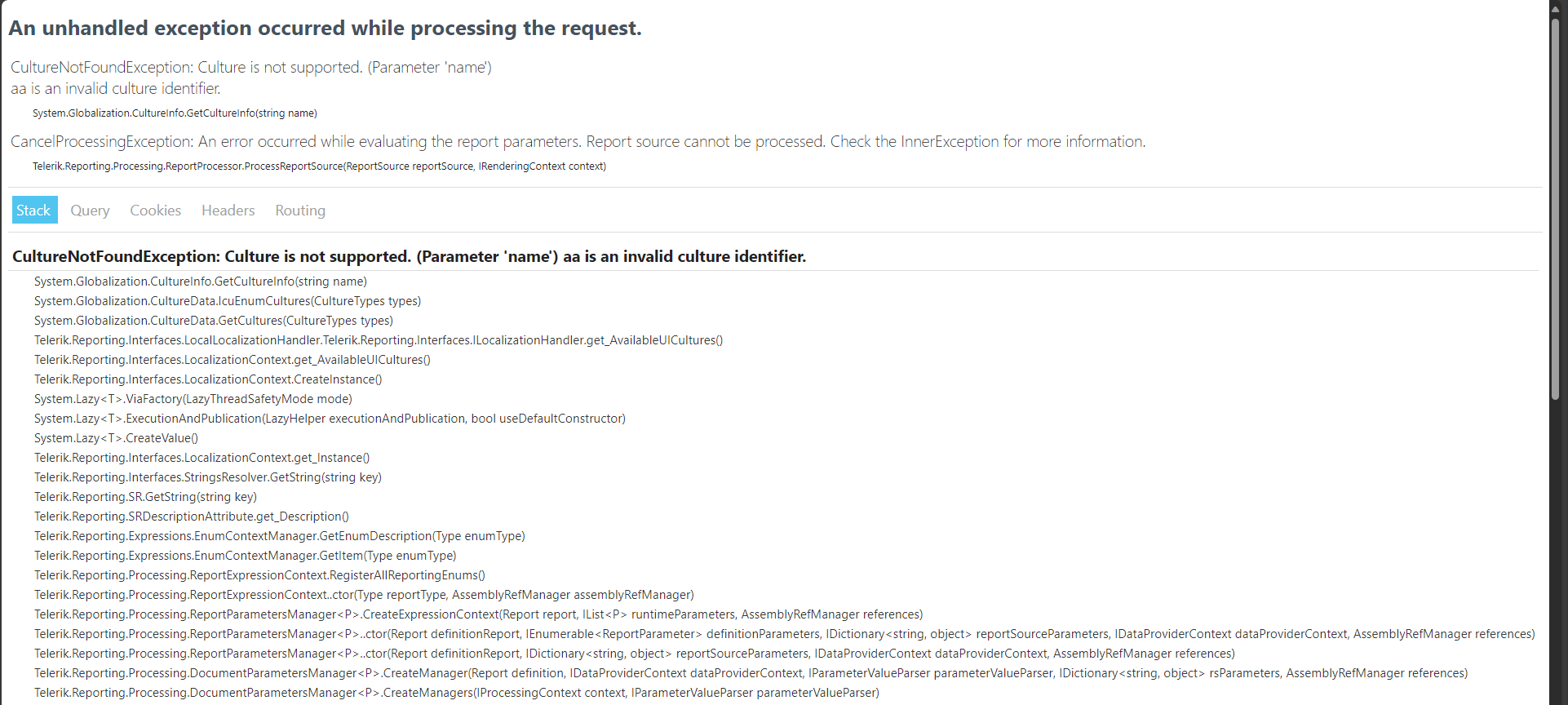
I am getting an error message, even when setting the culture manually to 'en-US', that the culture 'aa' is not found. Tried other approaches to get the culture manually installed, but there shouldn't be a reason your code is pulling all cultures when 'en-US' is the one being manually set by my code and in the report designer.
The option for creating a new connection in the SqlDataSource of the WRD is disabled in the .NET Framework implementation of the ReportDesignerController.

The OpenXML renderings in .NET work with DocumentFormat.OpenXml 2.7.2 - 2.20.0
When upgrading to version 3.0.0 the Word rendering throws the following exception:
CSharp.Net7.Html5IntegrationDemo Error: 0 : System.TypeInitializationException: The type initializer for 'Telerik.Reporting.OpenXmlRendering.Wordprocessing.DocumentHelper' threw an exception.
 ---> System.TypeLoadException: Could not load type 'DocumentFormat.OpenXml.Packaging.ImagePartType' from assembly 'Telerik.Reporting.OpenXmlRendering.2.7.2, Version=17.2.23.1114, Culture=neutral, PublicKeyToken=a9d7983dfcc261be' due to value type mismatch.
   at Telerik.Reporting.OpenXmlRendering.Wordprocessing.DocumentHelper..cctor()
   --- End of inner exception stack trace ---
   at Telerik.Reporting.OpenXmlRendering.Wordprocessing.DocumentHelper.CreateMainPart(WordprocessingDocument package)
   at Telerik.Reporting.OpenXmlRendering.Wordprocessing.DocumentBuilder.CreateMainPart()
   at Telerik.Reporting.OpenXmlRendering.Wordprocessing.DocumentBuilder.CreateBodyLayout()
   at Telerik.Reporting.OpenXmlRendering.Wordprocessing.ReportWriter.WriteDocument(DocumentBuilder documentBuilder, LayoutElement layoutElement)
   at Telerik.Reporting.OpenXmlRendering.Wordprocessing.WordprocessingWriter.WriteEndElement(LayoutElement source, ElementPageInfo pageInfo)
   at Telerik.Reporting.BaseRendering.PageHandler.Telerik.Reporting.Paging.IPageHandler.EndElement(LayoutElement element, ElementPageInfo info)
   at Telerik.Reporting.Paging.PageEndElement.OutputToPage(IPageHandler handler)
   at Telerik.Reporting.Paging.PageElementsLayer.OutputToPage(IPageHandler handler)
   at Telerik.Reporting.Paging.PageContent.Output(IPageHandler handler)
   at Telerik.Reporting.Paging.PageCompositionBase.OutputPageContent(Stopwatch stopwatchOutputContent, PageContent pageContent)
   at Telerik.Reporting.Paging.PageCompositionBase.<>c__DisplayClass124_0.<CreatePageContentOutputTask>b__0()
An error has occurred while rendering the report: System.OperationCanceledException: The operation was canceled.
   at System.Threading.CancellationToken.ThrowOperationCanceledException()
   at System.Threading.ManualResetEventSlim.Wait(Int32 millisecondsTimeout, CancellationToken cancellationToken)
   at System.Threading.Tasks.Task.SpinThenBlockingWait(Int32 millisecondsTimeout, CancellationToken cancellationToken)
   at System.Threading.Tasks.Task.InternalWaitCore(Int32 millisecondsTimeout, CancellationToken cancellationToken)
   at System.Threading.Tasks.Task.Wait(Int32 millisecondsTimeout, CancellationToken cancellationToken)
   at System.Threading.Tasks.Task.Wait(CancellationToken cancellationToken)
   at Telerik.Reporting.Paging.PageCompositionBase.SeparateThreadOutputBehavior.Finish()
   at Telerik.Reporting.Paging.PageCompositionBase.CreatePages()
   at Telerik.Reporting.Paging.PagerBase.Telerik.Reporting.Paging.IPager.CreatePages(IPageHandler handler, LayoutElement root)
   at Telerik.Reporting.BaseRendering.RenderingExtensionBase.Render(LayoutElement root, Hashtable renderingContext, Hashtable deviceInfo, CreateStream createStreamCallback, EvaluateHeaderFooterExpressions evalHeaderFooterCallback, PageSettings pageSettings)
*** Render Report #0 "ReportCatalog" DONE in 00:00:00.2183346 ***

CSharp.Net7.Html5IntegrationDemo Error: 0 : An error occurred while rendering the report in separate thread: System.OperationCanceledException: The operation was canceled.
   at System.Threading.CancellationToken.ThrowOperationCanceledException()
   at System.Threading.ManualResetEventSlim.Wait(Int32 millisecondsTimeout, CancellationToken cancellationToken)
   at System.Threading.Tasks.Task.SpinThenBlockingWait(Int32 millisecondsTimeout, CancellationToken cancellationToken)
   at System.Threading.Tasks.Task.InternalWaitCore(Int32 millisecondsTimeout, CancellationToken cancellationToken)
   at System.Threading.Tasks.Task.Wait(Int32 millisecondsTimeout, CancellationToken cancellationToken)
   at System.Threading.Tasks.Task.Wait(CancellationToken cancellationToken)
   at Telerik.Reporting.Paging.PageCompositionBase.SeparateThreadOutputBehavior.Finish()
   at Telerik.Reporting.Paging.PageCompositionBase.CreatePages()
   at Telerik.Reporting.Paging.PagerBase.Telerik.Reporting.Paging.IPager.CreatePages(IPageHandler handler, LayoutElement root)
   at Telerik.Reporting.BaseRendering.RenderingExtensionBase.Render(LayoutElement root, Hashtable renderingContext, Hashtable deviceInfo, CreateStream createStreamCallback, EvaluateHeaderFooterExpressions evalHeaderFooterCallback, PageSettings pageSettings)
   at Telerik.Reporting.BaseRendering.RenderingExtensionBase.Render(Report report, Hashtable renderingContext, Hashtable deviceInfo, CreateStream createStreamCallback, EvaluateHeaderFooterExpressions evalHeaderFooterCallback)
   at Telerik.Reporting.Processing.ReportProcessor.RenderCore(ExtensionInfo extensionInfo, IList`1 processingReports, Hashtable deviceInfo, IRenderingContext renderingContext, CreateStream createStreamCallback)
   at Telerik.Reporting.Processing.ReportProcessor.RenderCore(String format, IList`1 reports, Hashtable deviceInfo, IRenderingContext renderingContext, CreateStream createStreamCallback)
   at Telerik.Reporting.Services.Engine.ReportRenderer.Render(ReportRendererArgs args)
   at Telerik.Reporting.Services.Engine.Rendering.RenderWithCulture(ReportRendererArgs args)
   at Telerik.Reporting.Services.Engine.Rendering.ThreadFunc(Object o)
I would prefer my OpenXML rendering to work with the latest DocumentFormat.OpenXml version.

If the file `WebReportDesignerSettings.json` doesn't exist before running the Web Designer REST Service, the latter will create it. However, the file will remain locked and the service will throw the exception:
"The process cannot access the file '/app/Telerik_Reporting/WebReportDesignerSettings.json' because it is being used by another process."
When the file exists, the problem will be avoided, which leads to the workaround - create the file at a starting point of the application. Here is a sample code:
static void InitFile()
{
            var path = Path.Combine(Environment.GetFolderPath(Environment.SpecialFolder.ApplicationData), "Telerik Reporting", "WebReportDesignerSettings.json");
            File.Create(path).Close();
}
To allow localization for the WebReportViewer in Version 17.1.23.718 and before, it was enough to provide a customized Version of "telerikReportViewer.stringResources.js", which extended the property "window.telerikReportViewer.sr".
This worked for both, the WebReportViewer and the Preview of the WebReportDesigner. With version R3 2023 SP1 (17.2.23.1114), this approach does not work anymore.
The following exception is thrown when setting up the .NET 6, .NET 7, and .NET 8 demos with version 17.2.23.1114 to utilize Reporting REST Service Redis Storage. The storage is configured to use the StackExchange.Redis version 2.0.601 with Telerik.Reporting.Cache.StackExchangeRedis.2:
Error registering the viewer with the service. An error has occurred. Method not found: 'Boolean StackExchange.Redis.IDatabase.StringSet(StackExchange.Redis.RedisKey, StackExchange.Redis.RedisValue, System.Nullable`1<System.TimeSpan>, Boolean, StackExchange.Redis.When, StackExchange.Redis.CommandFlags)'.In the previous Reporting versions, 17.1.23.718 and 17.0.23.118 the Redis storage with the same setup works as expected.

When using the Report Viewer under WinForms, Print Preview allows the user to scroll through all report documents.  I.E., everything in the document map.  However, when using the Wpf version you cannot.  In the Wpf version, the user must use the Document map to select and scroll through each particular area.

For large reports containing multiple documents, this is tedious.

Please make the Print Preview functionality for the WPF control match that supported by the WinForms control.
When selecting an item in the report designer (for instance a textbox) if i go in the properties and i set the anchoring property, i have to click in an other property to get my anchor property to be updated.
I have attached a video that reproduce the problem :
Select a textbox, go to anchoring in the property explorer
Set the anchoring
And click in the report itself
As you can see anchoring property hasn't been updated.

I ship the Telerik Report Stand alone Designer, along with some support DLLs from my side to my clients, that use my application to design their reports. It even confuses me, when I design new reports, when I save, and didn't take attention to the format.
ok, it not a showstopper, as it's really easy to swtich formats afterwards.
thanks
Vulpes