


The checkbox graphic available is currently the default bluish blur that looks ugly on screen and on paper. There is the option to create one yourself but unless it is all rectangles, it is going to end up just as bad. Telerik Reporting is superior in most respects but the Component One FlexViewer checkbox ( the actual check is font-based and the text lines up properly next to it with nice padding) is a thing of beauty and a joy forever. (see attached) Please emulate it.

If you do a Excel export, it renders the headers value, which we set with an expression (customer specific localised text), but as CSV the header names/IDs are used.
It would be nice to have a 'Export Settings' category on the page properties, see attachment for example. Also shows another useful feature of disabling export option easily per report.

We are implementing Telerik Reporting in our ASP.NET hosted Blazor WASM application (using .NET 6).
So far we based our implementation on the following sample: https://github.com/telerik/reporting-samples/tree/master/BlazorViewerAndDesignerExample, using a DesignerController which derives from ReportDesignerControllerBase.
As described in the following forum post, we require to add an HttpOnly Cookie to the UserIdentity.Context.
The cookie is to be used for authentication in the apicontroller of the WebServiceDataSource.
https://www.telerik.com/forums/pass-user-claimsprincipal-from-reportscontroller-to-webservice-datasource-controller
So far we were able to add the cookie to the user context for most endpoints that request data from the WebServiceDataSource, except for a single endpoint.
The HTTP Post endpoint '/data/model' (TelerikDesignerController.GetDataModel(DataSourceInfo dsi)) can not be overriden in the derived controller class.
This causes an error when the WebServiceDataSource is used in the a report at design-time in the WebReportDesigner.
It should be possible to override all public endpoints of the ReportDesignerControllerBase in my opinion.
Also the RenderLiveItemAsync() method should be marked 'protected virtual' so it can be overridden in a derived class.
Currently we had to override every unique render method (RenderGraphAsync, RenderShapeAsync, ...) individually, while we could achieve the same if we could override the RenderLiveItemAsync method.
KR,
Lennert
In Web Report Designer HtmlTextBox input is just simple TextArea. There is a great need to be able to enter rich text as in a desktop application.
https://docs.telerik.com/reporting/report-items/htmltextbox/overview

When the Windows Accessibility -> Text size setting is scaled up, the text in the WinUI report viewer is not displayed correctly. That is, the text is scaled up according to the Windows setting but the items containing the text do not grow and parts of the text are truncated.
The format of a cell, textbox, can only be set using the predefined options for a number or date time. I want to be able to set the formatting of a textbox in an expression. i.e. `=Fields.Formatting`, which would equate to`{0:##,#0.00 "kW"}`. This is because the cell could be any type of unit, i.e. "kW", "Amps", "kWh"
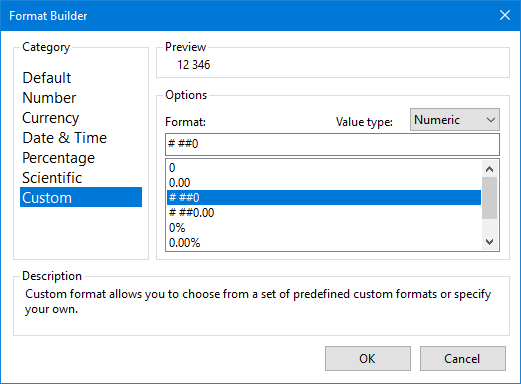
Using a format would allow the cell content to still be output as a number and when exporting to Excel, the displayed value would be in a user-recognised format but then would allow them to click on the cell and view the full, unrounded, number.
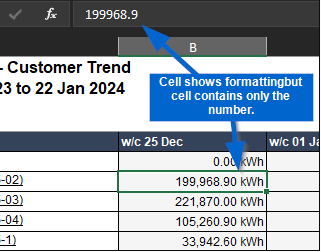
The above functionality is available in SSRS reporting using the formula `=IIf(Globals!RenderFormat.Name = "CSV", "0.00","#,0.00 '" & MAX(Fields!ReadingTypeUnit.Value) & "'")`, which allows for exporting to CSV to round the number.

The error below is thrown in PictureBox when System cryptography Use FIPS compliant algorithms is enabled:
An error has occurred while processing PictureBox 'pictureBox1': Exception has been thrown by the target of an invocation.--------------- InnerException ---------------
This implementation is not part of the Windows Platform FIPS validated cryptographic algorithms.

I have a following default code in a html file for a web designer.
$(document).ready(function () {
$("#webReportDesigner").telerik_WebReportDesigner({
persistSession: false,
toolboxArea: {
layout: "list"
},
serviceUrl: "some url",
report: "some_report_name",
}).data("telerik_WebDesigner");
});
I have also a custom report storage implemented from IDefinitionStorage, where I have a GetDefinition("some_report_name") method implemented in a custom way. In order to do that, I need to send additional parameters from a web designer (html code provided previously) but don't know how to do that.
For example, I need to open SalesInvoice.trdx file and I do a following: report: "SalesInvoice.trdx". If i need to send additional parameter, let's say some kind of token, there is no good place to send it. As a work around, i am doing report: "SalesInvoice.trdx&token=123". The problem with this, it is appearing in a title of a web designer and I don't want that. In an attachments, there is a screenshot where it looks good with a simple name and the one which has a token in it.
So, the question is, can I send other parameters as well from a client side of web designer to the server like parameters or so?
In a HTML5 ReportViewer we can send report file name and parameters as a reportSource like this:
serviceUrl: serviceUrl,
reportSource: {
report: reportUrl,
parameters: reportParams,
Can we do the same? Or how can I do that?
Currently, the parameters' editors of the WRD's internal viewer cannot be changed. A report parameter with available values is always rendered with the ListView widget.
I would like to be able to use the viewer's built-in ComboBox widget as shown in the HTML5 Report Viewer Options Overview - Telerik Reporting article, and to also be able to use a custom one.
What's the long-term plan for supporting Linux and Telerik Reporting? The dotnet design team is looking to remove support for System.Drawing.Common on Linux platforms. They're recommending compiler warnings in .Net 6, and full PlatformNotSupportedExceptions in .Net7
Sources:
designs/system-drawing-win-only.md at main · dotnet/designs (github.com)
Breaking change: System.Drawing.Common only supported on Windows - .NET | Microsoft Docs


Hello,
We use WebServiceDataSource with OData query in our reports. Sometimes OData can through an exception.
In our case, we have added Web Service DataSource and set this OData query for its Service Url:
https://services.odata.org/V3/Northwind/Northwind.svc/Products(1)?$select=ProductName1
If you see the query, it is selecting "ProductName1" property of "Product #1". But "ProductName1" property does not exist (correct property name is "ProductName"). When we use Postman for the OData query above, it shows an error which you can see from attached picture (ErrorWhenWeUsePostman.PNG, "Could not find a property named 'ProductName1' on type 'NorthwindModel.Product'"). From the second picture (TelerikReportingGeneralError.PNG, "An error has occurred... Response status code does not indicate success: 400 (Bad Request).") you can see the result of our test report (in html5 report viewer) that has the same OData query.
The question is when we preview our report (in html5 report viewer) how can we show the error message that OData sent instead of showing Telerik reporting general error?
Instead of this message:
An error has occurred while processing Report 'TestReportWithWebServiceDataSource': Response status code does not indicate success: 400 (Bad Request).
This OData error message should be handled and shown on browser (html5 report viewer) when previewing report:
Could not find a property named 'ProductName1' on type 'NorthwindModel.Product'
FYI: We are using Telerik Reporting version 15.0.21.224.
This is my post on Telerik forum related with this: How to get internal error message from Custom Report Resolver
Thank you,

In .NET Core the localization routines have changed and the approach to localize an application provided in the documentation doesn't work.
When adding the localized .resx files as described in the documentation - with BuildAction set to None - the resource strings cannot be obtained and even the default string values are lost. This effect can be mitigated with changing the BuildAction to EmbeddedResource.
When rendering a Report in PDF with Skia Sharp, the Arial Bold Italic font is rendered as Normal. Arial Bold and Arial Italic fonts are rendered correctly.
When rendering with GDI+ all fonts are displayed correctly.
In the Desktop Report Designers, you may display the Text of the Tooltips on several lines by adding new lines (\n) inside the text.
In the HTML5 Viewrs, the new lines are ignored and the text is displayed on a single line. You may work around this by replacing the new lines with <br /> elements. It would be much easier for the users if this is done in the code of the viewer instead.
In desktop app we have some space with description
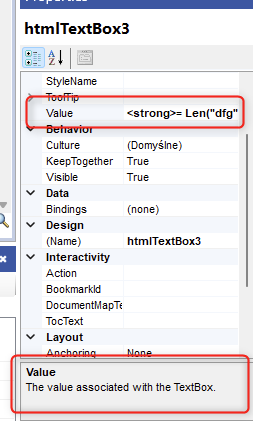
In web designer it would be nice to show some info in tooltip or another way like you prefer
If a WebServiceDataSource has inline JSON data for design-time preview, this inline data is not used when the report is designed with the Web Report Designer. Instead, the data is requested from the service both during design time and during live preview.
On the other hand, the Standalone Report Designer works as expected. I.e. inline data is used during design time and live data from the service is used during the preview.