

We are using Azure Redis Cache for the Report Server storage. Azure Redis stops the support for TLS 1.0 and 1.1 as stated in Remove TLS 1.0 and 1.1 from use with Azure Cache for Redis.
If I set Azure Redis to allow TLS 1.0 everything works fine.
If I switch the minimum TLS version in Azure to 1.2 (or 1.1 for that matter) I start to get the error:
No connection is available to service this operation: GET TRS\1\SV
   at StackExchange.Redis.ConnectionMultiplexer.ExecuteSyncImpl[T](Message message, ResultProcessor`1 processor, ServerEndPoint server)
   at StackExchange.Redis.RedisBase.ExecuteSync[T](Message message, ResultProcessor`1 processor, ServerEndPoint server)
   at StackExchange.Redis.RedisDatabase.StringGet(RedisKey key, CommandFlags flags)
   at Telerik.Reporting.Cache.StackExchangeRedis.RedisStorage.GetBytes(String key)
   at Telerik.Reporting.Services.Engine.PersistableObject.GetInt(String key)
   at Telerik.ReportServer.Engine.StorageUpgrader.UpgradeStorageVersion()
   at Telerik.ReportServer.Web.Models.ReportServerWebHost..ctor(IStorage storage)
   at Telerik.ReportServer.Web.WebApiConfig.ConfigureDependencyResolver()
   at Telerik.ReportServer.Web.WebApiConfig.Register(HttpConfiguration config)
   at System.Web.Http.GlobalConfiguration.Configure(Action`1 configurationCallback)
   at Telerik.ReportServer.Web.WebApiApplication.Application_Start()
The articles I can find all state that we should add "sslprotocols=tls12" in addition to "ssl=true" in the connection string to support TLS 1.2. When I do this I get the error "Keyword 'sslProtocols' is not supported".
This won't let me use Azure Redis Cache.
I suspect the issue is due to the deprecated package that you use for the Redis database connection.
For that reason, I would like it to be updated to the new one so that I may continue to use Azure Redis.
The CommandTimeout property of the MSSQL Storage is respected when provided in the ReportServerAdmin.config of the Report Server, for example with the following code:
<?xml version="1.0" encoding="utf-8" ?>
<configuration>
  <configSections>
    <section name="reportServer" type="Telerik.ReportServer.Web.Configuration.ReportServerConfigurationSection, Telerik.ReportServer.Web" requirePermission="false" allowLocation="true" />
  </configSections>
  <reportServer>
    <storage provider="MsSqlServer">
      <parameters>
                <parameter name="ConnectionString" value="Data Source=(local)\MSSQLSERVER01;Initial Catalog=RESTStorage;Integrated Security=SSPI" />
		<parameter name="commandTimeout" value="360" />
      </parameters>
    </storage>
  </reportServer>
</configuration>
The user should be able to provide this value from the Configuration page for the Storage settings, as this is done for the connection string.

Hello, almost every time I select a scheduled task that I have to scroll down to select in the Scheduling tab, the grid view jumps back up to the top of the task list, making it very annoying to look through tasks.
1. Open Scheduling tab.
2. Scroll down in scheduled task grid view below the first N rows displayed.
3. Select row corresponding to a scheduled task.
4. Task grid view returns to the top N rows of the scheduled tasks.
Thank you
In the Schedule I want to set the specific name of the attachment instead of the Report's intern name.
I have a report named Report xyz per period with parameters for day-, week and month report.
When I make a schedule I cannot set the name of the attachment when I sent it by mail, it's alway Report xyz per period.
If you unselect all the days from the Day of the Week in the recurrence rule of a scheduled task of data alert, the task can be saved but will throw an Internal Server Error and you won't be able to list the available tasks on the server.
The linked muted video demonstrates the problem.
Here is the error stack trace produced by the ServiceAgent:
Telerik.ReportServer.ServiceAgent.exe Information: 0 : Loaded 37 tasks in total.
Telerik.ReportServer.ServiceAgent.exe Error: 0 : System.IndexOutOfRangeException: Index was outside the bounds of the array.
   at Telerik.WinControls.UI.Scheduler.ICalendar.CalHelper.TryParseRecurrenceRuleProperties(RecurrenceRule result, IEnumerable`1 keywordPairs)
   at Telerik.WinControls.UI.Scheduler.ICalendar.CalHelper.TryParseRRuleCore(String valueToParse, RecurrenceRule& result)
   at Telerik.ReportServer.Web.Utils.Appointment..ctor(DateTime startUtc, String recurrenceRule)
   at Telerik.ReportServer.ServiceAgent.Tasks.TaskInfo.UpdateNextOccurrenceTime(DateTime utcFrom, DateTime utcTo)
   at Telerik.ReportServer.ServiceAgent.Services.SchedulingService.CalculatePendingTasks(List`1 pendingTasks)
   at Telerik.ReportServer.ServiceAgent.Services.SchedulingService.MainLoop()
   at Telerik.ReportServer.ServiceAgent.Services.SchedulingService.StartMain()
Currently, the Report Server is installed with binding only to HTTP-type sites. This may break a Report Server site bound to an HTTPS site after upgrading to a new version. It is necessary to add the binding to HTTPS manually after each upgrade.
It would be great if there is an option for binding to HTTPS with the installation and if all the bindings can be preserved after upgrading.
We cannot delete reports using the Report Server UI. After you select the report and choose to delete it, the report appears as removed from the list, even though the details are still visible. If you refresh the page, the report is still there.
Further investigation revealed that the ServiceAgent is not running. There is no proper error message indicating this though.
The issue is reproducible only with the Report Server running under HTTPS. When under HTTP there is a proper message stating that the ServiceAgent is stopped.
I am able to set all features that I need to set, except the first dropdown of the "Repeat On" section of the recurrence rule.

To localize the reports I now set the Localizable parameter to true and Culture an Language options to nl-NL (for the Netherlands).
So for Dutch customers that will be alright, but when I want to send a report to an English customer I must now make a second report with en-EN.
It will be nicer when I can change that in the schedule.
When I do a sort or filtering in the report section on the server and I edit a report (f.i. add revision) the sorting and filtering is gone.
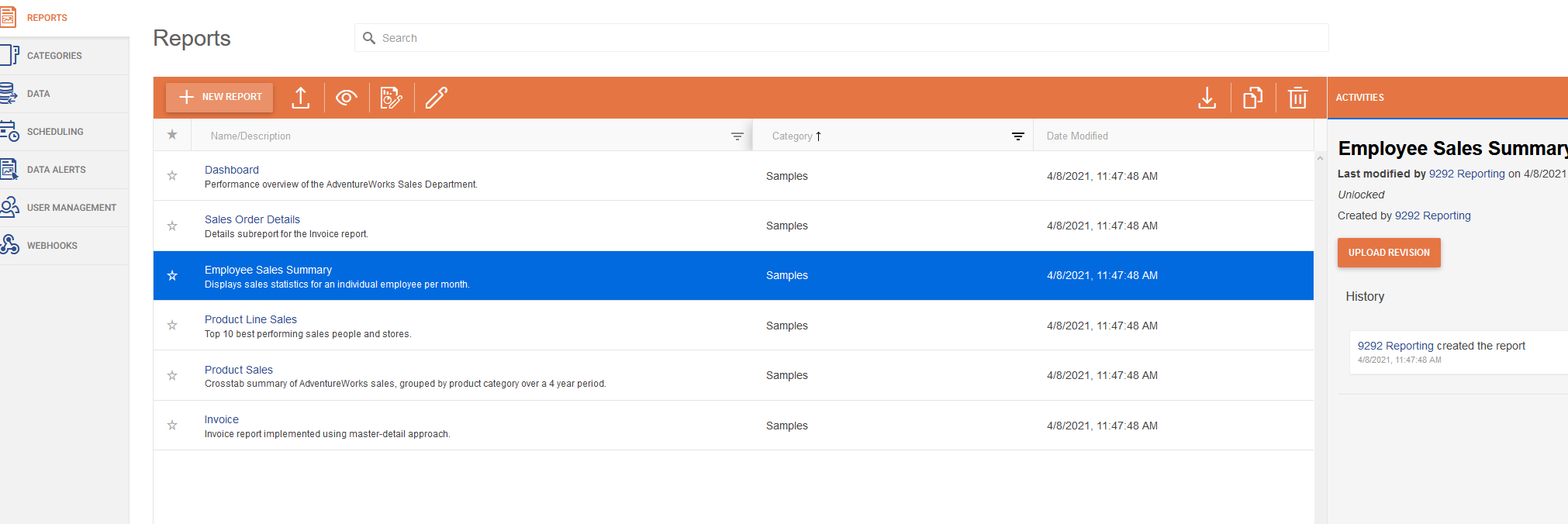
It's much nicer to keep the sorting and or filtering
Description: ASP.NET has detected data in the request that is potentially dangerous because it might include HTML markup or script. The data might represent an attempt to compromise the security of your application, such as a cross-site scripting attack. If this type of input is appropriate in your application, you can include code in a web page to explicitly allow it. For more information, see http://go.microsoft.com/fwlink/?LinkID=212874.
Hello,
I was on a remote web session with an engineer and we discovered that the Scheduler UI isn't saving the changed password to the database.
The environment that I use is below.
- Report Server is installed in an Azure Virtual Machine
- IIS is bound to ports 443 and 83
- The SMTP Service is on RackSpace
- The storage is located in SQL Server
The steps to reproduce are as follows.
- Change the Password
- Save the Changes
- Send Test
- Receive Error output
During the Remote Web Assistance Session, we tried a Gmail SMTP server and received the same results.
We also enabled tracing and noticed an error in the event logs which I will attach here.
Please let me know if you need any additional information.
In a Scheduled Task created with the Report Server API, the day of the week in the recurrence rule is not shown in the Edit Task window of the Report Server Manager. A detailed description of the issue is available in this forum post.
Hello,
It would be nice to edit raw html or paste html into the mail template editor.