

Read the documentation for CancelationTokenSource.CancelAfter:
this method will throw an ArgumentOutOfRangeException when: delay.TotalMilliseconds is less than -1 or greater than Int32.MaxValue (or UInt32.MaxValue - 1 on some versions of .NET). Note that this upper bound is more restrictive than TimeSpan.MaxValue.
----------------------------------------------------
your code in CancelationTokenSourceFactory.CreateTokenSource does this check:
if (timeSpan.HasValue && timeSpan.Value != TimeSpan.MaxValue)this check for TimeSpan.MaxValue seems totally pointless here, if timeSpan is anything between ~2147483647 and 922337203685476 milliseconds long this will still just throw a ArgumentOutOfRangeException.
I suspect that this check was intended as a way to prevent creating a cancellation timer that never triggers in the CancellationTokenSource, which should look like this:
if (timeSpan.HasValue && timeSpan != Timeout.InfiniteTimeSpan) //Timeout.InfiniteTimeSpan is -1 milliseconds
PdfFormatProvider provider = new PdfFormatProvider();RadFixedDocument fixedDocument = provider.Import(document.ByteArray);
System.NullReferenceException: Object reference not set to an instance of an object.
at Telerik.Windows.Documents.Fixed.FormatProviders.Pdf.Import.RadFixedDocumentImportContext.BeginImportOverride()
at Telerik.Windows.Documents.Fixed.FormatProviders.Pdf.Import.BaseImportContext.BeginImport(Stream pdfFileStream)
at Telerik.Windows.Documents.Fixed.FormatProviders.Pdf.Import.PdfImporter.Import(Stream input, IPdfImportContext context)
at Telerik.Windows.Documents.Fixed.FormatProviders.Pdf.PdfFormatProvider.<>c__DisplayClass19_0.<ImportOverride>b__0()
at Telerik.Windows.Documents.Fixed.FormatProviders.Pdf.ExceptionHandling.ExecutionHandler.TryHandleExecution[E](Action operation)
at Telerik.Windows.Documents.Fixed.FormatProviders.Pdf.PdfFormatProvider.ImportOverride(Stream input, CancellationToken cancellationToken)
at Telerik.Windows.Documents.Fixed.FormatProviders.Pdf.PdfFormatProvider.ImportOverride(Stream input)
at Telerik.Windows.Documents.Common.FormatProviders.FormatProviderBase`1.Import(Stream input)
at Telerik.Windows.Documents.Common.FormatProviders.BinaryFormatProviderBase`1.Import(Byte[] input)
I have attached the PDF I'm trying to import.
We use the PDF viewer in an WPF project and see sometimes faulty pdfs in the telerik viewer. If I open the pdf file in acrobat it lloks fine. Do you know this problem ?
Attached you find the original file and a screenshot from PDF viewer. Other files are shown correct in the telerik viewer.

The value of the TextBoxField is not visible until the field is clicked.
Workaround: Force content update:
foreach (var widget in textBoxField.Widgets)
{
    widget.RecalculateContent();
}
If the update still doesn't fix the issue, change the font prior to setting the value of the field:
foreach (var widget in textBoxField.Widgets)
{
    widget.TextProperties.Font = FontsRepository.Helvetica;
}RESOLVED: The issue is dismissed. The actual reason for the results is that FontsProvider implementation is missing. For accurately displaying the text the fonts used in the document need to be resolved correctly.

When a format string of type: _ * # ##0_ ;_ * -# ##0_ ;_ * "-"??_ ;_ @_ is set through code and the culture settings of the machine are set so that the number grouping symbol is space, the resulting format string comes out incorrect on export: _,*,# ##0_,;_,*,-# ##0_,;_,*,"-"??_,;_,@_,
This will happen every time the symbols in-between and after _ and * coincide with the number group separator.

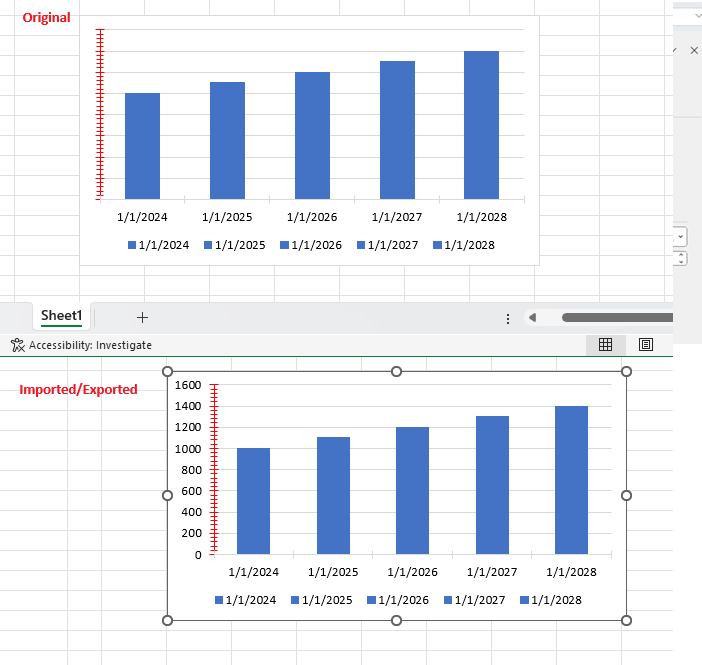
Workaround: this is the missing part after the export:

Hi there I have a pdf and whenever I try to Import the PDF file into PdfFormatProvider.Import method for flattening purposes, it throws null reference exception.
I have added a sample .net project with PDF added as source. You just need to run the project on your end. I am using version 2023.3.1106 of document processing library.
I am using ASP.NET 4.8 framework.
Thanks
If a worksheet has page breaks, but Fit to pages is also set to true, the page breaks should not be respected.
wb.ActiveWorksheet.WorksheetPageSetup.PageBreaks.Clear();
The table styles are not imported correctly from HTML. The back color is not respected. The column width is incorrect. The font size is different.
Font is not in proper case- All the cases are in lower case
An exception is thrown when the file contains the following format string
" PE @ "??0.0;-" PE @ "??0.0;" PE @ New";" PE @ "_0_0@
The exception is thrown in the ValidateNumberFormatDescriptors method.
In excel, if you set word wrap to cell content, make the column wider and then autofit the column in which it is, the content will fit to a reasonable width, as seen in the image below.
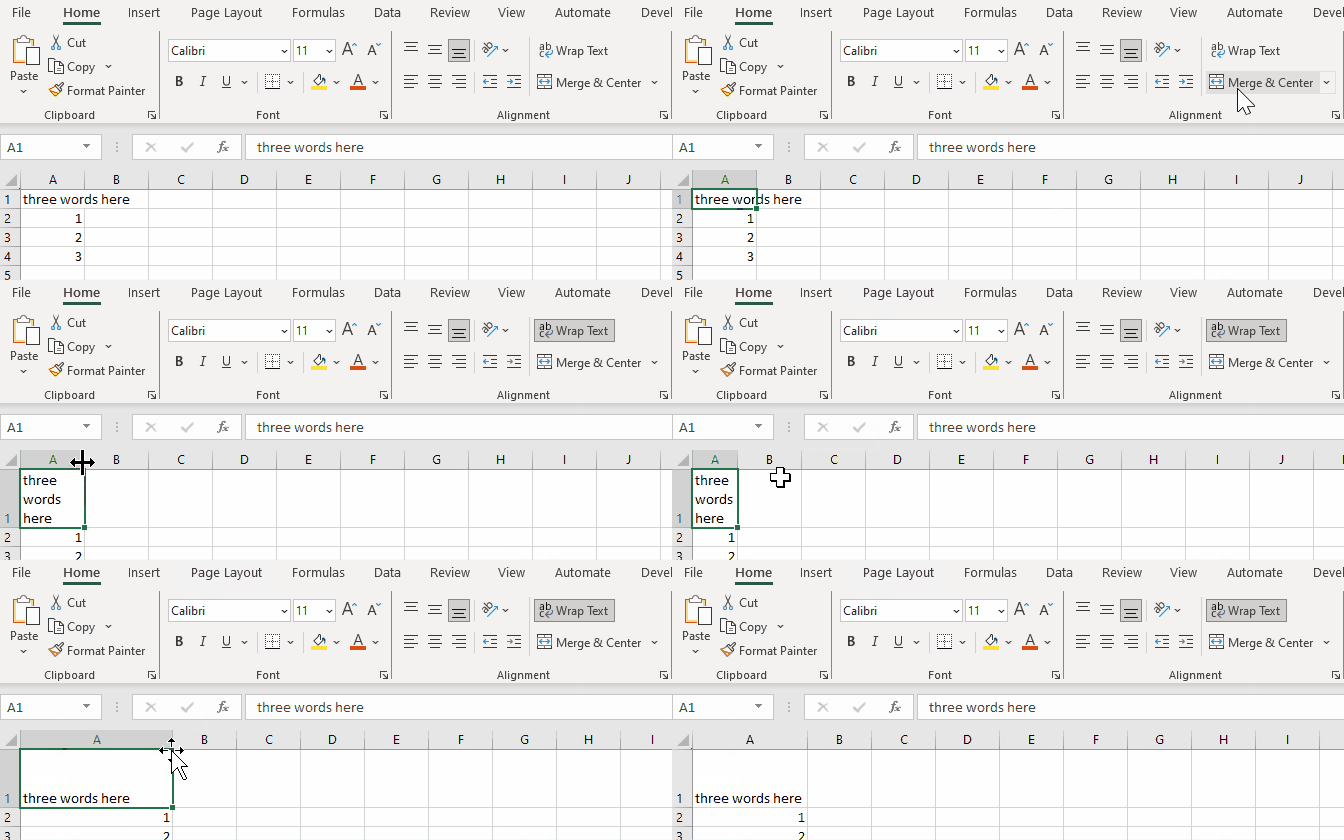
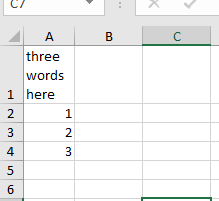
When doing the same in SpreadProcessing, the result is always a narrow column:
            CellSelection cellSelection = sheet.Cells[0, 0];
            cellSelection.SetIsWrapped(true);

            ColumnSelection columnSelection = sheet.Columns[0];
            columnSelection.SetWidth(new ColumnWidth(100, true));
            columnSelection.AutoFitWidth();
Result:
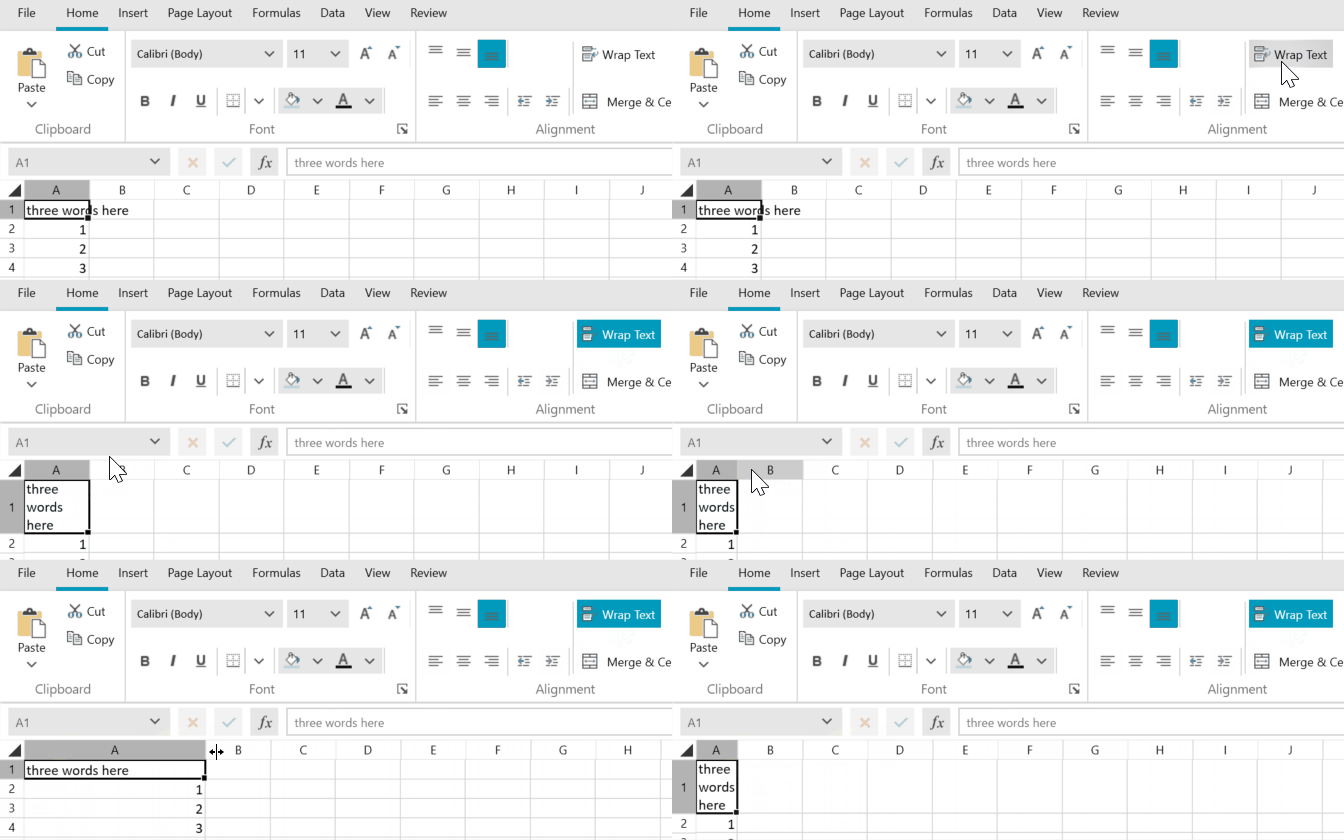
Here are the same steps performed in WPF RadSpreadsheet, which uses RadSpreadProcessing for its engine:
Hi,
We are using HTMLFormatProvider and PDFFormatProvider for converting HTML string to PDF file. The below issues are identified while converting PDF.
1. Text Foreground and Background color is not working in pdf.
HTML:
<p><span style="color: rgb(216, 55, 98); background-color: rgb(28, 122, 144); font-size: 30px;">Test</span></p>
We get the same issue even though we added below code.
foreach (Run run in document.EnumerateChildrenOfType<Run>())
{
    if (!run.Properties.HighlightColor.HasLocalValue)
	{
		run.HighlightColor = run.Shading.BackgroundColor.LocalValue;
	}
}
Attached the PDF file
2. Strikeout is not working in PDF
Sample HTML:
<!DOCTYPE html>
<html>
<head>
<title>Page Title</title>
</head>
<body>
<p><span style="font-size: 24px;"><del>Delete Strike Through line in the paragraph</del></span></p>
</body>
</html>
attached the PDF file .
It would be appreciated , if you provide the solution for those issues
Regards,
Babu