


When importing HTML content to a RadFlowDocument and exporting it to PDF format, the following error message occurs:
System.ArgumentException: 'The document element is associated with another parent. (Parameter 'item')'
at Telerik.Windows.Documents.Fixed.Model.Collections.DocumentElementCollection`2.VerifyDocumentElementOnInsert(T item)at Telerik.Windows.Documents.Core.Data.DocumentElementCollectionBase`2.Add(T item)
at Telerik.Windows.Documents.Fixed.Model.Editing.FixedContentEditor.Append(PositionContentElement element)
at Telerik.Windows.Documents.Fixed.Model.Editing.FixedContentEditor.Draw(PositionContentElement element)
at Telerik.Windows.Documents.Fixed.Model.Editing.Layout.ContentElementLayoutElementBase`1.Draw(DrawLayoutElementContext context)
at Telerik.Windows.Documents.Fixed.Model.Editing.Block.Draw(IEnumerable`1 lineElements, DrawLayoutElementContext context)
at Telerik.Windows.Documents.Fixed.Model.Editing.Block.DrawInternal(FixedContentEditor editor, Rect boundingRect)
at Telerik.Windows.Documents.Fixed.Model.Editing.Block.Draw(FixedContentEditor editor, Rect boundingRect)
at Telerik.Windows.Documents.Fixed.Model.Editing.Tables.TableCell.Draw(FixedContentEditor editor)
at Telerik.Windows.Documents.Fixed.Model.Editing.Tables.Table.DrawCellContent(FixedContentEditor editor, TableCell cell)
at Telerik.Windows.Documents.Fixed.Model.Editing.Tables.Table.DrawTableCells(FixedContentEditor editor, Int32 rowIndex, TableCellCollection cells)
at Telerik.Windows.Documents.Fixed.Model.Editing.Tables.Table.DrawTableRows(FixedContentEditor editor)
at Telerik.Windows.Documents.Fixed.Model.Editing.Tables.Table.DrawInternal(FixedContentEditor editor, Rect boundingRect)
at Telerik.Windows.Documents.Fixed.Model.Editing.Tables.Table.Draw(FixedContentEditor editor, Rect boundingRect)
at Telerik.Windows.Documents.Fixed.Model.Editing.Tables.TableCell.Draw(FixedContentEditor editor)
at Telerik.Windows.Documents.Fixed.Model.Editing.Tables.Table.DrawCellContent(FixedContentEditor editor, TableCell cell)
at Telerik.Windows.Documents.Fixed.Model.Editing.Tables.Table.DrawTableCells(FixedContentEditor editor, Int32 rowIndex, TableCellCollection cells)
at Telerik.Windows.Documents.Fixed.Model.Editing.Tables.Table.DrawTableRows(FixedContentEditor editor)
at Telerik.Windows.Documents.Fixed.Model.Editing.Tables.Table.DrawInternal(FixedContentEditor editor, Rect boundingRect)
at Telerik.Windows.Documents.Fixed.Model.Editing.Tables.Table.Telerik.Windows.Documents.Fixed.Model.Editing.Flow.IDrawArrangedElement.DrawArrangedElement(FixedContentEditor editor, Rect boundingRect)
at Telerik.Windows.Documents.Fixed.Model.Editing.Flow.SectionInfo.DrawArrangedElement(IBlockElement blockElement, Double horizontalOffset, Double verticalOffset)
at Telerik.Windows.Documents.Fixed.Model.Editing.Utils.SectionInfoExtensions.DrawArrangedElements(SectionInfo section, IList`1 elements)
at Telerik.Windows.Documents.Fixed.Model.Editing.RadFixedDocumentEditor.Draw()
at Telerik.Windows.Documents.Fixed.Model.Editing.RadFixedDocumentEditor.StartNewPage(SectionProperties sectionProperties)
at Telerik.Windows.Documents.Fixed.Model.Editing.RadFixedDocumentEditor.StartNewPage()
at Telerik.Windows.Documents.Fixed.Model.Editing.RadFixedDocumentEditor.AddBlock(IBlockElement blockElement, CancellationToken cancellationToken)
at Telerik.Windows.Documents.Flow.FormatProviders.Pdf.Export.PdfExporter.ExportSection(Section section, RadFixedDocumentEditor editor)
at Telerik.Windows.Documents.Flow.FormatProviders.Pdf.Export.PdfExporter.ExportDocument(RadFlowDocument document, RadFixedDocumentEditor editor)
at Telerik.Windows.Documents.Flow.FormatProviders.Pdf.Export.PdfExporter.ExportInternal()
at Telerik.Windows.Documents.Flow.FormatProviders.Pdf.Export.PdfExporter.Export()
at Telerik.Windows.Documents.Flow.FormatProviders.Pdf.PdfFormatProvider.ExportToFixedDocument(RadFlowDocument document, CancellationToken cancellationToken)
at Telerik.Windows.Documents.Flow.FormatProviders.Pdf.PdfFormatProvider.ExportOverride(RadFlowDocument document, Stream output, CancellationToken cancellationToken)
at Telerik.Windows.Documents.Common.FormatProviders.FormatProviderBase`1.Export(T document, Stream output, Nullable`1 timeout)
at _1713205HtmlToPdf.Program.Main(String[] args) in C:\Users\dyordano\OneDrive - Progress Software Corporation\MyProjects\1713205HtmlToPdf\Program.cs:line 46


Table with specified width in inches is not correctly exported when the size is set in inches (this is done in the imported HTML)
Workaround: set the table size in the code and remove the style.
foreach (Table table in document2.EnumerateChildrenOfType<Table>()){
table.LayoutType = TableLayoutType.FixedWidth;
table.PreferredWidth = new TableWidthUnit(TableWidthUnitType.Fixed, 950);
}
Unexpected table content indentation during PDF export when cells lack explicit margins and do not inherit table-level margins.
Manual Workaround Before PDF Export:
Preserve direct cell overrides; materialize table-default padding only for cells with no local padding:
foreach (var section in document.Sections)
{
    foreach (var block in section.Blocks)
    {
        if (!(block is Table table))
        {
            continue;
        }

        foreach (var row in table.Rows)
        {
            foreach (var cell in row.Cells)
            {
                if (!cell.Properties.Padding.HasLocalValue)
                {
                    cell.Padding = table.TableCellPadding;
                }
            }
        }
    }
}
RTF import loses the font applied once at paragraph/body level and falls back to a default font instead, when the \fonttbl uses flat, non-grouped font entries rather than individually braced {\fN ...} fonts.
Workaround: Re-save the document in MS Word.
Hello
Calling MailMerge on a document with a nested repeating group throws NullReferenceException when a merged value contains a line terminator.
All of the following are required to reproduce the crash:
- The group («BeginGroup:Items» … «EndGroup:Items») is nested inside an outer group
- The field whose value contains the newline sits in a later table cell than the group's begin marker
- The value belongs to a non-last record
I have attached a minimal repro demonstrating the bug.

When a paragraph has defined tab stops in its style and has the same tab stops locally cleared, the tab stops are still respected when exporting to PDF. Instead, cleared tab stops should not be respected.
Center alignment is not respected for list numbering.
Expected:
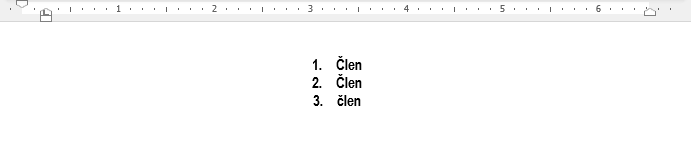
Actual:


Exporting to PDF of a table with a first cell having preferred width of 100% and a second cell having preferred width of auto will result in missing the second cell.
This is happening because the cell with preferred width 100% takes all the available width and all other columns are rendered with no available width which causes the height of the table to grow big.

WORKAROUND: Either clear the cell PreferredWidth property or set it to value which is smaller than 100%.