

The Delete and Backspace buttons remain enabled in spell check mode, allowing the client to delete selections inside the Editor's content area.

Steps to reproduce:
1. Open http://demos.telerik.com/aspnet-ajax/editor/examples/spellchecker/defaultcs.aspx
2. Click the Spell check icon
3. Select several words from the content and press Backspace/Delete

Result: The selected content is deleted
Expected: The Delete/Backspace button press is ignored
OnClientModeChange event is not fired in Mobile RenderMode.

Steps to reproduce:
Run the following code in a mobile Chrome (or mobile emulation) and click the edit Pencil button that switches the edit modes:

        <script type="text/javascript">
            function OnClientModeChange(editor, args) {
                var mode = editor.get_mode();
                switch (mode) {
                    case 1:
                        alert("We are in Design mode");
                        //do something
                        break;
                    case 2:
                        alert("We are in Html mode");
                        //do something
                        break;
                    case 4:
                        alert("We are in Preview mode");
                        //do something
                        break;
                }
            }
        </script>

        <telerik:RadEditor runat="server" OnClientModeChange="OnClientModeChange" ID="RadEditor1" RenderMode="Auto">
        </telerik:RadEditor>

The Bold, Italic, Underline, Justify, Indent, Outdent and other commands are not localized in the Undo/Redo dropdowns. Screenshots:Can be seen at http://demos.telerik.com/aspnet-ajax/editor/examples/localization/defaultcs.aspx.

The RadEditor Add Link dialog uses HTML tables for layout, but the tables are exposed with data-table semantics.
The dialog contains:
- An outer reControlsLayout table
- A nested reConfirmCancelButtonsTblLight table for the action buttons
- Hidden <caption>, <thead>, and <th> elements intended to describe the tables
- No role="presentation" or role="none" on the layout tables
Because these tables are used to arrange form fields and buttons rather than display tabular data, screen readers and automated accessibility tools may interpret them as data tables. The hidden headers are removed from the accessibility tree and do not provide useful table semantics. The nested table may also result in redundant or confusing table announcements.
This causes WCAG 2.1 accessibility findings related to table semantics, including F49 and F91 under Section 508.

In the demo:
https://demos.telerik.com/aspnet-ajax/editor/examples/trackchanges/defaultcs.aspx
1. (Preparation) Disable TrackChange and Remove all text. Enable Track Change back.
2. Insert table, (HTML View)
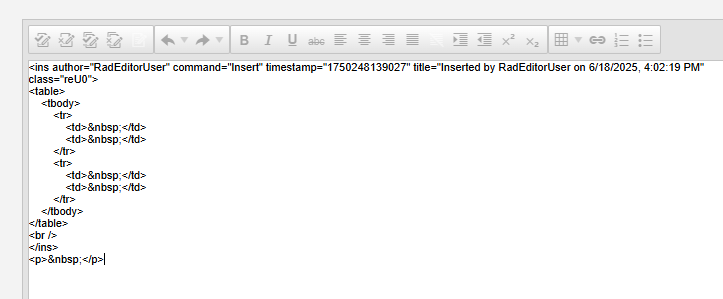
3. In the design mode set new paragraph after table:
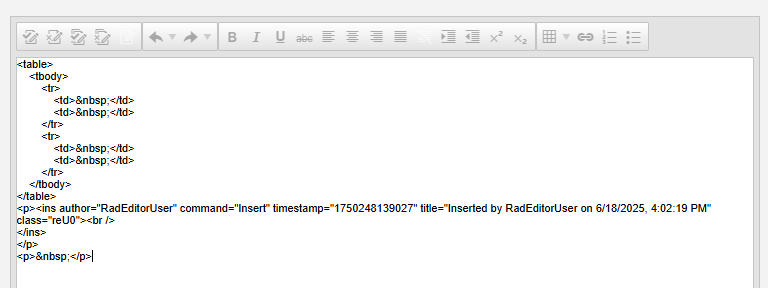
Insertion of the table dissapeared.
How to fix this issue?

Problem:

In the RadEditor we have the NewLineMode set to Div
We are also using a ToolsFile xml document to control the tools available in RadEditor.
The problem is the InsertParagraph tool now inserts <div> tags instead of <p> tags.
We want to keep the NewLineMode behavior as DIV while still having a tool that can insert a paragraph (i.e. a <p> tag).

To replicate this problem:

On the RadEditor demo page, first set "NEW LINES AS" to "Divs".
Then, in the editor content area just above the "Destinations" table, Type in three lines:
Comment1
Comment2
Comment3

If you then toggle to the HTML tab, you will see that the Comment1 line is (incorrectly) bracketed by a <p> tag while the Comment2 and Comment3 lines are (correctly) bracketed by <div> tags.

Next, go back to the Design tab and position yourself at the beginning of the Comment3 line then click the [Insert Paragraph] button.

In the newly inserted "paragraph" type "Comment2b".

If you then toggle to the HTML tab you will see that Comment2b is incorrectly bracketed by a <div> tag.  It should be a <p> tag.
RadEditor does not offer resx localization for the following Track Changes strings "Inserted by ", "Formatted by ", "Deleted by " as well as for the strings in the Comments dialog: Title, Save, Cancel and Edit.
1. Inside the editor (http://demos.telerik.com/aspnet-ajax/editor) copy and paste the contents of the attached file.

2. When prompted to clean the pasted data, select Yes.

3. Visually inspect the order of the list elements and the indentation - see the screenshot in the attachment.
Hi Team,
I would like to request the following image file extensions to be displayable using the RadEditor's ImageManager/DocumentManager.
- abci
- avif
- heif
- heic
- webp
Thank you!

I am currently using the Radeditor "Insert Table" function. I would like this to allow user to auto adjust columns and rows live just like the following demo. https://demos.telerik.com/aspnet-mvc/editor. I have disable the table wizard and table properties, so user will not be able to mess with this extra stuff. In the Capture.PNG is what I currently have. I would like to have the Want.PNG picture.
Repro steps:
- use the editor below and the attached Word document in the archive at the end
- copy the document content in the editor
- clean the word formatting
- select some of the content (e.g., one paragraph)
- click the format stripper dropdown and choose Strip Span Elements
- run get_html(true) in the console

Expected: spans are stripped only from the selected content

Actual: nothing is stripped. Changing to HTML mode and back to Design fixes this, so you should not use that to check the HTML

        <telerik:RadEditor RenderMode="Lightweight" runat="server" ID="RadEditor1">
            <Tools>
                <telerik:EditorToolGroup>
                    <telerik:EditorTool Name="FormatStripper" />
                </telerik:EditorToolGroup>
            </Tools>
        </telerik:RadEditor>


WORKAROUNDS:

For the majority of cases you can set up automatic stripping of span elements when pasting from Word, so your users do not need to do that themselves. Here is an example:

<telerik:RadEditor RenderMode="Lightweight" runat="server" ID="RadEditor1"
    StripFormattingOptions="ConvertWordLists, MSWordNoMargins, Span">
    <Tools>
        <telerik:EditorToolGroup>
            <telerik:EditorTool Name="FormatStripper" />
        </telerik:EditorToolGroup>
    </Tools>
</telerik:RadEditor>

You can read more on how stripping MS Word content works in the following demo, and play around with the various options to see what works best for your case: http://demos.telerik.com/aspnet-ajax/editor/examples/cleaningwordformatting/defaultcs.aspx and in the following documentation article: https://docs.telerik.com/devtools/aspnet-ajax/controls/editor/managing-content/pasting-content/clean-ms-word-formatting

There are also two possible code workarounds so advanced users can retain more control over the HTML without switching to the HTML mode themselves.
The second is likely to be a tad faster with large content, but the first is likely to produce better user experience.

1) this changes the mode to HTML and back to design with each paste so that the stripping tool can work with the selection


<telerik:RadEditor RenderMode="Lightweight" runat="server" ID="RadEditor1"
     OnClientCommandExecuted="OnClientCommandExecuted">
    <Tools>
        <telerik:EditorToolGroup>
            <telerik:EditorTool Name="FormatStripper" />
        </telerik:EditorToolGroup>
    </Tools>
</telerik:RadEditor>
<script>
    function OnClientCommandExecuted(sender, args) {
        if (args.get_commandName() == "Paste") {
            sender.set_mode(2);
            setTimeout(function () {
                sender.set_mode(1);
            }, 50);
        }
    }
</script>

2) this one is a workaround that allows the stripping tool to work without mode change, but it will not operate with the selection but with all the content


<telerik:RadEditor RenderMode="Lightweight" runat="server" ID="RadEditor1"
     OnClientCommandExecuting="OnClientCommandExecuting">
    <Tools>
        <telerik:EditorToolGroup>
            <telerik:EditorTool Name="FormatStripper" />
        </telerik:EditorToolGroup>
    </Tools>
</telerik:RadEditor>
<script>
    function OnClientCommandExecuting(sender, args) {
        if (args.get_commandName() == "StripSpan") {
            sender.set_html(sender.get_html(true));
        }
    }
</script>
When inserting video in Telerik Editor, radEditor by default inserts it using <embed>.
This element is not supported by Edge. Many modern browsers now support/recommend to use of the <video> tag.
So, that it will render video in most of Chromium browsers out there.
After upgrade from
<package id="Telerik.Licensing" version="1.6.16" targetFramework="net472" />
<package id="Telerik.UI.for.AspNet.Ajax.Net462" version="2025.3.825" targetFramework="net472" />
to
<package id="Telerik.Licensing" version="1.6.40" targetFramework="net472" />
<package id="Telerik.UI.for.AspNet.Ajax.Net462" version="2026.1.225" targetFramework="net472" />
we started experiencing the following error:
1. Add editor with ToolbarMode="RibbonBarShowOnFocus", no code-behind is required
        <telerik:RadEditor ID="Editor" runat="server" Width="100%"
            ToolbarMode="RibbonBarShowOnFocus">
        </telerik:RadEditor>
2. Open page, editor is empty and "Design" tab is active
3. Click on "Html" tab. Important: don't click on the editor content area while "Design" tab is active!
4. Paste some html, e.g.
<p>Your third Quarter Dining Rewards are Ready!</p>
5. Click to "Design" tab. Content is not rendered, editor is broken.
6. Find error in console
ScriptResource.axd?d=SIX1nT3k5ctYiH_Z5iBDXSZnshOXvXkzvSku5HLBqZlwfCmxfuwQE-bsvfCtuJcU8Kf5mMmqIz4_-haUfplj_Y2fBjNYHTB6sDwvO7dqA9dlR0fcUTx4578VpqHDjGrfk4WQ4Qs5nyG4zIAFDPwYjQ2&t=7fbf35ab:1 Uncaught TypeError: Cannot read properties of null (reading 'commonAncestorContainer')
at Object.getState (ScriptResource.axd?d=SIX1nT3k5ctYiH_Z5iBDXSZnshOXvXkzvSku5HLBqZlwfCmxfuwQE-bsvfCtuJcU8Kf5mMmqIz4_-haUfplj_Y2fBjNYHTB6sDwvO7dqA9dlR0fcUTx4578VpqHDjGrfk4WQ4Qs5nyG4zIAFDPwYjQ2&t=7fbf35ab:1:143451)
at Object.getToolState (ScriptResource.axd?d=SIX1nT3k5ctYiH_Z5iBDXSZnshOXvXkzvSku5HLBqZlwfCmxfuwQE-bsvfCtuJcU8Kf5mMmqIz4_-haUfplj_Y2fBjNYHTB6sDwvO7dqA9dlR0fcUTx4578VpqHDjGrfk4WQ4Qs5nyG4zIAFDPwYjQ2&t=7fbf35ab:2:7097)
at Object.setRibbonBarToolState (ScriptResource.axd?d=SIX1nT3k5ctYiH_Z5iBDXSZnshOXvXkzvSku5HLBqZlwfCmxfuwQE-bsvfCtuJcU8Kf5mMmqIz4_-haUfplj_Y2fBjNYHTB6sDwvO7dqA9dlR0fcUTx4578VpqHDjGrfk4WQ4Qs5nyG4zIAFDPwYjQ2&t=7fbf35ab:3:124809)
at Object._onEditorSelectionChange (ScriptResource.axd?d=SIX1nT3k5ctYiH_Z5iBDXSZnshOXvXkzvSku5HLBqZlwfCmxfuwQE-bsvfCtuJcU8Kf5mMmqIz4_-haUfplj_Y2fBjNYHTB6sDwvO7dqA9dlR0fcUTx4578VpqHDjGrfk4WQ4Qs5nyG4zIAFDPwYjQ2&t=7fbf35ab:3:124488)
at Array.<anonymous> (MsAjaxJs?v=D6VN0fHlwFSIWjbVzi6mZyE9Ls-4LNrSSYVGRU46XF81:1:2148)
at MsAjaxJs?v=D6VN0fHlwFSIWjbVzi6mZyE9Ls-4LNrSSYVGRU46XF81:1:50368
at Object.raiseEvent (ScriptResource.axd?d=TDVjdgRbdvNAY3tnbizUcIjfDUXiq5ixpnBN0VcDALLSiZ3CMr6-87hfvIaN_0cz2j3vISyRnNQUUXuS5a7lBoLr1EhUzo3XC7p-5gq6HdUFDfDXoZF6FnTKoxdUmGE70&t=7fbf35ab:3:34795)
at Function.callBaseMethod (MsAjaxJs?v=D6VN0fHlwFSIWjbVzi6mZyE9Ls-4LNrSSYVGRU46XF81:1:8931)
at Object.raiseEvent (ScriptResource.axd?d=SIX1nT3k5ctYiH_Z5iBDXSZnshOXvXkzvSku5HLBqZlwfCmxfuwQE-bsvfCtuJcU8Kf5mMmqIz4_-haUfplj_Y2fBjNYHTB6sDwvO7dqA9dlR0fcUTx4578VpqHDjGrfk4WQ4Qs5nyG4zIAFDPwYjQ2&t=7fbf35ab:1:326487)
at Object.set_html (ScriptResource.axd?d=SIX1nT3k5ctYiH_Z5iBDXSZnshOXvXkzvSku5HLBqZlwfCmxfuwQE-bsvfCtuJcU8Kf5mMmqIz4_-haUfplj_Y2fBjNYHTB6sDwvO7dqA9dlR0fcUTx4578VpqHDjGrfk4WQ4Qs5nyG4zIAFDPwYjQ2&t=7fbf35ab:2:26992)
This is a production issue so any quick fixes/workarounds will be greatly appreciated.
With JAWS
Paragraph Style button menu
Font Name button menu
Real Font button menu
Zoom button menu
With NVDA
Paragraph Style sub menu
Font Name sub menu
Real Font sub menu
Zoom sub menu
Using Alt+down arrow to expand the select option menu, using the arrow keys to navigate down the menu nothing is announced although you can visually see the focus highlight in the menu.
This is the same for the two screen readers JAWS and NVDA. Same result when testing on Edge and Chrome browsers.
Other menu options or expandable sections are having a similar issue for:
Paste Options
Foreground Color
Background Color
Paint Stripper
Insert Symbol
Insert Table
Module Manager this one is empty when it expands
Thank you.
video link:- https://jam.dev/c/88c17904-c758-47ab-949c-d29b4775dc6d
For a better description of the issue and reproduction steps, please view the ticket:

http://www.telerik.com/account/support-tickets/view-ticket?threadid=1010438

If a user clicks 'Ignore All' for a misspelled word, the focus moves to the next misspelled word after the last word included in the ignore all list.  This becomes problematic when editing a large quantity of text and the user's trying to go through things in order, but the focus moves to the very bottom of the content area.

In MS Word, it works as our users expect it would.  Once 'Ignore All' is chosen, the very next misspelled word is highlighted.
The following code will trigger the issue: <ins author="Test user1" command="Insert" timestamp="1488935783059" title="Inserted by Test user1 on 3/7/2017, 5:16:23 PM" class="reU7"> <p cssproperty="verticalAlign" author="Test User2" timestamp="1488945891760" title="Formatted by Test User2 on 3/7/2017, 8:04:51 PM" class="reFormat reU0" command="Remove alignment"><span style="font-size: 12pt;"> </span><span style="font-size: 12pt; font-family: 'Times New Roman';">This is some sample text.</span></p> </ins> When track changes are enabled and you try to delete from the end of this text, the deleted characters move to the following lines with a strikethrough rather than just deleting.
The InsertLink light dialog has a typo in the for attribute of the URL label, causing a case mismatch with the input's id. This results in accessibility tools like Wave and SortSite reporting the URL textbox as an unlabeled control.
Steps to Reproduce
1. Add a RadEditor with EnableAriaSupport="true" to a page
2. Ensure the InsertLink tool is enabled (it is by default)
3. Click the InsertLink toolbar button to open the dialog
4. Run an accessibility audit using Wave, SortSite, or inspect the DOM
Expected Behavior
The label's for attribute should match the input's id attribute exactly, allowing accessibility tools to correctly associate the label with the input.
Actual Behavior
• Label has for="LinkURL" (uppercase "URL")
• Input has id="LinkUrl" (mixed case "Url")
Since HTML for/id matching is case-sensitive, the label is not properly associated with the input control.
Affected File
InsertLink.ascx