

Can be reproduced in the demo:
- Open the default document in the radrichtextbox demo
- Activate change tracking (button "Track Changes")
- Make a modification to the document (delete a paragraph)
- Hover your mouse over the delete text: the date in the revision info. has always ":00" for the seconds
In our processes, it is very important to know if a change happened before or after another action. If all the revisions have zero seconds, it's impossible to determine the order of the changes when they happened in the same minute.
This is not a new bug introduce in SP2: it was there in SP1.

A compilation error occurs in a project that doesn't use any Telerik code, but it references a class library which installs the Telerik.Licensing NuGet package.
The error message from the class library project is the following:
C:\WINDOWS\Microsoft.NET\Framework\v4.0.30319\Microsoft.WinFx.targets(268,9): error MC1000: Unknown build error, 'Cannot resolve dependency to assembly 'Telerik.Licensing.Runtime, Version=1.4.6.0, Culture=neutral, PublicKeyToken=keyhere' because it has not been preloaded. When using the ReflectionOnly APIs, dependent assemblies must be pre-loaded or loaded on demand through the ReflectionOnlyAssemblyResolve event.'
To workaround this, you can add assembly references to the Telerik dlls in the main project (including Telerik.Licensing.Runtime), instead of using NuGet packages.
Alternatively, you can install the Telerik.Licensing NuGet package also in the class library.
<ItemGroup>
	<PackageReference Include="Telerik.Licensing" Version="1.4.*" />
</ItemGroup>
Note that with this approach you will see a message in the output that no license is installed, even if you have one. However, for now (versions from 1.4.6 to 1.4.12, which is the latest at the moment of writting this post), the error won't apply any compile or runtime restrictions on the UI or the functionality.
When adding a button cell as below, if the button cell is selected the button doesn't work when tapping it.
<telerik:GridViewDataColumn Header="Config"
                            DataMemberBinding="{Binding .}" IsReadOnly="True">
    <telerik:GridViewDataColumn.CellTemplate>
        <DataTemplate>
            <!-- Adding telerik:TouchManager.TouchMode="None" solves the issue -->
            <telerik:RadButton HorizontalAlignment="Center" Style="{StaticResource MyButtonStyle}"
                               Margin="2" Padding="1" Width="Auto" Height="Auto"
                               Command="{Binding DataContext.ShowExtraConfigurationCommand, RelativeSource={RelativeSource AncestorType=Window}}"
                               CommandParameter="{Binding .}" ToolTip="Config">
                <telerik:RadGlyph Glyph="{StaticResource GlyphGear}"/>
            </telerik:RadButton>
        </DataTemplate>
    </telerik:GridViewDataColumn.CellTemplate>
</telerik:GridViewDataColumn>
As stated in the comment, adding the property below to the RadButton solves the issue.
telerik:TouchManager.TouchMode="None"I have attached a sample project in which the error occurs, simply tap a button, close the MessageBox and tap the same button again. Thank you for your time!
Type in Japanese text in RichTextBox that word wraps beyond the first line and export it to PDF. The text should always be left aligned (as visually shown when typing) but has an "indent" when exported when the font is Segoe UI.

NullReferenceException is thrown when the document gets updated after TableRow objects were removed with the Remove method of the parent Rows collection of the Table.
The table.Rows.Remove method is not properly removing some of the rows.
Stacktrace:
Telerik.Windows.Documents.dll!Telerik.Windows.Documents.Model.TableGridMeasurer.CalculateTableCellMinMaxWidths(Telerik.Windows.Documents.Model.TableCell cell, float availableWidth) Line 137 C#  Telerik.Windows.Documents.dll!Telerik.Windows.Documents.Model.TableGridMeasurer.CalculateTableMinMaxWidths(Telerik.Windows.Documents.Model.Table table, float availableWidth) Line 165 C#  Telerik.Windows.Documents.dll!Telerik.Windows.Documents.Model.TableGridMeasurer.MeasureAutoFit(Telerik.Windows.Documents.Model.Table table, float availableWidth) Line 229 C#
  Telerik.Windows.Documents.dll!Telerik.Windows.Documents.Model.Table.RecalculateColumnWidths(float measureWidth) Line 1151 C#
  Telerik.Windows.Documents.dll!Telerik.Windows.Documents.Model.Table.RecalculateTableGrid(float measureWidth) Line 1249 C#  Telerik.Windows.Documents.dll!Telerik.Windows.Documents.Layout.TableLayoutBox.MeasureOverride(Telerik.Windows.Documents.Model.SizeF availableSize) Line 265 C#  Telerik.Windows.Documents.dll!Telerik.Windows.Documents.Layout.LayoutElement.MeasureCore(Telerik.Windows.Documents.Model.SizeF availableSize) Line 933 C#  Telerik.Windows.Documents.dll!Telerik.Windows.Documents.Layout.LayoutElement.Measure(Telerik.Windows.Documents.Model.SizeF availableSize) Line 836 C#  Telerik.Windows.Documents.dll!Telerik.Windows.Documents.Layout.SectionLayoutBox.MeasureOverrideInternal(Telerik.Windows.Documents.Model.SizeF availableSize) Line 721 C#  Telerik.Windows.Documents.dll!Telerik.Windows.Documents.Layout.SectionLayoutBox.MeasureOverride(Telerik.Windows.Documents.Model.SizeF availableSize) Line 468 C#  Telerik.Windows.Documents.dll!Telerik.Windows.Documents.Layout.LayoutElement.MeasureCore(Telerik.Windows.Documents.Model.SizeF availableSize) Line 933 C#  Telerik.Windows.Documents.dll!Telerik.Windows.Documents.Layout.LayoutElement.Measure(Telerik.Windows.Documents.Model.SizeF availableSize) Line 836 C#  Telerik.Windows.Documents.dll!Telerik.Windows.Documents.Layout.DocumentLayoutBox.MeasureOverrideInternal(Telerik.Windows.Documents.Model.SizeF availableSize) Line 223 C#  Telerik.Windows.Documents.dll!Telerik.Windows.Documents.Layout.DocumentLayoutBox.MeasureOverride(Telerik.Windows.Documents.Model.SizeF availableSize) Line 150 C#  Telerik.Windows.Documents.dll!Telerik.Windows.Documents.Layout.LayoutElement.MeasureCore(Telerik.Windows.Documents.Model.SizeF availableSize) Line 933 C#  Telerik.Windows.Documents.dll!Telerik.Windows.Documents.Layout.LayoutElement.Measure(Telerik.Windows.Documents.Model.SizeF availableSize) Line 836 C#  Telerik.Windows.Documents.dll!Telerik.Windows.Documents.Model.RadDocument.Measure(Telerik.Windows.Documents.Model.SizeF measureSize) Line 1515 C#  Telerik.Windows.Documents.dll!Telerik.Windows.Documents.UI.DocumentPrintLayoutPresenter.MeasureOverride(System.Windows.Size availableSize) Line 714 C#
To work this around, use the DeleteTableRow method of the RadDocumentEditor.
RadDocumentEditor documentEditor = new RadDocumentEditor(document);
documentEditor.DeleteTableRow(row);
If a RadDocking has its theme set to Windows 11 via the StyleManager.Theme attached property, placing a RadGridView inside (styled with a different theme, such as Office_Black, Summer, etc.) will cause its cells to look merged after performing an edit operation.
As a workaround, the RowHeight and the FontSize properties of the RadGridView instance can be used to resolve this.

After upgrading to .net 9 I get the following error when starting the published program (running it in RIDER in debug-mode doesn't create the issue).
(The issue might be similar to: https://feedback.telerik.com/wpf/1670420-typeinitializationexception-in-telerik-windows-input-touch-touchmanager-with-net-9 )
Application: Rueckrufdatenbank.exe
CoreCLR Version: 9.0.124.61010
.NET Version: 9.0.1
Description: The process was terminated due to an unhandled exception.
Exception Info: Prism.Ioc.ContainerResolutionException: An unexpected error occurred while resolving 'Rueckrufdatenbank.Views.MainWindow'
 ---> Unity.ResolutionFailedException: Resolution failed with error: Exception has been thrown by the target of an invocation.

For more detailed information run Unity in debug mode: new UnityContainer().AddExtension(new Diagnostic())
 ---> System.Reflection.TargetInvocationException: Exception has been thrown by the target of an invocation.
 ---> System.Windows.Markup.XamlParseException: Bei der Initialisierung von "Telerik.Windows.Controls.RadRibbonButton" wurde eine Ausnahme ausgelöst.
 ---> System.Xaml.XamlObjectWriterException: Beim Festlegen der Eigenschaft "System.Windows.ResourceDictionary.Source" wurde eine Ausnahme ausgelöst.
 ---> System.Windows.Markup.XamlParseException: Beim Festlegen der Eigenschaft "System.Windows.ResourceDictionary.DeferrableContent" wurde eine Ausnahme ausgelöst.
 ---> System.Xaml.XamlObjectWriterException: Fehler beim Erstellen von "ElementType" aus dem Text "Button".
 ---> System.IO.FileNotFoundException: Could not load file or assembly 'WindowsFormsIntegration, Culture=neutral, PublicKeyToken=31bf3856ad364e35'. Das System kann die angegebene Datei nicht finden.
File name: 'WindowsFormsIntegration, Culture=neutral, PublicKeyToken=31bf3856ad364e35'
   at System.Reflection.RuntimeAssembly.InternalLoad(AssemblyName assemblyName, StackCrawlMark& stackMark, AssemblyLoadContext assemblyLoadContext, RuntimeAssembly requestingAssembly, Boolean throwOnFileNotFound)
   at System.Reflection.Assembly.Load(AssemblyName assemblyRef)
   at System.Windows.Baml2006.Baml2006SchemaContext.ResolveAssembly(BamlAssembly bamlAssembly)
   at System.Windows.Baml2006.Baml2006SchemaContext.GetAssembly(Int16 assemblyId)
   at System.Windows.Baml2006.Baml2006SchemaContext.EnsureXmlnsAssembliesLoaded(String xamlNamespace)
   at System.Windows.Baml2006.Baml2006SchemaContext.GetXamlType(String xamlNamespace, String name, XamlType[] typeArguments)
   at MS.Internal.Xaml.XamlContext.GetXamlType(XamlTypeName typeName, Boolean returnUnknownTypesOnFailure, Boolean skipVisibilityCheck)
   at MS.Internal.Xaml.XamlContext.ResolveXamlType(String qName, Boolean skipVisibilityCheck)
   at MS.Internal.Xaml.Context.ObjectWriterContext.ServiceProvider_Resolve(String qName)
   at MS.Internal.Xaml.Runtime.ClrObjectRuntime.CreateObjectWithTypeConverter(ServiceProviderContext serviceContext, XamlValueConverter`1 ts, Object value)
   at System.Xaml.XamlObjectWriter.Logic_CreateFromValue(ObjectWriterContext ctx, XamlValueConverter`1 typeConverter, Object value, XamlMember property, String targetName, IAddLineInfo lineInfo)
   --- End of inner exception stack trace ---
   at System.Xaml.XamlObjectWriter.Logic_CreateFromValue(ObjectWriterContext ctx, XamlValueConverter`1 typeConverter, Object value, XamlMember property, String targetName, IAddLineInfo lineInfo)
   at System.Xaml.XamlObjectWriter.Logic_CreatePropertyValueFromValue(ObjectWriterContext ctx)
   at System.Xaml.XamlObjectWriter.WriteEndMember()
   at System.Xaml.XamlServices.Transform(XamlReader xamlReader, XamlWriter xamlWriter, Boolean closeWriter)
   at System.Windows.ResourceDictionary.EvaluateMarkupExtensionNodeList(XamlReader reader, IServiceProvider serviceProvider)
   at System.Windows.ResourceDictionary.SetKeys(IList`1 keyCollection, IServiceProvider serviceProvider)
   at MS.Internal.Xaml.Runtime.ClrObjectRuntime.SetValue(Object inst, XamlMember property, Object value)
   --- End of inner exception stack trace ---
   at System.Windows.Markup.XamlReader.RewrapException(Exception e, IXamlLineInfo lineInfo, Uri baseUri)
   at System.Windows.Markup.WpfXamlLoader.Load(XamlReader xamlReader, IXamlObjectWriterFactory writerFactory, Boolean skipJournaledProperties, Object rootObject, XamlObjectWriterSettings settings, Uri baseUri)
   at System.Windows.Markup.WpfXamlLoader.LoadBaml(XamlReader xamlReader, Boolean skipJournaledProperties, Object rootObject, XamlAccessLevel accessLevel, Uri baseUri)
   at System.Windows.Markup.XamlReader.LoadBaml(Stream stream, ParserContext parserContext, Object parent, Boolean closeStream)
   at System.Windows.Application.LoadBamlStreamWithSyncInfo(Stream stream, ParserContext pc)
   at MS.Internal.AppModel.AppModelKnownContentFactory.BamlConverterCore(Stream stream, Uri baseUri, Boolean canUseTopLevelBrowser, Boolean sandboxExternalContent, Boolean allowAsync, Boolean isJournalNavigation, XamlReader& asyncObjectConverter, Boolean isUnsafe)
   at MS.Internal.AppModel.MimeObjectFactory.GetObjectAndCloseStreamCore(Stream s, ContentType contentType, Uri baseUri, Boolean canUseTopLevelBrowser, Boolean sandboxExternalContent, Boolean allowAsync, Boolean isJournalNavigation, XamlReader& asyncObjectConverter, Boolean isUnsafe)
   at System.Windows.ResourceDictionary.set_Source(Uri value)
   at MS.Internal.Xaml.Runtime.ClrObjectRuntime.SetValue(Object inst, XamlMember property, Object value)
   --- End of inner exception stack trace ---
   at MS.Internal.Xaml.Runtime.ClrObjectRuntime.SetValue(Object inst, XamlMember property, Object value)
   at MS.Internal.Xaml.Runtime.PartialTrustTolerantRuntime.SetValue(Object obj, XamlMember property, Object value)
   at System.Xaml.XamlObjectWriter.Logic_ApplyPropertyValue(ObjectWriterContext ctx, XamlMember prop, Object value, Boolean onParent)
   at System.Xaml.XamlObjectWriter.Logic_DoAssignmentToParentProperty(ObjectWriterContext ctx)
   at System.Xaml.XamlObjectWriter.WriteEndMember()
   at System.Xaml.XamlServices.Transform(XamlReader xamlReader, XamlWriter xamlWriter, Boolean closeWriter)
   at System.Windows.SystemResources.ResourceDictionaries.LoadDictionary(Assembly assembly, String assemblyName, String resourceName, Boolean isTraceEnabled, Uri& dictionarySourceUri)
   at System.Windows.SystemResources.ResourceDictionaries.LoadGenericDictionary(Boolean isTraceEnabled)
   at System.Windows.SystemResources.FindDictionaryResource(Object key, Type typeKey, ResourceKey resourceKey, Boolean isTraceEnabled, Boolean allowDeferredResourceReference, Boolean mustReturnDeferredResourceReference, Boolean& canCache)
   at System.Windows.SystemResources.FindResourceInternal(Object key, Boolean allowDeferredResourceReference, Boolean mustReturnDeferredResourceReference)
   at System.Windows.StyleHelper.GetThemeStyle(FrameworkElement fe, FrameworkContentElement fce)
   at System.Windows.FrameworkElement.UpdateThemeStyleProperty()
   at System.Windows.FrameworkElement.OnPropertyChanged(DependencyPropertyChangedEventArgs e)
   at System.Windows.DependencyObject.NotifyPropertyChange(DependencyPropertyChangedEventArgs args)
   at System.Windows.DependencyObject.UpdateEffectiveValue(EntryIndex entryIndex, DependencyProperty dp, PropertyMetadata metadata, EffectiveValueEntry oldEntry, EffectiveValueEntry& newEntry, Boolean coerceWithDeferredReference, Boolean coerceWithCurrentValue, OperationType operationType)
   at System.Windows.DependencyObject.SetValueCommon(DependencyProperty dp, Object value, PropertyMetadata metadata, Boolean coerceWithDeferredReference, Boolean coerceWithCurrentValue, OperationType operationType, Boolean isInternal)
   at System.Windows.DependencyObject.SetValue(DependencyProperty dp, Object value)
   at Telerik.Windows.Controls.Theme.DefaultStyleKeyHelper.SetDefaultStyleKey(Control control, Object value)
   at Telerik.Windows.Controls.StyleManager.SetDefaultStyleKey(Control control, Type controlType)
   at Telerik.Windows.Controls.RadButton.OnInitialized(EventArgs e)
   at Telerik.Windows.Controls.RadRibbonButton.OnInitialized(EventArgs e)
   at MS.Internal.Xaml.Runtime.ClrObjectRuntime.InitializationGuard(XamlType xamlType, Object obj, Boolean begin)
   --- End of inner exception stack trace ---
   at System.Windows.Markup.XamlReader.RewrapException(Exception e, IXamlLineInfo lineInfo, Uri baseUri)
   at System.Windows.Markup.WpfXamlLoader.Load(XamlReader xamlReader, IXamlObjectWriterFactory writerFactory, Boolean skipJournaledProperties, Object rootObject, XamlObjectWriterSettings settings, Uri baseUri)
   at System.Windows.Markup.WpfXamlLoader.LoadBaml(XamlReader xamlReader, Boolean skipJournaledProperties, Object rootObject, XamlAccessLevel accessLevel, Uri baseUri)
   at System.Windows.Markup.XamlReader.LoadBaml(Stream stream, ParserContext parserContext, Object parent, Boolean closeStream)
   at System.Windows.Application.LoadComponent(Object component, Uri resourceLocator)
   at Rueckrufdatenbank.Views.MainWindow.InitializeComponent() in C:\GitLocal\Rueckrufdatenbank\Rueckrufdatenbank\Views\MainWindow.xaml:line 1
   at Rueckrufdatenbank.Views.MainWindow..ctor() in C:\GitLocal\Rueckrufdatenbank\Rueckrufdatenbank\Views\MainWindow.xaml.cs:line 13
   at System.RuntimeMethodHandle.InvokeMethod(Object target, Void** arguments, Signature sig, Boolean isConstructor)
   at System.Reflection.MethodBaseInvoker.InvokeWithNoArgs(Object obj, BindingFlags invokeAttr)
   --- End of inner exception stack trace ---
   at System.Reflection.MethodBaseInvoker.InvokeWithNoArgs(Object obj, BindingFlags invokeAttr)
   at System.Reflection.RuntimeConstructorInfo.Invoke(BindingFlags invokeAttr, Binder binder, Object[] parameters, CultureInfo culture)
   at System.Reflection.ConstructorInfo.Invoke(Object[] parameters)
   at Unity.Processors.ConstructorProcessor.<>c__DisplayClass16_0.<GetResolverDelegate>b__0(BuilderContext& c)
   at Unity.Processors.MemberProcessor`2.<>c__DisplayClass8_0.<GetResolver>b__0(BuilderContext& c)
   at Unity.Processors.MemberProcessor`2.<>c__DisplayClass8_0.<GetResolver>b__0(BuilderContext& c)
   at Unity.Processors.MemberProcessor`2.<>c__DisplayClass8_0.<GetResolver>b__0(BuilderContext& c)
   at Unity.UnityContainer.<>c__DisplayClass113_0.<OptimizingFactory>b__0(BuilderContext& c)
   at Unity.Strategies.BuildPlanStrategy.PreBuildUp(BuilderContext& context)
   at Unity.UnityContainer.<>c.<.ctor>b__73_1(BuilderContext& context)
   --- End of inner exception stack trace ---
   at Unity.UnityContainer.<>c.<.ctor>b__73_1(BuilderContext& context)
   at Unity.UnityContainer.Unity.IUnityContainer.Resolve(Type type, String name, ResolverOverride[] overrides)
   at Prism.Unity.UnityContainerExtension.Resolve(Type type, ValueTuple`2[] parameters)
   --- End of inner exception stack trace ---
   at Prism.Unity.UnityContainerExtension.Resolve(Type type, ValueTuple`2[] parameters)
   at Prism.Unity.UnityContainerExtension.Resolve(Type type)
   at Prism.Ioc.IContainerProviderExtensions.Resolve[T](IContainerProvider provider)
   at Rueckrufdatenbank.App.CreateShell() in C:\GitLocal\Rueckrufdatenbank\Rueckrufdatenbank\App.xaml.cs:line 67
   at Prism.PrismApplicationBase.Initialize()
   at Prism.PrismApplicationBase.InitializeInternal()
   at Prism.PrismApplicationBase.OnStartup(StartupEventArgs e)
   at Rueckrufdatenbank.App.OnStartup(StartupEventArgs e) in C:\GitLocal\Rueckrufdatenbank\Rueckrufdatenbank\App.xaml.cs:line 75
   at System.Windows.Application.<.ctor>b__1_0(Object unused)
   at System.Windows.Threading.ExceptionWrapper.InternalRealCall(Delegate callback, Object args, Int32 numArgs)
   at System.Windows.Threading.ExceptionWrapper.TryCatchWhen(Object source, Delegate callback, Object args, Int32 numArgs, Delegate catchHandler)
   at System.Windows.Threading.DispatcherOperation.InvokeImpl()
   at MS.Internal.CulturePreservingExecutionContext.CallbackWrapper(Object obj)
   at System.Threading.ExecutionContext.RunInternal(ExecutionContext executionContext, ContextCallback callback, Object state)
--- End of stack trace from previous location ---
   at System.Threading.ExecutionContext.RunInternal(ExecutionContext executionContext, ContextCallback callback, Object state)
   at MS.Internal.CulturePreservingExecutionContext.Run(CulturePreservingExecutionContext executionContext, ContextCallback callback, Object state)
   at System.Windows.Threading.DispatcherOperation.Invoke()
   at System.Windows.Threading.Dispatcher.ProcessQueue()
   at System.Windows.Threading.Dispatcher.WndProcHook(IntPtr hwnd, Int32 msg, IntPtr wParam, IntPtr lParam, Boolean& handled)
   at MS.Win32.HwndWrapper.WndProc(IntPtr hwnd, Int32 msg, IntPtr wParam, IntPtr lParam, Boolean& handled)
   at MS.Win32.HwndSubclass.DispatcherCallbackOperation(Object o)
   at System.Windows.Threading.ExceptionWrapper.InternalRealCall(Delegate callback, Object args, Int32 numArgs)
   at System.Windows.Threading.ExceptionWrapper.TryCatchWhen(Object source, Delegate callback, Object args, Int32 numArgs, Delegate catchHandler)
   at System.Windows.Threading.Dispatcher.LegacyInvokeImpl(DispatcherPriority priority, TimeSpan timeout, Delegate method, Object args, Int32 numArgs)
   at System.Windows.Threading.Dispatcher.Invoke(DispatcherPriority priority, Delegate method, Object arg)
   at MS.Win32.HwndSubclass.SubclassWndProc(IntPtr hwnd, Int32 msg, IntPtr wParam, IntPtr lParam)
   at MS.Win32.UnsafeNativeMethods.DispatchMessage(MSG& msg)
   at System.Windows.Threading.Dispatcher.PushFrameImpl(DispatcherFrame frame)
   at System.Windows.Application.RunDispatcher(Object ignore)
   at System.Windows.Application.RunInternal(Window window)
   at Rueckrufdatenbank.App.Main()
The pop-up content is not displayed in the bottom right corner, but in the top left corner, and can not show balloon.
Screen resolution: 4K
Window size: 15.6 inches
Operating System: Windows 11
Run:From Microsoft Store App telerik WPF controls.
Hi!
Iam trying to use a RadGauge to display two values, CurrentCapacity and MaxCapacity, and I thought a gauge would be a nice way. But my marker on the RadHorizontalLinearGauge does not align correctly.
<telerik:RadHorizontalLinearGauge>
    <telerik:HorizontalLinearScale Min="0" Max="10" >
        <telerik:HorizontalLinearScale.Indicators>
            <telerik:Marker Value="2"></telerik:Marker>
        </telerik:HorizontalLinearScale.Indicators>
    </telerik:HorizontalLinearScale>
</telerik:RadHorizontalLinearGauge>
Results in:

Notice marker is not on 2. The same problem occurs with different Max and Values.
Do I have some strange style that applies a margin/padding or something?
Using RadTabbedWindow I noticed difficulty dragging maximized windows between monitors. It seems to happen in multi-monitor environments and only when dragging Left of the PrimaryScreen.
In the video I've included , the blue window is a standard window and can be maximized in one drag across any display.
The white window is RadTabbedWindow and the drag will default to the PrimaryScreen when dragged to the left-most display.
Any help would be appreciated. Thanks
SelectedItems collection not updated when items are removed

I have no idea how to reproduce this, but every so often after a paste operation into a RadRichTextBox, the host thread becomes unresponsive to user input. The message pump is still running but the following unhandled exception gets thrown in a tight infinite loop. The only way to close the window is to right click on the taskbar button.
System.NullReferenceException
Message: Object reference not set to an instance of an object.
Call Stack:
at Telerik.Windows.Documents.Layout.LayoutElement.SetParent(LayoutElement newParent)
at Telerik.Windows.Documents.Layout.LayoutBox.EnsureParent()
at Telerik.Windows.Documents.Layout.LayoutBox.get_Parent()
at Telerik.Windows.Documents.Layout.FormattingSymbolLayoutBox.get_IsEndOfCell()
at Telerik.Windows.Documents.Layout.FormattingSymbolLayoutBox.GetFormattingSymbolVisual()
at Telerik.Windows.Documents.SpanBoxPositionHandler.get_Location()
at Telerik.Windows.Documents.UI.DocumentWebLayoutPresenter.GetViewPointFromDocumentPosition(DocumentPosition position)
at Telerik.Windows.Controls.RichTextBoxUI.PasteOptionsPopup.CalculateLocation()
at Telerik.Windows.Controls.RichTextBoxUI.PasteOptionsPopup.OnOwnerLayoutUpdated(Object sender, EventArgs e)
at System.Windows.ContextLayoutManager.fireLayoutUpdateEvent()
at System.Windows.ContextLayoutManager.UpdateLayout()
at System.Windows.ContextLayoutManager.UpdateLayoutCallback(Object arg)
at System.Windows.Media.MediaContext.FireInvokeOnRenderCallbacks()
at System.Windows.Media.MediaContext.RenderMessageHandlerCore(Object resizedCompositionTarget)
at System.Windows.Media.MediaContext.RenderMessageHandler(Object resizedCompositionTarget)
at System.Windows.Threading.ExceptionWrapper.InternalRealCall(Delegate callback, Object args, Int32 numArgs)
at System.Windows.Threading.ExceptionWrapper.TryCatchWhen(Object source, Delegate callback, Object args, Int32 numArgs, Delegate catchHandler)
Dear Telerik Support Team,
I am encountering an issue with the RadGridView control in my application, which is impacting the usability for users relying on screen readers. Below, I have outlined the details of my development environment, the problem, and attached a sample project demonstrating the issue.
Issue Description:
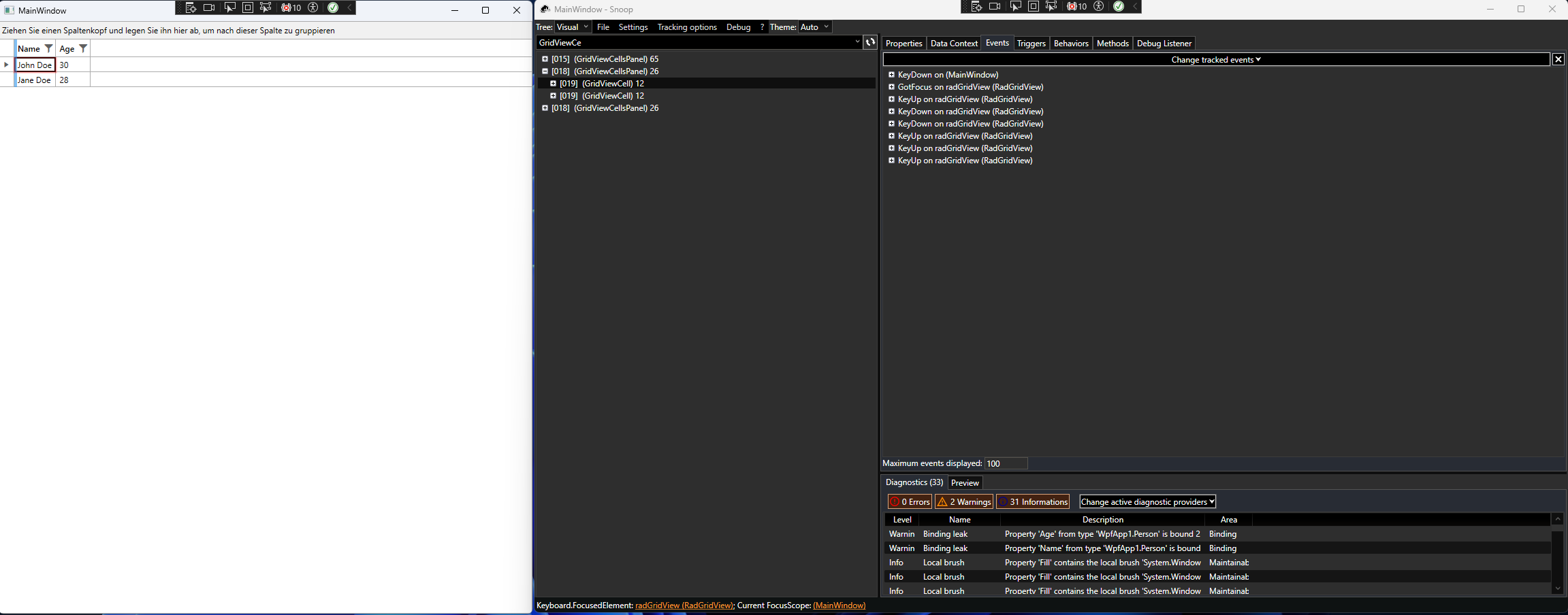
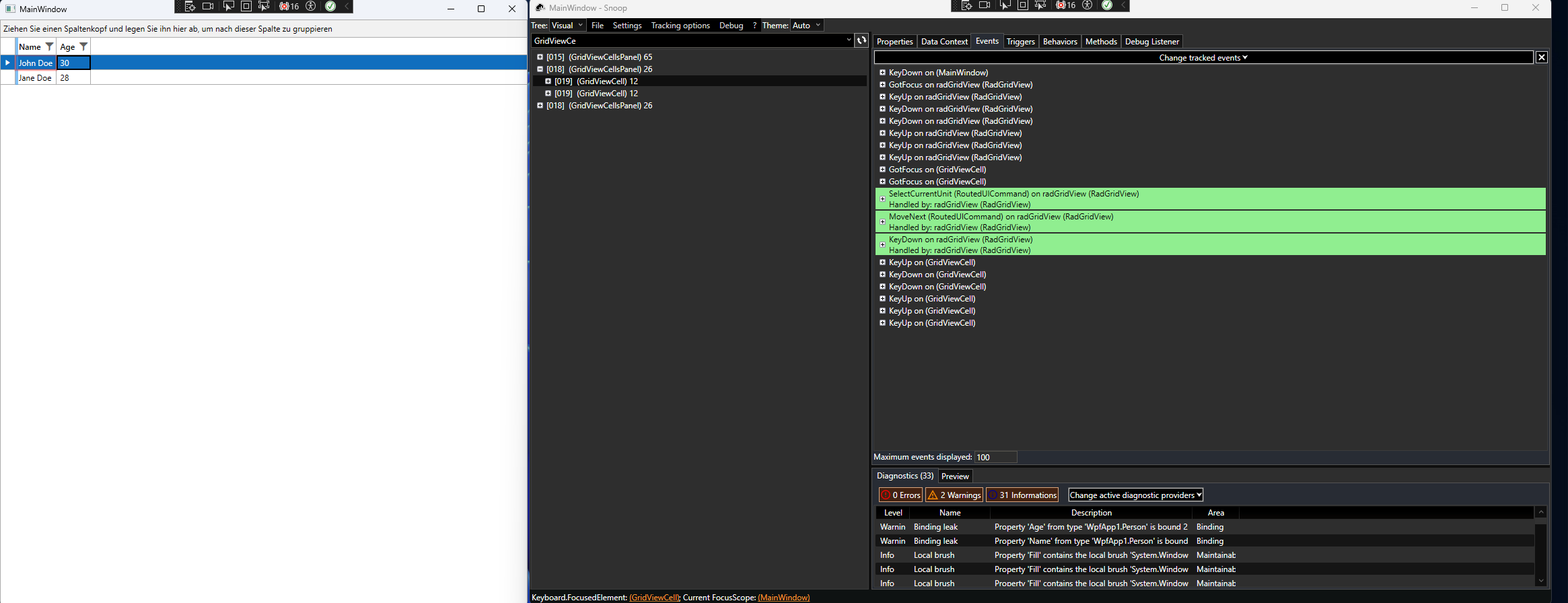
In the attached sample project, I have implemented a simple RadGridView without any custom styling and populated it with sample data. I have observed that the focus behavior is inconsistent, particularly with the first cell in the RadGridView. When attempting to focus the first cell, only the cell itself receives focus, unlike subsequent cells where both the cell and the entire row are focused. This inconsistency results in screen readers failing to read out the content of the first cell, while they correctly read the contents of all other cells.
Upon further investigation using the Snoop utility to explore the visual tree, I noticed that the GotFocused event for the initially focused cell identifies it as being of type RadGridView, whereas, for other cells, the type is GridViewCell. This discrepancy seems to be at the root of the issue.
Attachments:
I have included a simplified, runnable standalone application that reproduces this behavior. Please find the sample project attached to this ticket.
I believe this might be a bug affecting the accessibility of the application, and I would greatly appreciate your guidance on whether this is a known issue with a workaround or if there's a fix available.
Thank you for your assistance.
Best regards,
Christian
First Tab:
Second Tab:
After using Direct2D in ChartView, zoom in/zoom out/pan , finally shrink back to the original size. After many iterations, it is possible that the Scatter spline will be shifted, if don't use Direct2D or use the Net Framework,Such problems do not arise.
Please check the attachment.