

Unplanned
Last Updated: 23 Mar 2026 16:40 by Martin Ivanov

The label of the field that allows you to set the ScreenTip in the Hyperlink dialog is not vertically centered to the associated textbox visual. This reproduces in the Windows11 theme.

To work this around, get the TextBlock element in the Hyperlink dialog and set its VerticalAlignment property to Center.

private void RadSpreadsheet_Loaded(object sender, RoutedEventArgs e)
{
    var hyperlinkDialog = this.spreadsheet.ActiveWorksheetEditor.Dialogs.HyperlinkDialog as HyperlinkDialogContent;
    hyperlinkDialog.Loaded += HyperlinkDialog_Loaded;
}

private void HyperlinkDialog_Loaded(object sender, RoutedEventArgs e)
{
    var dialog = (HyperlinkDialogContent)sender;
    var screenTipLocalizedText = LocalizationManager.Manager.GetStringOverride("Spreadsheet_InsertHyperlinkDialog_ScreenTip");
    var screenTipTb = dialog.ChildrenOfType<TextBlock>().FirstOrDefault(x => x.Text == screenTipLocalizedText);
    if (screenTipTb != null)
    {
        screenTipTb.VerticalAlignment = VerticalAlignment.Center;
    }            
}

Unplanned
Last Updated: 23 Mar 2026 15:49 by Martin Ivanov
Currently, the headers of the menu items in the context menu are hardcoded. Add localization support so they change based on the applied culture.
Unplanned
Last Updated: 06 Mar 2026 13:57 by Manish

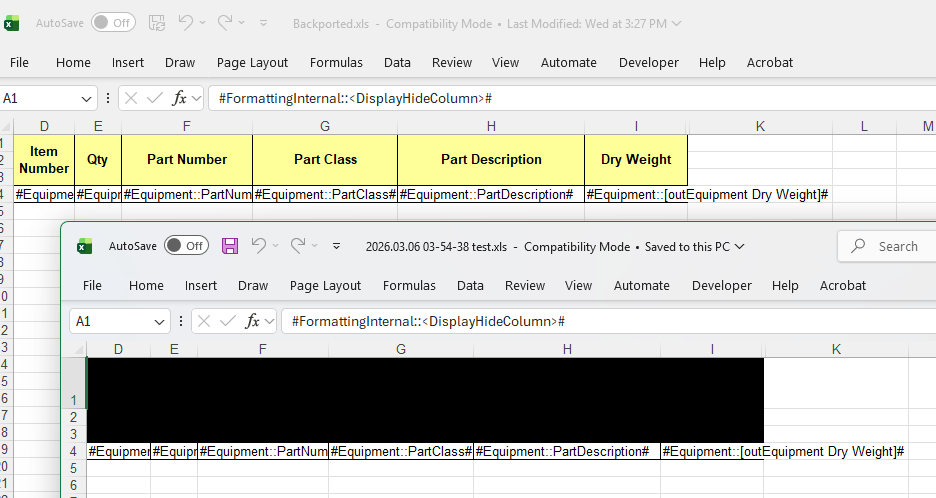
We have a document in XLS format produced by GemBox. The yellow cells get black once the document is imported and then exported (back to XLS or XLSX) with RadSpreadProcessing.
Unplanned
Last Updated: 09 Jan 2026 16:01 by Stenly
Currently, when using the RadSpreadsheet with the RadSpreadsheetRibbon, the performance can be reduced when performing selection and edit operations in fast succession.

We could check if we could improve the performance in this scenario.
Unplanned
Last Updated: 11 Sep 2025 19:32 by Martin Ivanov

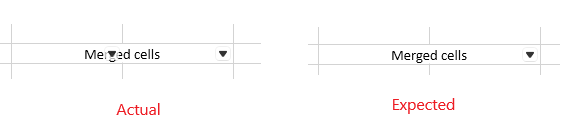
When filter is added to merged cells, there should be a single filter icon displayed in the combined cell. Instead, multiple filters appear - one for each column in the range of the merged cells.
Unplanned
Last Updated: 22 Aug 2025 06:17 by Jonas

Handle the case when the cell is too small and the value contains a decimal separator. 

For example, see attached images. 

Unplanned
Last Updated: 12 Aug 2025 13:14 by Stenly
Using the print preview dialog to customize the printing, the page range is not correctly transferred when the FromPage is set to a value higher than 1.

For example, if the total page count is 11, setting the FromPage to 2 and ToPage to 8, the page range in the native PrintDialog will be set to 2-7. Setting the FromPage to 3 and the ToPage to 8 will result in the page range to be 3-6.
Unplanned
Last Updated: 08 Aug 2025 09:33 by Victoria
The Find and Replace Dialog does not adjust label widths automatically to accept a longer string when using French culture.
Unplanned
Last Updated: 08 Aug 2025 09:28 by Victoria

 Missing localization strings in PageSetup dialog. 

Go to the headers and footers section. The localization is missing.

Unplanned
Last Updated: 02 Jul 2025 13:39 by Stenly

When applying a ListDataValidation, the created RadDropDownButton, which has a RadPathButton in it, looks broken when using the Windows11, Office2013, Office2019, and VisualStudio2019 themes.

Unplanned
Last Updated: 16 May 2025 06:18 by Jonas
Introduce support for sorting columns that contain merged cells. 
Unplanned
Last Updated: 07 May 2025 09:02 by Stenly

The CustomFilterDialogContent element's OK and Cancel buttons are different in size for the Windows 11 theme.

To work this around, you can subscribe to the Loaded event of the CustomFilterDialogContent element and retrieve the RadButton with x:Name="PART_ButtonCancel" via the ChildrenOfType extension method. On the retrieved button, set the VerticalAlignment property to Center.

The following code snippet showcases this suggestion's implementation:

static MainWindow()
{
    EventManager.RegisterClassHandler(typeof(CustomFilterDialogContent), LoadedEvent, new RoutedEventHandler(OnCustomFilterDialogContentLoaded));
}

private static void OnCustomFilterDialogContentLoaded(object sender, RoutedEventArgs e)
{
    RadButton cancelButton = ((CustomFilterDialogContent)sender).ChildrenOfType<RadButton>().FirstOrDefault(x => x.Name == "PART_ButtonCancel");

    if (cancelButton != null)
    {
        cancelButton.VerticalAlignment = VerticalAlignment.Center;
    }
}

Unplanned
Last Updated: 31 Mar 2025 09:35 by Martin Ivanov

The horizontal ScrollBar of RadSpreadsheet is missing the bottom border of its track. Additional to that there is a slight offset between the right end of the viewport and the right button of the ScrollBar.
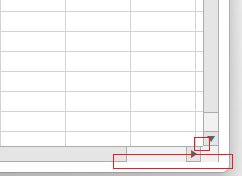
To work this around, set the Margin of the horizontal ScrollBar to 0, and modify its ControlTemplate so that it adds a bottom border for the track's RepeatButton elements.

private void RadSpreadsheet_Loaded(object sender, RoutedEventArgs e)
{
    var spreadsheet = (RadSpreadsheet)sender;
    var scrollBar = spreadsheet.ChildrenOfType<ScrollBar>().FirstOrDefault(x => x.Name == "HorizontalScrollBar");
    scrollBar.Margin = new Thickness(0);
    scrollBar.Template = (ControlTemplate)this.Resources["MyCustomScrollBarTemplate"];
}

Unplanned
Last Updated: 30 Jan 2025 08:54 by Stenly

For the German language translations, the following resource keys are translated into Dutch instead:

  • Spreadsheet_PrintPreview_FitSheetOnOnePage
  • Spreadsheet_PrintPreview_FitSheetOnOnePage_Description
  • Spreadsheet_PrintPreview_FitColumnsOnOnePage
  • Spreadsheet_PrintPreview_FitColumnsOnOnePage_Description
  • Spreadsheet_PrintPreview_FitRowsOnOnePage
  • Spreadsheet_PrintPreview_FitRowsOnOnePage_Description
Unplanned
Last Updated: 29 Jan 2025 09:17 by Martin Ivanov
Currently, the insert hyperlink dialog displayed on Ctrl+K press in the selected cell (or cell range) allows you to create a link to a webpage page, email address or place in the same document. 

Add a "Create New Document" option that allows you to create a document from the selected cell range, like in the Excel version of the Insert Hyperlink dialog. 
Unplanned
Last Updated: 25 Oct 2024 12:16 by Sasidhar

Add information about the selection in the SelectionChanged event arguments. 

- We need to differentiate from mouse event to keyboard event. But since the EventArgs is empty we are not able to differentiate.

Unplanned
Last Updated: 21 Oct 2024 07:17 by ADMIN
Selectionchanged is firing two times when changing the active worksheet.
Unplanned
Last Updated: 02 Sep 2024 05:20 by Sambhav

Spreadsheet: Add the ability to build formulas using keyboard navigation:

1. Press '=' in a cell. The cell goes into Edit Mode. 
2. Use the Keyboard arrow keys to move in any direction. The Cell reference of the focused cell is automatically entered after the '=' into the cell which is in edit mode.
3. The user can press the Control+Arrow Key to add a reference to an entire row or column of data.
Unplanned
Last Updated: 20 Jun 2024 08:49 by Robby
Add support for digital signature in the XLSX format.
Unplanned
Last Updated: 09 May 2024 07:23 by n/a
Add sheet list that allows activating a sheet similar to Excel.
1 2 3 4 5 6