




It is possible to add one control, but when when you try to add other controls to the layout, just sits where you place it rather than split in to sections.
Expected:

Actual:
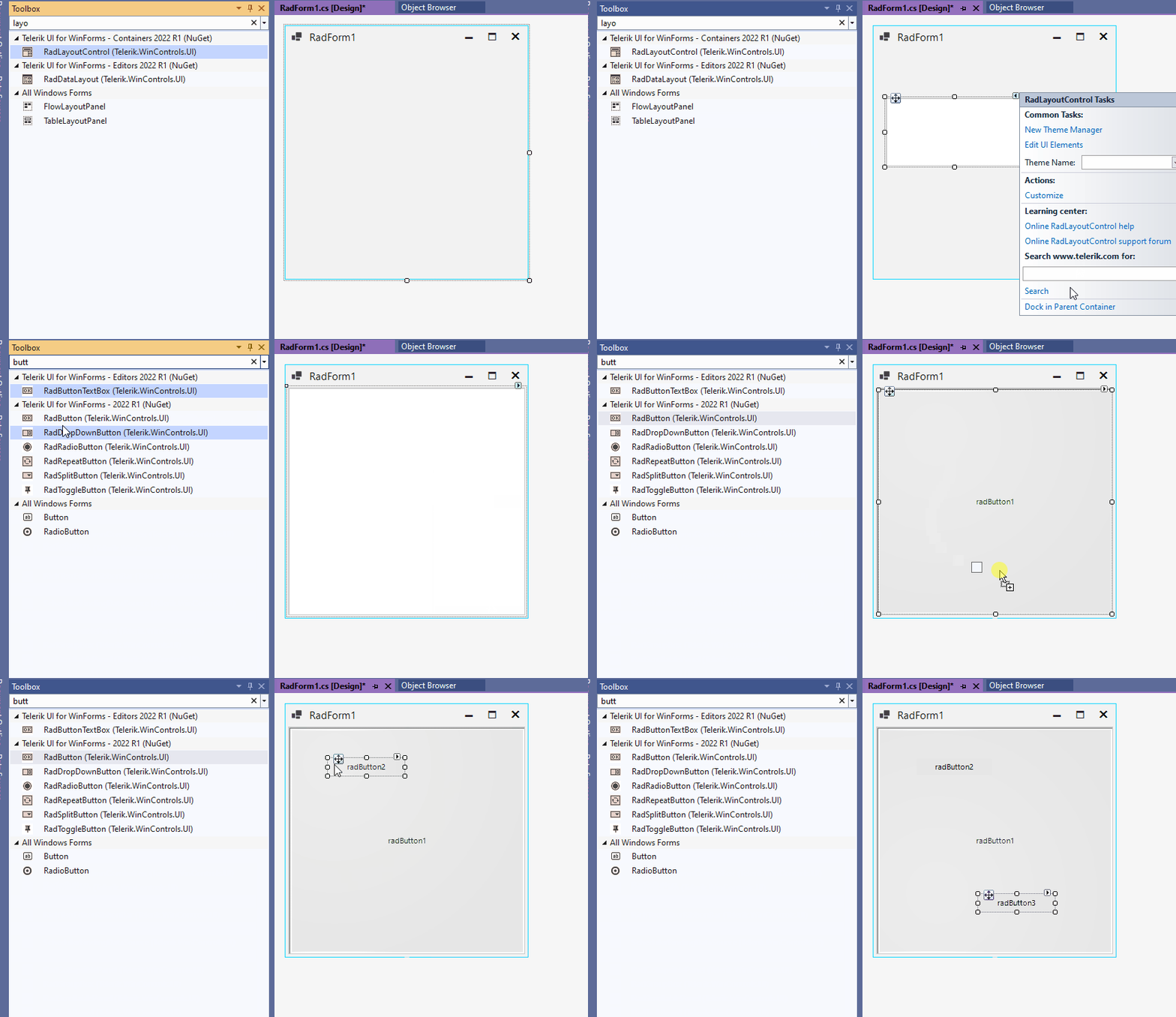
I just found out that after removing the padding on the control it started working fine again. I had recently added padding to add some space between the layout and the docked command bar.
So it looks like the RadLayoutControl dos not like having padding. The exception was being thrown in Telerik.WinControls.UI.LayoutTree.GetDropTargetNode(DraggableLayoutControlItem dropTargetElement, Point mousePosition, Type dragContext)
For the time being, I will add an empty space at the top of the layout instead of using padding.
Hope it can help you resolve this bug.

I can not add any type of control to the layoutControlGroupItem. I have a screen recording of me trying to follow the procedure shown but it is 60M so I can't attach it. I shared the file on my OneDrive if you would like to access it that way.

To reproduce:
private void RadButton5_Click(object sender, EventArgs e){
RadButton labelControl = new RadButton();
labelControl.Size = new Size(200, 30);
labelControl.Text = "Test";
layoutControlItem1.AssociatedControl = labelControl;
}
Workaround:
private void RadButton5_Click(object sender, EventArgs e)
{
RadButton labelControl = new RadButton();
labelControl.Size = new Size(200, 30);
labelControl.Text = "Test";
((RadLayoutControlControlCollection)this.radLayoutControl1.Controls).RemoveInternal(layoutControlItem1.AssociatedControl);
((RadLayoutControlControlCollection)this.radLayoutControl1.Controls).AddInternal(labelControl);
layoutControlItem1.AssociatedControl = labelControl;
layoutControlItem1.UpdateControlBounds();
}
Workaround: handle the RadPropertyChanging and RadPropertyChanged

public partial class RadForm1 : Telerik.WinControls.UI.RadForm
{
    public RadForm1()
    {
        InitializeComponent();

        this.layoutControlGroupItem1.RadPropertyChanging += LayoutControlGroupItem1_RadPropertyChanging;
        this.layoutControlGroupItem1.RadPropertyChanged += LayoutControlGroupItem1_RadPropertyChanged;
    }

    private void LayoutControlGroupItem1_RadPropertyChanged(object sender, RadPropertyChangedEventArgs e)
    {
        if (e.Property == LayoutControlGroupItem.IsExpandedProperty)
        {
            Console.WriteLine("IsExpanded Changed");
            Console.WriteLine("Old Value: " + e.OldValue);
            Console.WriteLine("New Value: " + e.NewValue);
        }
    }
}
Workaround: set a White back color to the control in the designer or use the attached custom theme

To reproduce:
- Start the attached project.
- Collapse and then expand the group.
- The label should remain hidden.

Workaround:
bool labelVisiable = false;
private void TxtIdNro_VisibleChanged(object sender, EventArgs e)
{
    if (txtIdNro.Visible && !labelVisiable)
    {
        txtIdNro.Visible = false;
    }
}

Please run the attached sample project and follow the steps in the document locate din the zipped folder.

Workaround:
this.radLayoutControl1.VerticalScrollbar.ValueChanged += VerticalScrollbar_ValueChanged;

private void VerticalScrollbar_ValueChanged(object sender, EventArgs e)
        {
            this.Width += 1;
            this.Width -= 1;
        }
To reproduce:
- Add layout control to a standard Form.
- Make the form smaller so a scrollbar appears in the layout control.
- There is an exception when you are scrolling.

Workaround:
Use RadForm instaed.
To reproduce:
- Open the attached project.
- Select the second tab and then the inner tabs.
- The layout is not updated.

Workaround:
private void TabStrip_ItemSelected(object sender, RadPageViewItemSelectedEventArgs e)
{
    LayoutControlTabStripElement el = sender as LayoutControlTabStripElement;
    foreach (LayoutControlTabStripItem  item in el.Items)
    {
        var groupItem = item.LayoutGroupItem;
        groupItem.Visibility = Telerik.WinControls.ElementVisibility.Visible;
        groupItem.InvalidateMeasure(true);
        groupItem.InvalidateArrange(true);
        groupItem.UpdateLayout();
        groupItem.Visibility = Telerik.WinControls.ElementVisibility.Collapsed;
    }

    foreach (LayoutControlTabStripItem item in el.Items)
    {
        if (item == e.SelectedItem)
        {
            var groupItem = item.LayoutGroupItem;
            groupItem.Visibility = Telerik.WinControls.ElementVisibility.Visible;
            break;
        }
    }
}

// access event
layoutControlTabbedGroup4.TabStrip.ItemSelected += TabStrip_ItemSelected;
Workaround: access the tabbed group and remove the group item manually
this.layoutControlTabbedGroup1.ItemGroups.Remove(this.layoutControlGroupItem1);
this.radLayoutControl1.HiddenItems.Add(this.layoutControlGroupItem1);
The attached video shows how this can be reproduced.

Workaround:
private void RadLayoutControl1_MouseWheel(object sender, MouseEventArgs e)
{
    HandledMouseEventArgs ee = (HandledMouseEventArgs)e;
    ee.Handled = true;
}
radlayoutcontrol does not support System.Windows.Forms.TextBox autosize in multiline mode but supports radTextBox, Please considere fizing that bug.

take a look at the attached picture
To reproduce:
- Create a new project and add a blank user control to it.
- Add RadLayoutControl to the user control.
- Add another control to the layout control.

Workaround
Use a form instead of user control. Then add the controls from the form at runtime.
To reproduce:
- Add RadPageView with four pages to a form.
- In the firs page add RadLayoutControl with some items in it.
- Select the second page and try to add controls to it.

Workaround:
- Place the layout control in a separte user control and then add it to the main form.