In my gridview need support of different heights of rows. I solved it with the autosize property.
But now I have a side action that the header row and filter row also react to the autosize property.
Attached you can see this behaviour...
Here my code:
Grid.MasterView.TableFilteringRow.MinHeight = 40
Grid.AutoSizeRows = True
Is there a chance to separate data rows from filter and header row?
Regards,
Dimitri

Please refer to the attached gif file. You will notice that for the GridViewMaskBoxColumn with numeric mask the filtering doesn't work. For the other columns each key stroke filters the grid rows.
Workaround: either use a GridViewDecimalColumn or change the default editor for the GridViewMaskBoxColumn :
this.radGridView1.EditorRequired += radGridView1_EditorRequired;
private void radGridView1_EditorRequired(object sender, EditorRequiredEventArgs e)
{
if (this.radGridView1.CurrentColumn.HeaderText == "MaskBoxColumn")
{
GridSpinEditor spinEditor = new GridSpinEditor();
RadSpinEditorElement element = spinEditor.EditorElement as RadSpinEditorElement;
element.ShowUpDownButtons = false;
e.Editor = spinEditor;
}
}
Hello,
In our Environment it's not possible to assign a GroupComparer to another GridView template then MasterTemplate. The GroupComparer property is always null after assignment.
It's possible to assign our custom comparer to the MasterTemplate and it will be triggered, but not in another template then MasterTemplate.
Best regards.
Tassilo Koller | Dipl. Informatiker (FH) | IT-Softwareentwicklung
[T] +49 (0)8233 381 383
[E] Tassilo.Koller@forum-media.com | [W] www.forum-verlag.com
FORUM MEDIA GROUP GMBH| Mandichostraße 18 | 86504 Merching | [T] +49 (0)8233 381-0 | [F] + 49 (0)8233 381-222 | [W] www.forum-media.com| Sitz der Gesellschaft: Merching | Register: AG Augsburg HRB 11537 | Geschäftsführer: Magdalena Balanicka, Norbert Bietsch, Roland Hradek, Mihaela Mravlje | Beirat: Ronald Herkert (Vorsitzender)
Elektronische Rechnungen bitte an folgende Adresse senden: invoice@forum-media.com

Hi,
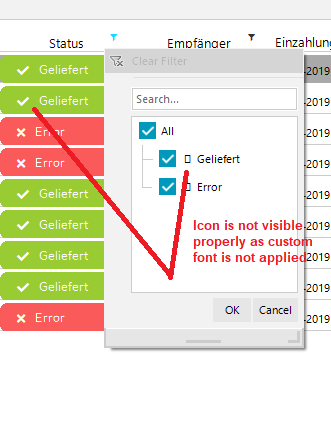
I am working with the RadGridView in my c# winform application. I am using the custom font ("Font Awesome 5 Free Solid") for the RadGridView using the "CellFormatting" event to view the icons along with the text. Here i am able to see the proper icons with text but when i open the filter menu to filter out the rows, i am unable to see the icons (icons shown as the box) as in filterbox we don't have any custom font.
I tried to working out the properties of the RadTreeNodeCollection but here we dont have any Custom font property for the same.
i want to show the text as it is in the filterbox along with the text and the icon.
so can you suggest what i can do to view the icons in the filterbox?
Check the attachment for reference.

It seems that the GridViewColumnGroup.MinHeight has a big influence on the height of the filter cell.
Workaround:
this.radGridView1.AutoSizeRows = true;

If you want to use Conditional Formatting via code (expression based formatting) you will see that it throws an exception if you set TRIM() condition.
ExpressionFormattingObject expressionCondition = new ExpressionFormattingObject(
expressionCondition.Expression = "TRIM(ContactName) = 'Maria Anders'";
expressionCondition.CellBackColor = Color.Aqua;
this.radGridView1.Columns["CustomerID"].ConditionalFormattingObjectList.Add(expressionCondition);
There is no exception if you use the same condition via "Conditional Formatting Rules Manager" form.

Hi,
when I select the column chooser multiple times via context menu, the column chooser dialog scales multiple times.
Reproduced here with the Telerik sample application. 150 % dpi scaling.
Regards
Erwin

When RadGridView is bound to a collection of 60 000 records the difference in the sorting time between using a ProBindingSource and a DataTable is massive. Changes in any core logic in both internal implementations, RadGridView and ProBindingSource, isn't so easy as it looks. Both products have been for a very long time on the market designed to cover the main scenarios of the target customers groups for which they are developed.
By default, if the rows count is less than 10 000 we use quick sort to order the items in the grid. If there are more items we use Red-Black tree. This is controlled by the UseHybridIndex property.
(radGridView.MasterTemplate.ListSource.CollectionView as GridDataView).UseHybridIndex = false;However, both of algorithms use non-linear data access. If the ProBindingSource is not optimized to get data not linearly, the performance wouldn't be satisfactory.
That is why we have introduced the BypassSort functionality to cover this case after cooperation with the OE developers. Thus, our RadGridView won't perform any logic for sorting and the whole time necessary for sorting will depend on the DataSource itself (ProBindingSource in your case) and how this collection sorts its items: https://docs.telerik.com/devtools/winforms/controls/gridview/sorting/basic-sorting
In the current version of Telerik UI for WinForms suite, the BypassSort property is ignored if the BypassFilter is not set to true as well. Hence, the sorting will be still slow.
Both properties shouldn't affect each other and if a developer wants to improve only the sorting performance, it is expected to enable only the ByPassSort property.

Note : Issue in Current version of Telerik (2020.1.218.40)
On cheked of GridViewCheckBoxColumn (Multiple rows) in GridView grdFrReview_HeaderCellToggleStateChanged fires and header checkbox get checked. Header checkbox should check only if all check-boxes of current page checked, otherwise header checkbox should not checked. This was working fine in my previous version of Telerik (2018.3.1016.40).
In the screenshot shown i have checked 1st and then 2nd row of grid, you can see its headercheckbox status has been checked.

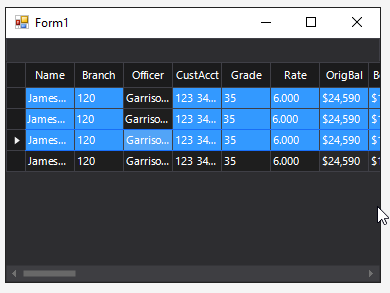
I have a radGridView with MutliSelect set to true and SelectionMode set to FullRowSelect. A theme is applied, and this behavior is seen with other themes too. Several columns are pinned to the left.
When I multi-select rows using the shift or control buttons by clicking one of the cells under the frozen columns, the row is selected and colored accordingly, except for the cell that was actually clicked which remains with the unselected color.
If I multi-select by clicking on one of the cells under an unpinned column, the full row is selected as expected.
In the image below, I held down shift and selected the first and third row in sequence under the Officer column.
How can I fix this to show the complete row selected?

We found one problem with the RadListFilterPopup (WindowsForms)
when we use the char '/' to search the filter, our App close.
When we use one specific type of keyboard (with numeric and it has char '.' in it) the char '.' make the same error.
Currently, when you update the value of the checkbox cell (toggle/untoggle), Narrator reads the value only the first time after selecting the cell. Each next checking/unchecking does nothing.
It is expected from the Narrator to read the value of the RadCheckBoxEditor when it is being activated after entering edit mode. It the column uses EditMode.OnValueChange, the value changes also should be read by the Narrator.
Please refer to the attached sample project.
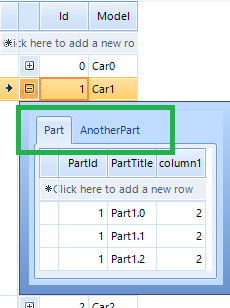
If the main Cars list is not empty, the child templates have correct captions:
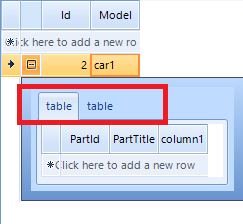
However, if initially there are no Cars and you add a new one via the new row, the captions of the child template remains with the default value ("table"):