Exporting a report from the Report-Viewer to Word(docx), then opened in Word for Web (browser-version of Word) causes incorrect rendering of the document. Images are replaced with placeholders.
In comparison, exporting the report as PDF, then opening and converting it to Word and uploading it, renders much more correct and with images.

Hi
If I run the angular report viewer within my main page, all is well. However if the report viewer is hosted in a <p-dialog> (or <p-overlaypanel>), the report does not render (even though data is loaded and the report can be exported). To confirm this, I even have the report visible in a <tr-viewer> on the main page behind the dialog and load them at the same time.
If the dialog is not visible when the main page opens, then the report viewer toolbar is in a column on the left, and is not operational. (see attached)
If the dialog is visible when the main page opens, then the toolbar appears at the top and functions normally. (see attached)
<tr-viewer #rptViewerBody
[containerStyle]="viewerContainerStyle"
[serviceUrl]="reportServerUrl"
[viewMode]="'INTERACTIVE'"
[scaleMode]="'SPECIFIC'"
[scale]="1.0">
</tr-viewer>
vs
<p-dialog modal="true"
appendTo="body"
header="Report"
[(visible)]="showReport"
[width]="1500"
[height]="1500">
<tr-viewer #rptViewerDialog
[containerStyle]="viewerContainerStyle"
[serviceUrl]="reportServerUrl"
[viewMode]="'INTERACTIVE'"
[scaleMode]="'SPECIFIC'"
[scale]="1.0">
</tr-viewer>
</p-dialog>
In the code, I tried both of these container styles. The result for the dialog was that relative position rendered the toolbar (top or left), but absolute position rendered nothing at all (height became 0)
this.viewerContainerStyle = {
position: 'absolute',
top: '0px',
left: '0px',
right: '0px',
bottom: '0px',
['font-family']: 'ms sans serif'
};
this.viewerContainerStyle = {
position: 'relative',
width: '1300px',
height: '1300px',
['font-family']: 'ms sans serif'
};
using @progress/telerik-angular-report-viewer": "7.19.718"
Thanks.
Hi,
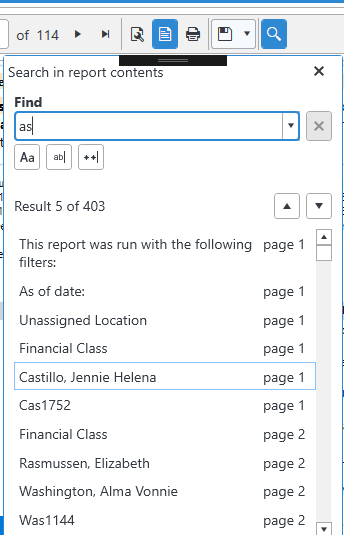
There is an issue where the search window that opens from the Report Viewer tool bar does not allow for deleting text from the search string input box using backspace.
The keyboard command provider seems to have many other keys covered for the intended behavior, but backspace does not seem to be handled appropriately.

In my report, I use font SimSun to display Chinese, when preview it's OK, but after click print, an exception is thrown.
Internal Server Error
Font data for font "SimSun" cannot be obtained. Possible reasons are: The font is not installed in . The font is not found in the directories specified by the "FontLocations" configuration entries. The font is not declared in "" configuration section
In my docker image, run command -list, is there.
C:\Users\Anders> docker exec -it 3485 bash
root@3485bbdabbb3:/app# fc-list
/usr/share/fonts/truetype/dejavu/DejaVuSerif-Bold.ttf: DejaVu Serif:style=Bold
/usr/share/fonts/truetype/dejavu/DejaVuSansMono.ttf: DejaVu Sans Mono:style=Book
/usr/share/fonts/truetype/dejavu/DejaVuSans.ttf: DejaVu Sans:style=Book
/usr/share/fonts/simsun.ttf: SimSun,宋体:style=Regular
/usr/share/fonts/truetype/dejavu/DejaVuSans-Bold.ttf: DejaVu Sans:style=Bold
/usr/share/fonts/truetype/dejavu/DejaVuSansMono-Bold.ttf: DejaVu Sans Mono:style=Bold
/usr/share/fonts/truetype/dejavu/DejaVuSerif.ttf: DejaVu Serif:style=Book
My is below.
FROM /2.2- AS builder
WORKDIR /app

# caches restore result by copying  file separately
COPY * config/
RUN  restore

COPY .
RUN  publish --output /app/ --configuration Release
RUN  -n 's:.*<AssemblyName>\(.*\)</AssemblyName>.*:\1:p' * > __assemblyname
RUN if [ - __assemblyname; then filename=$ *); echo $filename%*} > __assemblyname;

# Stage 2
FROM /2.2--runtime

ENV PORT 80
EXPOSE 80

COPY simsun.ttf /usr/share/fonts/simsun.ttf

RUN apt-get update \
    && apt-get install -y \
        libc6-dev \
         \
        libx11-dev \
		 \
    && rm -rf /var/lib/apt/lists/*

RUN fc-cache -f -v

WORKDIR /app
COPY --from=builder /app

ENTRYPOINT  $cat /app/__assemblyname)
In CSharp.ReportExamples.VS2017, I copy all reports into project CSharpAspNetCoreDemo, and make them always copy.
Then I change ReportsController to the Reports directory above.
When Run it in IIS, it's OK, but when check into Docker, there is an exception thrown.
{
	"message": "An error has occurred.",
	"exceptionMessage": "Type: Telerik.Reporting.XmlSerialization.Current.ReportSerializable`1[Telerik.Reporting.Report]",
	"exceptionType": "System.MissingMethodException",
	"stackTrace": "   at Telerik.Reporting.Xml.ObjectXmlReader.CreateInstance(Type type, String name)\n   at Telerik.Reporting.Xml.ObjectXmlReader.ReadObject(Type type)\n   at Telerik.Reporting.Xml.ObjectXmlReader.ReadXmlElement(String name)\n   at Telerik.Reporting.Xml.XmlSerializer.Deserialize(Stream stream, IResourceHandler resourceHandler)\n   at Telerik.Reporting.XmlSerialization.ReportXmlSerializer.Telerik.Reporting.XmlSerialization.IXmlSerializer.Deserialize(Stream stream, IResourceHandler resourceHandler)\n   at Telerik.Reporting.ReportPackager.UnpackageDocument(Stream packageStream)\n   at Telerik.Reporting.Processing.UriReportDocumentResolver.Resolve(IProcessingContext context, UriReportSource rs)\n   at Telerik.Reporting.Processing.ReportDocumentResolver.Bind[T](IProcessingContext context, ReportSource source, Func`2 func)\n   at Telerik.Reporting.Processing.ResolvedReportDocument.ResolveReportsRecursively(ReportSource rs, IProcessingContext context, IDictionary`2 parentRsParameters, Boolean parentShouldDispose, List`1 result, IReportDocument& definition, ResolvedReport& tocReport, ReportBookTocPosition& tocReportPosition)\n   at Telerik.Reporting.Processing.ResolvedReportDocument.Create(ReportSource rs, IProcessingContext context)\n   at Telerik.Reporting.Services.Engine.ReportEngine.GetParameters(String clientID, String report, Dictionary`2 parameterValues)\n   at Telerik.Reporting.Services.AspNetCore.ReportsControllerBase.GetParameters(String clientID, ClientReportSource reportSource)\n   at lambda_method(Closure , Object , Object[] )\n   at Microsoft.AspNetCore.Mvc.Internal.ActionMethodExecutor.SyncActionResultExecutor.Execute(IActionResultTypeMapper mapper, ObjectMethodExecutor executor, Object controller, Object[] arguments)\n   at Microsoft.AspNetCore.Mvc.Internal.ControllerActionInvoker.InvokeActionMethodAsync()\n   at Microsoft.AspNetCore.Mvc.Internal.ControllerActionInvoker.InvokeNextActionFilterAsync()\n   at Microsoft.AspNetCore.Mvc.Internal.ControllerActionInvoker.Rethrow(ActionExecutedContext context)\n   at Microsoft.AspNetCore.Mvc.Internal.ControllerActionInvoker.Next(State& next, Scope& scope, Object& state, Boolean& isCompleted)\n   at Microsoft.AspNetCore.Mvc.Internal.ControllerActionInvoker.InvokeInnerFilterAsync()\n   at Microsoft.AspNetCore.Mvc.Internal.ResourceInvoker.InvokeNextExceptionFilterAsync()"
}
This is my Dockerfile
FROM mcr.microsoft.com/dotnet/core/aspnet:2.2-stretch-slim AS base
WORKDIR /app
EXPOSE 80

FROM mcr.microsoft.com/dotnet/core/sdk:2.2-stretch AS build
WORKDIR /
COPY ["AspNetCoreDemo/CSharpAspNetCoreDemo", "AspNetCoreDemo/"]
RUN  restore "AspNetCoreDemo/CSharpAspNetCoreDemo"
COPY .
WORKDIR "/src/AspNetCoreDemo"
RUN  build "CSharpAspNetCoreDemo" -c Release -o /app

FROM  AS publish
RUN  publish "CSharpAspNetCoreDemo" -c Release -o /app

FROM base AS final
RUN apt-get update \
    && apt-get install -y --allow-unauthenticated \
        libc6-dev \
         \
        libx11-dev \
    && rm -rf /var/lib/apt/lists/*
WORKDIR /app
COPY --from=publish /app
ENTRYPOINT ["", "CSharpAspNetCoreDemo"]
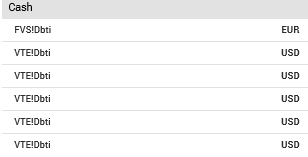
Using Roboto Medium changes values "FVS!dBTI" should be "EUR Cash" (shift characters by 1) weird !!!!