

Using the following code for updating the ReportSource of the viewer:
ngOnInit() {
this.setParameters();
}
setParameters(): void {
this.reportViewer.setReportSource({
report: 'SampleReport.trdp',
parameters: {}
});
}
comes up with the error
Argument of type '{ report: string; }' is not assignable to parameter of type 'JSON'.
Type '{ report: string; }' is missing the following properties from type 'JSON': parse, stringify, [Symbol.toStringTag]
Currently, the workaround is to cast the reportSource object as follows:
ngAfterViewInit() {this.setReportSource();
}
setReportSource(): void {
let rs = {
report: 'SampleRepport.trdp',
parameters: {}
} as unknown as JSON;
this.viewer.setReportSource(rs);
}

When attempting to export a report in Excel 97-2003 format, an exception is thrown:
"The type initializer for Telerik.Reporting.Excel 97.Workbook threw an exception. Object contains non-primitive or non-blittable data."
As HTML, PDF and OpenXML-based renderings are supported on Linux/macOS machines, please remove the old Excel 97-2003 format.
When trying to set the 'parametersAreaVisible' option in the Angular viewer the application breaks with an error in the browser console:
"Can't bind to 'parametersAreaVisible' since it isn't a known property of 'tr-viewer'."
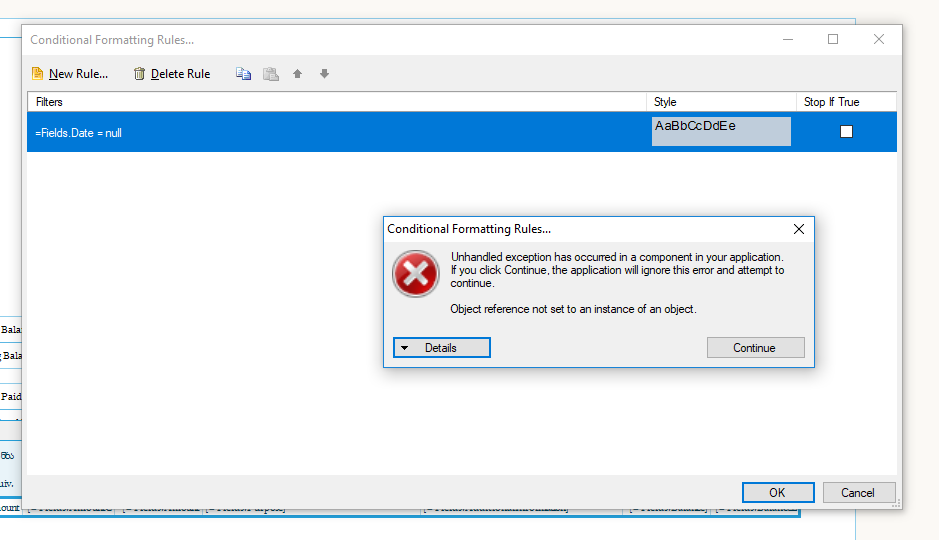
I want to define conditional formatting on table row, after I define a filter and save it, I can not save the conditional formating dialog, it gives exception.
What am I doing wrong?

I'm not a PDF expert, but if something can be done in a free library, a pay'd version of reporting tools should do it also right.

In many cases, I do a report to PDF for my clients. Since PDF contains useful data, I't normal to assume, client will use copy-paste and copying data to Word, Browser, etc.

Similar approach was used, when I created a project for the General prosecution of SR, but there the PDF was generated by PdfSharp and by writing text-outputs (with esired font, size, etc.). The result was correct.

Unfortunatelly with Telerik it's not so. I've tryed to explain it in a ticket, but I only got excuses, explanation about lignatures and so. I got/left myself almost convinced, but my main point is the starting sentence in this description.

The original issue: http://www.telerik.com/account/support-tickets/view-ticket.aspx?threadid=893196

Telerik saving to PDF issue intermittently. The issue is that the graph gets skewed and then won’t open in Acrobat once the report is exported.

We use Telerik's report books extensively - and find that to be a very powerful way to create dynamically generated reports.

The feature request is: if a report's datasource doesn't fetch any rows don't add a blank page to the report book.
Why is it that the telerik report designer is locked down and cannot be used as a set of controls in a custom application as any other telerik control. We would like to use the report designer controls in an application we make to give it our look and feel and so we can give it the functionality we require. Why limit your customers by locking down your report designer. One of the great things about telerik is a great set of products and customer support. If we had a way to get at the Telerik.ReportDesigner.Core.dll we can figure our where the controls are and display them in our app. I don't understand the marketing behind the locked down report designer. How does it benefit your customers? You can still have a locked down designer for those customers that don't want to customize it. Providing access to Telerik.Reporting.Core.dll will give your customers the ability to customize the report designer to their needs. Telerik sells controls that customers use to make applications that they sell, so whats the difference with the designer?

The Labels to be displayed on a Numerical Scale Axis are currently set automatically.
The user can control the scale range via Axis Scale Minimum and Maximum properties. The user can control also the Label Step.
However, the exact Axis Labels to be shown are calculated automatically and cannot be controlled directly by the user.
For example the user cannot force the Axis Labels to start from the Minimum value.

As a developer integrating a Web-based report viewer into my apllication / Report Server implementer,
I would like to provide BCC field as part of the Send email functionality ( https://docs.telerik.com/reporting/html5-report-viewer-send-mail ),
So that my end users have more flexible UX.