

The SearchDialog is placed based upon a parent window of type "Window". However, when I use other types like "RadRibbonWindow" as my main window the placement does not work correct. As a result the SearchDialog is shown in the upper right corner of the desktop. This is the code (in SearchDialogController.cs):
Window GetParentWindow()
{
return (this.model.PageScrollViewer == null)
? null
: this.model.PageScrollViewer.FirstParentOfType<Window>();
}
At least this method should also take RadRibbonWindow in account (this is certainly not used that rarely since we all use Telerik components!) or for a more generic solution look for types that are derived from Window.
In a scenario where the report needs a lot of time to load this behavior is not optimal. In such case the report viewer areas should not be cleared until the first page of the new report is prepared to be displayed in the viewer. The developers should be able to configure the loading behavior and notification message appearance through the report viewer options. The viewer's API should also provide event handlers for these events, so the developers can have more control over the page displaying process.

Steps to reproduce:
1.Download and run the project
2. If the scaleMode is FitPage, the report doesn't appear
3. If the scaleMode is FitPageWidth, the UI seems to be broken
You can check the attached video for further reference.
Steps to reproduce:
1. Download and run the attached project in IE or Firefox
2. Write in the field for example "haha" and click the button.
3.Scroll down and you will notice that the headers are not frozen.

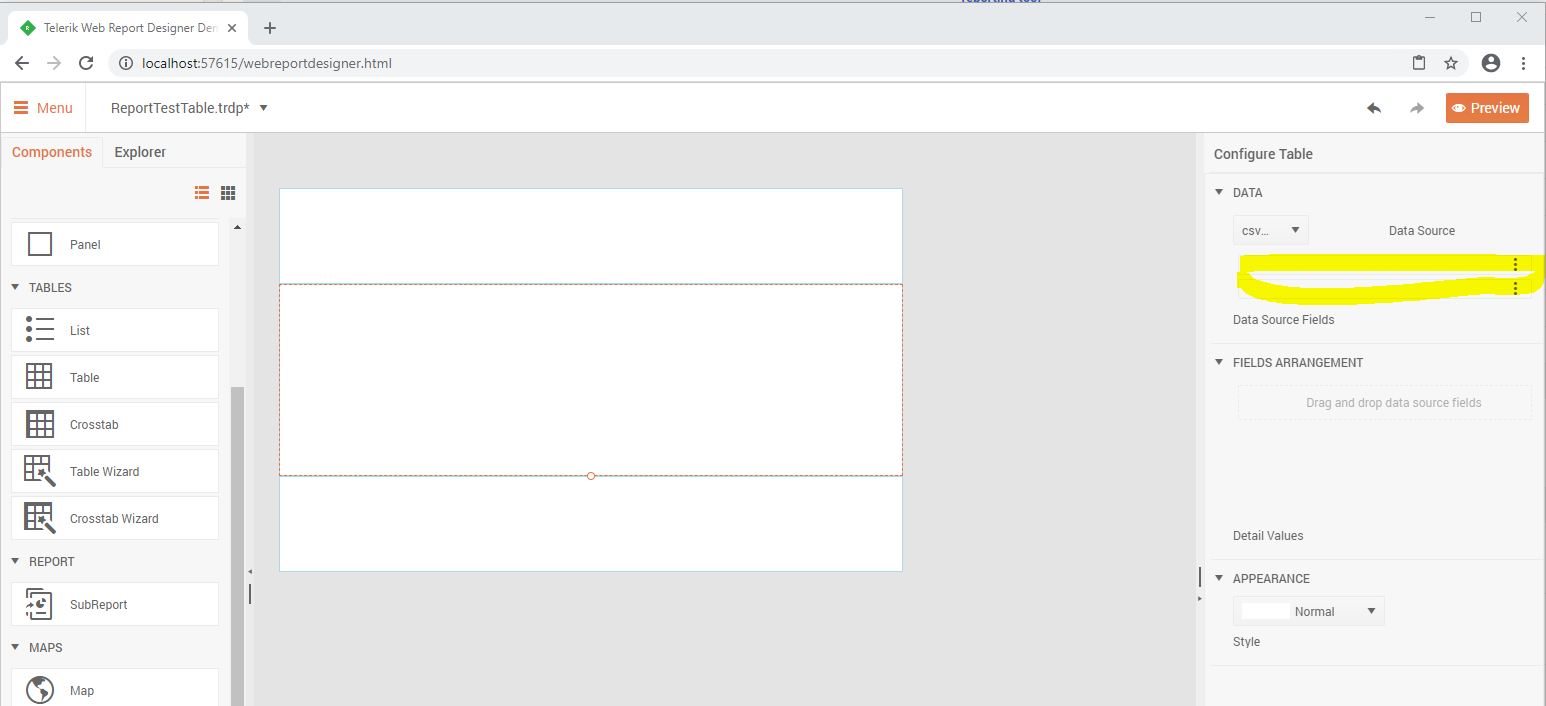
Steps to reproduce the issue:
1. Create a new report in the WebReportDesigner;
2. Add a simple CSV DataSource (for example with Item and Value columns);
3. Select the Table Wizard and set the CSV DataSource as a Value of the DataSource property;
You will notice that the names of the columns from the datasource are missing.
The issue occurs when a report contains a subreport with InstanceReportSource set as its ReportSource. If the report definition in this InstanceReportSource contains data sources, they will be serialized as DataSourceRef objects instead of using their actual type names like EntityDataSource, CsvDataSource, etc.
The issue is reproducible only in Standalone Report Designer, i.e. serializing/deserializing the report definition programmatically would work as expected.
The issue is introduced in Telerik Reporting R1 2019.

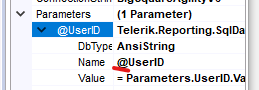
When editing an existing SQL data source from stored procedure, the "@" before the parameter name got dropped. Causing the report not passing the report parameter value to the query parameter
2020 R2
I have a Custom Csv Export class that implements IRenderingExtension. This works fine when the ReportServiceConfiguration.Storage is set to an instance of FileStorage or MsSqlServerStorage.
When using RedisStorage, after clicking on the CSV option from the Html5 Viewer's menu, the browser redirects to a new url to display the following error message:
{"message":"An error has occurred.","exceptionMessage":"Buffer cannot be null.\r\nParameter name: buffer","exceptionType":"System.ArgumentNullException","stackTrace":" at System.IO.MemoryStream..ctor(Byte[] buffer, Boolean writable)\r\n at System.IO.MemoryStream..ctor(Byte[] buffer)\r\n at Telerik.Reporting.Services.WebApi.ReportsControllerBase.GetDocument(String clientID, String instanceID, String documentID) in C:\\DeveloperTooling_Reporting_Agent1\\_work\\17\\s\\Source\\Code\\Telerik.Reporting.Services.WebApi\\ReportsControllerBase.cs:line 305\r\n at lambda_method(Closure , Object , Object[] )\r\n at System.Web.Http.Controllers.ReflectedHttpActionDescriptor.ActionExecutor.<>c__DisplayClass13.<GetExecutor>b__c(Object instance, Object[] methodParameters)\r\n at System.Web.Http.Controllers.ReflectedHttpActionDescriptor.ActionExecutor.Execute(Object instance, Object[] arguments)\r\n at System.Web.Http.Controllers.ReflectedHttpActionDescriptor.<>c__DisplayClass5.<ExecuteAsync>b__4()\r\n at System.Threading.Tasks.TaskHelpers.RunSynchronously[TResult](Func`1 func, CancellationToken cancellationToken)"}The debug console in Visual Studio shows this error:
Failed to load resource: the server responded with a status of 500 () [https://localhost:44350/api/reports/clients/9bbda764fa6/instances/722eb62b3a9/documents/969b05177e4f00b24938d1?response-content-disposition=attachment]
Currently, you may aggregate values from a certain scope for a particular page with the Page function PageExec. It would be great to be able to display also the carryover aggregates up to the current page.
For example:
Page 1: Page1 Sum = 10; Total Sum at the end of the page1 = 10Page 2: Page2 Sum = 5; Total Sum at the end of the page2 = 15
Page 3: Page3 Sum = 13; Total Sum at the end of the page3 = 28
We create many legal forms, which use nested ordered lists. In htmlTextBox for reporting, we'd like to apply styles like upper-alpha, lower-alpha, etc to the ol tag. Currently, the only numbering for an ol is 1, 2, 3. CSS ability to set the style at depth (like ol ol) would be best.
<ol>
<li>1. text</li>
<li>2. text
  <ol>
  <li>a. text
     <ol>
          <li>i. text</li>
          <li>ii. text</li>
      </ol>
  </li>
  <li>b. text</li>
  </ol>
</li>
</ol>

If a table-based item (Table, List, Crosstab) does not fit in a single page and needs to occupy more than one page, its bottom border is not drawn on the first page and its top border is not drawn on the second (subsequent) page. This behavior is by design and its purpose is to help the users visually distinguish the table as a single item. The table has only one top and bottom border and they are displayed at the beginning and at the end of the table, regardless how many pages the table actually occupies.
Since users might find this confusing, a table should have a property controlling this behavior. The default state of the property will preserve the current rendering. If the user explicitly sets the property, then the table will draw its top and bottom borders on every page it occupies.