

I am using Telerik Report Designer 15.1.21.512
I have created a Web Service Datasource:
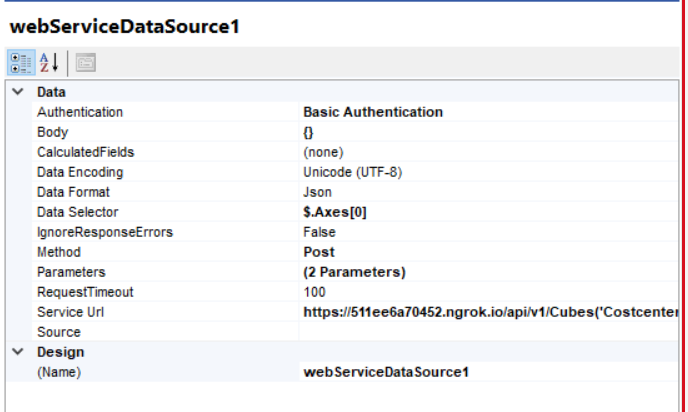
The returned Raw String in Preview Data in the Wizard:
| Raw |
|---|
{ |
Everything appears to work, however the Datasource returns an Error:
System.NullReferenceException: Der Objektverweis wurde nicht auf eine Objektinstanz festgelegt.bei Telerik.Reporting.Processing.WebServiceDataSource.WebServiceClient.SendCore(IWebServiceRequestSettings settings, AuthenticationHeaderValue authHeader, HttpClient httpClient, HttpClientHandler httpClientHandler)
bei Telerik.Reporting.Processing.WebServiceDataSource.WebServiceClient.Request(WebServiceDataSource processedDS)
bei Telerik.Reporting.Processing.WebServiceDataSource.WebServiceDataProvider.GetRemoteRawData(WebServiceDataSource processedDS)
bei Telerik.Reporting.Processing.WebServiceDataSource.WebServiceDataProvider.get_RawData()
bei Telerik.Reporting.Processing.WebServiceDataSource.WebServiceSchemaAdapter.AddDataMeasures(SimpleDataModel model)
bei Telerik.Reporting.Processing.Data.SimpleSchemaAdapterBase.Fill(SimpleDataModel model)
bei Telerik.Reporting.Processing.Data.SimpleDataProvider`1.GetSchemaCore()
bei Telerik.Reporting.Processing.Data.DataProvider`1.Telerik.Reporting.Processing.Data.IDataProvider.GetSchema()
bei Telerik.Reporting.Data.Design.DataSourceService.GetLocalSchema(IDataSource datasource, IDataProviderContext dataProviderContext)
bei Telerik.Reporting.Data.Design.DataSourceDesignerBase.Telerik.Reporting.Design.Interfaces.IDataSchemaProvider.GetSchema()
bei Telerik.Reporting.Data.Design.DataSourceService.GetSchemaFromContext(Object context)
bei Telerik.Reporting.Data.Design.DataSourceService.Telerik.Reporting.Design.Interfaces.IDataSourceService.GetCurrentDataItemSchema(Boolean getFromParentRecursively)
bei Telerik.Reporting.Design.DataExplorerControl.<>c__DisplayClass2.<RefreshDataSource>b__0()
When groupings in a cross tab or merged row table span multiple pages the actual row label should be carried over to new page along with a label of some sort (if desired) to mark group is being continued from previous page.

A possible solution would be to expose a ParametersAreaLoaded and ParametersAreaUpdated events with the needed arguments.
This will make migration from Silverlight easier. There the user has a direct access to them through the ReportViewerModel.


2. A new empty Telerik report is created
3. The report is client-side filled with those predefined data sources using the Telerik Javascript Shell (EditorCommand.NewItem for creating them and SetPropertyValue for filling in the details).
This approach has been working well for me until getting updated to the R1 2021 SP1 release (15.0.21.224), or the following versions, which are now unable to show the datasources fields in the explorer at first. However, manually adding a new component into the canvas makes the datasource tree to be updated then.
kendo.all.js:105032 Uncaught TypeError: Cannot read property 'find' of null
    at init.toggle (kendo.all.js:105032)
    at P (telerikReportViewer:9)
    at Object.<anonymous> (telerikReportViewer:9)
    at Object.trigger (telerikReportViewer:9)
    at Object.trigger (telerikReportViewer:9)
    at se (telerikReportViewer:9)
    at Object.setDocumentMapVisible (telerikReportViewer:9)
    at b (telerikReportViewer:9)
    at E (telerikReportViewer:9)
    at o (telerikReportViewer:9)

Figure 1 report is generated using the data source in figure 2. Data in column "Value2" is mapped to the column Text in the generated report.
In the below-generated report, text in row one "Default CUS for CDV" is truncated. A feature to make the user know there is more data to be shown will be great.
Figure 1
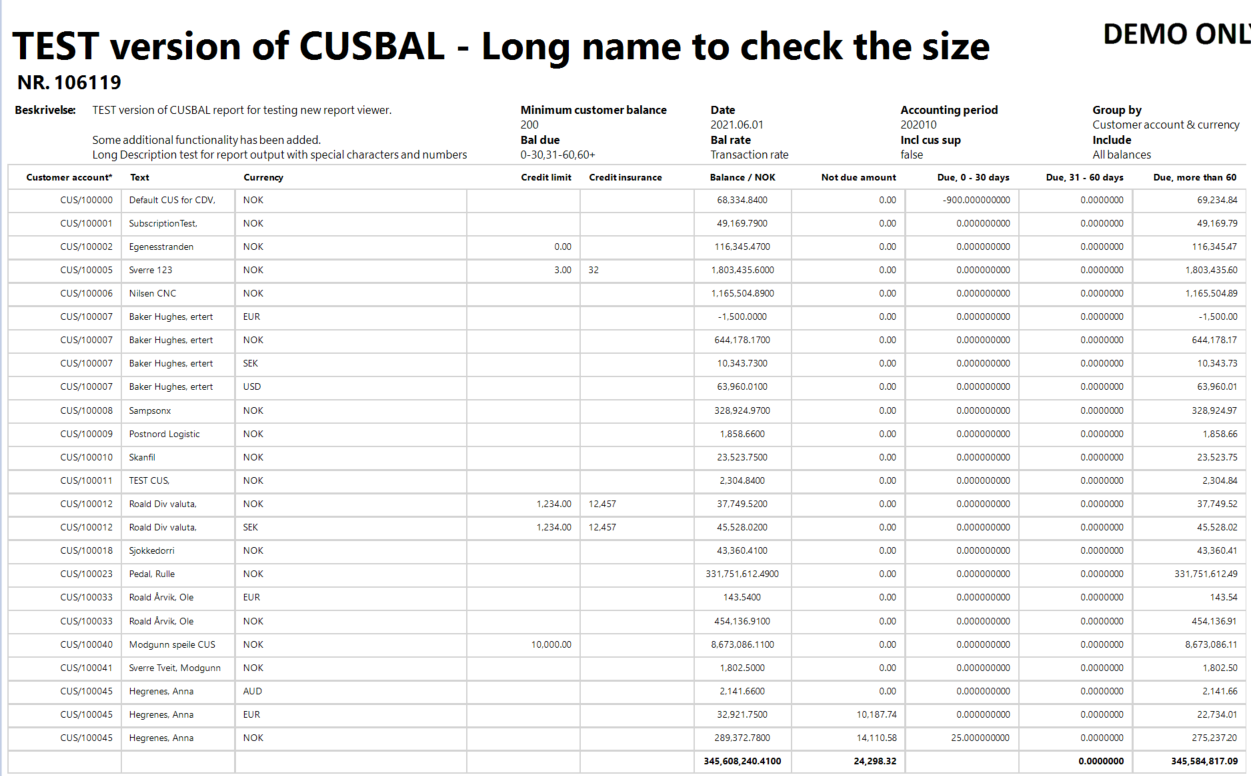
Figure 2
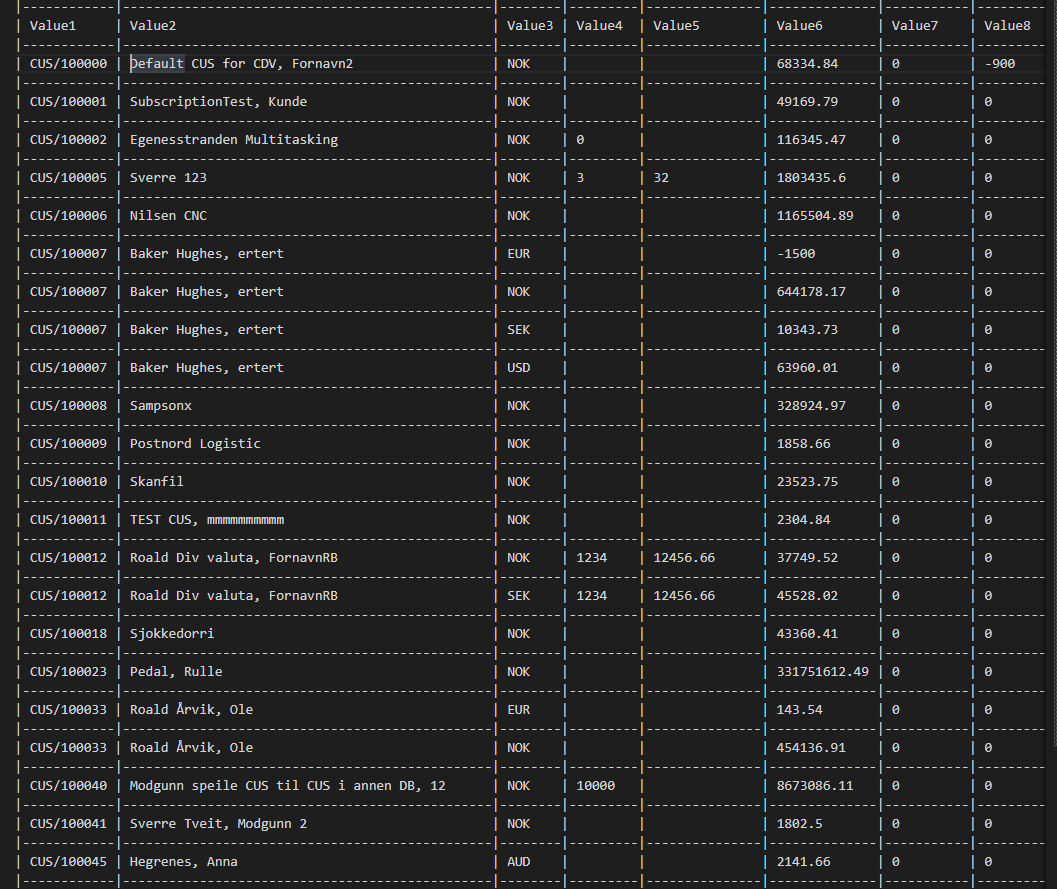
So, Adding an option to display an indicator such as “...” for truncated strings so that the viewers get to know there is more information to be displayed
Or
Provide an option to absolute break (display until last possible character) of the string rather than word-wrapping if there’s more content than the text box width.
Please add the ability to specify the graph series colours dynamically via binding expressions instead of hardcoding predefined values in palette or conditional formatting.
lineSeries.Style.LineColor = "= Fields.HexColour";
Setting the ParametersAreaVisible and DocumentMapVisible to False in the Xaml, or in the initialization code of the WpfReportViewer doesn't hide the corresponding areas.
The issue is reproducible in .NET Core and .NET Framework.
Hi Team,
Thanks for your regular support.
I Want to hide the GroupFooterSection if I don't have any data to be displayed(zero records found case).
Please let me know the solution for the above case.
Regards
Ausfleet Team.
The @progress/kendo-ui package breaks the report viewer:
- With telerikReportViewer.kendo referenced - see the first attachment
- Without reference to the telerikReportViewer kendo widgets: see the second attachment

Implementing Drag&Drop for the Web Report Design is a major step toward feature parity with the Standalone Designer, and helps end-users leverage their established workflow when migrating to the Web Report Designer.
- Dragging a field from the Fields list onto the surface should A) Create a default Textbox. B) Populate that Textbox with a simple =Fields.field expression.
- Dragging and dropping a component from the component tree should create that component at the drop location.
Background:
I create an ASP.NET Web Application - Empty. I add to it a Telerik HTML Report Viewer page. The wizard creates a new REST service with a sample report. Inside the Html5ReportViewer.html file is the line
<!--If Kendo is used it should be added before the report viewer.-->
<script src="/api/reports/resources/js/telerikReportViewer-15.0.21.326.min.js/"></script>
with a trailing / in the src attribute. This works perfectly.
Problem:
I have a ASP.NET Webforms website that displays reports from the Reporting web application. Pages that display a report also have this script tag. However, any time there is an update for the Reporting toolkit, if I use the Reporting Upgrade Wizard, (Visual Studio 2019 "Extensions" menu -> Telerik -> Reporting -> Upgrade Wizard) the script tags get updated with the latest version, but the trailing / in the src attribute is no longer there and the page breaks because the Javascript library is not loaded. Adding in the / fixes the problem. Is this intended behavior or a bug in the upgrade wizard?