


Ways to reproduce the problem:
1. Create simple one table one column report, with right horizontal text alignment in the column.
2. Set a data source with multiple rows, with different lengths for the string, displayed in the table's column.
3. Render the report under Windows and under Linux - the column text on different rows will not be aligned properly on linux, but will be shifted to the left or right depending on string's contents and length.
I've done a bit reserch on PDF rendering, concerning libgdiplus "MeasureString" method deficiencies, and here's what I discovered so far:
1. The source of the problem is the fact that libgdiplus ends up using cairo to measure string glyphs, and it does it's font metric in whole pixels (integer), using the DPI of the context it is called in. In short, if the context is using 96DPI, cairo will use these 96DPI to calculate (and round) the font metrics, and to write strings eventually.
2. When libgdiplus is compiled to use pango, the problem is much smaller (several millimeter differences become part of the millimeter), because internally pango scales the measurement 1024 times, but it appears that this is not enough to resolve the problem.
3. When using libgdiplus (with or without pango inbetween it and cairo) for both "DrawString" and "MeasureString", everything is perfect, but the fundamental problem in Relerik Reporting to PDF is that it renders in a vector format, but uses text metering for pixel format - it uses System.Graphics.MeasureString which is a DPI vased metering (on Linux at least) but uses proprietary "PdfRenderer.DrawString" of the "PdfRendered" class, not the native Graphics.DrawString. Since cairo rounds every character glyph metrics to an integer value, the longer the string is, the larger the discrepancy will be between string rendering when PDF is viewed (based on floats/doubles) and Graphics.MeasureString (based on integers, at least on Linux).
Ways to resolve the issue:
1. The best way to resolve the issue is not to call Graphics.MeasureString at all, when rendering to vector based format, because it measures string based on the DPI on graphics context it is in. In other words, proprietary "PdfRenderer.MeasureString" must be implemented, which works with font glyphs directly, entirely using single or double precision math to calculate glyph dimensions and string dimensions.
2. Another, not so perfect, but HUGELY EASIER way is to set DPI of the rendering context of the PDF to a higher value, here's how:
For the moment, PdfContext's constructor looks like thispublic PdfContext(string ownerPassword, string userPassword)
{
this.dataFormatter = string.IsNullOrWhiteSpace(ownerPassword) ?
new DataFormatter() :
new DataFormatterEncypted(ownerPassword, userPassword);
this.bmp = new Bitmap(1, 1);
this.graphics = Graphics.FromImage(this.bmp);
this.hdc = this.graphics.GetHdc();
this.pdfFontCache = new PdfFontCache();
}So, a simple way to get around this is to use higer DPI Graphics object, like this:
public PdfContext(string ownerPassword, string userPassword)
{
    this.dataFormatter = string.IsNullOrWhiteSpace(ownerPassword) ?
                            new DataFormatter() :
                            new DataFormatterEncypted(ownerPassword, userPassword);

    this.bmp = new Bitmap(1, 1);
    bmp.SetResolution(9600, 9600); //ADDED
    this.graphics = Graphics.FromImage(this.bmp);
    this.hdc = this.graphics.GetHdc();
    this.pdfFontCache = new PdfFontCache();
}3. Another, more or less simple way to get around this, is to multiply font size and layout metrics by some number (I personally tried 16, 32, 128 and 256) before calling Graphics.MeasureString(), and dividing the result of the call by the same number after calling it. From my experience, 16 makes things MUCH better, and 128 is maybe enough to resolve 99.99% of the cases.
Attached is the result when rendered without multiplication (Linux-Orig.png) and when font size and layout methrics are multiplied by 128 before calling "MeasureString", and dividing the result by 128 afterwards (Linux-MultipliedBy128.png). On Windows the result looks exactly like the the corrected rendering on the "Linux-MultipliedBy128.png.
The default value of the report property SkipBlankPages is True and when there is an error in the report, for example, due to a problem with the connection to the database, the error message may be hidden as the report is not rendered at all.
The report should be rendered in order to display the error message also when SkipBlankPages is True.

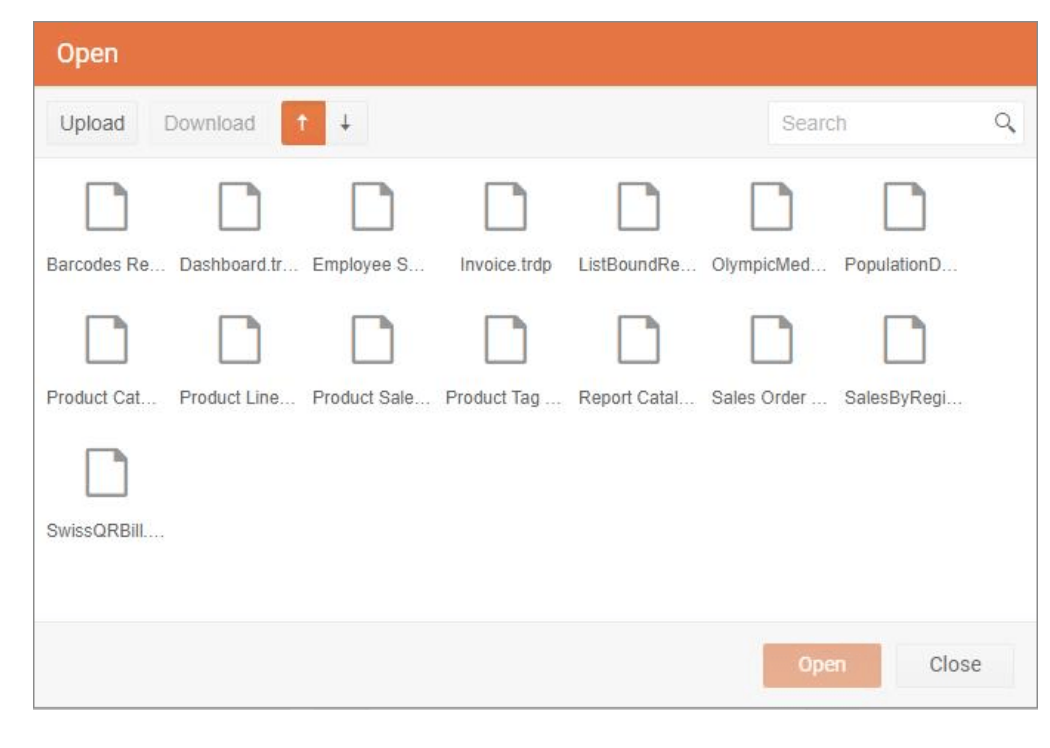
I like the new open dialog for the Web Report Designer, but now my report names are all truncated and I can't tell what anything is. Can you please off a list view in the Open Dialog so all my names aren't "Company R..."
Pasting a HEX value to a report item whose color has not been set before leads to the error:
"An error has occurred. NaN is not a valid value for Int32."
The workaround is to set the color of that property through the ColorPicker control before attempting to paste the new HEX color. If a color has been selected before, the issue is not present.
Hello,
I am using the Blazor Web Report Designer on a page that is not the default route, i.e. "/". When I am at step 2 in the WebServiceDataSource wizard to add parameters, if I click the Add Parameter button it routes to the home page.
I believe this is caused by the href="#' empty route. Below is an animation of what I mean. This is also reproduced in the BlazorIntegrationDemo in the installation directory.

Currently, the Web Report Designer does not allow one to insert a report item in place of a table cell textbox.
Meanwhile, the Standalone Designer does allow such operations.

The print button does not work in Chrome and Edge when the PDF default behavior is set to Download PDF.
Currently there appears to be no functionality available to add additional attachments via the Telerik Reporting Send Mail dialog or programmatically by passing parameters to the Report Viewer using a model.
Scenario 1:
- When we email a new Quote, which is a Telerik Report, to a Customer we would like to automatically attach a "New Products Brochure". The brochure is a frequently updated pdf document that would reside on the server.
Scenario 2:
- When we email a Customer Invoice, which is a Telerik Report, to a Customer if:
1) It is the 1st Invoice we have sent them for the current Agreement then automatically attach the Agreement related to Invoice - where the Agreement is another Telerik Report.
2) The Customer has an outstanding balance with us then attach a "Customer Statement", which is another Telerik Report, in pdf format.
Thanks in advance.
When trying to use XML markup as Report Source for a SubReport, the error "Root element is missing" is being thrown.
The input field taking the XML markup seems to initially read only the first row of the XML markup. To work around this issue, expand the input field dropdown and select the <Expression> option then paste the XML markup and save.
Consider the following expression of HtmlTextBox:
= " <span style="text-decoration: underline">hello</span>"
It is evaluated as invalid due to the quotes. However, it works if you replace the inner ones with single quotes:
= " <span style="text-decoration: underline">hello</span>"
Our manufacturing floor needs to have unprintable characters encoded in the data matrix in our reports, so that our plant controllers can receive instructions. The characters I'm speaking about are things like the Record Separator (ASCII 1E), Group Separator (ASCII 1D), and End of Transmission (ASCII 4).
You can have the three styles in HtmlTextBox. For example:
<strong>bold</strong>, <em>italics</em> , <span style="text-decoration: underline">underling</span>However, if you use expression, for example:
= IIF( Parameters.Parameter1.Value , "<strong>bold</strong>, <em>italics</em> , <span style="text-decoration: underline">underling</span>","some bold text ")Then the expression cannot be evaluated and an error is thrown.
I have a Windows Forms application that references a Reports_Library.dll that contains my CLR reports. I want to use the ReportBook in VS, so I followed all of the online tutorials. However, I'm having an issue using the ReportBook.
My Steps:
- Create a new form
- Add a Report Viewer to the form (I don't add any report source to the viewer at this time)
- I add a ReportBook to the form and a dialog box appears with the title of "Report Sources..." I click on "New" and then I click on "Type name". From there I click the drop-down under "Select a Report Type" and there are no options... Usually, when following this procedure with a ReportViewer, there is an option that says <Select Report Document>. I click on that and then choose my document from the Reports Library. However, I don't have the option to do that because the drop-down is blank.
When a report is open and the user click on the "generate" button, a busy indicator is displayed and the user can continue to use the application during the generation of the report. The UI thread is not blocked.
But when opening a view with the ReportViewer, the UI freezes during the initial connection to the remote engine, until the report is ready to be generated. If the report has parameters requiring a database query to load the available values, it freezes for a few seconds.
Would it be possible to load the ReportViewer instantly, then display a busy indicator until the report is ready, without blocking the UI thread ? (exactly as for the generation of the report)