



Hi,
It would be necessary to have a way to export a sub-report to a trdx file with the designer. Also, the same tool could be used to import a sub-report into an XML source. Currently, it takes a lot of acrobatics to be able to do this work.
Thank you for your help!

as Microsoft is going into Power Bi it is worth to take over SQL Server Reports possible to convert to Telerik Reporting

I would love to be able to get a log of the SQL generated by the designer/VS IDE upon running a report within a debugging environment. This would help me identify any issues and make performance improvements as well. thanks.
https://www.telerik.com/account/support-center/view-ticket/1565286
Currently we implemented the IDefinitionStorage to read and save files from azure storage
It would be nice if we could call the async methods
Hi,
It could be userfull to have a way to dynamically prompt for user name and password for the database connection. The proposed solution to put the connection string in a report parameter exposes sensitive information. It could be an option in the "Configure SQL Data Source" where we could set a checkbox as "Prompt for user name and password". At the end, everything would be saved with the report definition except the user name and password. On the report rendering, the user name and password will raised a dialog box for user name and password for the report.
Thanks,
It seems that only one event is being removed when disposing, there are 3 more, can these 3 also be removed when disposing?
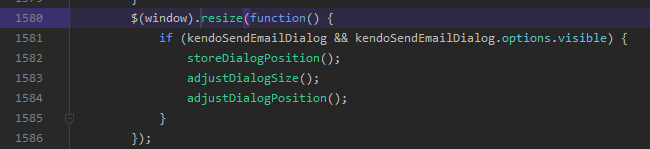
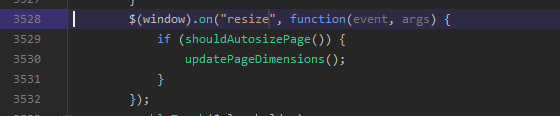
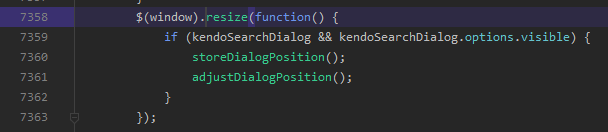
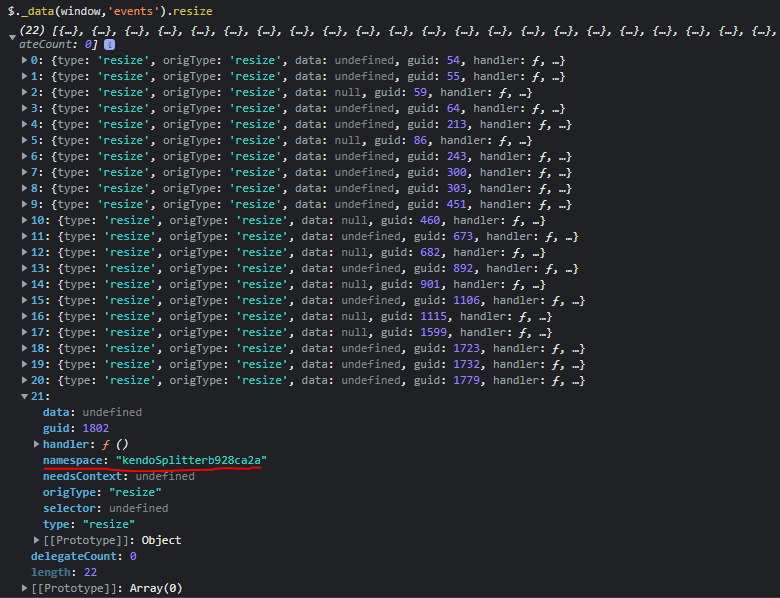
Also if possible remove the kendoSplitter resize event:
Hi, after Updating to the latest version I'm getting this error:
System.InvalidOperationException: Headers are read-only, response has already started.
   at Microsoft.AspNetCore.Server.Kestrel.Core.Internal.Http.HttpHeaders.ThrowHeadersReadOnlyException()
   at Microsoft.AspNetCore.Server.Kestrel.Core.Internal.Http.HttpResponseHeaders.Microsoft.AspNetCore.Http.IHeaderDictionary.set_ContentType(StringValues value)
   at Microsoft.AspNetCore.Http.DefaultHttpResponse.set_ContentType(String value)
   at Microsoft.AspNetCore.Mvc.Formatters.OutputFormatter.WriteResponseHeaders(OutputFormatterWriteContext context)
   at Microsoft.AspNetCore.Mvc.Formatters.TextOutputFormatter.WriteAsync(OutputFormatterWriteContext context)
   at Microsoft.AspNetCore.Mvc.Infrastructure.ObjectResultExecutor.ExecuteAsyncCore(ActionContext context, ObjectResult result, Type objectType, Object value)
   at Microsoft.AspNetCore.Mvc.Infrastructure.ObjectResultExecutor.ExecuteAsync(ActionContext context, ObjectResult result)
   at Microsoft.AspNetCore.Mvc.ObjectResult.ExecuteResultAsync(ActionContext context)
   at Microsoft.AspNetCore.Mvc.Infrastructure.ResourceInvoker.<InvokeResultAsync>g__Logged|22_0(ResourceInvoker invoker, IActionResult result)
   at Microsoft.AspNetCore.Mvc.Infrastructure.ResourceInvoker.<InvokeNextResultFilterAsync>g__Awaited|30_0[TFilter,TFilterAsync](ResourceInvoker invoker, Task lastTask, State next, Scope scope, Object state, Boolean isCompleted)
   at Microsoft.AspNetCore.Mvc.Infrastructure.ResourceInvoker.Rethrow(ResultExecutedContextSealed context)
   at Microsoft.AspNetCore.Mvc.Infrastructure.ResourceInvoker.ResultNext[TFilter,TFilterAsync](State& next, Scope& scope, Object& state, Boolean& isCompleted)
   at Microsoft.AspNetCore.Mvc.Infrastructure.ResourceInvoker.InvokeAlwaysRunResultFilters()
--- End of stack trace from previous location ---
   at Microsoft.AspNetCore.Mvc.Infrastructure.ResourceInvoker.<InvokeNextResourceFilter>g__Awaited|25_0(ResourceInvoker invoker, Task lastTask, State next, Scope scope, Object state, Boolean isCompleted)
   at Microsoft.AspNetCore.Mvc.Infrastructure.ResourceInvoker.Rethrow(ResourceExecutedContextSealed context)
   at Microsoft.AspNetCore.Mvc.Infrastructure.ResourceInvoker.Next(State& next, Scope& scope, Object& state, Boolean& isCompleted)
   at Microsoft.AspNetCore.Mvc.Infrastructure.ResourceInvoker.InvokeFilterPipelineAsync()
--- End of stack trace from previous location ---
   at Microsoft.AspNetCore.Mvc.Infrastructure.ResourceInvoker.<InvokeAsync>g__Logged|17_1(ResourceInvoker invoker)
   at Microsoft.AspNetCore.Mvc.Infrastructure.ResourceInvoker.<InvokeAsync>g__Logged|17_1(ResourceInvoker invoker)
   at Microsoft.AspNetCore.Routing.EndpointMiddleware.<Invoke>g__AwaitRequestTask|6_0(Endpoint endpoint, Task requestTask, ILogger logger)
   at Als.ALSolutions.WebSite.Startup.<>c__DisplayClass13_0.<<Configure>b__3>d.MoveNext() in C:\ALS_Git\ALSolutions V2\ALSolutions_V2\Als.ALSolutions.WebSite\Startup.cs:line 615

Issue #1: In WinUI3, for Telerik Report Viewer, when we have a link to URI to open in a new window, it is not working correctly.
Here is a setting in a demo report (Report Catalog):
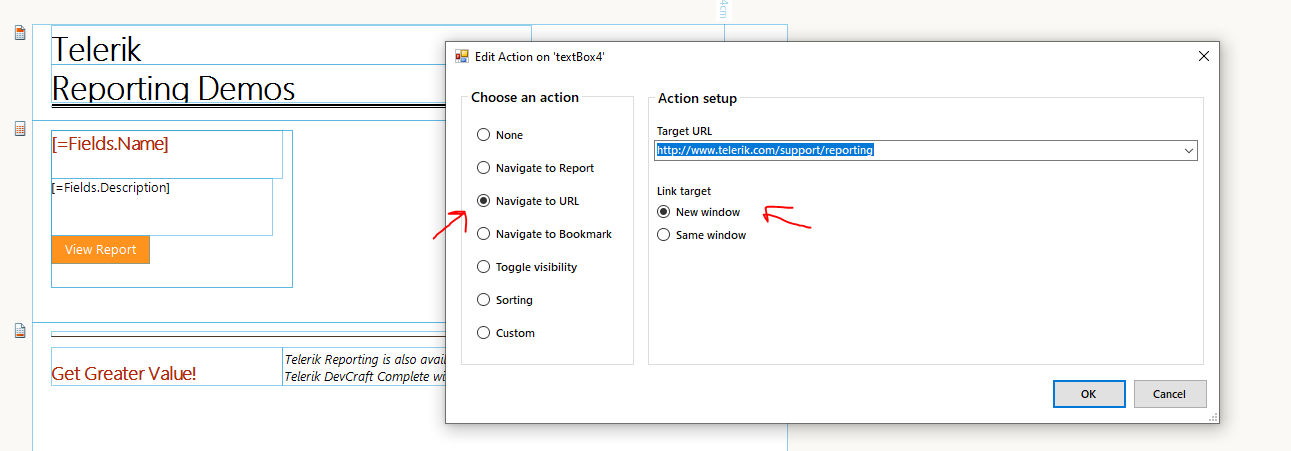
When clicking to link in control on runtime, we are getting the following error:
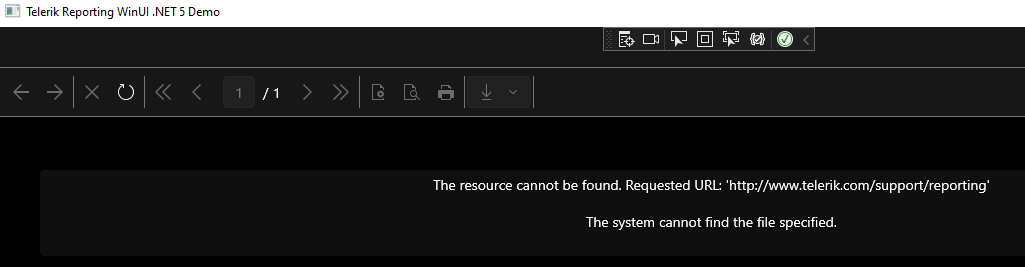
This looks like a bug.
Issue #2: Our scenario is the following: We will have some custom links in a report like, "MyApp:Customer/TEST". When we click on that, we need to send that link to our WinUI app, which will let's say navigate to a Customer page after it is clicked in a report. Due to Issue #1, we were not able to test it. Even when Issue #1 is resolved, what is a good way for us to handle the current scenario? I don't want to refresh the report when some link is clicked.
Issue #3. We might have the HTML Text box in a report. When it has a link, it is not clickable. This is another item that looks like a bug.
Can you please help to resolve these 3 issues?
Thanks,
Updating jQuery to 3.6.0 seems to work, however, using Kendo 2022.1.119 appears to break the fonts and some menus in the web report designer.
The rest of our project is using 2022.1.119 so we would like to deploy only one version of Kendo (and jQuery) across our product.
The response to the Get Page request of the REST Service in .NET Core/5/6 doesn't include page size when the paper kind is Custom. This may be the reason why the printing from the WPF Viewer results in blank pages.
When the service is in .NET Framework, the paper size is in the response, and the document is printed correctly.
The XAML rendering extension, used by the WPF Report Viewer, by default checks for invalid characters while writing the XAML page contents. When the data that will be rendered on the page contains invalid Unicode characters, an exception is thrown and the report is not rendered.
The current solution is to introduce a UserFunction that parses the string contents and strips the invalid characters, but implementing and maintaining this approach requires more efforts from the developer.
An option in the XAML Device Information Settings that disables the check for invalid characters, would work in most scenarios without having to write a dedicated UserFunction. By default this option will preserve the current behavior, i.e. the characters checking will be performed, but the developers will have the ability to disable it on their own discretion.

Adding a Parent Group to another Column Group in a Crosstab leads to "Object reference not set to an instance of an object" on report preview. Stack Trace:
Object reference not set to an instance of an object.
   at Telerik.Reporting.Processing.Table.ForEachCell(Action`1 action)
   at Telerik.Reporting.Processing.Table.MeasureDataItemContent(IMeasureContext context, SizeLU availableClientSize)
   at Telerik.Reporting.Processing.DataItem.MeasureContent(IMeasureContext context, SizeLU availableClientSize)
   at Telerik.Reporting.Processing.LayoutElement.MeasureCore(IMeasureContext context, SizeLU availableSize)
   at Telerik.Reporting.Processing.VisualElement.MeasureCore(IMeasureContext context, SizeLU availableSize)
   at Telerik.Reporting.Processing.ProcessingElement.MeasureCore(IMeasureContext context, SizeLU availableSize)
   at Telerik.Reporting.Processing.AbsolutePositionLayout.MeasureChildItems(IMeasureContext context, SizeLU availableClientSize)
   at Telerik.Reporting.Processing.AbsolutePositionLayout.MeasureContent(IMeasureContext context, SizeLU availableClientSize)
   at Telerik.Reporting.Processing.ReportSectionBase.MeasureContent(IMeasureContext context, SizeLU availableClientSize)
   at Telerik.Reporting.Processing.LayoutElement.MeasureCore(IMeasureContext context, SizeLU availableSize)
   at Telerik.Reporting.Processing.VisualElement.MeasureCore(IMeasureContext context, SizeLU availableSize)
   at Telerik.Reporting.Processing.ProcessingElement.MeasureCore(IMeasureContext context, SizeLU availableSize)
   at Telerik.Reporting.Processing.StackLayout.MeasureContent(IMeasureContext context, SizeLU availableClientSize)
   at Telerik.Reporting.Processing.Group.MeasureContent(IMeasureContext context, SizeLU availableClientSize)
   at Telerik.Reporting.Processing.LayoutElement.MeasureCore(IMeasureContext context, SizeLU availableSize)
   at Telerik.Reporting.Processing.VisualElement.MeasureCore(IMeasureContext context, SizeLU availableSize)
   at Telerik.Reporting.Processing.ProcessingElement.MeasureCore(IMeasureContext context, SizeLU availableSize)
   at Telerik.Reporting.Processing.StackLayout.MeasureContent(IMeasureContext context, SizeLU availableClientSize)
   at Telerik.Reporting.Processing.Report.MeasureContent(IMeasureContext context, SizeLU availableClientSize)
   at Telerik.Reporting.Processing.LayoutElement.MeasureCore(IMeasureContext context, SizeLU availableSize)
   at Telerik.Reporting.Processing.VisualElement.MeasureCore(IMeasureContext context, SizeLU availableSize)
   at Telerik.Reporting.Processing.ProcessingElement.MeasureCore(IMeasureContext context, SizeLU availableSize)
   at Telerik.Reporting.Processing.LayoutElement.Measure(IMeasureContext context, SizeLU availableSize)
   at Telerik.Reporting.Processing.LayoutElement.MeasureElement(LayoutElement elementToMeasure, SizeLU availableSize, IMeasureContext context)
   at Telerik.Reporting.ImageRendering.ImageReportInteractive.MeasureRootCore(LayoutElement root, PageSettings pageSettings)
   at Telerik.Reporting.BaseRendering.RenderingExtensionBase.Render(LayoutElement root, Hashtable renderingContext, Hashtable deviceInfo, CreateStream createStreamCallback, EvaluateHeaderFooterExpressions evalHeaderFooterCallback, PageSettings pageSettings)
   at Telerik.Reporting.BaseRendering.RenderingExtensionBase.Render(Report report, Hashtable renderingContext, Hashtable deviceInfo, CreateStream createStreamCallback, EvaluateHeaderFooterExpressions evalHeaderFooterCallback)
   at Telerik.Reporting.Processing.ReportProcessor.RenderCore(ExtensionInfo extensionInfo, IList`1 processingReports, Hashtable deviceInfo, IRenderingContext renderingContext, CreateStream createStreamCallback)
   at Telerik.ReportViewer.Common.ReportRenderer.Render(ReportRendererArgs args)