

We often receive feedback regarding hard/impossible editing of reports after they are exported to Word format.
The existing rendering mechanism will produce Word tables which are harder for manual editing - http://docs.telerik.com/reporting/designing-reports-considerations-word

Let us know in comments about your experience with editing reports exported to Word format so we can understand more clearly what is required from Reporting Word rendering extention.

I display the WPF Report Viewer control in a closable tab. To free the resources I invoke DisposeViewerResources on tab close as described here: https://docs.telerik.com/reporting/embedding-reports/display-reports-in-applications/wpf-application/disposing-the-report-viewer-resources
However, I see the following dialog every time. There is no way to capture this error or suppress the dialog.
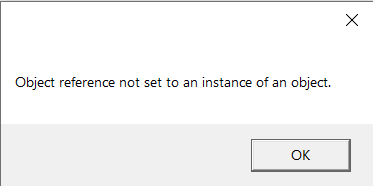
I am trying to get a basic example of the Web Report Designer working following the guide here but I keep getting this error message

in the console, I can see these errors
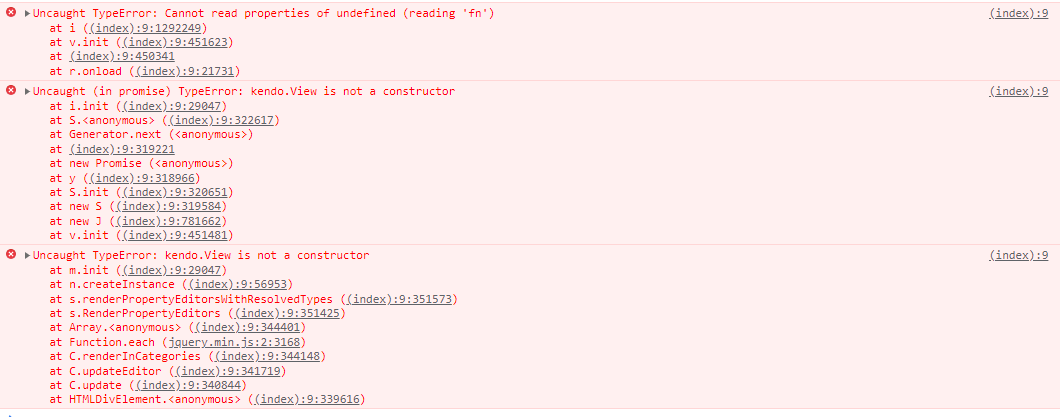
here is the razor page that contains the WebReportDesigner
@page "/report-designer"

@attribute [Authorize]

@using Telerik.WebReportDesigner.Blazor

<WebReportDesigner DesignerId="wrd1"
                   ServiceUrl="/api/reportdesigner"
                   ToolboxArea="new ToolboxAreaOptions() { Layout = ToolboxAreaLayout.List }"
                   PropertiesArea="new PropertiesAreaOptions() { Layout = PropertiesAreaLayout.Categorized }" />
Any assistance would be appreciated
I am currently investigating including the Telerik Reports in our products but when I load the Web Report Designer it loads a theme which is overwriting our custom theme.
Is there any way to prevent this so that we keep our custom theme?
When the PDF rendering extension has its "enableAccessibility" setting set to true, the text in the produced document cannot be selected using the Select Tool from the Adobe Acrobat Reader context menu. The text can be selected in other PDF readers like Foxit PDF Reader. The text is also selectable in Adobe Acrobat Reader when the document is created without enabling the accessibility features.

Please see the attached report for a reproduction of this behavior.
As you can see, the crosstab has only one row group in the group explorer which has its PageBreak property set to None. However, in the report explorer, you can see a greyed out row group I deleted with PageBreak=After which results in page breaks being inserted even though the group was supposedly deleted. In order to reproduce this, it appears that you have to first delete the column only and then delete the group, and you are left with a grey "ghost group" in the report explorer. If I delete both at once this does not seem to happen. I'm on version 15.0.21.120
Please add the Web Report Designer Item Template for VB.NET projects too
It seems that the MultiSelect Combo Box Filtering does not work in the Report Viewer. o be smaller if the user starts typing
example of how it is removed
Trying to preview a report with a lot of data in the report viewer in an ASP.NET Core application results in the error:
"System.ArgumentException: The JSON value of length n is too large and not supported."

Consider adding functionality that allows for loading Assets into the Asset Manager from code.
I would prefer to store assets in a database and load them up for a user.
Makes more sense than randomly loading them from whatever computer you are working on.
The Web Report Designer uses a subset of all available Kendo UI widgets. It will be useful to have a documentation article listing all of them, just as it's done for the HTML5 Report Viewer here: Kendo Widget Requirements.
This way the users will have better understanding which Kendo UI classes and components are used by Web Report Designer and will enable them making their own distribution packages when needed.
If you add the 'kendo.common.min.css' that is required for the Html5 Viewer to the page with the Web Report Designer, the latter Menu styles get broken.
Due to this, if you need to have both the viewer and the designer in the same project and cannot have scoped styles, the appearance of one of them will be broken.
It takes 2+ seconds between "info" polls to the server. This should be a much smaller interval. Maybe .5 or .25 seconds.
Telerik's own ReportClient example shows a 500ms interval between info polls...

        private static byte[] GetDocument(ReportClient restServiceClient, string instanceId, string documentId)
        {
            bool documentProcessing;
            do
            {
                Thread.Sleep(500);// wait before next Info request
                documentProcessing = restServiceClient.DocumentIsProcessing(instanceId, documentId);
            } while (documentProcessing);

            byte[] pdfDocumentBytes = restServiceClient.GetDocument(instanceId, documentId);

            return pdfDocumentBytes;
        }
It would be very useful if custom size and arrangement of the tool panes could be remembered by the Standalone Designer.

In particular it would be useful for the property pane and it's popup windows (e.g. Graph Series Connection Editor)

More info here: http://www.telerik.com/forums/remember-user-settings-between-opening-and-closing-the-application
In some scenarios, it would be helpful to have the path to the report available, for example, as a Global Object, so that you may use it in the Expressions.
Here is a use case. The PictureBox resolves relative paths with respect to the report's folder. Currently, if you want to check whether an image that is in the report's folder exists by its name only, you need a custom user function. If you know the report's folder, you may do this with System functions.