

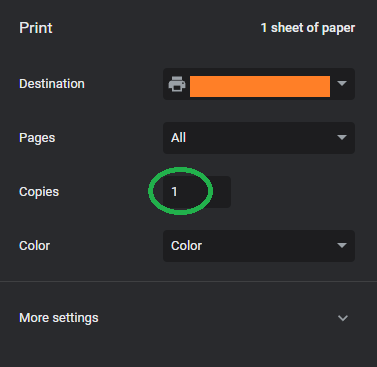
As explained in this support ticket (https://www.telerik.com/forums/specify-default-print-settings---number-of-copies), our customers want to be able to set the default value of the number of copies for a report since they require multiple copies for their business processes.
Would it be possible to enable setting the default values for the printing when a report is generated?

New development is being done with net core 3.1 and netstandard 2.1 and we can no longer create reports in the Report Designer using the ObjectDataSource.
Seems like it's time to update the standalone Report Designer for these new standards.
Problem description:
On ".net Framework" it is a supported scenario that assemblies with datasources and/or functions are loaded into the standalone ReportDesigner. This assemblies are used while designing and later also in the ReportViewer while executing the report. Feature described here https://docs.telerik.com/reporting/standalone-report-designer-extending-configuration
Now that .net 6 is release by MS the same feature is needed there. The problem is that the "standalone ReportDesigner" is targeting ."net framework" which means it can only load assemblies targeting ".net framework" or up to ".net standard 2.0". But that is not sufficient because on ".net standard 2.0" only EntityFrameworkCore3.1 is supported and all newer version (EF Core 6.0) are not. See here https://docs.telerik.com/reporting/knowledge-base/use-reporting-in-dotnetcore-with-entity-framework-core
So in summary:
It`s not possible to use EF Core 6.0 (and upwards) DataSources in the given "standalone ReportDesigner" because it is targeting .net framework. It`s critical to be able to use the newest EF Core versions as DataSource to not be blocked from upgrading a ".net framework" application to .net 6 where the described feature/scenario is used. I need to use the "standalone ReportDesigner" because it gets shipped with the application to edit the reports individually by the enduser. The "VS ReportDesinger" is going to get the upgrade but this would only be usable as a developer before shipping the application.
Feature request:
Upgrade the "standalone ReportDesigner" to target .net 6.

When a TRDP/TRDX report is imported to a CS report, the produced .designer.cs does not have Unicode encoding, instead, it is with ANSI encoding.
Because of this, some of the report text might instead be displayed as ????
The workaround is to Save As the file, from Visual Studio, with Encoding which will open a window where you may change the encoding to Unicode.
Steps to reproduce the problem:
1. Open the attached report in EUD2. Ensure its RuntimeSettings contain parameter "EnableAccessibility" set to True or add the setting before opening the designer in its configuration file
3. Preview the report and export it to PDF
EXPECTED:
The produced PDF is tagged (accessible) - check it in Acrobat Reader's file properties in the bottom left corner. The file size should be ~155KB
OBSERVED:
The produced PDF is not tagged (accessible). Its size is ~123KB.
Some corner case page size value force report processing to create an invalid page clipping during paging.
Workaround: If you encounter such scenario, please experiment with changing the page size to another value, which is close to the original one.
The following Base64 image:
iVBORw0KGgoAAAANSUhEUgAAATIAAABaCAYAAAA7FtpGAAAABHNCSVQICAgIfAhkiAAAAZ1JREFUeJzt1EkOgkAAAEHw/3/Gk9HoIEsksZOqm8wCDtrzNE3L9GJZnh/nef649j62Zu+a0bzR/Me80bWttXuf6ej3PHNWZ85y7V6j8T17nd3v6LtaG79q3mj+0fdy9Pz2/g/OzLvqHLf2+MUZfPutbN1j6/2N1t6+PyrA/xMyIE/IgDwhA/KEDMgTMiBPyIA8IQPyhAzIEzIgT8iAPCED8oQMyBMyIE/IgDwhA/KEDMgTMiBPyIA8IQPyhAzIEzIgT8iAPCED8oQMyBMyIE/IgDwhA/KEDMgTMiBPyIA8IQPyhAzIEzIgT8iAPCED8oQMyBMyIE/IgDwhA/KEDMgTMiBPyIA8IQPyhAzIEzIgT8iAPCED8oQMyBMyIE/IgDwhA/KEDMgTMiBPyIA8IQPyhAzIEzIgT8iAPCED8oQMyBMyIE/IgDwhA/KEDMgTMiBPyIA8IQPyhAzIEzIgT8iAPCED8oQMyBMyIE/IgDwhA/KEDMgTMiBPyIA8IQPyhAzIEzIgT8iAPCED8oQMyBMyIE/IgDwhA/KEDMi7AzLSZLNf8xCVAAAAAElFTkSuQmCC
is recognized by the Reporting engine as SVG, which results in the following error in the PictureBox:
An exception has occurred while processing 'pictureBox1' item:
System.Xml.XmlException: The '�' character, hexadecimal value 0xFFFD, cannot be included in a name. Line 1, position 5.
   at System.Xml.XmlTextReaderImpl.Throw(Exception e)
   at System.Xml.XmlTextReaderImpl.ParseElement()
   at System.Xml.XmlTextReaderImpl.ParseDocumentContent()
   at System.Xml.XmlLoader.Load(XmlDocument doc, XmlReader reader, Boolean preserveWhitespace)
   at System.Xml.XmlDocument.Load(XmlReader reader)
   at System.Xml.XmlDocument.LoadXml(String xml)
   at Telerik.Reporting.Svg.RadSvgImage.SvgDocumentFromXml(String xml)
   at Telerik.Reporting.Processing.Imaging.SvgImageItem.CreateImageInfo()
   at Telerik.Reporting.Processing.Imaging.IImageInfoMapExtensions.StoreImageData(IImageInfoMap imageInfoMap, IImageItem imageItem, ICache cache)
   at Telerik.Reporting.Processing.PictureBox.ResolveImage(Object value)
   at Telerik.Reporting.Processing.PictureBox.ProcessItem()
   at Telerik.Reporting.Processing.ReportItemBase.ProcessElement()
   at Telerik.Reporting.Processing.ProcessingElement.Process(IDataMember dataContext)
Ideally, if the user prints a report, the output should be the same as what they see on the screen.
Currently, if the user prints/exports the report sometime after previewing it, the data will be updated and they will not get what they see.
When exporting to PDF from Telerik Report Designer the software creates a list of flat links for each TOC entry, but the links are separated in the structure from the TOC Label. While a good start, it would be better to use a main TOC tag under which each line in the TOC would receive a TOCI (Table of Contents Item) tag. Each TOCI would contain the label and link for the respective item. Attaching a few examples to assist.
| <TOC> | Table of contents element is an element that contains a structured list of items and labels identifying those items; has its own discrete hierarchy. |
| <TOCI> | Table of contents item element is an item contained in a list associated with a table of contents element. |
References:
https://www.hhs.gov/sites/default/files/pdf-tagging.pdf (page 29).
https://www.pdflib.com/pdf-knowledge-base/pdfua/the-pdfua-standard/
Clicking the cancel button on the HTML5 report viewer show "Report processing was canceled" in the UI but the report is still being generated and rendered on the server.
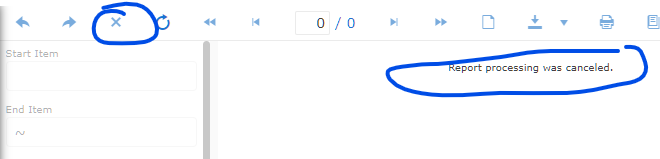
In this old thread it is stated that it isn't possible to cancel the report generation on the server. Is that still the case?
In my report, when the content fits in the page width, the PDF document is generated correctly. When there is a horizontal page break though, the content of the pages after the first one is clipped.
When exporting the tags for the document's Table of Contents Telerik Report Designer exports TOC leaders as distinct tags, requiring that they be removed when completing the accessibility tagging for the document. Leaders - the ellipses found in the Table of Contents (e.g., Introduction ...................... Page 3) between the TOC item and the page number will be read by assistive technology as "dot dot dot dot dot..." etc. They need to be deleted from the tag tree. Please Artifact them or (preferably) NOT tag them on the export. Thanks.
Reference:
https://www.levelaccess.com/pdf-table-of-contents/
https://www.w3.org/TR/2014/NOTE-WCAG20-TECHS-20140408/pdf.html

I have a report that has dynamically created html text based on the data. I would like to have a footnote associated with one of those HtmlTextBox controls to appear at the bottom of the page on which the section occurs.
Please see a ticket "How to create a report footnote"  https://www.telerik.com/forums/how-to-create-a-report-footnote

Thank you.
I need to set a structured heading tags like <h2><h3> (https://www.w3.org/TR/WCAG20-TECHS/PDF9.html) so the pdf file can have those tags.
Please make the Reporting support more various tags so pdf files can have structured tags.