Hi,
It would be very practical to have a component that could display HTML and CSS code from a data source.
Thank you
Bernard


I am using the stand alone report designer, connected to a report server.
In the report I am designing, I have several cross tabs. We now want to create the same crosstabs, with additional filtering for the data.
- I copy the existing crosstab, then paste it.
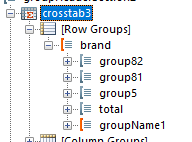
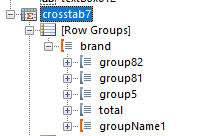
Both cross tabs now reference the SAME row groups. Because of this, when I edit the filters, it just doesn't work. Looks like there are reference issues when the copy / paste is done, not all the objects within the cross tab are getting a new copy.
Original crosstab - it has a row group called "groupName1" :
Copied crosstab - same "groupName1" row group - it shouldn't be the same row group object.


I have a request that probably doesn't require much explanation. It would be helpful to allow comments in expressions created via the standalone designer to help explain particularly complex and infrequently encountered logic.

When building report templates in the Standalone Report Designer, it would be very helpful to have a keyboard shortcut to access the Property Browser and possibly the other panels (Report Explorer, Data Explorer, Group Explorer).
I have grown accustomed to the shortcuts available in Visual Studio for similar access. For instance, the F4 key will jump to the Visual Studio Properties panel (at least in my configuration) from a designer window. This makes it easy to update things like field name, size, location, and other properties without constantly reaching for the mouse.
Visual Studio uses Control-R to access its Project Explorer (again, in my C#-centric configuration), perhaps similar to the Report Designer's Report Explorer.
Adding these keyboard shortcuts, whether fixed to specific keys or configurable, would speed up report development for keyboard-bound programmers like me.
Hello,
The Telerik Reporting REST service with CubeDataSource component that now can only be used with the .NET Framework.
We'd like to request that this component for .NET Core 6.
Thanks in advance.

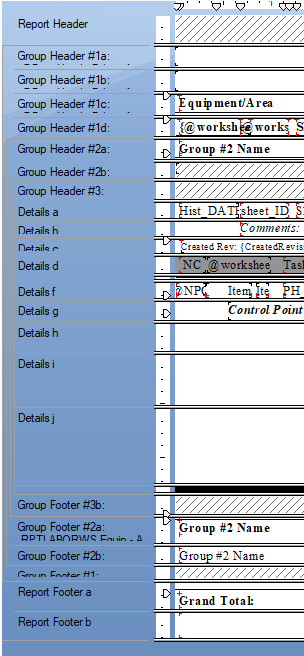
Ability to split sections for use in Conditions and Formatting.
Example: Detail split into Detail-A and Detail-B where either or both may display based on a condition defined at the Section Split level.
For Crystal Report users (myself since 2008) this is a very important feature.
It allows a single report be used for detail or summary reporting as well as multiple conditions for display.
This is an example from CR:
When a Report Parameter is Nullable, and the Null value comes from the data source, for example, from a JsonDataSource assigned to the parameter AvailableValues, the Desktop viewers don't recognize this value and show an exception that the parameter value is not valid. You need to check the NULL checkbox to set the parameter value to Null.
In the Html5 Viewer, the same is working as expected, and the Null value from the data source is correctly set directly to the parameter.
The link to the Nullable Parameter video demonstrates the issue.
When I display the page count in PrintPreview mode with the following function, the result depends on the value of the Report property SkipBlankPages and may be wrong:
= PageCount("Report1", 1)If I use only:
= PageCount
the result is correct.
The linked PageCount video demonstrates the problem.

Hi,
It could be userfull to have a way to dynamically prompt for user name and password for the database connection. The proposed solution to put the connection string in a report parameter exposes sensitive information. It could be an option in the "Configure SQL Data Source" where we could set a checkbox as "Prompt for user name and password". At the end, everything would be saved with the report definition except the user name and password. On the report rendering, the user name and password will raised a dialog box for user name and password for the report.
Thanks,
Hi, after Updating to the latest version I'm getting this error:
System.InvalidOperationException: Headers are read-only, response has already started.
   at Microsoft.AspNetCore.Server.Kestrel.Core.Internal.Http.HttpHeaders.ThrowHeadersReadOnlyException()
   at Microsoft.AspNetCore.Server.Kestrel.Core.Internal.Http.HttpResponseHeaders.Microsoft.AspNetCore.Http.IHeaderDictionary.set_ContentType(StringValues value)
   at Microsoft.AspNetCore.Http.DefaultHttpResponse.set_ContentType(String value)
   at Microsoft.AspNetCore.Mvc.Formatters.OutputFormatter.WriteResponseHeaders(OutputFormatterWriteContext context)
   at Microsoft.AspNetCore.Mvc.Formatters.TextOutputFormatter.WriteAsync(OutputFormatterWriteContext context)
   at Microsoft.AspNetCore.Mvc.Infrastructure.ObjectResultExecutor.ExecuteAsyncCore(ActionContext context, ObjectResult result, Type objectType, Object value)
   at Microsoft.AspNetCore.Mvc.Infrastructure.ObjectResultExecutor.ExecuteAsync(ActionContext context, ObjectResult result)
   at Microsoft.AspNetCore.Mvc.ObjectResult.ExecuteResultAsync(ActionContext context)
   at Microsoft.AspNetCore.Mvc.Infrastructure.ResourceInvoker.<InvokeResultAsync>g__Logged|22_0(ResourceInvoker invoker, IActionResult result)
   at Microsoft.AspNetCore.Mvc.Infrastructure.ResourceInvoker.<InvokeNextResultFilterAsync>g__Awaited|30_0[TFilter,TFilterAsync](ResourceInvoker invoker, Task lastTask, State next, Scope scope, Object state, Boolean isCompleted)
   at Microsoft.AspNetCore.Mvc.Infrastructure.ResourceInvoker.Rethrow(ResultExecutedContextSealed context)
   at Microsoft.AspNetCore.Mvc.Infrastructure.ResourceInvoker.ResultNext[TFilter,TFilterAsync](State& next, Scope& scope, Object& state, Boolean& isCompleted)
   at Microsoft.AspNetCore.Mvc.Infrastructure.ResourceInvoker.InvokeAlwaysRunResultFilters()
--- End of stack trace from previous location ---
   at Microsoft.AspNetCore.Mvc.Infrastructure.ResourceInvoker.<InvokeNextResourceFilter>g__Awaited|25_0(ResourceInvoker invoker, Task lastTask, State next, Scope scope, Object state, Boolean isCompleted)
   at Microsoft.AspNetCore.Mvc.Infrastructure.ResourceInvoker.Rethrow(ResourceExecutedContextSealed context)
   at Microsoft.AspNetCore.Mvc.Infrastructure.ResourceInvoker.Next(State& next, Scope& scope, Object& state, Boolean& isCompleted)
   at Microsoft.AspNetCore.Mvc.Infrastructure.ResourceInvoker.InvokeFilterPipelineAsync()
--- End of stack trace from previous location ---
   at Microsoft.AspNetCore.Mvc.Infrastructure.ResourceInvoker.<InvokeAsync>g__Logged|17_1(ResourceInvoker invoker)
   at Microsoft.AspNetCore.Mvc.Infrastructure.ResourceInvoker.<InvokeAsync>g__Logged|17_1(ResourceInvoker invoker)
   at Microsoft.AspNetCore.Routing.EndpointMiddleware.<Invoke>g__AwaitRequestTask|6_0(Endpoint endpoint, Task requestTask, ILogger logger)
   at Als.ALSolutions.WebSite.Startup.<>c__DisplayClass13_0.<<Configure>b__3>d.MoveNext() in C:\ALS_Git\ALSolutions V2\ALSolutions_V2\Als.ALSolutions.WebSite\Startup.cs:line 615
I would love to be able to get a log of the SQL generated by the designer/VS IDE upon running a report within a debugging environment. This would help me identify any issues and make performance improvements as well. thanks.
https://www.telerik.com/account/support-center/view-ticket/1565286
Telerik report is showing error -
Method Name: Telerik.reporting.PictureBox.Set_Value - Parameter is not valid.

Above highlighted line gives an error during component initialize.
It was working earlier, but now showing this error, even there is no code change. Please help.
Your help is highly appreciated.
Jeetendra Kumar
In some scenarios, it would be helpful to have the path to the report available, for example, as a Global Object, so that you may use it in the Expressions.
Here is a use case. The PictureBox resolves relative paths with respect to the report's folder. Currently, if you want to check whether an image that is in the report's folder exists by its name only, you need a custom user function. If you know the report's folder, you may do this with System functions.
I am trying to get a basic example of the Web Report Designer working following the guide here but I keep getting this error message

in the console, I can see these errors
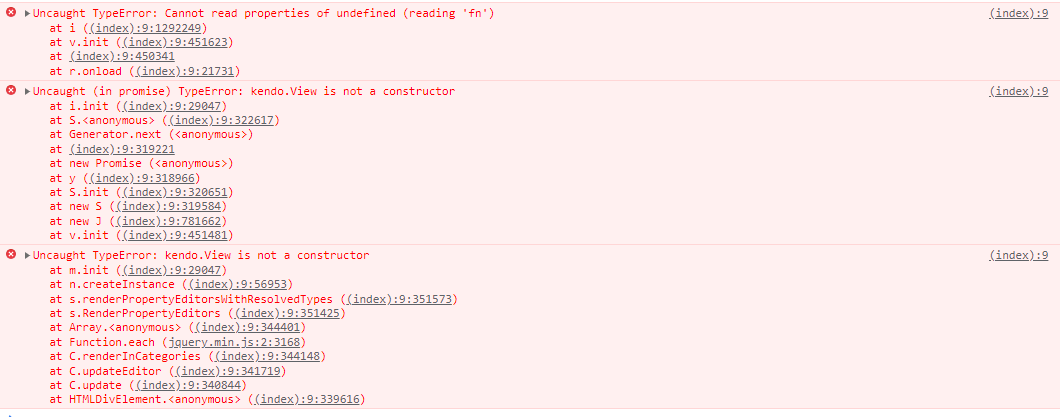
here is the razor page that contains the WebReportDesigner
@page "/report-designer"

@attribute [Authorize]

@using Telerik.WebReportDesigner.Blazor

<WebReportDesigner DesignerId="wrd1"
                   ServiceUrl="/api/reportdesigner"
                   ToolboxArea="new ToolboxAreaOptions() { Layout = ToolboxAreaLayout.List }"
                   PropertiesArea="new PropertiesAreaOptions() { Layout = PropertiesAreaLayout.Categorized }" />
Any assistance would be appreciated
I display the WPF Report Viewer control in a closable tab. To free the resources I invoke DisposeViewerResources on tab close as described here: https://docs.telerik.com/reporting/embedding-reports/display-reports-in-applications/wpf-application/disposing-the-report-viewer-resources
However, I see the following dialog every time. There is no way to capture this error or suppress the dialog.