The attached report generates different PDF documents when rendered by the Standalone Designer and REST Service, both targeting the .NET Framework 4.6.2:
- The PDFs have different sizes
- When using the 'Read out loud' functionality of the Adobe Reader, the items are read in a different order. The order in the PDF generated by the designer is correct, and the one in the service-generated PDF is wrong.
Description
Even though there is no map wizard for the WRD, it is possible to create a map item and try to set it. However, it is not possible to select an ESRI Shapefile for the spatial data or inspect the already existing one in the report:

Steps To Reproduce
- Use the PopulationDensity report
- Open the ShapeMapSeries:

- The Source type can't be configured:

Expected behavior
Even with no map wizard in the WRD, the map item should be created from scratch, and all properties should be editable.
Actual behavior
The Source Type doesn't show any option for selecting shape files.

When I invoke a cancellation before the report processing starts, the expected behavior is that the report should really not even begin processing, but it runs to completion.
When I export to XLSX, RTF, and CSV formats, and try to cancel the report a few seconds later, so that cancellation is signaled while report processing is already occurring, it doesn't stop. The expected behavior is that a TaskCanceledException should be raised, and the report processing should stop, but the report runs to completion. In PDF, DOCX, and PPTX, this works as expected.

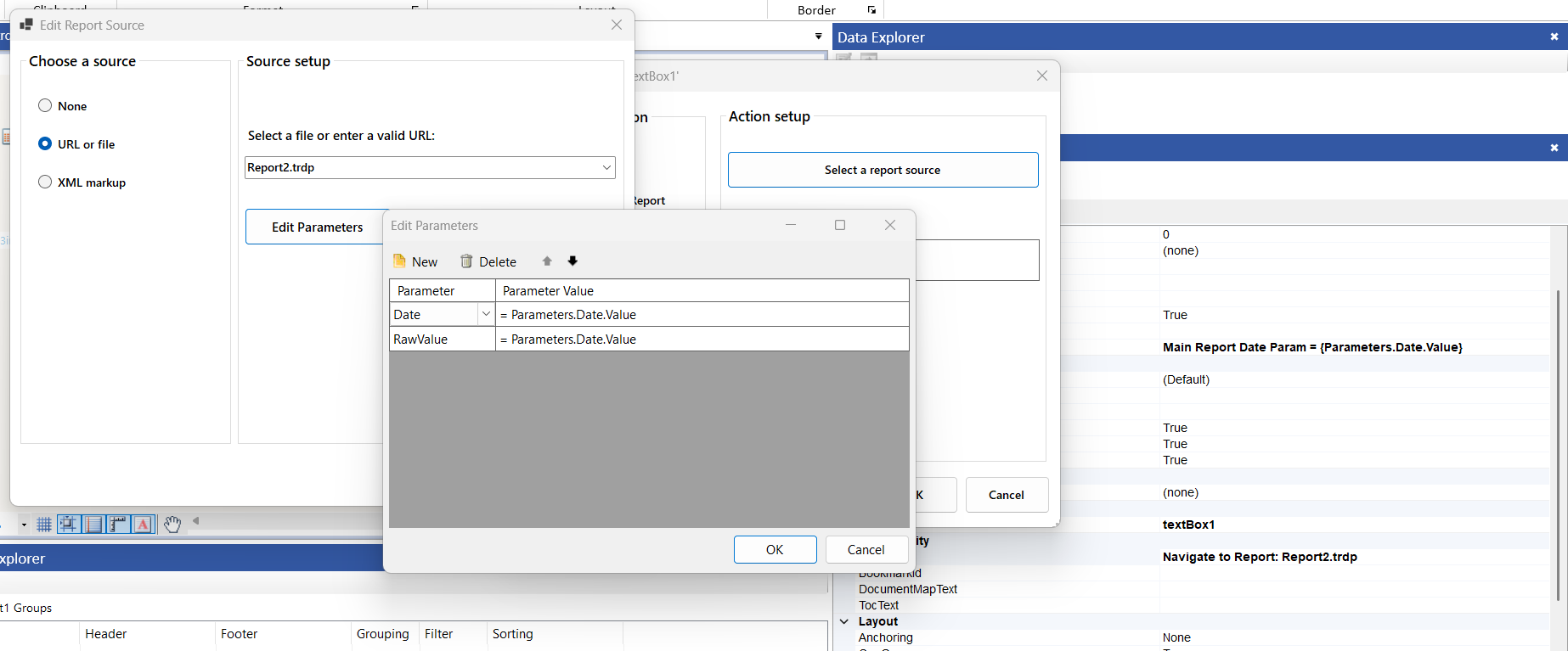
After updating to the Q1 2026 release of Reporting, I get the following error when passing the value of a DateTime parameter from the main report to a DateTime parameter of a report that I open via the Navigate To Report action:
CSharp.Net10.ReportingRestServiceCorsDemo Error: 0 : Parameter /Date(1771253073461)/ does not match Epoch regex format!
CSharp.Net10.ReportingRestServiceCorsDemo Error: 0 : Parameter /Date(1771253073461)/ does not match Epoch regex format!
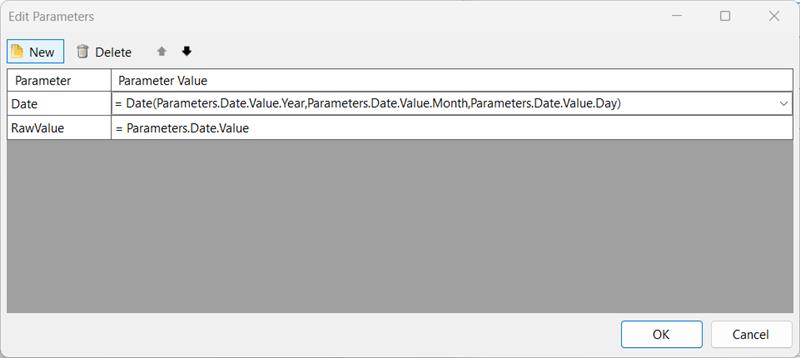
The issue seems to occur only when directly passing the value of the DateTime report parameter, so as a workaround, I decided to create a new date using the Date() function. For example:
I have created an ellipse shape item and have set its Stretch property to True. Then, I have set the width of the item to be 1.5in, while the height is 1in, which results in a horizontally stretched ellipse on design-time:
However, when I render the report on Linux where the Skia graphics engine is used, the shape is not rendered properly:


in the expression editor i have a html tag like this...
<ol style="list-style-type: lower-roman" start="2">
design view on the expression editor correctly shows the indented list starting with ii (2).
On the main report view and print, it only shows as i (1).
Yet any editing it switches back to ii (2);
---
Comment from admin: The HtmlTextBox item does not (yet) support the `start` attribute (please check Styling and Formatting HtmlTextBox). Therefore, the result in the report preview/print is the expected one, while the design view is misleading.
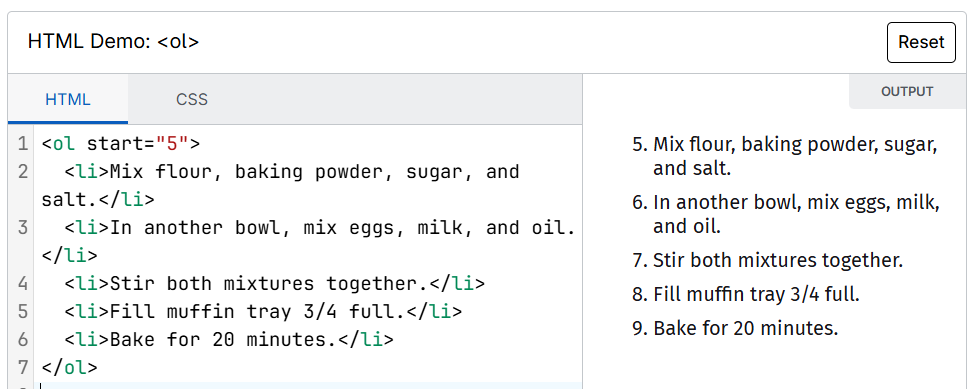
Consider adding support for the `start` attribute of the `ol` element in HtmlTextBox. This would allow us to change the start counting:

In the Report Book’s Edit Parameters dialog, non‑mergeable parameters only show index 0 in the dropdown, even when multiple report instances are present:
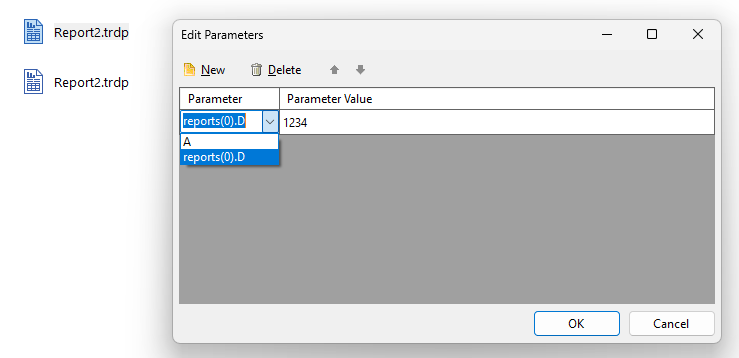
Other indexes can be applied only by manually typing the value into the combo box, but this behavior is not intuitive and makes it unclear that parameters can be assigned per instance.
When using a report parameter of type string whose value resembles a date format (e.g., "3036-01"), the System.Text.Json serialization logic used by Telerik Reporting incorrectly treats the value as a date instead of a plain string. As a result, the parameter is serialized and displayed as a parsed DateTime value rather than the original text, leading to unexpected outputs such as "3036-01-01T00:00:00.0000000":
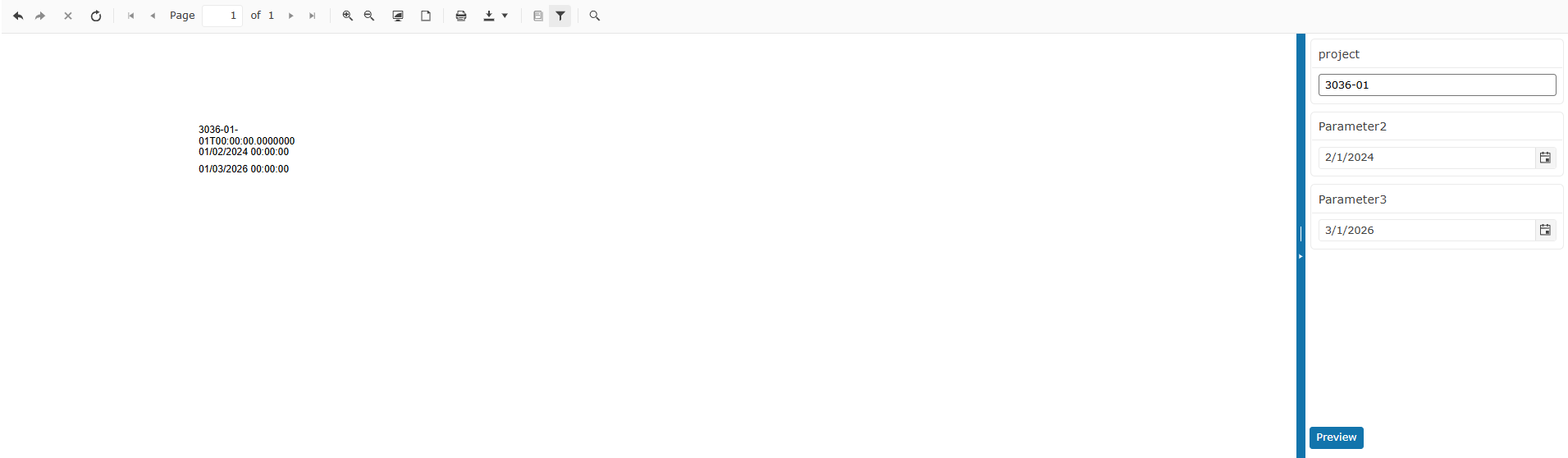
We are using "@progress/telerik-angular-native-report-viewer": "29.26.211"
Seems options Fit to page/Fit to width are mixed
Fit to page does what Fit to width should be doing and vice versa

I am using the ObjectDataSource component of the Standalone Report Designer. However, I get errors mentioning that types from `System.Private.CoreLib` cannot be loaded. This used to work in version 19.3.26.121. The workaround in the latest version is to manually register the `System.Private.CoreLib` assembly in the designer through `assemblyReferences` (File -> Options -> Add).
WPF report viewer crashes when launching it the second time. The issue appears to occur only when having a trial license activated.
System.Windows.Data Error: 23 : Cannot convert '<null>' from type '<null>' to type 'System.Uri' for 'en-US' culture with default conversions; consider using Converter property of Binding. NotSupportedException:'System.NotSupportedException: UriTypeConverter cannot convert from (null).
   at System.ComponentModel.TypeConverter.GetConvertFromException(Object value)
   at System.ComponentModel.TypeConverter.ConvertFrom(ITypeDescriptorContext context, CultureInfo culture, Object value)
   at System.UriTypeConverter.ConvertFrom(ITypeDescriptorContext context, CultureInfo culture, Object value)
   at MS.Internal.Data.DefaultValueConverter.ConvertHelper(Object o, Type destinationType, DependencyObject targetElement, CultureInfo culture, Boolean isForward)'
Exception thrown: 'System.NullReferenceException' in Telerik.ReportViewer.Wpf.dll
Object reference not set to an instance of an object.
When an HtmlTextBox contains a large HTML ordered list that exceeds a single page height, the generated PDF is cut at the pixel-level page boundary rather than at a text line boundary. This results in a line of text being visually split mid-glyph — part of the line appears at the bottom of one page, and the remainder is orphaned at the top of the next page.
To reproduce, create an HtmlTextBox that contains an <ol> with lots (>40) <li> items, so they span more than one physical page and export to PDF. Observe the page boundary where the list crosses a page — the split occurs mid-line.
Expected behaviour:
The renderer splits the HtmlTextBox content at a complete line boundary, consistent with how a plain TextBox behaves.
Actual behaviour:
The split occurs at the pixel-level page margin, cutting through a rendered text line.
Currently, logarithmic axes do not support the LabelStep and MajorStep properties, which makes it difficult to control label density and avoid visual clutter for larger data ranges.
Adding support for these settings (similar to numerical scales), or providing a way to conditionally hide axis labels, would significantly improve readability and axis customization.
The rendering extensions are currently loaded by the Telerik.Reporting.Processing.RenderingExtensionManager all at once in the main thread when the report processing starts. This is redundant because one report processing requires one rendering extension to be loaded.

When I display a report in a web report viewer, whose service is running on a server where one or more of the used fonts are not available, the first instance of the item(s) that use those fonts is being substituted with another font. The rest of the items do render with the original font, however.
This creates confusion and inconsistency. We should use the substituted font because it's used for measuring when using Print Preview mode in the web viewers, or when rendering to pdf via print/export.
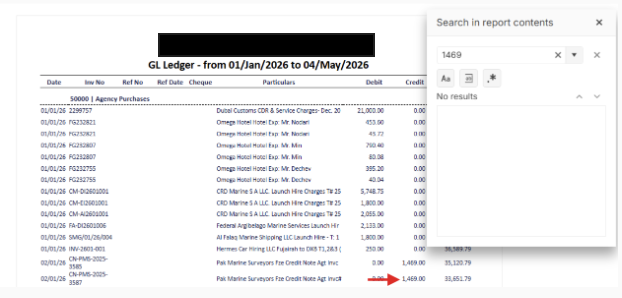
Currently, the search functionality in the Report Viewer only matches the exact text as it is displayed on the screen. For example, if a value is formatted as "1,469", searching for "1469" yields no results.
I would like the search functionality to work against the underlying data value. Users should be able to find numeric values even if they don't include the thousands separator (comma) or other formatting in their search query. This would make the report much more user-friendly and consistent with how users expect search to work.
- Actual Value: 1469
- Displayed Text: 1,469
- Expected Search Behavior: Searching for "1469" should highlight "1,469".