

When I drag a data field from a DataSource component to the Report details section in the Standalone Report Designer, the Report > DataSource property is set automatically to the corresponding DataSource component.
In the Web Report Designer, when I drag a data field, the Report > DataSource property remains empty, and the Preview shows an empty report. It would be very helpful the same functionality to be introduced also in the Web Designer.

Reports designed in Blazor Web Designer may have multiple shared data sources, only one of which can be used to bind details section data. That I understand.
A use of a secondary data source can be to provide data to which Report Parameters can be bound, such as providing dynamic localized values for any language and/or region. This I expect to do in every report of mine.
Right now, unless I've overlooked some existing mechanism, in each and every report for each field in such a secondary data source I have to manually create a new Report Parameter, bind it to the desired data source, and at least set the ValueMember to that data source field. This can be very time consuming, especially if there are a large number to be created.
It would seem possible for you to add a data source feature such that use of that data source in a report automatically does this for me for each selected field in the Select Query. That would save me a tremendous amount of design time!
Also, if you reply to this, perhaps you could tell me what constitutes a report's "Inline Data Source"? I have been unable to locate any discussion in your documentation nor any means to actually create one if that were useful to me.

I am using the ObjectDataSource component and within my class, I use EF Core and initialize the DbContext with a connection string to pull data.
This works as expected in my application, however, when I try to use the assembly in the .NET Standalone Report Designer, it throws exceptions that one or more of the dependencies of the EF Core package cannot be loaded:
FileLoadException: Could not load file or assembly 'Microsoft.Extensions.Configuration

Steps to reproduce:
1. Add two lists at the same level:
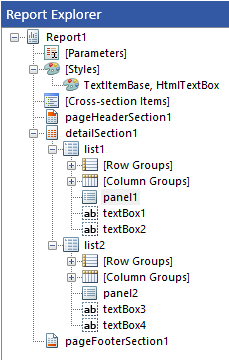
2. Select list1 and click Ctrl+X
3. Select panel2 nested in list2 and press Ctrl+V:
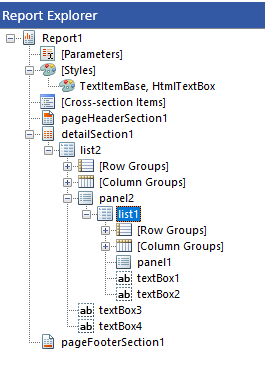
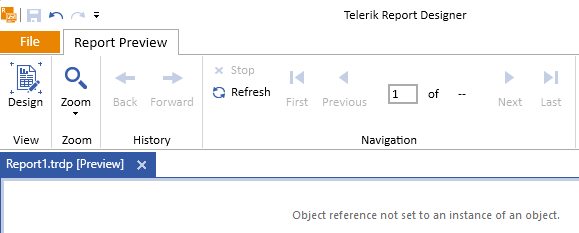
4. Preview the report:
I would like to request an option on bar charts or column chart where the bars can be separated or pushed apart. The default in Telerik is to place all bar series next to each other, which is visually terrible. Attached is a sample image below.
I simple spacing option would be great!
Hello
I see a design issue using JsonDataSource and possible nested objects/arrays and providing data in runtime.
Setting up a "root" JsonDataSource is no problem. Also the way setting the json trough parameters.
The issue begins when I want to use a nested array AND the root object.
Example Json{
"InvoiceDate" : "2024-01-01",
"InvoiceNo":"IN2024-001",
"Positions" : [
{
"Product":"Product 1",
"Price" : 5.25
},
{
"Product":"Product 2",
"Price" : 10.5
}
]
}The approach using JsonPath for accessing the "Positions" is ok but I have to set up another JsonDataSource with the same json and so that I can access the nested array.
And now I don't now how to set the Source of the second JsonDataSource in runtime. Setting it using parameters is only possible with one DataSource.
A nice approach would be binding the Source of the second JsonDataSource to the first JsonDataSource with a JsonPath. So we could avoid duplication of data.
Or let us bind to a nested object in a table.
When the parametersAreaVisible property of the report viewer is set to true, the parameters area of the viewer should be open by default if a report that has visible parameters is being previewed.
However, when a mobile device is used, the parameters area is closed by default.
Additionally, the arrow used to open the parameters area is hidden by default. The device orientation needs to be toggled to horizontal and back for the arrow to appear.
I use cascading parameters and need to specify their Text property with an Expression, as the label should be translated through a User Function. My parameters shouldn't have values initially.
The problem is that the dependent parameter's Text Expression is not evaluated when the report is first displayed by the designer or viewer. The label shows the Expression instead.
If I make the independent parameter Nullable, the issue doesn't occur, but I prefer not to allow Null values.
The problem is shown in the linked muted video.
In Telerik Reporting versions before 18.1.24.514, I could change the order of items in a section by dragging an item up or down in the Report Explorer list.
If I try that now, nothing seems to happen on the screen. Dragging does not appear to change the position of an item in Report Explorer; the item appears to be fixed in place. However, if I close the report and reopen it, the position of the item may have changed.
The same happens if I use Send To Back/Brink to Front on an item. The new item position is not updated in the Report Explorer.
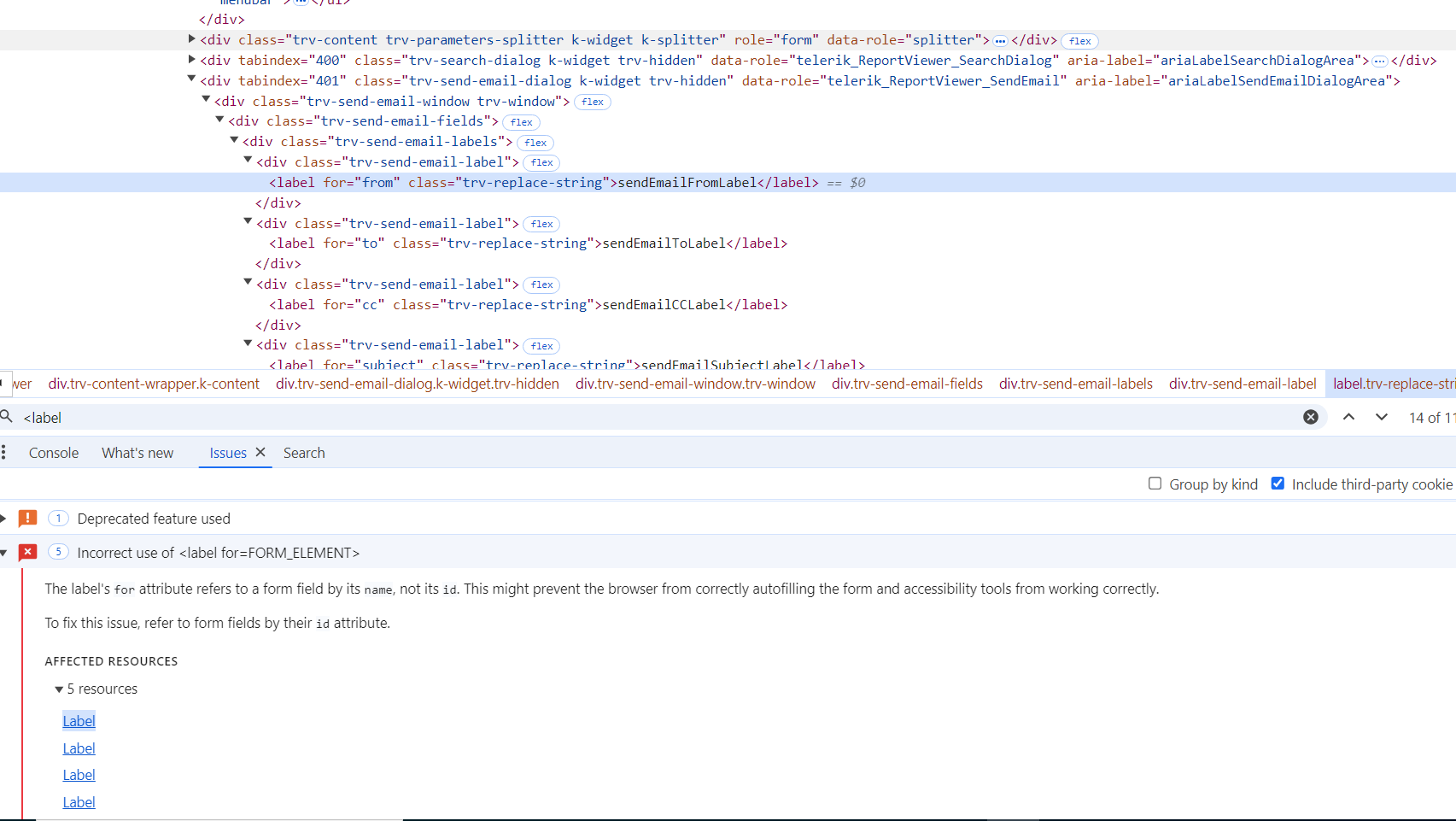
The labels of the Send Mail form in the HTML5 Report Viewer and its wrappers do not conform to accessibility standards. They refer to form fields using the field's name attribute instead of the id attribute.
Telerik.Reporting.nupkg has a dependency on ResXResourceReader.NetStandard.
Our 3rd party security audit has found the missing Digital Signature of this DLL. A digital signature would aid in verifying its authenticity and integrity.

In the latest Reporting version, the interface of the report viewer allows users to set the value of a multiselect report parameter to an empty collection but not make it null.
In some scenarios, reports rely on parameters being null to filter their data and this makes them unusable in the latest version.

When the Blazor Web Report Designer is closed and then reopened, some of its resources are not loaded the second time around, causing the resize handles to break.

Making sure the following resources are always loaded on the web designer page, resolves the issue.
- <script src="/api/reportdesigner/designerresources/ext_js/jquery.ui-1.12.1.min.js/"></script>
- <link type="text/css" rel="stylesheet" href="/api/reportdesigner/designerresources/ext_styles/jquery.ui-1.12.1.min.css/">
The Editor-Control for the HTMLTextBox does not use the localized values from the WebReportDesignerStrings.xx.js.

Setting the Style > BackgroundImage property of the Linear Gauge > Indicator throws the following error:

This doesn't let me customize the Indicator of the Gauge.
When I try to open the edit dialog for a report parameter from the Report Explorer in the .NET Standalone Report Designer, the dialog does not open.
The same appoach works as expected with the .NET Framework Standalone Report Designer.
As an alternative for the .NET Standalone Report Designer, the second approach from the ReportParameter Collection Editor at a Glance - Telerik Reporting article may be used.
When I set the Graph Legend Position to Absolute, the Legend is drawn always inside the Plot area:
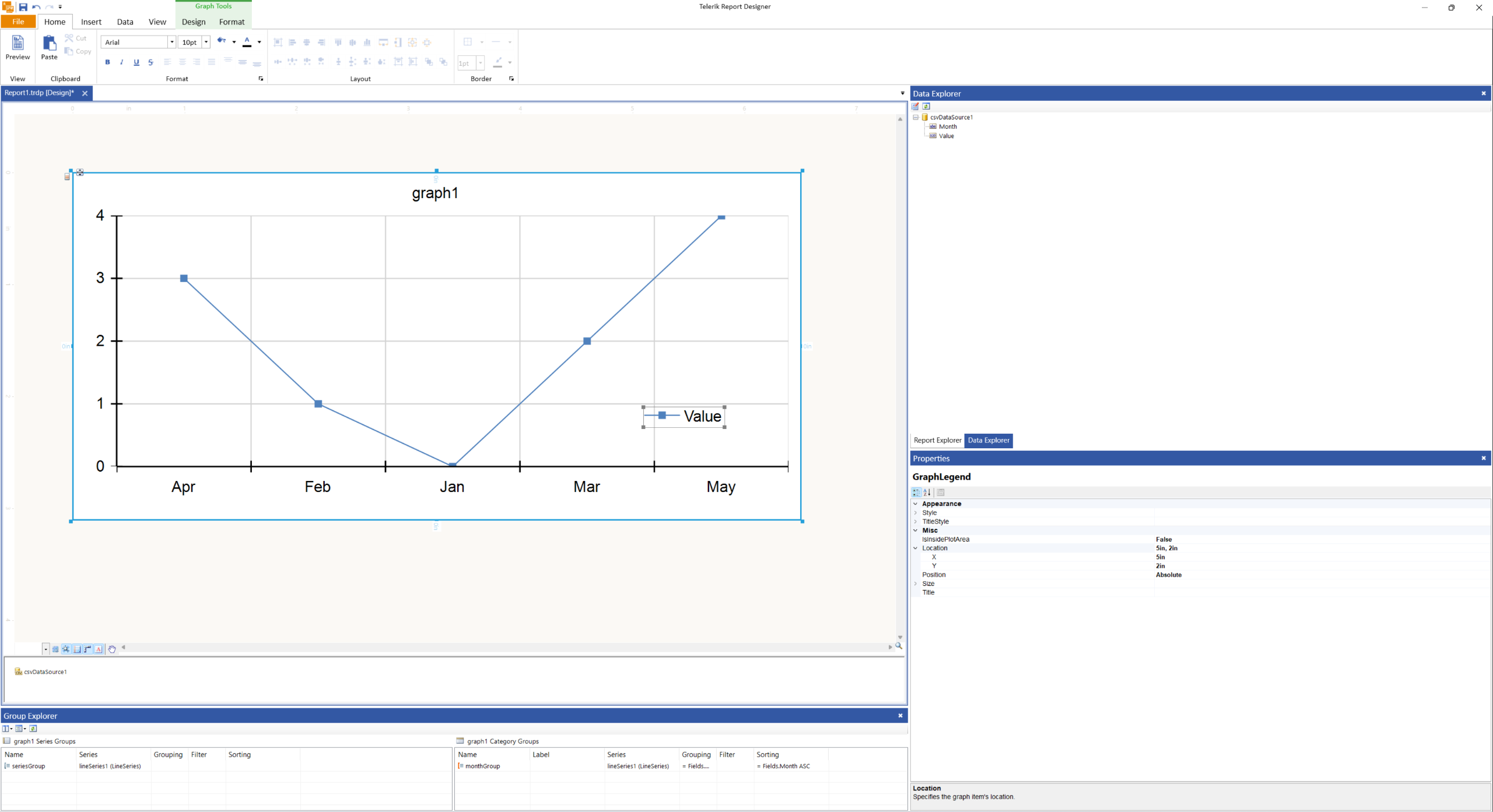
I would expect it to behave as the other Legend Positions and draw the Legend outside the Plot area.

I have a report that uses custom assemblies and I export it through the ReportProcessor class in my .NET application.
For the reporting engine to resolve the custom assemblies, I had to pass an IConfiguration instance through its constructor where the custom assembly is referenced in the assemblyReferences element - Configuration for the ReportProcessor in .NET.
This approach does not work with the latest version of Telerik Reporting(18.2.24.924). I get errors that the assembly and the used types are not registered in the configuration file when I render the report.