

When developing a Telerik report template with the intention of exporting to Excel, I observed the % sign was not displaying for positive numbers in the exported Excel file. The format we were using was {0:N2}%. The results displayed on the HTML report viewer and the Word export document was correct:

However in the excel file result, the cells were formatted without the % for positive numbers, and with the % for negative numbers.
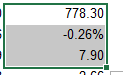
Upon further inspection, I noticed the excel cell formatting was translated as:

This format would not generate the % symbol for a positive number as the trailing % is missing before the semi-colon.
We are fixing this by using the below Format specification directly in the Report Designer:
{0:#,##0.00"%";-#,##0.00"%"}
which is directly retained in the excel custom format:

While I understand that N, C etc. C# number formats are supported according to the design considerations and this bug is also technically resolved by using UseExtendedFormatting (setting this to false translates {0:N2} to #,##0.00"%"), this seems like an unexpected result of translating the format codes that does not match the standard behavior of {0:N2}%. Reporting this behavior for review.

The JS file with the stringResources shipped with the installation at the following location:
C:\Program Files (x86)\Progress\Telerik Reporting <Release>\Html5\ReportViewer\js
is incorrect, it should be as shown in the Localization - Telerik Reporting article.
Basically, line 9 should be changed to:
; (function (trv, $) {while lines 178 to 180 should be like this:
    trv.sr = $.extend(trv.sr, sr);

}(window.telerikReportViewer = window.telerikReportViewer || {}, jQuery));
When HTML entities are used in an embedded expression of the HtmlTextBox, they are parsed.
The same does not happen when the "= ..." expression syntax is used.
For example:
This expression works.
= Replace(Fields.Column2, 'less than','<')This one throws an error.
{Replace(Fields.Column2, 'less than','<')}
Utilizing Native Blazor Report Viewer with Telerik Blazor UI 4.0 results in some toolbar icons appearing blank. The icons are still functional.
Switching to Blazor UI 3.7 fixes the issue.
Here is a snippet from the file '/@progress/telerik-angular-report-viewer/dist/es/telerik-report-viewer.component.js' in Telerik Reporting NPM repository of the Angular Viewer that hard-codes the message:
TelerikReportViewerComponent.decorators = [
        { type: Component, args: [{
                    selector: 'tr-viewer',
                    template: '<div [ngStyle]="containerStyle" [attr.id]="reportViewerID" #container>Loading Report Viewer...</div>',
                    styleUrls: [],
                    encapsulation: ViewEncapsulation.None,
                },] },
    ];
Currently, there is no easy way for localizing or removing this message in an Angular-wise approach.
The DocumentMapVisible/ParametersAreaVisible settings that I set in the initialization of the native Blazor Report Viewer are not respected.
I can hide/show these areas from the buttons in the report viewer's toolbar but am unable to have them hidden initially.
Currently, the only workaround is to have a JS function that clicks on the toolbar after initialization:
function reportViewerMapClick() {
    $(".k-i-dictionary-add").click();
}
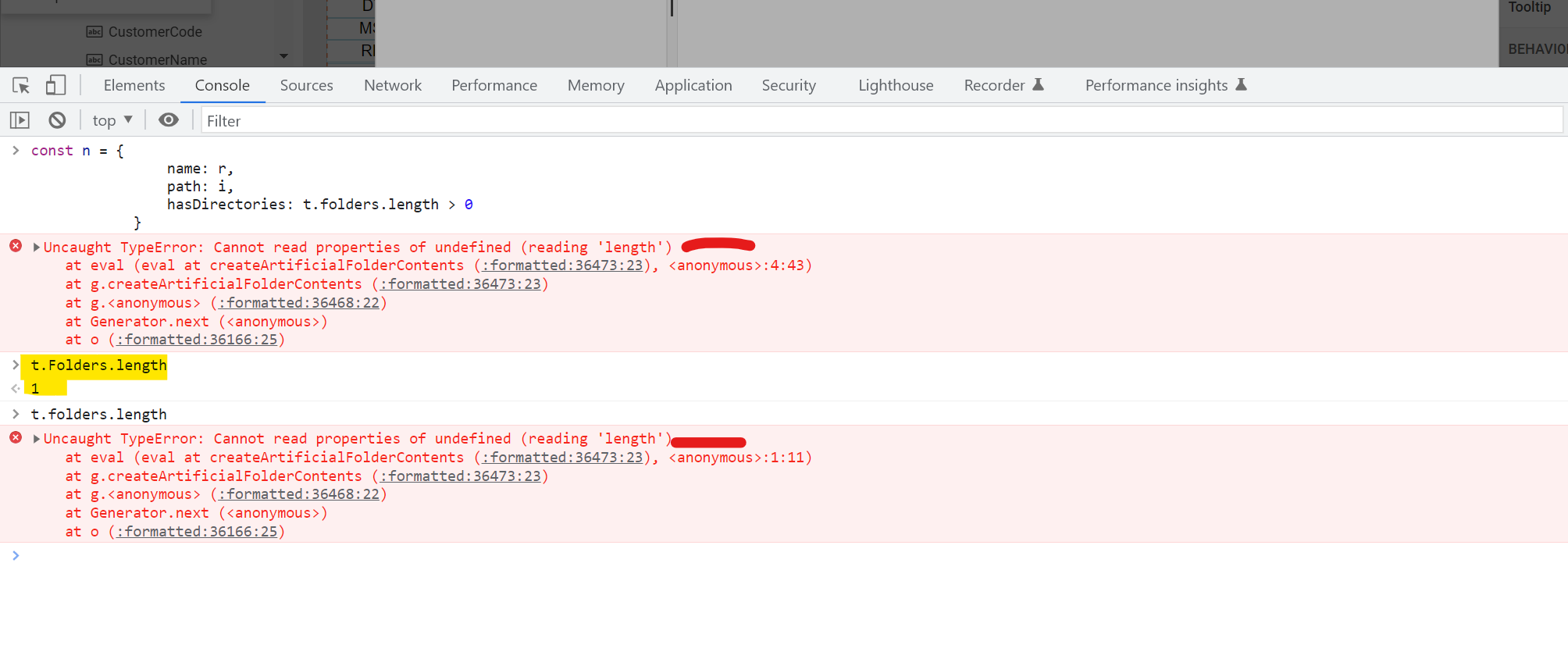
In this file t.folder is lowercase which should be Capital t.Folder
t.folder throws error
t.Folder return value
same or files vs Files

Currently, I am using XmlSerializer to deserialize .trdx file, and it returns Telerik.Reporting.Report type object.
Since, for a long time, I need to add my own functions to be available in the report's expressions, and this need becomes larger and larger, it would be great if I could use the Telerik.Reporting.XmlSerialization.ReportXmlSerializer class to deserialize the .trdx file in my derived class.
For example:
var report = new Telerik.Reporting.XmlSerialization.ReportXmlSerializer().Deserialize<MyReportDerivedClass>(TemplateStream);
For example:
Item("MyProperty",Fields.MyDictionary)This would add a invaluable degree of freedom when considering the structure and usage of report's datasources. For example, the current way of working with ExpandoObject (which are also IDictionaries) is very problematic and in my opinion not a good way of doing it. One such utility function will eliminate almost all of the problems that are present at the moment.
Another way (even better) would be to make something like:
Fields("MyProperty")If both ways are added, this will completely (in my opinion) eliminate all the problems using dictionaries and expando objects in reporting.
I am trying to add HtmlTextBox to my report. After double-clicking on the HtmlTextBox, instead of opening the HTML editor, an error message appears

And after that, it is not possible to delete any element of the report
When the EnableAccessibility PDF device info setting is set to true in the RuntimeSettings of a report, the text set to an item in the AccessibleDescription report item property is not respected.
For example, a PictureBox with AccessibleDescription set to "Text1" will have the "Picture Box" alternate text set in the exported PDF instead of "the Text1" string.
Recursive sub-report with hierarchical data. When expanding/collapsing, all nodes get expanded or collapsed.
I would expect only the selected node to be expanded/collapsed.
For reference, the report from the How to represent hierarchical nested data in report recursively - Telerik Reporting KB article was used as a base
Using a Toggle Visibility action to expand/collapse recursive SubReport results in the "Node should be found among parent nodes" error. The recursive SubReport renders fine without the action.
The report from the How to represent hierarchical flat data in report recursively - Telerik Reporting KB article was used as a base.
I made sure that all files were saved and new assemblies have been generated, but the Main Report Preview shows the subreport with the original layout. If I quit and restart Visual Studio, the Preview will then be updated.
The source of my SubReport was in a nested class and in the preview of the main report I received the error "Invalid report type" although the same nested class was successfully discovered in the VS designer with the assembly-qualified name 'Test.Class1+DetailReport1, Test, Version=1.0.0.0, Culture=neutral, PublicKeyToken=null'.
When I tried using a class (without a nested class, e.g., 'Test.DetailReport1, Test, Version=1.0.0.0, Culture=neutral, PublicKeyToken=null') then I could get the subreport to render within the main report.
It could be the syntax for the qualified name is not handling nested classes.
Attempting to delete a group section from the Explorer tab in the Web Report Designer leads to the following error being thrown in the browser console:
Uncaught (in promise) Error: Rollback inner transaction
    RollbackTransaction http://localhost:51863/api/reportdesigner/designerresources/js/webReportDesigner-16.2.22.1109.min.js/:9
    Rollback http://localhost:51863/api/reportdesigner/designerresources/js/webReportDesigner-16.2.22.1109.min.js/:9
    execute http://localhost:51863/api/reportdesigner/designerresources/js/webReportDesigner-16.2.22.1109.min.js/:9
As a result, the section is not deleted. However, the section can be deleted by deleting the corresponding report group from the Properties area(Data section) in the Web Report Designer.
In such a case, the following exception is thrown
Inner exception: System.ArgumentException: The path is not of a legal form.
   at System.IO.Path.NormalizePath(String path, Boolean fullCheck, Int32 maxPathLength, Boolean expandShortPaths)
   at System.IO.Path.InternalGetDirectoryName(String path)
   at Telerik.Reporting.Interfaces.FrameworkDependentDeploymentModel.GetDirectory(Assembly assembly) in
The likely reason for the error is that since the assembly is loaded from the bytes, and not from a path, the assembly.Location in the Telerik.Reporting.Interfaces.FrameworkDependentDeploymentModel.GetDirectory method is Null.

In some scenarios, the PrintOnLastPage functionality of the page sections does not work as expected.
For example, if the report with PrintOnLastPage is the last one in the report book, on the last page of the report book, which will also be the last page for that report, a page section will still be rendered even if PrintOnLastPage is False.
This happens when the default PageNumberingStyle.Continue is used by the reports.
On the other hand, if the last report has a PageNumberingStyle.ResetNumberingAndCount, the page section will not be rendered if PrintOnLastPage is set to False, so in this scenario, it works as expected.