

The data member list in "Choose a data member" (step 2) of the objectDataSource wizard in the Web Report Designer does not appear to be in alphabetical order as it is in the Standalone Report Designer.
When there are many data members it is hard to pick the one you want when not ordered alphabetically.
In the Web Report Designer's objectDataSource wizard, once the "Preview data source results" (step 4) are ready and the Finish button is clicked, there is another call to the data source member but instead of using the Design-Time Values for the member, the values in the Value column appear to be used.
For example, If report parameters are already assigned to the data source parameters the string of the Value (e.g. "= Parameters.StartDate.Value") is used instead of the actual report parameter value. I think the data member call to generate the data schema should be the Design-Time Values again. In order to get the data schema generated I had to use the same values for Value column as in the Design-Time Values value.
After the data source parameters are assigned to report parameters then it breaks the generation of the data schema later when the report is opened again in the Web Report Designer and there is an error (e.g. Error An error occurred while loading the data schema for "Widgets". ("Message"."String was not recognized as a valid DateTime.").
I cannot create a Report Parameter with the same name as a data source parameter or CSV data source field. Trying to do so results in an error messagе
(Error Could not change property 'Name'. Name 'FromEffectiveDate' already exists).
This issue can be demonstrated in the Web Report Designer Demo page: create a parameter for the yearDataSource data source, try to create a report parameter with the same name to get the error.
Using report parameter names that are also data source parameter names works fine in the Standalone Report Designer.

I have the chance to use a 27", 5120 x 2880 monitor, with text on Windows set to 200%.
The problem with Telerik Report Designer is that the icons in the report designer are very small and barely usable:
- Panel icon to move it.
- Table icon to move it.
- The open / close icons in the Report Explorer.
Also the zoom indicator at the bottom left of the screen, where the text part is too small to display the current zoom.
Steps To Reproduce:
- Install Reporting.
- Go to \Tools folder.
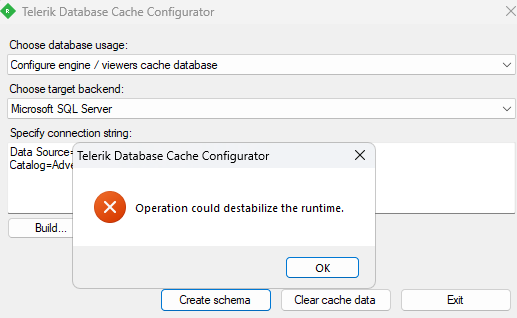
- Start DatabaseCacheConfigurator.exe
- Leave the first combobox to 'Create engine viewers/cache database'
- Paste a valid connection string in the textbox below, e.g. Data Source=.\sqlexpress;Initial Catalog=AdventureWorks;Integrated Security=True
- Click on Create Schema or Clear Cache Data.
Expected behavior: The function is executed
Actual behavior: A message saying "Operation could destabilize the runtime." is shown.
1. The data member list in "Choose a data member" (step 2) of the objectDataSource wizard in the Web Report Designer does not appear to be in alphabetical order as it is in the Standalone Report Designer. When there are many data members it is hard to pick the one you want when not ordered alphabetically.
2. For a data member that returns a DataSet result, a table row has to be returned for the design time feature to generate a data schema. In the Standalone Report Designer a returned row is not necessary, all that is required is a returned DataSet with a Table with Columns setup. It would be easier when using Web Report Designer to not require data returned to establish the data source data schema. In the WidgetDataSource a fake row is returned for the sake of having the data schema generated.
3. In the Web Report Designer objectDataSource wizard, once the "Preview data source results" (step 4) are ready and the Finish button is clicked, there is another call to the data source member but instead of using the Design-Time Values for the member, the values in the Value column appear to be used. If report parameters are already assigned to the data source parameters the string of the Value (e.g. "= Parameters.StartDate.Value") is used instead of the report parameter value. I think the data member call to generate the data schema should be the Design-Time Values again. In order to get the data schema generated I had to use the same values for Value column as in the Design-Time Values value. After the data source parameters are assigned to report parameters then it breaks the generation of the data schema later when the report is opened again in the Web Report Designer and there is an error (e.g. Error An error occurred while loading the data schema for "Widgets". ("Message"."String was not recognized as a valid DateTime.").
4. In the Report Previewer for the Web Report Designer there does not seem to be a way to provide a null value to a nullable data source parameter. For the GetWidgets member the FromEffectiveDate parameter is a nullable DateTime. After the data source is configured the data source parameter DataType is set to String, it did not resolve to nullable DateTime. Even after I change the data source FromEffectiveDate parameter to DataType of DateTime it cannot accept a null value from a DateTime report parameter, it seems to be interpreted as string instead of null. In the Standalone Report Designer there is no problem having a DateTime report parameter passing null to a nullable DateTime data source parameter; after reconfiguring the data source in the Standalone Report Designer the DataType for the data source parameter is <DataType>System.Nullable`1[System.DateTime]</DataType> instead of <DataType>System.DateTime</DataType> as from the Web Report Designer.
5. This is not a specific objectDataSource wizard issue but rather a general issue in the Web Report Designer. I cannot create a Report Parameter with the same name as a data source parameter or CSV data source field. Trying to do so results in an error message (Error Could not change property 'Name'. Name 'FromEffectiveDate' already exists). This issue can be demonstrated in the Web Report Designer Demo page: create a parameter for the yearDataSource data source, try to create a report parameter with the same name to get the error. Using report parameter names that are also data source parameter names works fine in the Standalone Report Designer.
Hi,
In Desktop Designer, I create a very simple Report with :
- a JSON datasource mapped to the report
- a Table with two colunms
I want to duplicate this table, so I select it and do a copy. After that, I select the detailSection and do a paste. The pasted table, in the Report Explorer look fine, but in the designer view it is not the case. And if I compare the TRDX files, an entire section is missing (the <Cells> section).
Attached files :
- Multi-zone.trdx : Before copy/paste
- Multi-zone-2.trdx : After copy/paste
- Screenshot.png : screenshot of the Designer where you can see the two tables and the Report Explorer
Thank you
PS: In additional informations, I specify ASP.NET MVC as Project Type, but it is not relevant.
When using a date parameter with AutoRefresh set to True in the Standalone Report Designer, selecting a new value from the date picker does not automatically refresh the report viewer to show the updated report. To make the new value take effect, you need to move the focus away from the date picker.


When upgrading my .NET Framework project with the Upgrade Wizard, the Telerik.Reporting.OpenXmlRendering assemblies, including the newer 2.7.2 and 3.0.1 ones, are not upgraded
All assembly references except Telerik.Reporting.OpenXmlRendering ones are updated. The upgrade wizard finishes without errors.

This is very annoying as I have to replace them manually,

When I export my report in Excel with the Standalone Report Designer for .NET, the GDI engine produces the expected result, whereas with the Skia graphics engine, the Graph in the report is rendered with a bold font, although I use a regular/normal font.
Hello,
the search results in a PDF generated with report is not correct. Again...
Please fix this bug and add this scenario to your tests.
Steps: Search for a text in a pdf.
Hello Telerik Team,
I would like to suggest a feature enhancement for the Web Report Designer that would allow dynamic configuration of design-time parameter values during initialization.
Currently, design-time values for report parameters are embedded within the report definition and can only be set manually using the Web Report Designer interface. While runtime parameter values work perfectly and can be passed dynamically through code, not being able to dynamically set design-time values causes significant limitations—especially during the report design process.
My Use Case:
In my application, I load data from a dynamic web service endpoint, and the service domain needs to be set at runtime. While this works fine during preview in my ASP.NET MVC project (where I pass the URL dynamically using report parameters), I run into issues when designing reports:
During design time, the URL has to be manually entered into every Web Service Data Source just to fetch the model fields and avoid errors.
If the domain name changes (e.g., due to staging/production environments), I must manually update the domain in every report and each Web Service Data Source, which is both time-consuming and inefficient.
This becomes even more tedious in large projects with many reports and data sources.
So, my question is: Is it mandatory to pass design-time values (like the service URL) manually just for design-time purposes? If not, it would be incredibly helpful to have a way to supply these values dynamically during the Web Report Designer initialization, perhaps via a configuration option or external context.
Petar from the Telerik team mentioned that this would indeed be a valuable feature and encouraged me to submit this suggestion. You can view our discussion here: 🔗 Dynamic Web Service Domain Configuration in Telerik Report Designer Server
This capability would make designing reports much smoother and far more maintainable, especially for applications that rely on dynamic, environment-specific configurations.
Thank you for considering this request, and I appreciate your continued support and guidance.
Screenshots are also attached for quick reference, though they are already available in the forum link above.
Best regards,
Prabesh
Currently, when using External Stylesheets in the reports, the engine tries to first load the stylesheet as an embedded resource of the assembly. If it fails to load it from the assembly, a message is written to the trace along the lines of:
ESS: Attempt to load ExternalStyleSheet from EmbeddedResource from assembly Telerik.Reporting, Version=19.0.25.211 with resource name styles.xml is unsuccessful.
After this, the engine will try other ways to resolve the stylesheet such as from URI and if it succeeds, the report will render as expected.
This can create confusion because looking at the trace, one might think that there were errors with the rendering of the report because the stylesheet did not load but it was actually successfully loaded with one of the other approaches.
It would be better to write the errors to the trace only if the stylesheet does not load after all attempts.
To reproduce, use online web designer demos with Employee Sales Summary.trdx report.
Check the video https://go.screenpal.com/watch/cTfDlNnj4I1.
- The main report opened in the designer has a Navigate to Report action.
- Preview the report and trigger the action to open the second report.
- Now, click on Design to go back to design time.
Expected: opens the main report
Observed: In design you see the second report
Additionally, the URL to the second report is absolute rather than relative path - the issue logged in Full system-path being used by REST Service as reference when linked by a 'Navigate To Report' action
2. Toolbar Button Properties: Along with this, since IReportViewerTool exposes the Icon and CommandName, request it also expose an Enabled property. At a bare minimum, it would be helpful if, while rendering, all but the 'Stop Rendering' (Cancel) and Pager buttons are disabled by default or by setting a new viewer property.
Currently we must use JSInterop to accomplish these things.
The reason we are managing these things in the first place is because we are using Custom Parameter Editors (CPEs). When a long-running report is in the process of rendering, and a user changes a parameter and re-requests the report (either via our 'Retrieve' button or a viewer toolbar button), an unhandled exception occurs in _content/Telerik.ReportViewer.BlazorNative/js/reporting-blazor-viewer.js. So we make use of the OnRenderingBegin and OnRenderingEnd events to disable/enable the CPEs. The problem arises when the 'Stop Rendering' (Cancel) button is clicked. Since we cannot detect the button click, our CPEs remain disabled.
I have created an abstract class in my report library that inherits from Telerik.Reporting.Report. When I try to load the project's assembly in the Standalone Report Designer to import those reports as TRDP, an exception is thrown while the application tries to load the assembly that there are report types that do not have a parameterless constructor.
To resolve the issue, I had to remove the 'abstract' modifier. However, that should not be necessary. The wizard should ignore abstract classes or at the very least, let me import the other report types while displaying a message that there are report types with parameterless constructors.
When trying to open reports from an assembly in the Standalone Report Designer so that they can be imported, if there are types that inherit from Telerik.Reporting.Report that do not have a parameterless constructor, this will cause an exception as it is required for the report types to have such a constructor, otherwise, the wizard cannot import them into TRDP.
In this scenario, the report types that do not have a parameterless constructor should be written to the trace or in the exception message dialog so that the user can see which are the problematic types and correct them.
We have reports that contain a table of images. This seems to work great in the designer and when generated to a PDF without accessibility turned on. However, with accessibility turned on and rendering to a PDF, it throws an exception:
System.NullReferenceException: Object reference not set to an instance of an object.
   at Telerik.Reporting.Pdf.PdfAccessibilityElementWriter.TryAttachToParentNode(ProcessingInstanceIdentifier id, PdfOrderedReference element, Int32 rowIndex, Int32 columnIndex)
   at Telerik.Reporting.Pdf.PdfAccessibilityElementWriter.TryAttachToParentNode(IProcessingElement processingElement, IProcessingElement parentProcessingElement, PdfOrderedReference taggedElementReference)
   at Telerik.Reporting.Pdf.PdfAccessibilityElementWriter.AttachNonLeafNode(LayoutElement element, PdfOrderedReference taggedElementReference)
   at Telerik.Reporting.Pdf.PdfAccessibilityElementWriter.InitTaggedElement(AccessibilityPdfElement pdfElementType)
   at Telerik.Reporting.Pdf.PdfAccessibilityElementWriter.AddFigureElement(ITableCell element)
   at Telerik.Reporting.Processing.ProcessingElementVisitor.Visit(LayoutElement element)
   at Telerik.Reporting.Writing.AccessibilityElementWriter.StartWrite(ReportItemBase element, Int32& index)
   at Telerik.Reporting.Writing.VisualElementWriter`1.StartWriteAccessibilityItem(ReportItemBase item, ElementPageInfo pageInfo, DocumentWriter writer)
   at Telerik.Reporting.Writing.VisualElementWriter`1.WriteClientFocusableItems(T element, ElementPageInfo pageInfo, DocumentWriter writer)
   at Telerik.Reporting.Writing.ReportItemBaseWriter`1.StartWrite(T element, ElementPageInfo pageInfo, DocumentWriter writer)
   at Telerik.Reporting.Writing.ElementWriter`1.Telerik.Reporting.Writing.IElementWriter.StartWrite(LayoutElement element, ElementPageInfo pageInfo, DocumentWriter writer)
   at Telerik.Reporting.Writing.WriteOperationsDispatcher.Visit(PictureBox pictureBox)
   at Telerik.Reporting.Processing.ProcessingElementVisitor.Visit(LayoutElement element)
   at Telerik.Reporting.Writing.DocumentWriter.Telerik.Reporting.BaseRendering.IWriter.WriteStartElement(LayoutElement element, ElementPageInfo pageInfo)
   at Telerik.Reporting.Paging.PageElementsLayer.OutputToPage(IPageHandler handler)
   at Telerik.Reporting.Paging.PageContent.Output(IPageHandler handler)
   at Telerik.Reporting.Paging.PageCompositionBase.OutputPageContent(Stopwatch stopwatchOutputContent, PageContent pageContent)
   at Telerik.Reporting.Paging.PageCompositionBase.<>c__DisplayClass124_0.<CreatePageContentOutputTask>b__0()
In the attached report, all items in the detail section have Docking set to Top.
In the Interactive view of the report designer, the report looks fine.
In PrintPreview mode though, some items overlap.