

On some system configurations, the setup wizard throws the following error when upgrading the Telerik Report Server from version R2 2023 SP1 to version R3 2023 SP1.
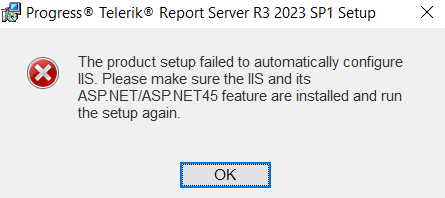
To work around the issue, one can uninstall the previous version first and install the new one afterward.

In my MSSQL database, I use SQL Server Authentication with a password that contains '^' and '<'. I connect without problems through the MSSQL Management Studio.
When I try to pass the connection string with this user, I receive an Internal Server Error and cannot set up storage with it.

In the production environment, there is no option to clear the Redis database after each redeploying/restarting of the applications (ex. k8s with many pods).
The are many reasons:
- this database can be used for other purposes, but you deprecate RedisStorage with a separate database selection
- more complex deploy/restart operations with additional steps to clear Redis
- users can use Reporting at this moment
Please add TTL option for RedisStorage in ReportServiceConfiguration
Yesterday I installed the report server. Everything seemed to be working correctly. Today when I try to view a report I get this error message "Error registering the viewer with the service. An error has occurred. Incorrect value (null) deserialized. Make sure you are using CacheStorage inside single-instance application deployment only."


As a Report Server user,
I need to deliver reports to all subscribers in a single email message,
So that no person gets the email more than once if the subscriber emails are groups and a person is part of multiple groups.
This would also allow the persons to reply to all other subscribers.
Milen
In one of our Dev environments we had Telerik Report Server installed, but unfortunately whoever set it up, didn't write down the Admin Username and Password.
The SMTP server wasn't configured when starting with the Report Server, and there is no option for resetting the password.
We do have a username and password that logs in, but it doesn't have sufficient rights to make the necessary administrational.
In such scenarios, it would be helpful if there is an external tool we may use to create an admin user directly in the Storage of the Report Server. Obviously, if somebody has unlimited rights to access the Report Server storage, he/she should be authorized also to be an admin of the Report Server.
Good evening. I have a ticket number 1563975. Attached video where you can see attached information. The TRS core database does not support SSAS OLAP connection. Only local connections work. Can you add that it is centralized?
We are using database storage for the Report Server and we are monitoring the report server service.
If the database is not accessible, for example due to it being updated, the service may stay running but it will not be able to send scheduled tasks.
In this state of the service (running, but not working), no monitoring or automated restart of the service will be triggered.
Please change the state of the service from running to not running when the service is losing contact with the database
The 'report name/Shelve' path seems to be broken.
For example, when I try to preview the report in Server > Web Preview in the Standalone Designer connected to the Report Server, the browser tries to open the URL 'reportServerHost/Report/View/CategoryName/ReportName/Shelve'. However, it hangs and doesn't display anything.
When I delete a report from the Reports page, it disappears from the list. However, its details are still visible.
When I refresh the page, the deleted report info disappears.
The Report Server's built-in Web Report Designer does not resolve custom functions assemblies that are referenced in the TelerikReporting.config configuration and thus, on Design time, they are not visible under Functions -> Misc.
The workaround around is to reference the custom functions assembly in the Web.config file in {install_dir}\Telerik.ReportServer.Web
When I try to set a new SMTP I receive the error:
An error occurred while saving the settings: The changes were not applied!
There is nothing logged by the Trace Listener or in the Windows Event Viewer.
Some of my scheduled tasks generate errors in the ServiceAgent log like:
Telerik.ReportServer.ServiceAgent.exe Error: 0 : Sending an email message failed:
System.Net.Mail.SmtpException: Exceeded storage allocation. The server response was: 4.3.1 Message size exceeds fixed maximum message size
   at System.Net.Mail.DataStopCommand.CheckResponse(SmtpStatusCode statusCode, String serverResponse)
...
and
Telerik.ReportServer.ServiceAgent.exe Error: 0 : Sending an email message failed:
System.Net.Mail.SmtpException: Failure sending mail. ---> System.IO.IOException: Unable to write data to the transport connection: An existing connection was forcibly closed by the remote host. ---> System.Net.Sockets.SocketException: An existing connection was forcibly closed by the remote host
   at System.Net.Sockets.NetworkStream.Write(Byte[] buffer, Int32 offset, Int32 size)
...
In these cases, the report document seems to be generated correctly, however, it is too large to be attached to an email and there aren't any emails sent to the users.
It would be helpful to have at least notifications sent to the admin that the task was executed, but the emails were not sent due to particular reasons.

I am trying to edit an existing user, and before changing anything I receive the error message 'The email is already taken!'. This happens occasionally.
Here is a link to a video that demonstrates the problem.
Edit User Dialog cannot be closed through the Cancel/Save button after resetting the user's password. The issue appears to happen when the password is auto-filled.
Even though the dialog cannot be closed through the Cancel/Save button, it closes successfully through the X button in the top right corner. However, that user will no longer be visible on the page needs to be reloaded.
Currently the Report Server appears to keep the execution history of scheduled report tasks indefinitely. The task execution history is a very useful feature but there appears to be no way to limit the history to a certain amount of time. For our use case it is unlikely that we will need to go further back then 1 or two months in the history and as we get months an even years of history (which includes the execution and related documents) the time needed to backup and restore the Report Server increases. We only have about 30 scheduled reports that run each day but over a year that is 10,000+ executions that are stored and anything over a month or so old has little value to us. I am not sure if these also have an impact on the overall performance of the Report Server or at least the Scheduler portion of the UI but that would be another reason to limit the retention.
Currently the only method to delete the executions is to either (a) do it manually via the UI (screenshot below) or (b) to write an application that deletes executions outside our retention window using the API to query and then delete them. Method (a) is too time consuming for a person to do and (b) will require writing the application but then also monitoring it's status and keeping up with any changes in the API over time.
I would propose adding some method of allowing users to set a "retention period" for scheduled task executions.
- The retention period would ideally be able to be set globally and overridden for a particular task
- The retention period would be specified in days
- To actually remove the old executions you could create a task that runs once a day and is executed by the windows service that exists -OR- each time the task executes to run the report it can also look to see which historical executions are older then the retention period and delete them.
- The removal of the historical tasks should also delete any associated documents
Implementing this would allow for much quicker upgrades, backups, and restores of the Report Server.