

This option is supported in the Telerik Reporting product, and I would like to see it supported in the Report Server as well.
We have a scenario where some groups need to have reporting info that is not visible to other users on the Report Server instance. I can assign permission limiting access to report categories and data connections, but I don't see a way to limit shared data sources.
Imagine, for example, a scenario where payroll wants to include an ADP data feed in their reports and they want to save it as SDSX to use in multiple places. As far as I can tell, all other report editors on the server can now load and use that SDS.
I should be able to determine what SDSX files each user can access in the same way that I can for specific reports.

Steps to reproduce.
1. Configuration -> Mail Template -> Schedule Task Attachment -> Subject set to empty.
2. Update and Save changes.
3. Access Reports
For example, the 'Activity' and 'items per page' in the Scheduled Tasks are not available in the 'sr.js' file:
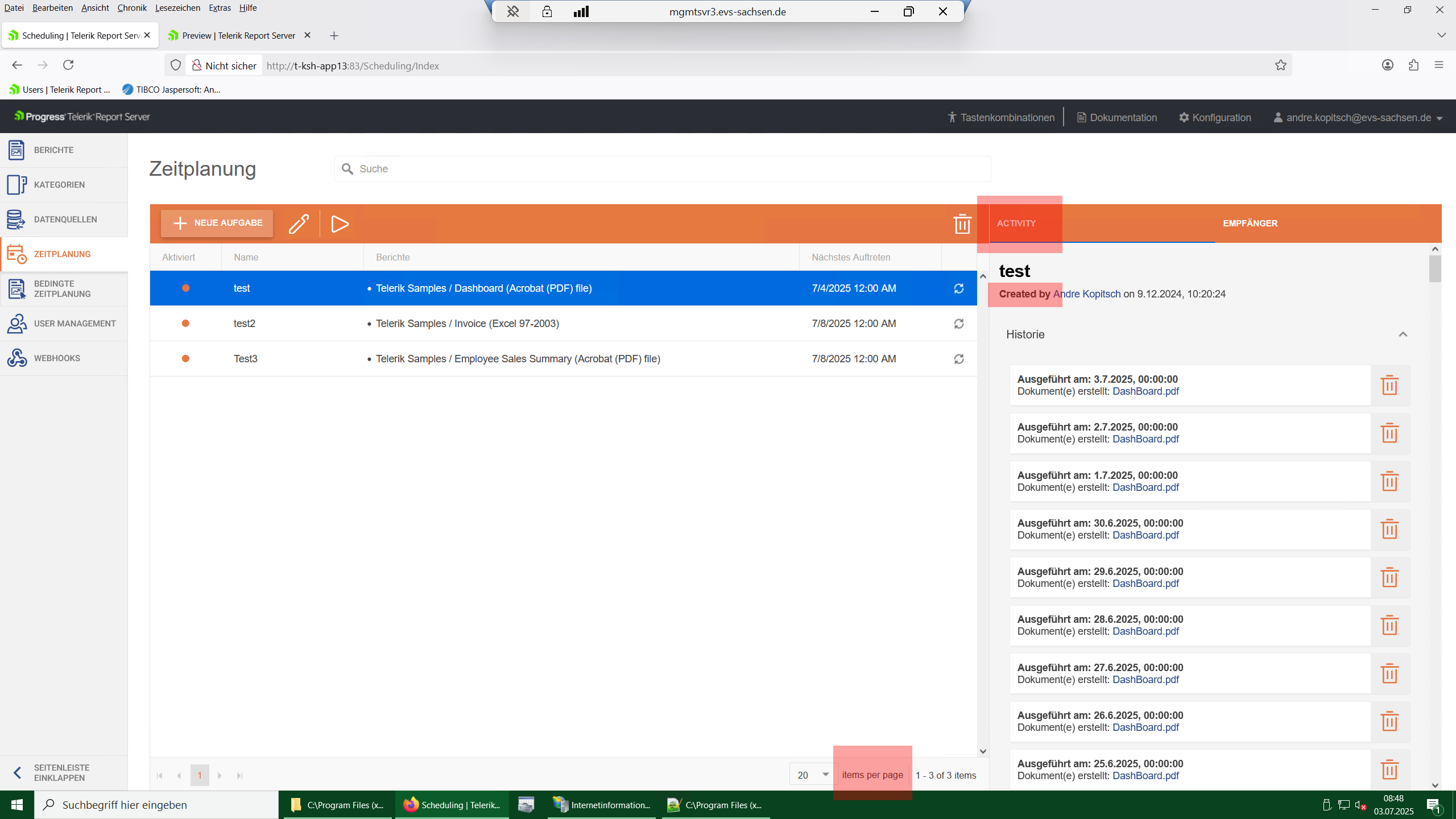
This doesn't let us translate the whole Report Server.
The Report Server mail templates have a variable named "link" which should provide a link to the exported document for the email receiver.
However, this link does not use the Report Server's public address set through IIS, instead, the link uses the "http://localhost:83" as a base URL for the link.
Please correct the behavior and/or allow for changing the links' base URL.
Hi,
I'm trying to customize the interface language (english to german) of our report server web application without success. I set some language entries in the sr.user.js file in the script folder of the web application but the labels of the report server remain english. When I do this in the original file (sr.js) it works well.
Currently, the POST api/reportserver/v2/documents endpoint is available only for the standard version of the Report Server.
Consider adding it to Report Server for .NET as well.
When I try to use the Report Server for .NET 2025 Q1 in a Docker container, I get the following error in the logs:
"An error occurred while checking the licenseResult: The value cannot be an empty string. (Parameter 'path')."
The error does not seem to prevent the Report Server Manager from remaining functional.

I am using the Reporting/Report Server 2024 Q4, and my report uses the Amiri font.
Other export formats work as expected, however, the PDF export fails with an "Object reference not set to an instance of an object" error message and produces a corrupted/empty PDF.
Hi Team,
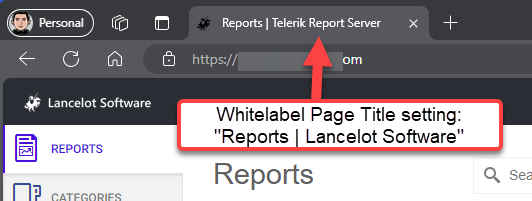
Currently when Report Server has whitelabeling enabled, the browser tab will still show "Page | Telerik Report Server". This request is to allow us to set a value for the 2nd half of the page title.
I see this is applied by using the @ViewBag.Title, my request is to have a field in the Whitelabeling settings page for a brand name in the title. This could be combined with the page name to have a customized title. For example "Page Name | Whitelabeled Name".
Here's a visual example to explain further
Thank you,
Rick
We need to send emails to specific people only when Errors occur in scheduled reports. They shouldn't receive the scheduled reports when there are no errors.
For example, there may be a new user role added for this purpose.
The assemblyReferences, typeReferences, and typeValidation configuration elements are not respected from the TelerikReporting.config files of Report Server Manager and ServiceAgent.
The same settings are respected when set in the corresponding Web.config and Telerik.ReportServer.ServiceAgent.exe.config.
When you revert to another Report revision and don't refresh the browser page, the date of the active report in the Revisions History is different from the Report Date Modified. The user needs to refresh manually to match the dates.
The issue is demonstrated in the linked muted video.
We recently upgraded our report server after years of operation due
to various technical challenges. Our system currently manages over 250
reports and more than 100 scheduled tasks, all of which have been
running for the past seven years. The backup process has become
significantly delayed, as we are handling over 70GB of data, primarily
composed of daily generated reports related to executed scheduled tasks.
While we regularly review execution history (execution date & time) for debugging purposes, but we never use the
reports of executed scheduled task for all historical records. This leads to unnecessary storage usage, which will continue to grow over time.
Manually deleting seven years' worth of historical reports across over 100 tasks is not feasible, and scripting this deletion would impact the performance of our already heavily utilized report server.
I believe the execution history is valuable for everyone for debugging purpose. However, the associated reports which takes significant amount of storage space should be kept optional. Therefore, I propose the following features:
During the configuration of scheduled tasks, include an option (similar to an "Enabled" checkbox) that allows users to choose whether to retain or delete the associated report for each scheduled task execution. This would only apply to reports generated for future task executions.
Introduce a REST API endpoint within the Scheduled Tasks framework that would facilitate the deletion of historical tasks and their associated reports.
These enhancements would greatly improve our report management and storage efficiency as we have over 10+ intensely used report servers for different businesses.
These are some feature requests which align with our goals -
HTML5 Report Viewer cannot connect to report server for .NET.
The old report server still connects us expected.
Hi Team,
This feature request is to ask that a capability be added to Report Server that restricts certain administrative functionality to only be allowed on predefined subnets (e.g. adding new users, data sources, etc.).
Thank you,
Amish