Declined
Last Updated: 16 Dec 2025 08:23 by ADMIN
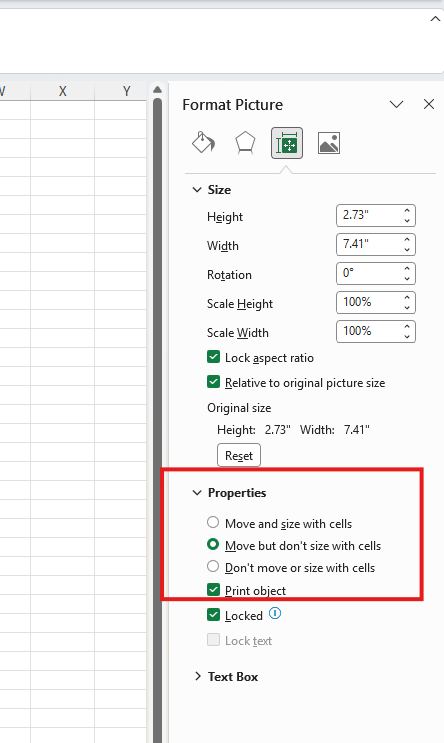
This is caused by hasSize field in ShapeBase class which is set when decoding the image size. However, when SetWidth and SetHeight methods are called before the size is initialized the value of hasSize is false which causes the issue.

Workaround: Call the Size property getter before calling SetWidth/SetHeight method. See the code below:

// This line workarounds the issue with SetWidth method which does not get the correct size when locking aspect ratio. 
Size size = imageInline.Image.Size;
imageInline.Image.SetWidth(true, width);
Declined
Last Updated: 16 Dec 2025 08:05 by ADMIN
Currently empty paragraphs are exported to HTML with one space inside. Such paragraphs are not rendered by the browser. Such paragraph should be exported to HTML with one non-breaking space (@nbsp;) inside to ensure that they are visible in the browser.

Workaround: manually add nbsp-s in all empty paragraphs:
paragraph.Inlines.AddRun("\u00a0");


Steps to reproduce:
- Create document with empty paragraphs:

                        var document = new RadFlowDocument();
                        Section section = document.Sections.AddSection();
                        section.Blocks.AddParagraph();
                        section.Blocks.AddParagraph();
                        section.Blocks.AddParagraph();
                        section.Blocks.AddParagraph().Inlines.AddRun("test");

- Export it to HTML.

- Load the HTML in a browser.

Expected: The word 'test' is preceded by 3 empty rows.

Actual: The word 'test' is on the first row.
In Development
Last Updated: 16 Dec 2025 08:04 by ADMIN

The issue is reproducible only in a specific setup with a specific document. It is related to the calculations of the line spacing when the table row should be split between two pages. Workaround: Change the line spacing:

foreach (var paragraph in this.document.EnumerateChildrenOfType<Paragraph>())
{
    paragraph.Properties.LineSpacingType.LocalValue = HeightType.Auto;
    paragraph.Properties.LineSpacing.LocalValue = 1;
}

In Development
Last Updated: 15 Dec 2025 18:45 by ADMIN
Some PDF files have an additional content added before the file header (before %PDF-1.4 for example). This additional content makes all byte offsets in the document invalid, which causes the format provider to throw an exception.

At this point, to import a similar document it should be pre-processed so the content before the version header is removed before importing it.
In Development
Last Updated: 12 Dec 2025 14:40 by ADMIN
Handle the import of incrementally updated documents with invalid cross-reference offsets.
In Development
Last Updated: 12 Dec 2025 06:24 by ADMIN
Content is moved from the second page to the first after applying styling to the footer and exporting to PDF format
Declined
Last Updated: 10 Dec 2025 12:40 by ADMIN
Created by: Alexandr
Comments: 2
Category: PdfProcessing
Type: Bug Report
4
Please check the attached pdf document showing incorrect stamp processing.
In Development
Last Updated: 10 Dec 2025 10:57 by ADMIN
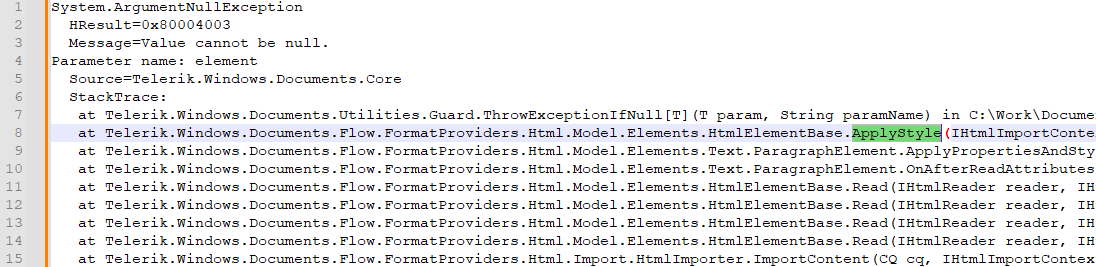
HtmlFormatProvider: NullReferenceException is thrown when exporting a document that contains styles with no ParagraphMarkerProperties.
In Development
Last Updated: 10 Dec 2025 09:26 by ADMIN
Files exported with SpreadStreamProcessing cannot be read by OleDB consumers
In Development
Last Updated: 09 Dec 2025 11:04 by ADMIN
MissingMethodException is thrown when converting a PDF stream to a PdfArray.
In Development
Last Updated: 09 Dec 2025 10:25 by ADMIN

During export operation of a document that contains signature fields the following error occurs: 

System.InvalidOperationException: 'The signature was not properly initialized for external signing. The signing delegate is missing.'
In Development
Last Updated: 09 Dec 2025 10:24 by ADMIN

Resaving a document with Acrobat throws an error due to invalid Info dictionary in document trailer.

In Development
Last Updated: 05 Dec 2025 14:42 by ADMIN
The "w:multiLine" property of a text content control is lost on import-export.
<w:sdt>
  <w:sdtPr>
    <w:text w:multiLine="1"/>
  </w:sdtPr>
  <w:sdtContent>
    <w:r>
      <w:t>Line 1</w:t>
    </w:r>
    <w:r>
      <w:br/>
    </w:r>
    <w:r>
      <w:t>Line 2</w:t>
    </w:r>
  </w:sdtContent>
</w:sdt>
Unplanned
Last Updated: 05 Dec 2025 08:35 by David
PdfFormatProvider: Incorrect column width for tableGrid tables with merged cells.
In Development
Last Updated: 04 Dec 2025 13:29 by ADMIN
Tab stop distances are not calculated correctly during PDF export if a hanging indent is applied.
Unplanned
Last Updated: 03 Dec 2025 14:24 by Domenico

This is the code for reproducing the incorrect PDF document. If the step with changing the font is commented, the document is exported properly:

 //Step 1: Create an instance of XlsxFormatProvider to import the Excel file
            XlsxFormatProvider xlsxFormatProvider = new XlsxFormatProvider();
            Telerik.Windows.Documents.Spreadsheet.FormatProviders.Pdf.PdfFormatProvider pdfFormatProvider = new Telerik.Windows.Documents.Spreadsheet.FormatProviders.Pdf.PdfFormatProvider();

            Workbook workbook;
            using (FileStream input = new FileStream("Input.xlsx", FileMode.Open))
            {
                workbook = xlsxFormatProvider.Import(input, TimeSpan.FromSeconds(10));
            }

            //Step 2: Export the workbook to PDF RadFixedDocument to modify fonts
            Telerik.Windows.Documents.Spreadsheet.FormatProviders.Pdf.PdfFormatProvider spread_pdf_provider = new Telerik.Windows.Documents.Spreadsheet.FormatProviders.Pdf.PdfFormatProvider();
            RadFixedDocument fixedDocument = spread_pdf_provider.ExportToFixedDocument(workbook, TimeSpan.FromSeconds(10));

            foreach (var page in fixedDocument.Pages)
            {
                foreach (var content in page.Content)
                {
                    if (content is TextFragment text)
                    {
                        // Replace the font with Helvetica or HelveticaBold based on the original font style
                        text.Font = text.Font.Name.ToLower().Contains("bold")
                            ? FontsRepository.HelveticaBold
                            : FontsRepository.Helvetica;
                    }
                }
            }

            //Step 3: Save the modified RadFixedDocument back to PDF
            string outputFileName = "ExportedWorkbook.pdf";
            Telerik.Windows.Documents.Fixed.FormatProviders.Pdf.PdfFormatProvider fixed_pdf_provider = new Telerik.Windows.Documents.Fixed.FormatProviders.Pdf.PdfFormatProvider();
            using (FileStream output = new FileStream(outputFileName, FileMode.Create))
            {
                fixed_pdf_provider.ExportSettings.DocumentUnhandledException += ExportSettings_DocumentUnhandledException;
                fixed_pdf_provider.ExportSettings.FontEmbeddingType = Telerik.Windows.Documents.Fixed.FormatProviders.Pdf.Export.FontEmbeddingType.Subset;
                fixed_pdf_provider.Export(fixedDocument, output, TimeSpan.FromSeconds(10));
            }
            Process.Start(new ProcessStartInfo() { FileName = outputFileName, UseShellExecute = true });

Unplanned
Last Updated: 27 Nov 2025 12:52 by Vitalii

When importing a large document (e.g. 2.3GB) , the library fails to parse int value that exceeds the limit which leads to endless importing:

Unplanned
Last Updated: 27 Nov 2025 12:45 by Yannick Patton

LocalizableException is thrown after removing columns from a workbook with set Print Titles.

Workaround - Remove the PrintTitles before removing the columns:

WorksheetPageSetup pageSetup = workbook.ActiveWorksheet.WorksheetPageSetup;
pageSetup.PrintTitles.RepeatedRows = null;
pageSetup.PrintTitles.RepeatedColumns = null;


Declined
Last Updated: 27 Nov 2025 09:55 by ADMIN
NotSupportedImageFormatException is thrown during DOCX to PDF conversion in Linux.
Unplanned
Last Updated: 27 Nov 2025 08:49 by Petter

HtmlFormatProvider: Styles are not correctly preserved when a <b> tag is applied to the same styled element.

Workaround: Apply bold through CSS instead of using <b>.

1 2 3 4 5 6