

When adding a ComboBox in a page and navigating back from this page to another page, the app crashes.
PlatformView cannot be null here
StackTrace = " at Microsoft.Maui.Handlers.ViewHandler`2.get_PlatformView()\r\n at Telerik.Maui.Handlers.RadBorderHandler.MapBackgroundColor(RadBorderHandler handler, IRadBorder border)\r\n at Microsoft.Maui.PropertyMapper`2.<>c__DisplayClass5_0.<Add>b__0(IElementH...
Workaround:
If I wrap that command call in an ICommand then no issues.

I tested Android and iOS only. Other platforms i cannot test at the moment.
Given the following implementation of the Combobox i observ different behaviour if the bound item is a enum or a class.
<telerik:RadComboBox x:Name="a"
                     ItemsSource="{Binding CloudProviders}"
                     SelectedItem="{Binding SelectedCloudProvider}"
                     IsClearButtonVisible="False">
    <telerik:RadComboBox.ItemTemplate>
        <DataTemplate>
            <Grid HeightRequest="40"
                  Padding="10">
                <Label Text="{Binding Title}"
                       TextColor="{DynamicResource DisabledTextColor}"
                       FontSize="14" />
            </Grid>
        </DataTemplate>
    </telerik:RadComboBox.ItemTemplate>
    <telerik:RadComboBox.SelectedItemTemplate>
        <DataTemplate>
            <Grid HeightRequest="40"
                  Padding="10">
                <Label Text="{Binding Title}"
                       TextColor="{DynamicResource DisabledTextColor}"
                       FontSize="14" />
            </Grid>
        </DataTemplate>
    </telerik:RadComboBox.SelectedItemTemplate>
</telerik:RadComboBox>
If the Itemssource is a Array of a enum type it works as intended.
If the Itemssource is a Array of classes the initial selected display member is not visible. The moment i tap into the closed combobox, the selected member is visible.
The attached screenshots show the page after loading and after touching into the white area(combobox) once.
For Localization and more details, we want to use classes. Is this a bug or do we have a issue in our code here?
System.InvalidOperationException: Event registration is overwriting existing delegate. Either just use events or your own delegate: Microsoft.Maui.Controls.Handlers.Items.ReorderableItemsViewDelegator`2[Microsoft.Maui.Controls.ReorderableItemsView,Microsoft.Maui.Controls.Handlers.Items.ReorderableItemsViewController`1[Microsoft.Maui.Controls.ReorderableItemsView]] UIKit.UIScrollView+_UIScrollViewDelegate
at UIKit.UIApplication.EnsureEventAndDelegateAreNotMismatched(Object del, Type expectedType)
at UIKit.UIScrollView.EnsureUIScrollViewDelegate()
at UIKit.UIScrollView.add_Scrolled(EventHandler value)
at Telerik.Maui.Controls.RadPopup.SetPopupIsOpen(Boolean value)
at Telerik.Maui.Controls.RadPopup.UpdatePopup()
..................

When you add Telerik .NET MAUI controls that use icons, such as ComboBox, AutoComplete, etc, there are font-related exceptions in the output.
Although the exceptions do not affect the behavior and appearance of the controls, they make the output hard to read.
If a "long" placeholder value is set when the user selects a few of the items from the multi-select combobox and taps off of the combobox, the combobox is left displaying extra whitespace below.
Reduce the space between the text and the X button.
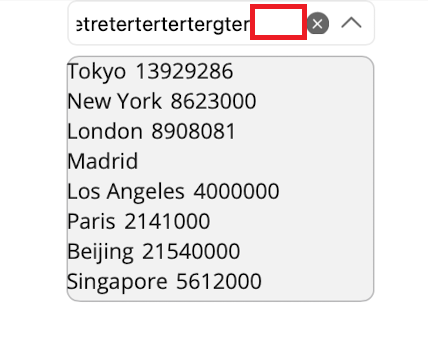
I want to reset the scroll position because in our implementation, we have filter buttons that when clicked, fetch a new list from our web API.
It appears that the scroll position is being saved when a new list is assigned while the ComboBox is not focused.
The width of RadEntry, RadMaskedEntry, and RadComboBox are the same on windows, android and ios. On mac there is difference when the width of the defined Column is set to * in grid:
MacCatalyst:
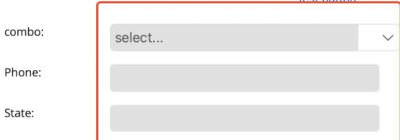
Windows:

Whenever the combobox doesn't have enough space to be displayed on the screen, the footer gets pushed to the bottom and off the dropdown popup.
This was tested on Telerik 3.0 but I also tested it on 3.1, 3.2, 3.2.1, and 4.0 with the same results.
When setting SelectedItem and using static data for the ItemsSource, Layout cycle detected. Layout could not complete exception is thrown
Setup:
<telerik:RadComboBox x:Name="ComboBox"
                                 SelectedItem="{Binding SelectedItem, Mode=TwoWay}">
                <telerik:RadComboBox.ItemsSource>
                    <x:Array Type="{x:Type x:String}">
                        <x:String>USA</x:String>
                        <x:String>Uganda</x:String>
                        <x:String>Ukraine</x:String>
                        <x:String>Canada</x:String>
                        <x:String>France</x:String>
                        <x:String>Italy</x:String>
                        <x:String>United Kingdom</x:String>
                        <x:String>China</x:String>
                        <x:String>Japan</x:String>
                    </x:Array>
                </telerik:RadComboBox.ItemsSource>
            </telerik:RadComboBox>