

Hi
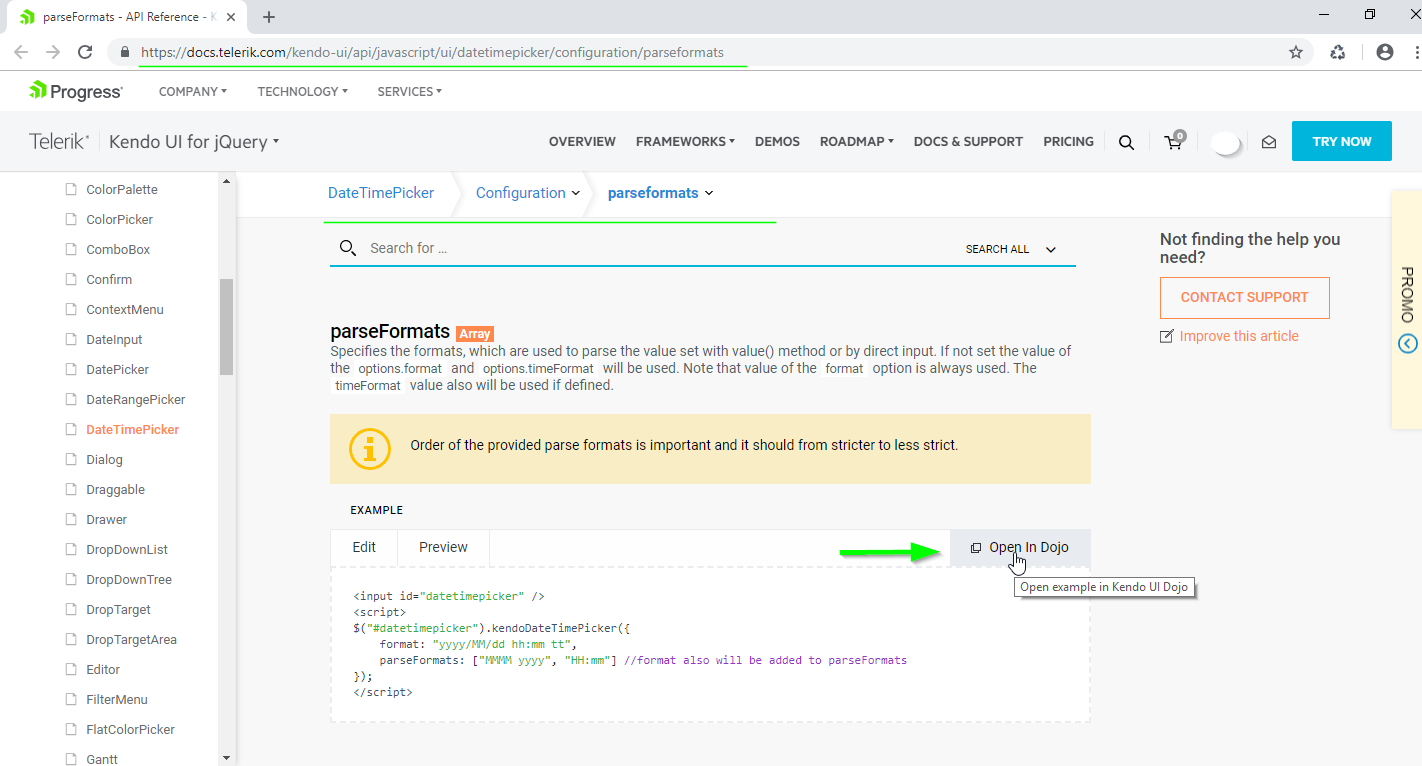
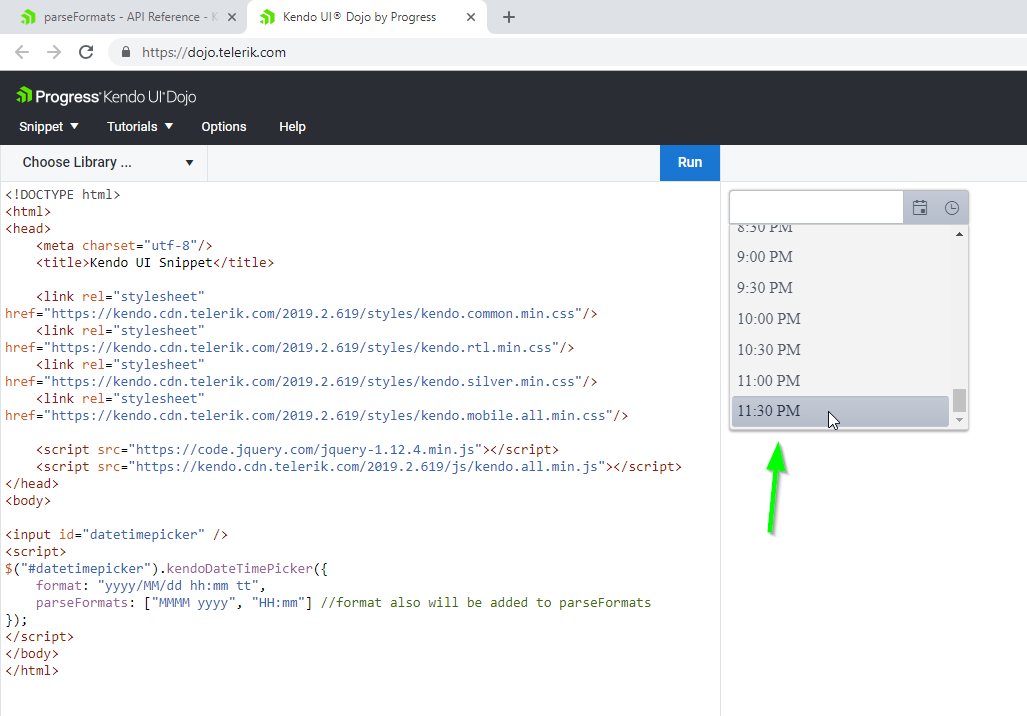
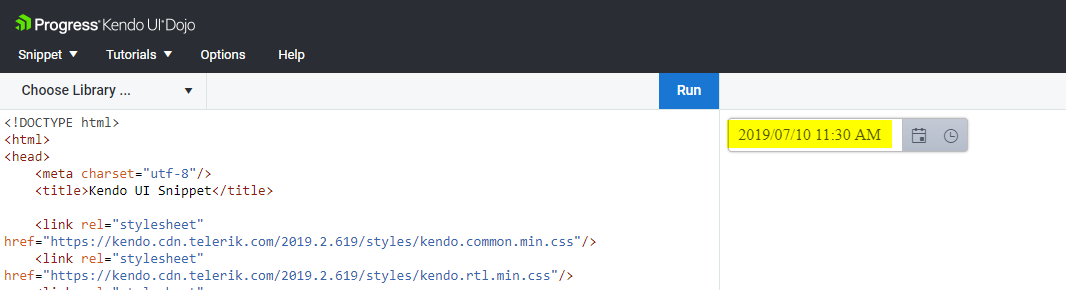
I've tried one of your Dojo to use a dateTimePicker and it's not working like it supposed to.
I haven't changed anything on the Dojo before trying it. This behavior as not cause us any problem so far, it was just to inform you.
I try to enter a time in a PM, but it puts it in AM

Hi All,
Datepicker is closing after clicking month or year not waiting until selecting the date.
We are using IPAD IOS 13.2.2 version and loading the data in desktop website in IPAD. Dojo also not working properly in IPAD with desktop mode.
Thanks,
Srikanth.K

https://dojo.telerik.com/iyEXeDoH
video to understand the exact behaviour
https://drive.google.com/file/d/1yN3hbYqkdaN8EPT1am7szt7Gvgr07Rnz/view
Bug report
When you use the setOptions method on the DateTimePicker, the selected date is lost
Regression introduced with 2024.4.1112
Reproduction of the problem
- Open the Dojo - https://dojo.telerik.com/RCgGUwDW/9
- Open the DateTimePicker to check the selected date
- Select the AM checkbox, which will call the setOptions method, and open the DateTimePicker again
Current behavior
The selected date is lost
Expected/desired behavior
The selected date should be persisted
Environment
- Kendo UI version: 2025.3.812
- Browser: [all ]
Bug report
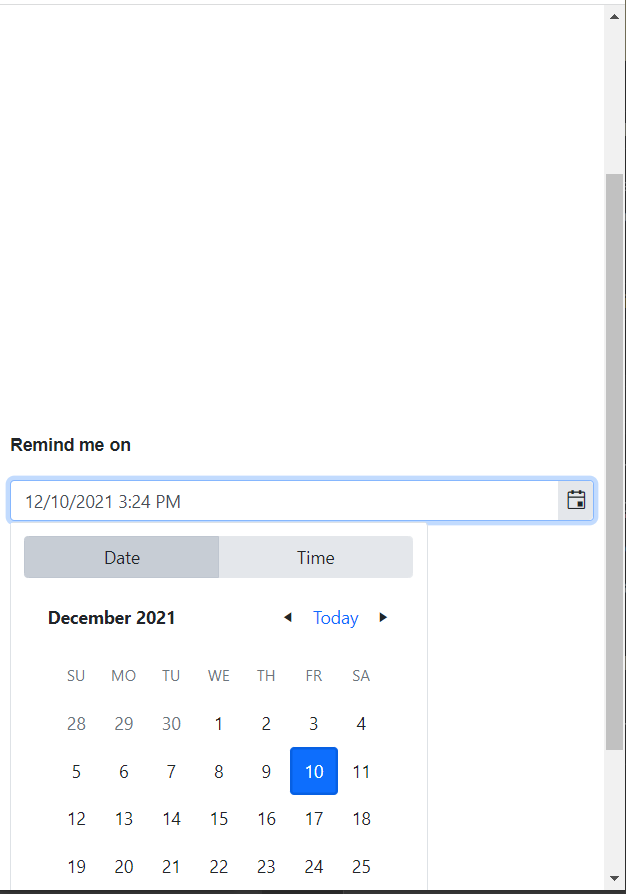
DateTimePicker modern type cut does not flip popup when there is more space above the input
Reproduction of the problem
Open this example:
https://runner.telerik.io/fullscreen/OnUNodon/2
Resize the window so vertical scrollbar appears
Scroll so the DateTimePicker is below the center of the window
Open the DateTimePicker
Expected/desired behavior
Popup shall be positioned on top of the input
Environment
Kendo UI version: all
Browser: [all]
TicketID 1545933
Bug report
TimePicker does not preserve the new value when dateInput is enabled
Reproduction of the problem
Dojo demo: https://dojo.telerik.com/IOtuzHie
Change the value from the popup window
Expected
The value shall be preserved
Environment
Kendo UI version: 2024.4.1112
jQuery version: 3.4.1
Browser: [all]
Bug report
Reproduction of the problem
- Open the Dojo - https://dojo.telerik.com/VGCfaixF
- Select the month part and start typing first letter of a February, April, June, September or November months.
Current behavior
The mentioned months not selected. However, some months such as Jan, July are selected as expected.
Expected/desired behavior
All the months should be filtered/selected when typing first letters
The issue is a regression starting with 2024.4.1112
Environment
- Kendo/Telerik version: 2026.2.520
- Browser: [all ]
Currently, when you have a disabled DatePicker in MVVM scenario and the setOptions method is called, the component gets enabled. Dojo - https://dojo.telerik.com/OBMifPCW
The widget does not provide a configuration option that allows setting the enable state. The component can be improved by adding an enabled configuration option, and also by avoiding enabling the component after the setOptions method is used.
Bug report
In the DateTimePicker with dateInput:true, if you change the AM/PM using the arrow keys, the day changes as well.
Regression introduced with 2023.2.606
Reproduction of the problem
- Open this Dojo example - https://dojo.telerik.com/yzuuvxJA/3
- Select a date
- Focus AM/PM and press the arrow keys multiple times
Current behavior
The date will change as well
Expected/desired behavior
The date shouldn't be changing
Environment
- Kendo UI version: 2024.3.1015
- Browser: [all]
Bug report
In a "modern" TimePicker, when you open the component and click on the input, if you use the up/down arrow keys, the value input is incorrect
Reproduction of the problem
- Open this Dojo example - https://dojo.telerik.com/@martin.tabakov@progress.com/EvIQaZaD
- Open the TimePicker
- Click on the input
- Hit the up/down arrow keys
Current behavior
Value will be changed to something like: "hour010203040506070809101112"
Expected/desired behavior
The correct value should be e.g. 01
Environment
- Kendo UI version: 2024.2.519
- Browser: [all]
Bug report
When trying to select a value from the modern Kendo UI TimePicker configured with Max and Min ranges, the currently selected value of the TimePicker is not updated.
Reproduction of the problem
- Go to this Progress Kendo UI Dojo.
- Open the TimePicker - notice it's at 9:00
- Click Set
- Value is set to 00:00.
Expected/desired behavior
The value should be set upon initial selection.
Potential Workarounds
- Use Classic ComponentType
- Turn off animations, and open/close the TimePicker. (Dojo)
Environment
- Kendo UI version: 2024.3.806
- jQuery version: All Supported Versions
- Browser: All

Bug report
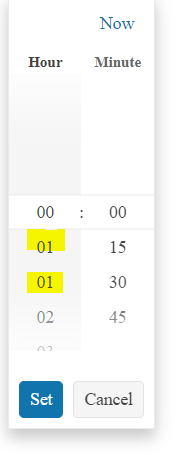
Modern TimePicker popup renders 01 option twice in the popup with the following configuration:
$("#timepicker").kendoTimePicker({
        format: "HH:mm",
        componentType:"modern",
        interval: {
          hour: 1,
          minute: 15
        }
      });
Regression with v.2023.3.1010
Reproduction of the problem
Dojo: https://dojo.telerik.com/aKeJOluk
Expected/desired behavior
01 shall be present only once.
Environment
**Kendo UI version: 2023.3.1010
**jQuery version: 3.4.1
**Browser: [all]
Bug report
When the width of the DatePicker and DateTimePicker is set through style attribute and is set with fixed pixels, the buttons with icons for opening the popup might be hidden.
Reproduction of the problem
- Open the Dojo - https://dojo.telerik.com/@NeliK/ESesUSoW
Current behavior
Depending on the browser used the buttons containing the calendar and time icons are partially visible or entirely hidden. The issue does not occur if the width is set in percentages.
Expected/desired behavior
The DatePicker and DateTimePicker components should be entirely visible when the width is set in pixels through the style attribute.
Workaround: Set the input element's width to 100%:
for DatePicker:
.k-datepicker input {
      width: 100% !important;
}
for DateTimePicker:
.k-datetimepicker input {
      width: 100% !important;
}
for TimePicker:
.k-timepicker input {
      width: 100% !important;
}
Environment
- Kendo UI version: 2024.2.514
- Browser: [all ]
Bug report
In a modern TimePicker, if you configure the min option to e.g. 00:15, the configuration is not respected.
Reproduction of the problem
- Open this Dojo example - https://dojo.telerik.com/@martin.tabakov@progress.com/obEnoCOT/6
- Open the TimePicker
Current behavior
The min time is 00:00
Expected/desired behavior
Min time should be 00:15
Environment
- Kendo UI version: 2024.2.519
- Browser: [all]
Bug report
Modern TimePicker does not render dates array
Reproduction of the problem
1. Use this code snippet https://dojo.telerik.com/eQoGuKIb
2. Run the code and click on the Time icon
3. Noticed that popup does not contain any values
4. Remove the componentType config, values are displayed in the popup.
Ticket ID: 1641396
Environment
Kendo UI version: [all]
jQuery version: x.y
Browser: all
Bug report
While clicking tab key the button to choose Date or Time, Set and Cancel gets disappear
Reproduction of the problem
Dojo: https://dojo.telerik.com/eMaQIbAw
1. Click on the date button in the date time picker to open the Calendar popup
2. Press tab until the buttons disappear.
3. Pressing shift+tab will show the buttons again.
Expected/desired behavior
Set and Cancel buttons shall not disappear
Environment
Kendo UI version: [all]
jQuery version: x.y
Browser: [all]
Bug report
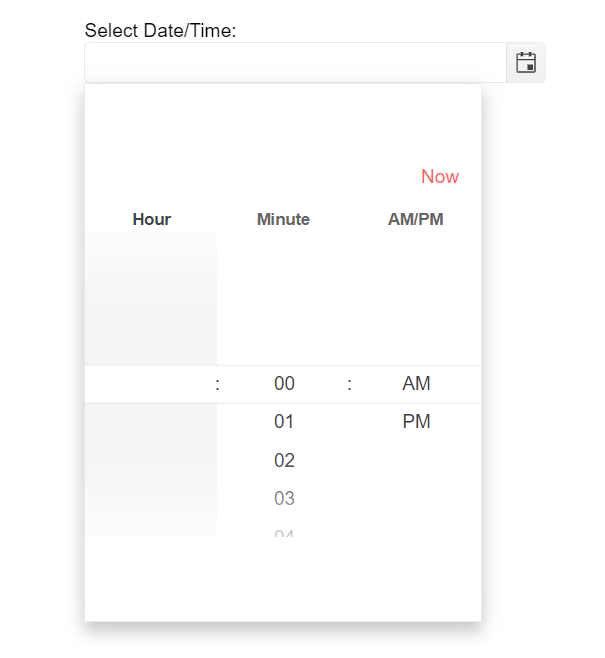
Modern DateTime picker messed-up and switches to timepicker when timpicker clicked i nthe back
Reproduction of the problem
1. Dojo: https://dojo.telerik.com/iJESeFUc
2. Click on the Calendar icon
3. Click around the calendar to hit the datepicker in the back
Result:
Environment
Kendo UI version: [all]
jQuery version: x.y
Browser: all
Bug report
Hours are not visible on load in modern DateTimePicker
Regression since 2022.1.119
Reproduction of the problem
https://demos.telerik.com/kendo-ui/datetimepicker/component-type
Expected/desired behavior
Hours shall be visible at all times.
Environment
Kendo UI version: 2022.1.119 or newer
jQuery version: [all]
Browser: [all]
The problem can be observed in the following example from the documentation: