

Bug report
Reproduction of the problem
Dojo example.
- Click on "Folder" in the treeview
Current behavior
The file in the selected folder is displayed as "undefined"
Expected/desired behavior
The file data is properly retrieved and displayed.
A workaround is available in this dojo example: https://dojo.telerik.com/ORImIvaC
Environment
- Kendo UI version: 2020.1.114
- jQuery version: x.y
- Browser: [all]

Hi,
I've tried to configure resizable columns in File manager grid like in the following
It works, but I got a confirm popup panel when I try to resize ...
What's wrong ..??
Thanks
I am running into inconsistencies when using the toolbar Search input of a File Manager object after navigating to new folders.
Simple dojo for reference - https://dojo.telerik.com/aPOtiXex/2
Steps to reproduce
- Click on "Folder1" in the treeview.
- In the Toolbar Search, enter the text "Sub 1001". This will correctly filter the displayed items.
- Click on "Sub 1001" in the treeview. Notice that the search filter is still in place, but that it is not applied to the current folder view.
- In the Toolbar Search, remove the text 1 character at a time. Notice that as you remove characters in the Search input, the filter IS applied to the current folder view. Continue removing characters until the Search input is empty.
- Click on "Folder1" in the treeview. Notice that the contents of the folder are STILL filtered as if the Search filter was "Sub 1001", even though Search input is currently empty.
- In the Toolbar Search, add 1 space character, then remove it. Notice that this finally clears the filter applied to the folcer in step #2.
I am not sure what the best answer for this scenario would be. Maybe navigating to a new folder should clear the search filter criteria in the toolbar and clear any applied filter criteria to the previous folder? Or maybe the toolbar search input should be reset to accurately reflect the current applied filter for the folder on navigate? Something good for your dev team to discuss, but it is clear that the current implementation will create some confusion for users.

Bug report
Reproduction of the problem
- Run this dojo
- Try to select a file by clicking on its icon
Current behavior
The select event is not fired.
If clicked next to the icon the select works as expected.
Expected/desired behavior
The select event should be fired consistently
TicketID:
1719355
Environment
- Kendo/Telerik version: 2026.3.811
As of version "@types/kendo-ui": "2020.3.0":
FileManager methods: path, view, getSelected, getSize have return type void, which is a pain to handle since it can't even be cast to bool.
FileManager method navigate doesn't accept params, should accept string 'path'.
FileManager method executeCommand doesn't accept params, should accept as per https://docs.telerik.com/kendo-ui/api/javascript/ui/filemanager/methods/executecommand .
FileManagerContextMenu interface is missing all event handlers: close, open, activate, deactivate, select.
The following are not exposed:
- kendo.data.schemas
- kendo.ui.filemanager.commands
Follow steps in sample at https://dojo.telerik.com/@GaloisGirl/OJUPoYOY/8
- Actual result: the call to "create" has no information that the new folder should be created in "folder 1"
- Expected result: the call to "create" should contain information about the path, for my back-end to create an entry in the correct place
Probably related to https://feedback.telerik.com/kendo-jquery-ui/1473893-filemanager-no-path-passed-to-datasource-read-method / https://github.com/telerik/kendo-ui-core/issues/5890
Bug report
Reproduction of the problem
- Reproducible in the demos: https://demos.telerik.com/kendo-ui/filemanager/index
- Type in "Doc" in the FileManager's search input
- Double-click the Documents folder
- Clear the search input
- Click the Home icon in breadcrumb
Current behavior
The FileManager shows only the Documents folder
Expected/desired behavior
The FileManager shows all folders on root level (Documents and Images)
Environment
- Kendo UI version: 2020.2.617
- jQuery version: x.y
- Browser: [all]
Bug report
When a node in the TreeView of a Kendo UI FileManager is selected, then the parent node is collapsed, and re-expanded, the selection is removed.
Reproduction of the problem
- Go to the following Progress Kendo UI Dojo.
- Expand the Root node
- Select Folder Inner 1
- Collapse Root
- Re-expand Root
Current behavior
The selected node within a parent after collapsing and expanding will lose its selection. Here is a screencast of the above in action.
Expected/desired behavior
The selection should persist even upon expanding/collapsing parent nodes.
Environment
- Kendo UI version: 2021.2.616
Moving files MORE than one level upwards in a folder hierarchy is bugged.
If you have a nested folder hierarchy like this:
folder1
folder2
folder3
1. moving a file from folder1 to folder2 works.
2. moving a file from folder2 to folder1 works.
3. moving a file from folder1 to folder3 works.
4. moving a file from folder3 to folder1 is BUGGED.
I have the issue in my code, but I also tested it in your demo site and it has the same problem.
https://demos.telerik.com/kendo-ui/filemanager/index
I have uploaded a screen dump of the error output from Chrome.
It is in or after the DataBinding event (Comming from Create action), the the error occurs, thus causing the Delete action and refresh of the UI to never occur.
The bug occurs in both Chrome and IE Edge.
Please fix the bug.
Bug report
In FileManager read request is triggered twice when navigating to a parent folder that has a nested folder. The issue does not occur if the folder contains only files without a nested folder.
Reproduction of the problem
- The issue can be replicated if a nested folder is created in the demo service. The screencast here demonstrates the issue.
Current behavior
Two identical requests are sent when the parent folder is selected.
Expected/desired behavior
There should be a single request when navigating to a parent folder, even if it has a nested child folder.
Environment
- Kendo UI version: 2022.1.119
- Browser: [all ]
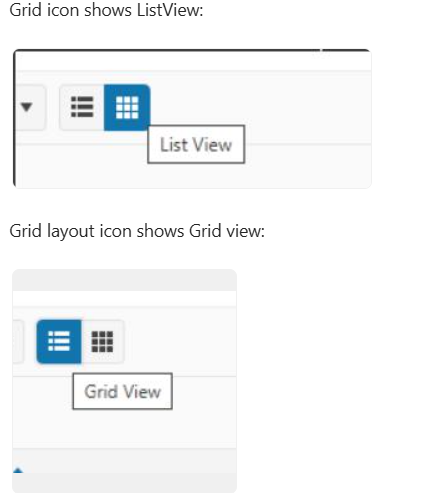
Bug report
File manager grid\list view icons are flipped
Reproduction of the problem
https://demos.telerik.com/kendo-ui/filemanager/index
Expected/desired behavior
Icons for the different views shall be flipped
Environment
Kendo UI version: [all]
Browser: [all]
We allow the user to rename files and folders, but if they rename to the same name as another file/folder, what we would like to do is prompt the user with a confirmation dialog, explaining that if they click "Ok", the existing file will be overwritten with the newly-renamed file. For folders, it would merge the contents, but again, duplicates would be overwritten. If they click "Cancel", then the dialog should close, and nothing else should happen.
Right now, the closest thing I could find was the "requestStart" event handler. This fires after the user renames, and before the request is sent to the server. The problem is, even in the documentation, it says, "This event can be prevented only for read requests."
We would like to be able to prevent "update" requests as well, for this scenario. Can this be added as a feature?
Hi Team,
I would like to request to add Wildcards to the Search panel for the Kendo UI FileManager.
Thank you!
Bug report
In the Grid view of the FileManager, if you choose to Sort By Date from the Toolbar, the sort icon in the Grid's column header is missing.
Reproduction of the problem
- Open the Overview demo - https://demos.telerik.com/kendo-ui/filemanager/index
- Select the Grid View from the Toolbar
- Choose Sort By Date Created
- Sort the content from the Toolbar
Current behavior
The sort arrow icons are missing in the Grid's column header
Expected/desired behavior
The icons should be visible
Environment
- Kendo UI version: 2024.3.806
- Browser: [all]

Bug report
In a FileManager with a configured toolbar, if you use the view method, the button selection in the toolbar will not change accordingly.
Reproduction of the problem
- Open this Dojo example - https://dojo.telerik.com/@martin.tabakov@progress.com/IkAJOyOf/3
Current behavior
The GridView button is not displayed as selected
Expected/desired behavior
The GridView button should be selected
Environment
- Kendo UI version: 2024.2.519
- Browser: [all]
Bug report
In the FileManager, adding a new subfolder and then selecting the parent folder ( or switching between Grid and List View ) results in duplicated subfolder.
Regression introduced with 2024.2.519
Reproduction of the problem
- Open the FileManager Overview demo - https://demos.telerik.com/kendo-ui/filemanager/index
- Select Documents and add New Folder.
- Select the New Folder and then Documents again, or switch between Grid and List View
Current behavior
The new subfolder is duplicated.
Expected/desired behavior
The subfolder should not be duplicated.
Environment
- Kendo UI version: 2024.2.519
- Browser: [all]
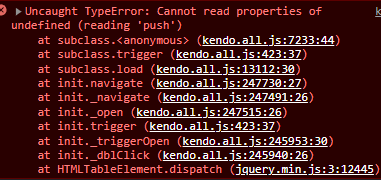
When the FileManager has data in the following structure Folder > SubFolder, File1, File2... and a Grid view with enabled paging, an error is thrown when you attempt to double click on "Folder".
Bug report
When using the trackpad for a laptop, the tap event does not fire when selecting files in the Kendo UI FileManager.
Reproduction of the problem
- Go to our Events Live demo
- Using a laptop's trackpad, try to select a file.
Current behavior
The tap event will not fire the Select event.
Expected/desired behavior
The tap event should fire the Select event.
Note
This event does fire for a physical mouse click, and with the touch event on a mobile device.
Environment
- Kendo UI version: 2024.2.514
- jQuery version: All Supported Versions
- Browser: all
Bug report
In the FileManager, if you try to override the default Search message through the messages.toolbar.search option, the new message is not being set.
Regression with R1 2023
Reproduction of the problem
- Open this Dojo example - https://dojo.telerik.com/UTAlEyOK/2
Current behavior
The Search placeholder message is not being updated.
Expected/desired behavior
The Search holder message should be updated with the value from the configuration.
Environment
- Kendo UI version: 2023.3.1010
- Browser: [all]