Bug report
Spreadsheet: Improper copy paste to Excel when merged cells are present and one column in the merged cells range is hidden. If the column containing the first merged cell is hidden all the rows on that row will be shifted to the left.
Reproduction of the problem
- Run the following Dojo;
- Select Range A1:D3 (note that column B is hidden)
- Press Ctrl + C;
- In Excel workbook press Ctrl + P;
Current behaviour
After pasting, the merged cell consists of 4 cells, as expected, but the cell data is shifted to the left and the hidden column contains the cell data of the next column
Expected/desired behavior
The cells after the merged cell should not be shifted.
Environment
- Kendo UI version: 2023.1.117
- Browser: [all ]
Bug report
When the select() method is used in the Spreadsheet changing event wrong cell is selected.
Reproduction of the problem
- Open the dojo example
- Select a different cell, change its value, and press Enter
Current behavior
Changing event is fired, but the 'B3' cell is selected instead of the 'B2'
Expected/desired behavior
The correct cell should be selected when using the select method inside the Spreadsheet event handlers.
Environment
- Kendo UI version: 2022.3.913
- Browser: [all ]
Hi Support Team,
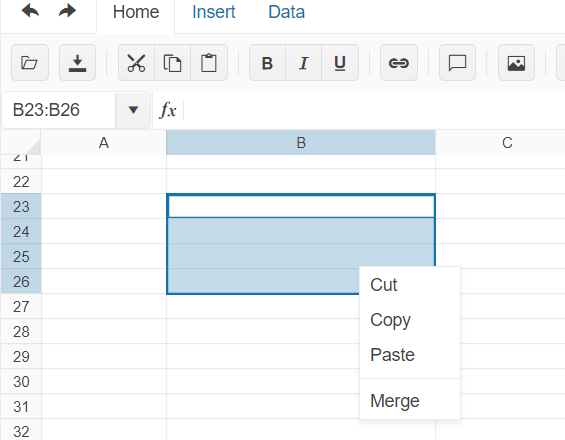
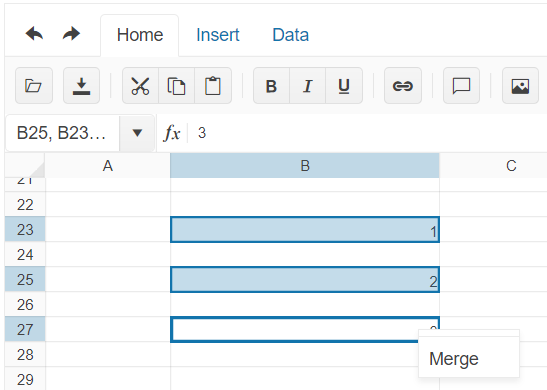
When select multiple cells continuously and right click, it will have more options. But when select multiple cells without continuously and right click, there is only 1 option
Would like to have a feature to have more options when select multiple cells without continuously and right click and also to able to detect which cells are selected if multiple cells are selected without continuously.
Select multiple cells continuously: Select multiple cells without continuously:
Bug report
When a border is applied and there are frozen rows/columns the border appears splitted with a white lin in the middle.
Reproduction of the problem
Current behavior
The bottom border and the right border are split with a white line in the middle.
Expected/desired behavior
The border should appear entirely filled with the selected color.
Environment
- Kendo UI version: 2022.2.510
- Browser: [all ]
Bug report
Hyperlinks in a Spreadsheet cell do not work mobile devices.
Reproduction of the problem
- Open this example on a mobile device - https://dojo.telerik.com/ahixOKep
- Try to click on the links in the Product column.
Current behavior
The link in the cell does not work.
Expected/desired behavior
The link should work
Environment
- Kendo UI version: 2022.2.510
- Browser: [all]
Reproduction of the problem
Open this web site:
https://demos.telerik.com/kendo-ui/spreadsheet/datasource
And follow the steps provided here:
https://www.screencast.com/t/UdEKYqIve
Current behavior
The first added cell value (or row) is removed when the user deletes an empty row.
If the ID is entered, the result is even stranger:
https://www.screencast.com/t/osmVOiY7al
Expected/desired behavior
It should behave and function like Excel. I think with local/static binding there are no issues.
### Bug report
When the property "useCultureDecimals" is enabled in a culture where the decimal separator is the comma, the function Text() does not format numbers correctly.
### Reproduction of the problem
1. Set a culture where the decimal separator is the comma (i.e. "da-DK");
2. Create a Spreadsheet and enable the property "useCultureDecimals";
3. Enter a number with a decimal separator comma (i.e. "0,1141");
4. Format the cell by using the Text() function ( =TEXT(A1; "##0,00%") );
5. The number is not formatted properly - "011%"
A Dojo sample for reproduction: https://dojo.telerik.com/AsiLiKil/12
### Expected/desired behavior
"0,1141" should be formatted as "11,41%" as in Excel.
### Environment
* **Kendo UI version: 2021.3.914
* **jQuery version: 1.12.4
* **Browser: [all]

When values in the sheet are updated using the batch method the DataSource does not update according to changes.
Dojo: https://dojo.telerik.com/@iankodj/IRUdufOx
1. Run the example
2. Check the console showing "no data" and an empty array.

Bug report
When the Sheetsbar is hidden the horizontal scrollbar is not adjusted to the bottom of the widget
Reproduction of the problem
- Run this dojo
- Note the space below the horizontal scrollbar:

Expected/desired behavior
The horizontal scrollbar should be adjusted to the bottom of the widget.
As a possible workaround, when hiding the Sheetsbar add the following styling:
<style>
    .k-spreadsheet-sheets-bar {
      padding: 0;
      border-style: none;
    }
</style>
Environment
- Kendo UI version: 2021.2.511
- Browser: [all]
Bug report
Reproduction of the problem
Dojo example.
- Click column "B"'s header to select the column.
- Use the "Wrap text" tool from the toolbar. The text in B2 is wrapped.
- While the column is still selected, use the "Wrap text" tool again.
Current behavior
The text in B2 is not unwrapped.
The merged cell prevents the unwrap. If there is no merged cell, or if the tool is used over the cell itself, wrapping/unwrapping works as expected.
Expected/desired behavior
The text in B2 is unwrapped.
Environment
- Kendo UI version: 2020.3.1021
- jQuery version: x.y
- Browser: [all]
Bug report
Memory usage is increased if the DevTools is open. Navigation between sheets is also slower.
Reproduction of the problem
- Open our Spreadsheet demo in Chrome.
- Import the attached Spreadsheet.
- Open the Task Manager to check Chrome memory usage, and switch sheets to see the navigation speed.
- Open DevTools and check memory usage again. Note that switching sheets is also significantly slower.
Current behavior
Memory usage increased and slower sheet change.
Expected/desired behavior
Memory usage should not be increased and sheet navigation should not be slow.
Environment
- Kendo UI version: 2020.2.619
- Browser: [all]
Bug report
The AND formula, when used as part of an array formula, does not evaluate the whole array.
{=AND(A1:D1="")} would return TRUE if a value is entered in the range B1:D1 and FALSE only if value is entered in A1
=IF(AND(A1="",B1="",C1="",D1=""),TRUE,FALSE) would return FALSE if value is entered in any cell in range A1:D1
Reproduction of the problem
- Run this dojo
- Select cell E1, press F2 to edit formula and press
Ctrl+Shift+Enterto enter as an array formula
Current behavior
- Enter a value in cell B1 - Array formula evaluates as TRUE, Non-array formula as FALSE
- Only if a value is entered in A1 the Array formula will evaluate as FALSE
Expected/desired behavior
Array formula should be evaluated correctly and return FALSE when a value is entered in any cell in range A1:D1.
Environment
- Kendo UI version: 2020.2.617
- Browser: [all]
Bug report
Reproduction of the problem
Reproducible in this demo: https://demos.telerik.com/kendo-ui/spreadsheet/datasource
- Scroll down to row 78
- Focus A78 and drag to E78. Copy the data
- Paste over the empty 79 row's first cell
- Press Ctrl + Z to undo the changes.
- Open the browser's dev tools network tab and press the "Save" button above the Spreadsheet.
Current behavior
The data cleared by the "undo" shortcut is saved and sent to the server
A different behavior is exhibited if the data is pasted over the row header instead of the row's first cell. Follow the same steps, but on step 3. instead of pasting over the first cell, paste the data over the row 79 header. After undo and then clicking "Save", the fields have null values.
Expected/desired behavior
No data is sent with the request
Environment
- Kendo UI version: 2020.2.617
- jQuery version: x.y
- Browser: [all]
This is observed also in online demos:
Steps:
- Open demo
- Edit a cell and enter text
- Press Alt+Enter and enter more text
- Press Alt+Enter
Result: the last letter of the row is transferred to the new row

1. Open https://demos.telerik.com/kendo-ui/spreadsheet/index
2. Move horizontal scroller to column P
3. Now select Row 1 header, then row 2 header and keep doing it
4. Please observe horizontal scroller is also moving towards left
I assume it is a bug and need a fix. Meanwhile if you can provide a workaround for the same if possible.
Note: Similar behavior can be noted for vertical scroller on column header selection
Dear Concerned,
1. Open https://demos.telerik.com/kendo-ui/spreadsheet/index
2. Select column B and drag mouse towards C, both columns will be selected which is correct behavior
3. Now just scroll down 2-3 rows using vertical scroll bar
4. Repeat step 2, this time it does not select B & C, instead it selects B,C,D,E.
5. Seems a bug, not an expected behavior.
Observation that might help you in fixing it:
1. if you move scroll bar in such a way so that no merged cell is visible it works well, e.g. scroll down till 20th row becomes first visible row on screen and now repeat step 2, it will work
2. if scroll position is on top then behavior is correct as well
3. Same issue exists in case of multiple row selection with merged column and scroll position.
Bug report
Reproduction of the problem
Dojo example.
Current behavior
The first row is duplicated.
Expected/desired behavior
The first row is not duplicated
Environment
- Kendo UI version: 2019.3.1023
- jQuery version: x.y
- Browser: [all]
Bug report
Office 365 Comment are shown with a warning:
"[Threaded comment]
Your version of Excel allows you to read this threaded comment; however, any edits to it will get removed if the file is opened in a newer version of Excel. Learn more: https://go.microsoft.com/fwlink/?linkid=870924
Reproduction of the problem
go to demo - https://demos.telerik.com/kendo-ui/spreadsheet/index
Current behavior
import a file from ticket - 1447268
A warning is displayed
Expected/desired behavior
No warning is displayed
Environment
- **Kendo UI version: 2019.3.1023
Hi team,
In kendo spreadsheet if you disable any row by adding enable property to false and apply sort from data tab, then the disable row is changing based on the sort. instead of applying to particular row it is applying to perticular range and while sorting the row items are changing. The cell properties are not applying there while sorting.
link for example: https://dojo.telerik.com/IkoJeMIz
please let me know if I am doing anything wrong here.
thanks.
Hi Team,
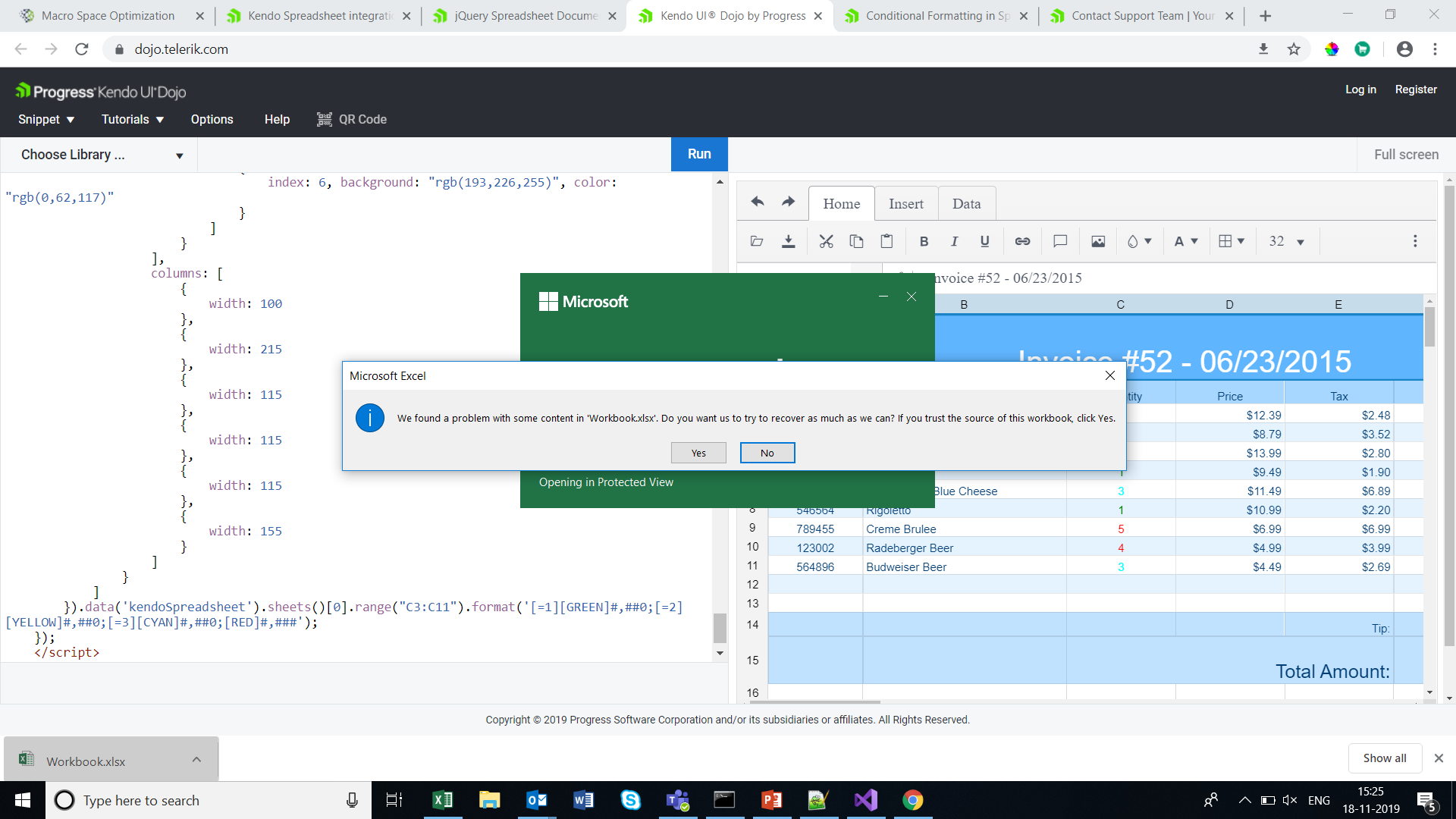
I have getting warning message when open down loaded excel file . This warning is coming if we apply conditional formatting in kendo spreadsheet .Please
check the URL