Hello,
I seem to have stubled upon a strange bug in TelerikGrid. We have wrapped a TelerikGrid and the Columns are also wrapped to allow special actions.
The bug is present in "raw-telerik-code" as well.
We have an edge case where we have a TelerikGrid and some of its columns should be Locked (Stickied/Frozen) as a default behaviour.
But depending on user interaction we want to change the state. We cannot use a property for each column that we want to be Locked/Unlocked as it should be handled by the GridState.
When the Column is using default behaviour (not Templated), it works as intended. But as soon as you use a <Template> for the Column, the Locked state cannot be changed from the default/supplied value.
TLDR: Programmatically changing the Locked state of a column where the cell is templated will not change the locked state.
I have prepared two REPL examples. One for 3.7.0 as it is what we currently are using, and one for 4.0.1 as to prove that it still exists in the current itteration.
3.7.0
https://blazorrepl.telerik.com/cHEHurlI06olUsJ410
4.0.1
https://blazorrepl.telerik.com/cdYRuBvo07aB6BGY39
With best regards

Imagine a Grid with two editable columns, which are separated by a few non-editable ones. In the standard use case, tabbing from the first editable column should jump over the non-editable columns, and the user should end up in the second editable column.
However, if the Grid uses virtual columns and the second editable column is not rendered, tab-to-edit will stop working.
The Blazor TelerikGrid component should support a dropdown column. It should be exactly the same as the dropdown column in the Ajax grid.
https://docs.telerik.com/devtools/aspnet-ajax/controls/grid/columns/column-types#dropdown
Grid with columns price1 and price2. Enter value in price1, switch to price2, enter value there, and editor is set to old value after async events finish.
The value entered in price2 is correctly set to the property, but the editor reverts to the previous value. If you escape edit mode of the cell, the value entered before the events finish will be shown.
On (fast) tabbing and entering values, this removes the first values entered before the async background events finish.
I tried reproducing the problem in REPL, but could not get the exact same behaviour. In our case no specific value is being set to price2, it just reverts.
https://blazorrepl.telerik.com/cxEzvQvE52q8aaAi27
How would you approach preventing the editor from being overridden by other cells' delayed events?
Using CheckBoxList filtering changes the filter menu for all columns. I would like to specify CheckBoxList only for certain columns, but that doesn't currently appear to be an easy option.
1) Leave as FilterMenuType "Menu" but implement a custom filter template for the columns I want. That would be the most obvious, but CheckBoxList is not a usable control on its own?
2) Or do the inverse, use FilterMenuType "CheckBoxList" and implement a custom filter template for all the columns where I don't want to use that. Seems like a lot of extra work to manually recreate default filters.
3) I guess I roll my own clone of the CheckBoxList control and use that like #1 on individual columns?
Any chance the CheckBoxList control could be publicly exposed for direct use?

I added a comment to this feedback post. In this post, I made a comment on how to get Tab select working in a grid component for a combobox.
It would be nice if tab select was a parameter for any dropdown component and autocomplete. Maybe a parameter called "TabSelect"? It would need to fire before the grid component picks up the Tab key first in InCellEdit mode.
If that was changed above, then the grid component could have the following:
Enter key to move down the list, and Shift-Enter keys to move up the list. Is there a way to do that currently, or could it be added?
Grid popup editing throws about parameterless constructor even when I use the OnModelInit event.
The inline and incell edit modes are still working.
The regression occurs in version 4.2.0.
**Description**:
I've encountered an issue with the Telerik Grid component in Blazor where caching the grid state, specifically the filtering state, leads to a casting exception upon reloading the page.
**Steps to Reproduce**:
1. Set up a Telerik Grid with a nullable enum column (e.g., `LeadStatuses? Status`).
2. Apply a filter to the `Status` column.
3. Save the grid state (including the filter state) to cache.
4. Refresh the browser.
5. Load the grid state from cache and apply it to the grid.
**Expected Behavior**:
The grid should load with the previously applied filter without any issues.
**Actual Behavior**:
A casting exception occurs, specifically: "Specified cast is not valid."
**Additional Information**:
- The issue seems to be related to filtering and saving state to the grid. When the column is removed, the error doesn't occur.
- Clearing the filter from the cached state for gid will work.
- The exact error message is:
```
Unhandled exception rendering component: Specified cast is not valid.

Hello,
after updating to the versin 4.6.0 from 4.5.0, almost all svg icons dissapeared(inside the grid). No erros, no console warnings.
Is there some breaking changes or aditional steps how to bring them back?
Original markup without changes(first blue button in example should have "play" icon at the beginning):
<TelerikButton OnClick="@(_ => OZRowCmd(null,20))" Icon="@FontIcon.Play" Title="Zahájit novou" Class="bg-primary" Size="@Telerik.Blazor.ThemeConstants.Button.Size.Large">Zahájit novou</TelerikButton>
Hello,
when using grid with multiple-selection mode and row template, ONLY single row selection works. Not able to select multiple rows. Grid somehow internally "reverts"(lose) selection to single row.
Here is full detail, with video and sample "what acts weird". Start with the post " Michal - Posted on: 19 Oct 2023 08:38":
Simplified reproducible sample from Nadezhda Tacheva(thanks), has that issue also - try to select multiple rows:
Video with the problem AND expected result(video is based on sample posted at same feedback above "Posted on: 19 Oct 2023 08:38":
https://feedback.telerik.com/attachment/download/1120622
Fully working example(recorded video) in VS - GridCheckBoxColumn in sample "IS HACK!", not required at all(just hint, which can be removed):
@using System.Collections.Generic;
@using System.Dynamic;
    <span>Selection bind not working as expected:</span>
    <TelerikGrid TItem="ExpandoObject"
    @bind-SelectedItems="@gSelectedItems"
                 OnRowClick="@OnGridRowClicked"
                 SelectionMode="GridSelectionMode.Multiple"
                 OnRead=@gHLReadItems
                 RowHeight="60">
        <RowTemplate Context="ctx">
            <td>
                @{
                    var it = (ctx as IDictionary<string, object>);
                    @(it["Name"].ToString())
                }
            </td>
        </RowTemplate>
        <GridColumns>
            <GridCheckboxColumn CheckBoxOnlySelection="true" Visible="false" @key="@("sIDX1")" SelectAll="false" />
            <GridColumn Field="Name" FieldType=@typeof(string) Title="Name" />
        </GridColumns>
    </TelerikGrid>
<span>WORKs OK:</span>
    <TelerikGrid TItem="ExpandoObject"
    @bind-SelectedItems="@gSelectedItems"
                 OnRowClick="@OnGridRowClicked"
                 SelectionMode="GridSelectionMode.Multiple"
                 OnRead=@gHLReadItems
                 RowHeight="60">
        <GridColumns>
            <GridCheckboxColumn CheckBoxOnlySelection="true" Visible="false" @key="@("sIDX2")" SelectAll="false" />
            <GridColumn Field="Name" FieldType=@typeof(string) Title="Name" />
        </GridColumns>
    </TelerikGrid>

@code
{
    private List<ExpandoObject> RowData;
    IEnumerable<ExpandoObject> gSelectedItems { get; set; } = Enumerable.Empty<ExpandoObject>();
    protected override void OnInitialized()
    {

        RowData = new List<ExpandoObject>();
        dynamic obj0 = new ExpandoObject();
        obj0.Name = "Tester";
        RowData.Add(obj0);
        dynamic obj1 = new ExpandoObject();
        obj1.Name = "Testovicz";
        RowData.Add(obj1);
        dynamic obj2 = new ExpandoObject();
        obj2.Name = "Selectant";
        RowData.Add(obj2);
    }
    protected async Task gHLReadItems(GridReadEventArgs args)
    {
        //RowData are readen from DYNAMIC source, cannot add any NEW property to it
        args.Data = RowData;
        args.Total = 3;
    }
    protected void OnGridRowClicked(GridRowClickEventArgs args)
    {
        var it = args.Item as ExpandoObject;
        if (gSelectedItems.Any(x => x == it))
        {
            gSelectedItems = gSelectedItems.Where(x => x != it);
        }
        else
        {
            gSelectedItems = gSelectedItems.Union(RowData.Where(x => x == it));
        }
    }
}
thanks

Greetings,
When using single selection mode, a row can be selected either by clicking the checkbox or by clicking on the rest of the row. There is no difference at all. Now, let's say I have a grid with multiple selection mode enabled, e.g.:
<TelerikGrid Data="listOfFoos" SelectionMode="GridSelectionMode.Multiple">
    <GridColumns>
        <GridCheckboxColumn SelectAll="true" SelectAllMode="GridSelectAllMode.All"  />
        <GridColumn Field="@nameof(Foo.Name)" Title="Name" />
    </GridColumns>
</TelerikGrid>
public class Foo {
public string Name { get; set; }
}
public List<Foo> listOfFoos = [ new Foo{Name="First"}, new Foo{Name="Second"}, new Foo{Name="Third"} ];
When we click an unselected row, the behavior varies depending on where we click exactly:
- if we click on the checkbox of the unselected row, the unselected row becomes selected. Previously selected rows are still selected. Everything is fine.
- if we click on the unselected row but not on the checkbox (e.g. on another column), the unselected row becomes selected but previously selected rows are unselected.
This notably makes multiple selection impossible if we click on the row but not on the checkbox and gives the impression we are using single selection mode. It is especially strange if we consider the existence of the CheckBoxOnlySelection parameter of <GridCheckboxColumn> whose name suggests we can select using the rest of the row by default.
Hi,
it seems that grid.GetState() and FilterDescriptors, contains +1 "dummy" object.
- If it is by design, ok, BUT then, how to bind this filter descriptor to the ie TelerikFilter? = It displays that dummy object as it is, and confusing end users. Or how to "identify 100%" that is some kind of dummy value to be trashed?
How to reproduce:
1 run the repl demo
2 put "a" into the first colum(Name) filter
3 click button and observe the content of filter descriptors(serialized below the grid - RED is wrong, Green is expected as ok)
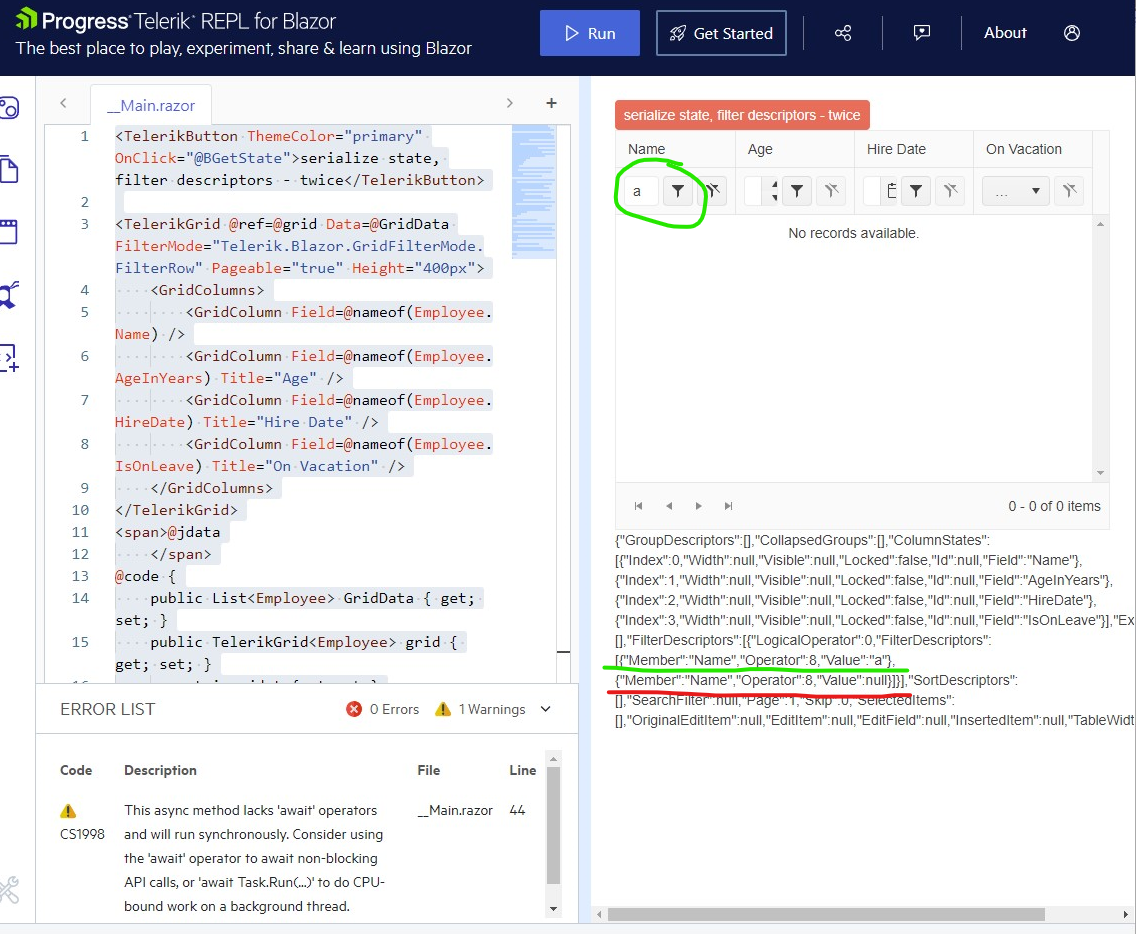
similar, but not the same(iam came from here):
Thanks for the tip, clarification, or removing that redundant values.
Hi,
I have spent a while looking for the feature to move the Footer Template to the first line of the Telerik grid. Is this currently possible with a parameter I'm unaware of? How possible would this be to do if not.
Kind Regards,
Elliot
There seems to be no System.Type that will allow a GridColumn to be specified with the 'FieldType' attribute to receive a TelerikTimePicker
typeof(DateTime) --> TelerikDateTimePicker
typeof(?) --> TelerikTimePicker
<TelerikGrid Data="@gridDataExpando" Width="100%" Sortable="false" Pageable="false" Resizable="true" ShowColumnMenu="false"
             ScrollMode="@GridScrollMode.Scrollable"
             Height="100%"
             EditMode="@GridEditMode.Incell"
             OnUpdate="@UpdateHandlerExpando"
             OnEdit="@EditHandler">
   <GridColumns>
      @{
         var firstItem = gridDataExpando.FirstOrDefault();
         if (firstItem != null)
         {
            var dictionaryItem = firstItem as IDictionary<string, object>;
            foreach (var item in dictionaryItem)
            {
               if (!item.Key.Contains("Id"))
               {
                  <GridColumn Field="@(item.Key)" FieldType="@(this.GetDataType(item.Key))" Width="140px" DisplayFormat="{0:hh:mm:ss tt}">
                     <HeaderTemplate>
                        <span>@item.Key</span>
                    </HeaderTemplate>
                   </GridColumn>
               }
            }
         }
      }
   </GridColumns>
</TelerikGrid>
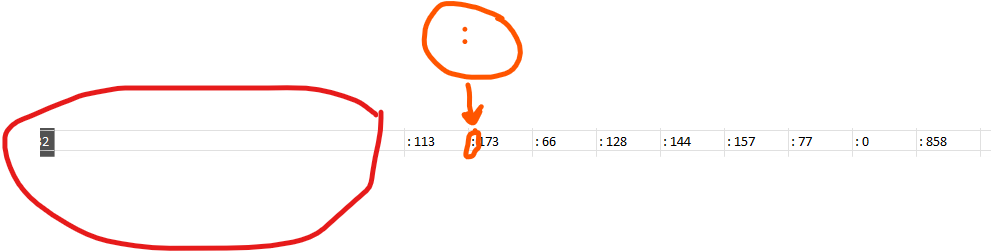
Cuando agrego GridAggregates el exportador de excel no me permite dejar limpia la fila de Totales (FooterTemplates) para unicamente dejar el Dato me coloca la siguiente estructura: "aggregate_sum: X" y al remover el aggregate_sum de los archivos de recursos me deja el texto ": X" por lo que la cadena sigue sin quedar limpia.
De igual manera en mi grid view tengo la columna de Totales y no la agrega al archivo que se exporta los totales como se ve en la imagen: