

The keyboard arrow selection doesn't select tabs, just moves the focus. This happens when the content area of RadRibbonView is minimizable and open.
To work this around, manually select the focused tab on key down.
private void RadRibbonView_PreviewKeyDown(object sender, KeyEventArgs e)
{
    var ribbon = (RadRibbonView)sender;
    if (ribbon.IsMinimized && (e.Key == Key.Left || e.Key == Key.Right))
    {
        var focusedHeader = Keyboard.FocusedElement as RadRibbonTab;
        if (focusedHeader != null && ribbon.SelectedItem != focusedHeader)
        {
            ribbon.SelectedItem = focusedHeader;
            e.Handled = false;
        }
    }
}

Initially RibbonView gets rendered design-time. Trying to edit RibbonTab-s or add new one causes the whole control to dissapear in the designer. Clean and rebuild of the solution doesn't help -- cleaning the Shadow cache of Visual Studio Designer is the onliest thing that helps.

The issue reproduces with Class Library containing the Ribbon setup and IsWindowsThemeEnabled property of RibbonWIndow turned off (default value).
When pressing the File -> Save button in the ribbon, the Save dialog doesn't appear at all.
var layer = ((NormalWorksheetEditorPresenter)radSpreadsheet.ActiveWorksheetEditor.ActivePresenter).UILayers.GetByName(WorksheetPredefinedUILayers.CellInput);CellInputUILayer cellInputUILayer = (CellInputUILayer)layer;cellInputUILayer.ApplyChange();
Value of a cell is visualized outside of the cell boundaries, or the value is clipped and partially visible, when the cell is updated (from code-behind), while being in an inactive worksheet, and is referenced by another cell from the active sheet.

Workaround: get a value of some cell in the active sheet and set it again to the same cell.

The issue is reproducible after the official release of Q1 2015.

When RadSpreadsheet is placed inside a data template and the Workbook property is bound, the binding fails.

In the Convert() method of the debug converter, the proper value is set. However, an empty workbook is displayed in the view.
If the document contains a simple field without run inside, the import process fails.

      <w:fldSimple w:instr="page" w:dirty="true"/>

The same document with a run inside the field does not cause an error

      <w:fldSimple w:instr="page" w:dirty="true">
        <w:r>
          <w:t>1</w:t>
        </w:r>
      </w:fldSimple>
The commands are: Left, Right, Backspace, Delete, Tab, Ctrl+C, Ctrl+V among others.
Workaround:
Attach custom event handler to the PreviewEditorKeyDown event of the RichTextBox. This event should set "e.SuppressDefaultAction = true" when the focus is in the InineUIContainer.
When a DropDownList SDT form is saved in a XAML document and then imported with the XamlFormatProvider, an extra ListItem entry is added in the items collection of the DropDownList. The extra entry is the default "Choose an item".
To work this around, iterate all ComboBoxProperties and manually remove duplicates of the "Choose an item" entry.
var dropDownLists = radRichTextBox.Document.EnumerateChildrenOfType<SdtRangeStart>()
     .Where(x => x.SdtProperties is ComboBoxProperties)
     .Select(x => x.SdtProperties).OfType<ComboBoxProperties>();
 var defaultItemString = LocalizationManager.GetString("Documents_ContentControlsGenerator_ListItem");
 foreach (var item in dropDownLists)
 {
     if (item.Items.Count > 0 && item.Items.Any(x => x.Value != defaultItemString) && item.Items.Any(x => x.Value == defaultItemString))
     {
         var occurrence = item.Items.FirstOrDefault(x => x.Value == defaultItemString);
         while (occurrence != null)
         {
             item.Items.Remove(occurrence);
             occurrence = item.Items.FirstOrDefault(x => x.Value == defaultItemString);
         }
     }
 }
For the German language translations, the following resource keys are translated into Dutch instead:
- Spreadsheet_PrintPreview_FitSheetOnOnePage
- Spreadsheet_PrintPreview_FitSheetOnOnePage_Description
- Spreadsheet_PrintPreview_FitColumnsOnOnePage
- Spreadsheet_PrintPreview_FitColumnsOnOnePage_Description
- Spreadsheet_PrintPreview_FitRowsOnOnePage
- Spreadsheet_PrintPreview_FitRowsOnOnePage_Description
After dialog initialization, while treeview is loading on demand on the left, user sets local path like "C:\temp\folder"
Expected: Main Pane switches to c:temp\folder
Actual: MainPane stays in the root of the network branch.
A workaround to this behavior would be to set the PaneActivationMode property to LastActivated.
Workaround: Import the document without using the default command

OpenFileDialog openFileDialog = new OpenFileDialog();
openFileDialog.Filter = "All Spreadsheet Files (*.txt, *.csv, *.pdf, *.xlsx)|*.txt;*.csv;*.pdf;*.xlsx|Excel Workbook (*.xlsx)|*.xlsx|CSV (Comma delimited) (*.csv)|*.csv|Text (Tab delimited) (*.txt)|*.txt|All Files (*.*)|*.*";
if (openFileDialog.ShowDialog() == true)
{
    string extension = Path.GetExtension(openFileDialog.SafeFileName);
    using (Stream input = openFileDialog.OpenFile())
    {
        Workbook workbook = WorkbookFormatProvidersManager.Import(extension, input);
        workbook.Name = openFileDialog.SafeFileName; // in the default implementation this is set after applying the document to RadSpreadsheet and triggers the event

        this.radSpreadsheet.Workbook = workbook;
    }
}
This behavior is observed when the Pane is dragged and dropped near the Compass border (but not on it) several times.

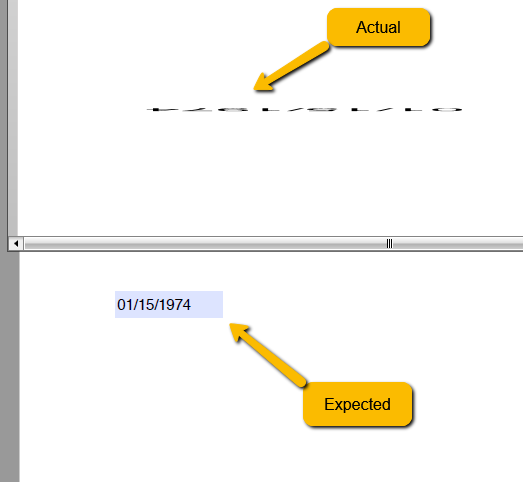
Observed when loading a document:
The committed RadSpreadsheetRibbon_style.xaml renders the AI group unconditionally:
<telerikRibbon:RadRibbonGroup Header="AI">
Workaround:
private void HideAIButton()
{
    var aiButton = this.spreadsheetRibbon
        .ChildrenOfType<RadRibbonButton>()
        .FirstOrDefault(b => b.Text == "AI Tools");
    if (aiButton == null)
    {
        return;
    }

    var aiGroup = aiButton.ParentOfType<RadRibbonGroup>();
    if (aiGroup != null)
    {
        aiGroup.Visibility = Visibility.Collapsed;
    }
    else
    {
        aiButton.Visibility = Visibility.Collapsed;
    }
}

When you start typing, the dropdown appears and then you leave the AutoCompleteBox without clicking, the cursor is not changing back to arrow.

As a workaround of the issue you could manually release the mouse capture in the Populated event handler of the control as shown below:


 private void AutoCompleteBox_Populated(object sender, System.EventArgs e)
        {
            if (Mouse.Captured is RadAutoCompleteBox)
            {
                (sender as RadAutoCompleteBox).ReleaseMouseCapture();
            }
        }