

Environment:
- Visual Studio 2026 Version 18.6.1 (May 2026 release)
- Visual Studio language: Japanese
- .NET 10 WPF project
- Telerik UI for WPF 2026.2.520
Problem:
Visual Studio freezes frequently while editing XAML when using Telerik UI for WPF 2026.2.520.
The issue does NOT occur with Telerik UI for WPF 2026.1.415.
Steps to reproduce:
- Install the "Progress Telerik UI for WPF Extension"
- Create a new WPF project using the Telerik extension/template (Empty)
- Open the automatically generated MainWindow.xaml
- Inside the existing <Grid> element, type:
<Grid - At the moment XAML IntelliSense/code completion is triggered, Visual Studio freezes
Additional information:
- XAML Designer is disabled
- Deleting the .vs folder does not help
- No third-party Visual Studio extensions are installed
- The issue only occurs with Telerik UI for WPF 2026.2.520
- Downgrading to Telerik UI for WPF 2026.1.415 resolves the issue completely
Could you please confirm whether this is a known issue related to Visual Studio 2026 / .NET 10 compatibility?
The Upgrade Wizard for WPF cannot upgrade projects targeting the 4.8 .NET Framework.
1. Install the latest extension for WPF
2. Create a new project targeting the 4.8 .NET Framework
3. Try to launch the Upgrade Wizard from the Telerik menu
4. See the error - The project cannot be upgraded because the target framework does not match

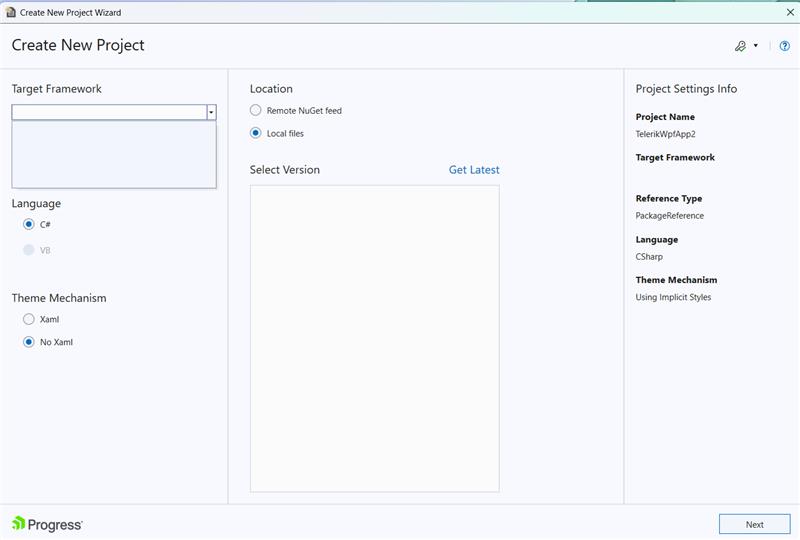
In the WPF Create New Project Wizard, the target framework versions dropdown is empty when no distribution is installed:
Error executing custom action Telerik.Windows.WPF.VSX.Actions.UpdateReferencesAction: System.Runtime.InteropServices.COMException (0x80004005): This reference cannot be removed from the project because it is always referenced by the compiler.
at VSLangProj.Reference.Remove()
at Telerik.VSX.Internal.ProjectManagement.ApplicationProjectAssemblyReference.RemoveReference()
at Telerik.VSX.ProjectConfigurators.ApplicationReferenceManager.RemoveReferences()
at Telerik.VSX.ProjectConfigurators.ApplicationReferenceManager.UpdateReferences()
at Telerik.VSX.Actions.UpdateReferencesAction.UpdateReferences(IProjectWrapUIComponents projectWrap)
at Telerik.VSX.Actions.UpdateReferencesAction.Execute(WizardContext wizardContext, IPropertyDataDictionary arguments, IProjectWrap project)
at Telerik.VSX.Actions.ProjectActionBase.Execute(WizardContext wizardContext, IPropertyDataDictionary arguments)
at Telerik.VSX.WizardEngine.Actions.ActionBase.Telerik.WizardFramework.IAction.Execute(IWizardContext wizardContext, IPropertyDataDictionary arguments)
at Telerik.VSX.WizardEngine.ActionManager.ExecActions()
After installing the WPF software I was not able to open any project in VS 2017 without it hanging.
In the end I removed the VS integration and was able to resume development.
It was the only Telerik component I had installed. I can't find the version number but it was the latest of the website as of 17th Oct 2019.
Can you explain why this happened?