

Currently SvgImage does not support the following inner animation:
<svg xmlns="http://www.w3.org/2000/svg"
className="linesBox"
viewBox="0 0 4325 2626"
width="1200"
height="800"
>
<path
d="m 2806,792.50001 -13.5,16.5 -33,10 -19.5,6.5 -17,15.5 -19,1 -9,16 -29.5,-4.70812 -34,18.70812 -37.5,16 -1.5,18 -20.5,8"
id="path60"
fill="none"
stroke="blue"
stroke-dasharray="20 10"
stroke-dashoffset="0"
stroke-width="4">
<animate attributeName="stroke-dashoffset"
from="0" to="30"
dur="3s"
repeatCount="indefinite"/>
</path>
</svg>

Dear Support-Team,
We have an issue with a translation on the spreadsheet print preview.
It shows there in the dropdown for the scaling several Netherland translations on a German system.
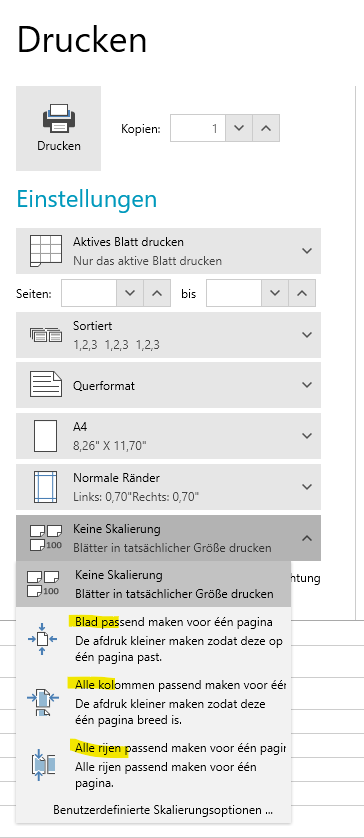
The text should be like:
1. Blatt für eine Seite anpassen
Den Ausdruck verkleinern, damit er auf eine Seite passt.
2. Alle Spalten passen auf eine Seite
Den Ausdruck verkleinern, so dass er eine Seite breit ist.
3. Alle Zeilen in eine Seite einpassen
Den Ausdruck verkleiner, so dass alle Zeilen auf eine Seite passen
Could there be a fix for this issue?
Kind regards,
Anna
Windows 11
VS 2022
UI for WPF (2024 Q4)
.NET 8
Binaries.NoXaml\WPF80\Telerik.Windows.Controls.RichTextBox.dll (2024.4.1213.80)
I can create a docx file with Word that results in a null reference exception at
| Name | Value | Type | |
|---|---|---|---|
| StackTrace | " at Telerik.Windows.Documents.Layout.ParagraphLayoutBox.ArrangeOverride(SizeF finalSize) in Telerik.Windows.Documents.Layout\\ParagraphLayoutBox.cs:line 1174" | string |
Since this exception is in a threadpool that is doing layout, the exception cannot be caught and is not recoverable.
It is easy to reproduce (see attached file). First create a Word doc with a large image that is anchored. Then add a bookmark. Removing either the bookmark or the "square" text wrapping removes the exception.
The code to load the document and display it is very simple:
   private string? LoadDocx(
      string path)
   {
      string? msg = null;
      try
      {
         using var instream = File.OpenRead(path);

         var openXmlRadDocProvider =
            new Telerik.Windows.Documents.FormatProviders.OpenXml.Docx.DocxFormatProvider();

         var raddoc = openXmlRadDocProvider.Import(instream);
         RadRtb.Document = raddoc;
      }
      catch (Exception ex)
      {
         msg = ex.Message;
      }

      return msg;
   }
"RadRtb" is a "RadRichTextBox". This method returns fine. The exception happens later in a non-UI threadpool thread.
While I don't expect the component to correctly render EVERY Word document, I do expect it to not exception on a valid document. There must be a better way to handle this.

Can we have a floating Label on a RadComboBox and a RadMultiColumnComboBox, same as a WatermarkTextBox?
It is quite annoying to have on a same form a WatermarkTextBox and Combo boxes as they appearance are so different.
The committed RadSpreadsheetRibbon_style.xaml renders the AI group unconditionally:
<telerikRibbon:RadRibbonGroup Header="AI">
Workaround:
private void HideAIButton()
{
    var aiButton = this.spreadsheetRibbon
        .ChildrenOfType<RadRibbonButton>()
        .FirstOrDefault(b => b.Text == "AI Tools");
    if (aiButton == null)
    {
        return;
    }

    var aiGroup = aiButton.ParentOfType<RadRibbonGroup>();
    if (aiGroup != null)
    {
        aiGroup.Visibility = Visibility.Collapsed;
    }
    else
    {
        aiButton.Visibility = Visibility.Collapsed;
    }
}