


So, if there is a solution to this, I haven't found it yet after scouring the documentation and the internet.
Using your example in the WPF Demo, I created a custom object for my items that I bind to the RadNavigationView.ItemsSource. Yours was called NavigationItemModel. Mine is called ShellMenuItem. ShellMenuItem inherits from UserControl, and implements INotifyPropertyChanged, and ICommandSource. All bindings to my properties are wired up in the xaml and work great (EXCEPT FOR THE ISEXPANDED PROPERTY. Next, I have several properties that are pulled from a database, or can be set programmatically in code, like Id, ParentId, Header, NodeType, TargetPageType (Page, Window, etc), TargetViewModelType, etc... Just standard properties. These are so I can programmatically send these dynamic items menu items, pulled from a database, to the correct View and ViewModel. ALL OF MY PROPERTIES WORK FINE, and when I click on a menu item, if it is a page, it opens in the frame, if it is a window, it opens a window, etc... Everything works fine, except the IsExpanded. So, here is the issue. I have a property on ShellMenuItem named IsExpanded. When I try to set this property, the ShellMenuItems do not collapse or expand. Again, I have INotifyPropertyChanged implemented.
On the form, I have a toggle button to expand/collpase all items in the RadNavigationView. I have it's Checked event bound to a command in my ViewModel.
<ToggleButton Content="TestExpandAll">
     <i:Interaction.Triggers>
          <i:EventTrigger EventName="Checked">
               <i:InvokeCommandAction Command="{Binding ElementName=_this, Path=DataContext.CmdExpandMenus}" PassEventArgsToCommand="True" />
          </i:EventTrigger>
      </i:Interaction.Triggers>
</ToggleButton>
public ICommand CmdExpandMenus { get { return new RelayCommand<RoutedEventArgs>(OnExpandMenus); } }This fires correctly in my code, at which point I loop through the RadNavigationMenu's ItemsSource and set each property to IsExpanded = true; As shown below. The button should expand all items if the togglebutton state IsChecked, else, it should collpase all items. I have also tried to loop through the actual bound list which likewise, does not work. I can not find a way to get at the entire list of RadNavigationViewItems or even cast my items to a RadNavigationViewItem, even though the ItemContainerStyle's target type is RadNavigationViewItem. There has got to be a simpler way to achieve this.
        private void OnExpandMenus(RoutedEventArgs? e)
        {
            //foreach (var item in this.StaticMenuItems)
            //{
            //    item.IsExpanded = true;
            //}

            foreach (var shellMenuItem in this.MainMenu.ItemsSource)
            {
                var itm = shellMenuItem;
                var itmType = itm.GetType();
                //itmType is ShellMenuItem
                var menuItem = shellMenuItem as ShellMenuItem;
                //var targetType = this.MainMenu.ItemContainerStyle.TargetType;
                //targetType is RadNavigationViewItem
                menuItem.IsExpanded = true;
            }
        }
I have easily achieved this effect on many other controls, and you even have predefined Methods to perform this on controls such as RadTreeViewList.
    void treeListView_DataLoaded(object sender, EventArgs e)
    {
        treeListView.DataLoaded -= treeListView_DataLoaded;
        treeListView.ExpandAllHierarchyItems();
    }
Can you add a method to the RadNavigationView to ExpandAllHierarchyItems(true/false) or just add 2 methods...
ExpandAllHierarchyItems() and CollapseAllHierarchyItems()
If this is not feasible, then you should update your demo to show how to accomplish this with a custom menu item. Im sure I could make my ShellMenuItem inherit directly from RadNavigationViewItem but in my control library, I dont have any references to Telerik because there are applications that use ShellMenuItem that do not use Telerik at all, and we shouldnt have to make our generic controls inherit from a 3rd party control to make this work. It seems to me that if you have a control that allows a hierarchy of items, and those controls/classes can be expanded or collapsed, then you should ALWAYS add the methods above to those controls/classes. Or perhaps you could create an interface named IExpandable, and any control that you guys create that can be expanded/collapsed, could implement that interface and have access to the ExpandAll/CollapseAll funtionality.
Thanks,
John

The System.Drawing.Common package is installed in the project that builds Telerik.Windows.Controls.Navigation.dll for .NET Core 3.1 Core, .NET 5 and .NET 6. The current package version is 4.7.0.
Update the package to the latest available version.

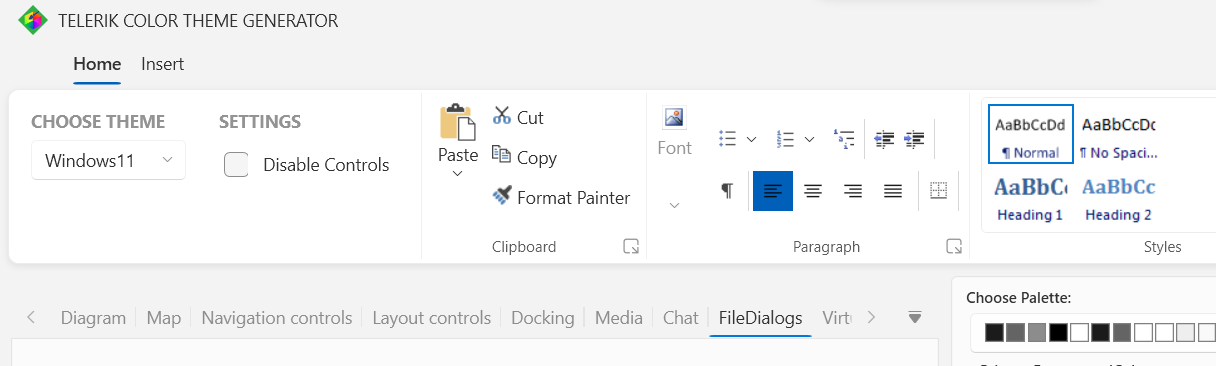
In our app many checkboxes are crop when user scale to 125 %, it happens in win11 but it has been reported in win10.
I found out that this is also happening in the colour theme generator from Telerik with the checkbox in the ribbon (screenshot below).
Is this a known issue or something that we can fix some how? so far we have taken the template for the checkboxes and change the margin of the element "grid" from 1 to 0 to work around it.
Thanks in advance
Julio
Hello,
I want to report a bug with text color in textbox and presumably in some other controls. When the textbox is edited, then the color is correctly black:
Telerik: 
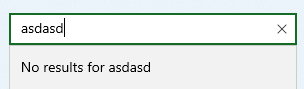
But when the textbox loses focus, it changes the color to gray, which is hard to read and looks like disabled:
Telerik: 

Thanks
- collision with classes CallbackBehaviour and ConcurrencyMode, collision with DuplexChannelFactory
- Collision with SecurityPolicyVersion and may others types in System.ServiceModel.Security Namespace | Microsoft Learn
- - large amount of 40 unnecessary dependencies. These are potential errors in Nuget dependecy resolution.
9,4 MB unnecessary additional files per application.
-Only necessary dependencies should be added.

Suddenly with WPF release 2024 Q4 some of pdf-s are not presented correctly. Attached file was produced with Telerik Report Designer and exported as pdf. With previous WPF version was OK.
You can check in your demo application. It is shown in previous release but not with latest.
Please make solution ASAP.
Regards
Janez Ovsenik
Steps to reproduce:
1. Open Word 2016 or later. Create a new blank document. Type any text. **File → Save As** → `original.docx`.2. Verify mode 15: rename `original.docx` to `.zip`, open `word/settings.xml`, confirm `<w:compatSetting w:name="compatibilityMode" ... w:val="15"/>`. Rename back to `.docx`.
3. Open Telerik's WPF Demos sample in Microsoft Store (RichTextBox demo). Open `original.docx`.
4. Without making any edit, click **Save** (or File → Save As) → `roundtrip.docx`.
5. Rename `roundtrip.docx` to `.zip` and open `word/settings.xml`. The value is now `<w:compatSetting w:name="compatibilityMode" ... w:val="14"/>`.
A Telerik.Windows.Analytics.TraceMonitor.Initialize(application, iAnalyticsMonitor) method should be added to Telerik.Windows.Analytics.TraceMonitor class.
PasswordBox: Content cannot be selected and cursor is missing-Windows8 theme
Check out the visualization at https://github.com/mbostock/d3/wiki/Gallery

It would be great if you could incorporate
Create a contour plot control for Silverlight. http://mathworld.wolfram.com/ContourPlot.html
Issues:

In some themes, when the element (both TextBox and PasswordBox) is focused, the hover does not appear anymore

Those two issue should be resolved:

1. Different left padding in all themes (WPF)

2. Different height in all themes (WPF)
When you place items in the gallery there are scenarios where the tooltip of the scroll up/down buttons is not correct.

Available in LIB version: 2014.3.1402