

NullReferenceException thrown on opening the CompletionListWindow when RadSyntaxEditor is hosted in a non-WPF application (usually WinForms) and there are no WPF Application and MainWindow initialized.
This can happen if the RadSyntaxEditor for WPF is hosted in a WinForms application. In this scenario the System.Windows.Application.Current and its MainWindow are not initialized, which is what the IntelliPrompt positioning logic relies on.
Exception details:
System.NullReferenceException: 'Object reference not set to an instance of an object.'
> Telerik.Windows.Controls.SyntaxEditor.dll!Telerik.Windows.Controls.SyntaxEditor.UI.IntelliPromptBase.SetPosition(System.Windows.Point pointInScreen) Line 452 C#  Telerik.Windows.Controls.SyntaxEditor.dll!Telerik.Windows.Controls.SyntaxEditor.UI.IntelliPromptBase.SetPosition(System.Windows.Point pointInEditorPresenter, System.Windows.Point pointAboveTheCaret) Line 442 C#  Telerik.Windows.Controls.SyntaxEditor.dll!Telerik.Windows.Controls.SyntaxEditor.UI.IntelliPromptBase.SetPositionInView() Line 480 C#  Telerik.Windows.Controls.SyntaxEditor.dll!Telerik.Windows.Controls.SyntaxEditor.UI.IntelliPromptBase.InitializeIntellisense() Line 401 C#  Telerik.Windows.Controls.SyntaxEditor.dll!Telerik.Windows.Controls.SyntaxEditor.UI.IntelliPromptBase.Show(Telerik.Windows.Controls.SyntaxEditor.UI.CaretPosition caretStartPosition, Telerik.Windows.Controls.SyntaxEditor.UI.CaretPosition caretEndPositions) Line 211 C#
  Telerik.Windows.Controls.SyntaxEditor.dll!Telerik.Windows.Controls.SyntaxEditor.UI.IntelliPromptBase.Show() Line 182 C#
To work this around, you can initialize a new WPF application and MainWindow and create a hidden HwndSource for the MainWindow. This should happen before showing the WPF content in the WinForms application's code.
 public Form1()
 {
     InitializeComponent();

     new System.Windows.Application();
     System.Windows.Application.Current.MainWindow = new System.Windows.Window();

     var parameters = new HwndSourceParameters("HiddenHost")
     {
         Width = 1, Height = 1,
         WindowStyle = unchecked((int)0x80000000) // WS_POPUP | WS_EX_NOACTIVATE
     };
     var hwndSource = new HwndSource(parameters);
     hwndSource.RootVisual = System.Windows.Application.Current.MainWindow;

      // other code here

     ElementHost host = new ElementHost { Dock = DockStyle.Fill };
     host.Child = wpfControl
     this.Controls.Add(host);
 }
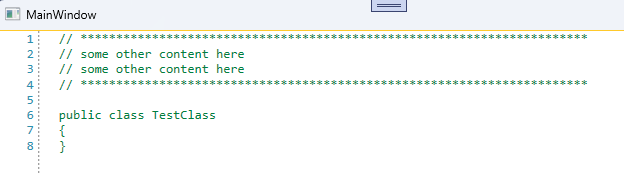
In the following example, the beginning of the first single line comment is considered a multiline comment start, but since nothing closes it, the entire text is tagged and colored as a comment.
// ***********************************************************************
// some other content here
// some other content here
// ***********************************************************************

public class TestClass
{
}

Localize the tooltips for the match case button, the match word button and the use regular expression button.
Currently, the tooltips of the buttons are using hardcoded strings in English.
To translate the tooltips, you can get the corresponding buttons on load of the syntax editor control and replace their tooltips manually.
private void syntaxEditor_Loaded(object sender, RoutedEventArgs e)
{
	var buttons = this.syntaxEditor.ChildrenOfType<RadToggleButton>();
	var matchCaseButton = buttons.FirstOrDefault(x => x.Name == "PART_MatchCaseButton");
	var matchWordButton = buttons.FirstOrDefault(x => x.Name == "PART_MatchWordButton");
	var useRegularExpressionsButton = buttons.FirstOrDefault(x => x.Name == "PART_UseRegularExpressionsButton");

	matchCaseButton.ToolTip = CreateToolTip("SyntaxEditor_MatchCase"); // these are custom localization resource keys that should be manually defined by the developer that uses this solution
	matchWordButton.ToolTip = CreateToolTip("SyntaxEditor_MatchWord");
	useRegularExpressionsButton.ToolTip = CreateToolTip("SyntaxEditor_UseRegularExpressions");
}

private static ToolTip CreateToolTip(string resourceKey)
{
	var toolTip = new ToolTip();
	toolTip.Content = LocalizationManager.Manager.GetStringOverride(resourceKey);
	return toolTip;
}

Good morning,
can You implement in one of the next releases the regex and case sensitive search? I provided you the Visual Studio 2019 search screenshot
Single line folding regions is falsely recognized (by default it should be avoided) and messes up with outer regions.
For example
1 [
2 [ inner region]
3]
There should be no folding button on the inner line. Collapsing line 1 does not collapse 3 but only 1 and 2 which is wrong.

For example this custom code completion command does not fire when pressing Ctrl + Enter:
private void syntaxEditor_Loaded(object sender, RoutedEventArgs e)
{
var completionCommand = this.syntaxEditor.Commands.CodeCompletionCommand;
InputBinding keyBinding = null;
foreach (InputBinding item in this.syntaxEditor.EditorPresenter.Caret.InputBindings)
{
if (item.Command == completionCommand)
{
keyBinding = item;
break;
}
}
// unregister old key binding via Caret InputBindings
this.syntaxEditor.EditorPresenter.Caret.InputBindings.Remove(keyBinding);
// register new command in Syntaxeditor
this.syntaxEditor.KeyBindings.RegisterCommand(completionCommand, Key.Enter, ModifierKeys.Control);
}
Expected : no commented section and comment coloring in this code line
When using LineHighlightTagger a NullReferenceException is thrown. To workaround this exception, you can add a custom TextFormatDefinition object to the TextFormatDefinitions collection of the RadSyntaxEditor.
this.syntaxEditor.TextFormatDefinitions.AddLast(LineHighlightTagger.LineHighlightFormatDefinition, new TextFormatDefinition(new Telerik.Windows.Controls.SyntaxEditor.UI.Pen(new SolidColorBrush(Colors.Gray), new Thickness(1))));
Shift + Alt + Down Selection then typing multiple characters results in all of them being typed in all selected lines.
Shift + Alt _ Down Selection then typing multiple characters results in only the first one being typed in all lines, then selection is lost and next chars are inserted in the last selected line only.