NullReferenceException is thrown when you click a non-frozen cell to start the row edit and RadDataGrid has frozen columns. To reproduce this, the UserEditMode should be set to Inline and at least one of the frozen columns should be read-only (CanUserEdit = False).
The stacktrace of the exception is:
Telerik.WinUI.Controls.dll!Telerik.UI.Xaml.Controls.Grid.XamlGridEditCellGenerator.GenerateContainerForItem(Telerik.UI.Xaml.Controls.Grid.CellGenerationContext info, object containerType) Telerik.WinUI.Controls.dll!Telerik.UI.Xaml.Controls.Grid.CellEditorModelGenerator.GenerateContainerForItem(Telerik.UI.Xaml.Controls.Grid.CellGenerationContext context, object containerType)   Telerik.WinUI.Controls.dll!Telerik.UI.Xaml.Controls.Grid.ItemModelGenerator<Telerik.UI.Xaml.Controls.Grid.GridCellEditorModel, Telerik.UI.Xaml.Controls.Grid.CellGenerationContext>.GenerateContainer(Telerik.UI.Xaml.Controls.Grid.CellGenerationContext context) Telerik.WinUI.Controls.dll!Telerik.UI.Xaml.Controls.Grid.CellsController<Telerik.UI.Xaml.Controls.Grid.GridCellEditorModel>.GetCellDecorator(Telerik.UI.Xaml.Controls.Grid.IItemInfoNode parentRow, Telerik.Data.Core.Layouts.ItemInfo columnItemInfo, int rowLine, int columnLine)
Telerik.WinUI.Controls.dll!Telerik.UI.Xaml.Controls.Grid.CellsController<Telerik.UI.Xaml.Controls.Grid.GridCellEditorModel>.GenerateCellsForRow(Telerik.UI.Xaml.Controls.Grid.IItemInfoNode rowDecorator, int rowSlot)
Telerik.WinUI.Controls.dll!Telerik.UI.Xaml.Controls.Grid.Model.GridModel.GenerateCellsForEditRow(int rowSlot, double largestRowElementWidth, Telerik.UI.Xaml.Controls.Grid.IItemInfoNode rowDecorator) Telerik.WinUI.Controls.dll!Telerik.UI.Xaml.Controls.Grid.Model.GridModel.Telerik.UI.Xaml.Controls.Grid.ITable.GenerateCellsForRow(int rowSlot, double largestRowElementHeight, Telerik.UI.Xaml.Controls.Grid.IItemInfoNode rowDecorator) Telerik.WinUI.Controls.dll!Telerik.UI.Xaml.Controls.Grid.EditRowPool.UpdateEditRow(Telerik.Data.Core.Layouts.ItemInfo info, Windows.Foundation.Point startPosition, bool hasFrozenColumns)
  Telerik.WinUI.Controls.dll!Telerik.UI.Xaml.Controls.Grid.Model.GridModel.UpdateEditRow() Telerik.WinUI.Controls.dll!Telerik.UI.Xaml.Controls.Grid.Model.GridModel.ArrangeCells(Windows.Foundation.Size finalSize)   Telerik.WinUI.Controls.dll!Telerik.UI.Xaml.Controls.Grid.RadDataGrid.OnCellsPanelArrange(Windows.Foundation.Size finalSize) Telerik.WinUI.Controls.dll!Telerik.UI.Xaml.Controls.Grid.Primitives.DataGridCellsPanel.ArrangeOverride(Windows.Foundation.Size finalSize)

The frozen group rows area overlaps part of the column headers on horizontal scroll. This happens when GroupHeaderDisplayMode is Frozen.
To work this around, set the GroupHeaderDisplayMode to Scrollable.
<telerikGrid:RadDataGrid GroupHeaderDisplayMode="Scrollable">
A group can get duplicated when the GroupHeaderDisplayMode is Frozen (this is the default mode). In this case, a group visual is drawn in both the frozen headers area and the scrollable area below.
To work this around, set the GroupHeaderDisplayMode property to Scrollable.
<telerikGrid:RadDataGrid x:Name="dataGrid" GroupHeaderDisplayMode="Scrollable">
The click actions (like cell selection and sorting) stop working when RadDataGrid is hosted in a RadTabControl or TabView. To reproduce this, you should select the tab item with the data grid, then select another tab, and select back the tab with the data grid. This prevents the hit testing in the RadDataGrid element.
The issue occurs because the hit test service used in the RadDataGrid implementation. The hit test service relies on the IsLoaded property of RadDataGrid (inherited from RadControl). The property is set in the Loaded and Unloaded events. However, when switching tabs, the Unloaded event is invoked on deselection, but on second selection of the same tab, the Loaded event is never called again, thus IsLoaded is false.
To work this around, you can subscribe to the PreviewSelectionChanged event of RadTabControl and manually update the internal isLoaded field of the data grid.
 private void RadTabControl_PreviewSelectionChanged(object sender, Telerik.UI.Xaml.Controls.RadSelectionChangedEventArgs e)
 {
     if (e.AddedItems.Count > 0)
     {
         var gridView = ((RadTabItem)e.AddedItems[0]).Content as RadDataGrid;
         var isLoadedField = typeof(RadControl).GetField("isLoaded", System.Reflection.BindingFlags.Instance | System.Reflection.BindingFlags.NonPublic);
         isLoadedField.SetValue(gridView, true);
     }
 }
IndexOutOfRangeException occurs in some situations when updating the ItemsSource collection of RadDataGrid. In order to reproduce the issue, the ItemsSource collection should be cleared by calling its Clear method. When you add a specific number of items after that the error occurs. The number of added items depends on the viewport's height.
To work this around, instead of calling the Clear() method of the ItemsSource collection, remove the items one by one.
var collection = (ObservableCollection<MyModel>)this.dg.ItemsSource;
 while (collection.Count > 0)
 {
     collection.RemoveAt(collection.Count - 1);
 }
This should allow you to enable filtering also in the DataGridTemplateColumn.
Then all other columns being hidden before maximization are still invisible.
Workaround: Set width of the DataGrid.
This is the same feature as the "FilterRow" FilteringMode setting of RadGridView for WPF.

Hi Support
I'm using RadDataGrid on several pages in my application. There a pages where the scrollbar does not appear. On some pages it works.
The structure of the pages is similar. What are your suggestions to look for.
Regards,
Hans
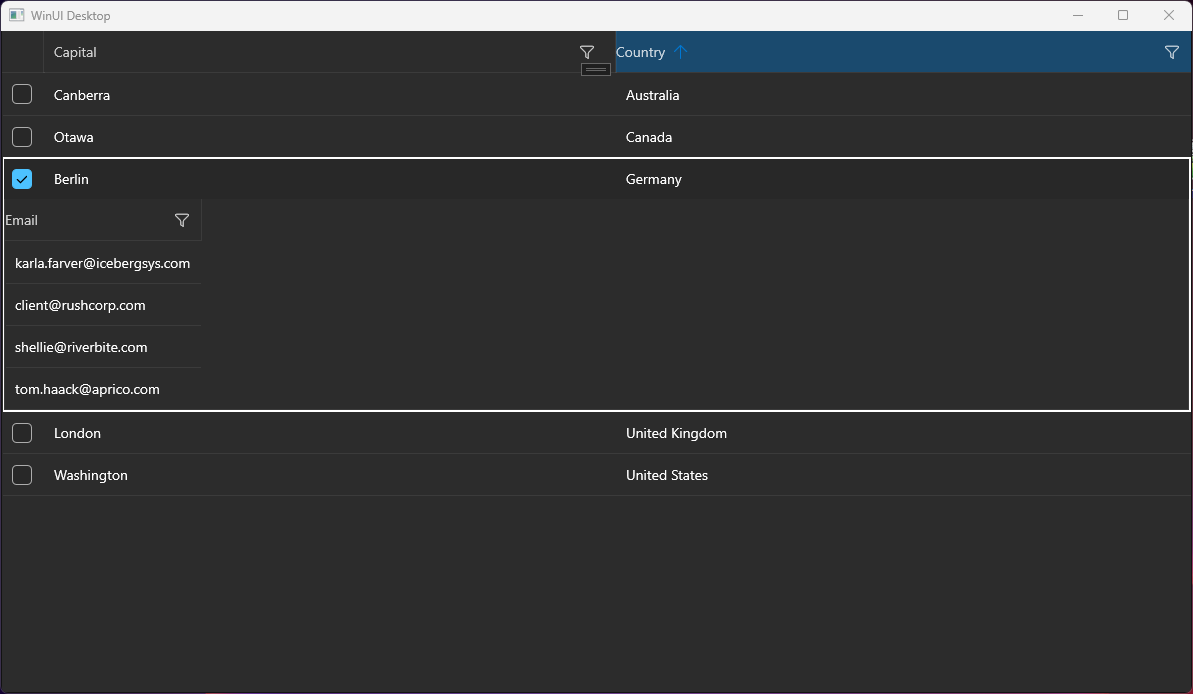
Hello, I tried to implement the sample application from your docs. (https://docs.telerik.com/devtools/winui/controls/raddatagrid/row-details)
But it seems to be not working, the detail area is not displayed completely. Only one column.
I have a similar behavior on another application.
Details:
- .NET 7
- Windows 11 Pro Version 23H2 (22631.3155)
- Telerik WinUI 2.9.0