
Declined
Last Updated:
30 Nov 2020 14:54
by ADMIN

Created by:
Jan
Comments:
1
Category:
PageView
Type:
Feature Request
It would be great if there was also a None (ViewMode) for PageView. That means no tabs and only the container. This is especially useful if you use PageView for Single Page WinForms. Up to now I use to hide the tabs with CodeBehind.
Declined
Last Updated:
03 Nov 2020 11:52
by ADMIN

Created by:
Stoyan
Comments:
2
Category:
PageView
Type:
Bug Report
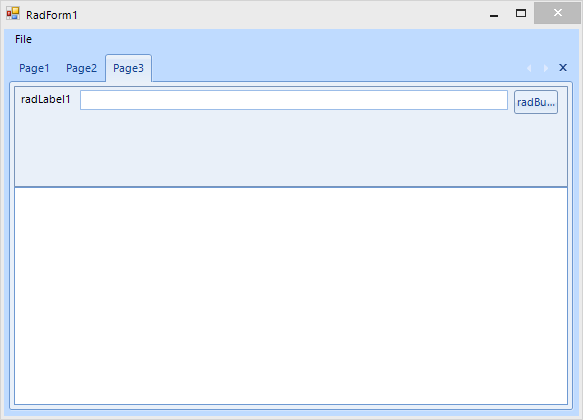
The layout on a monitor with 100%:
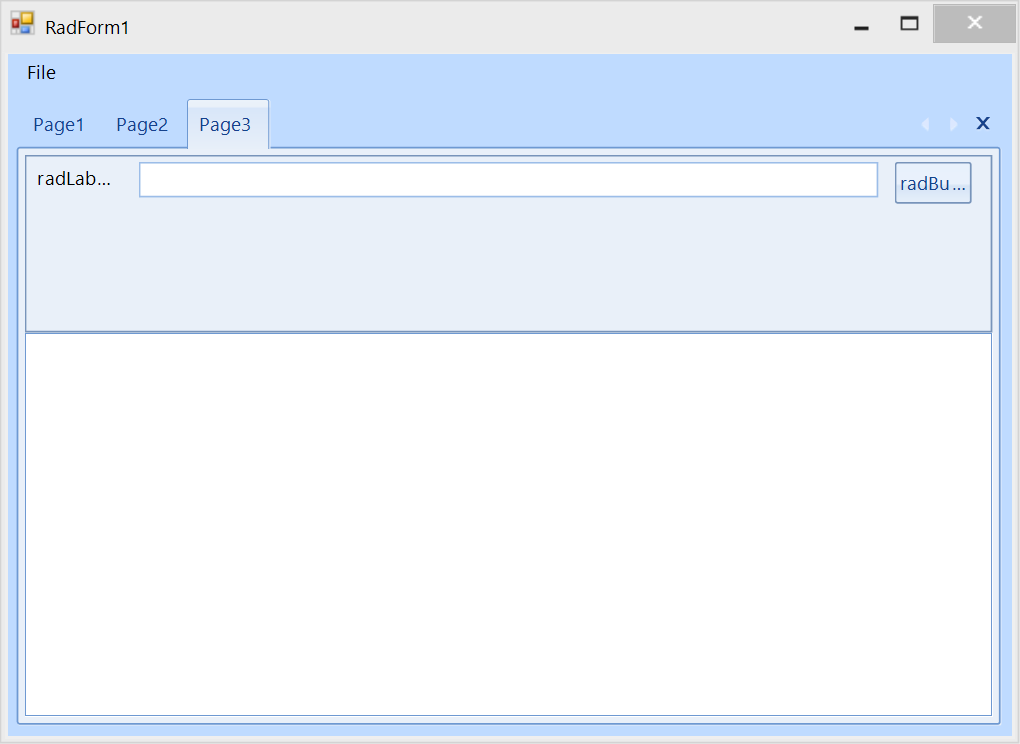
After moving the form to a monitor with higher than 100% DPI scaling, e.g. 175% or greater:
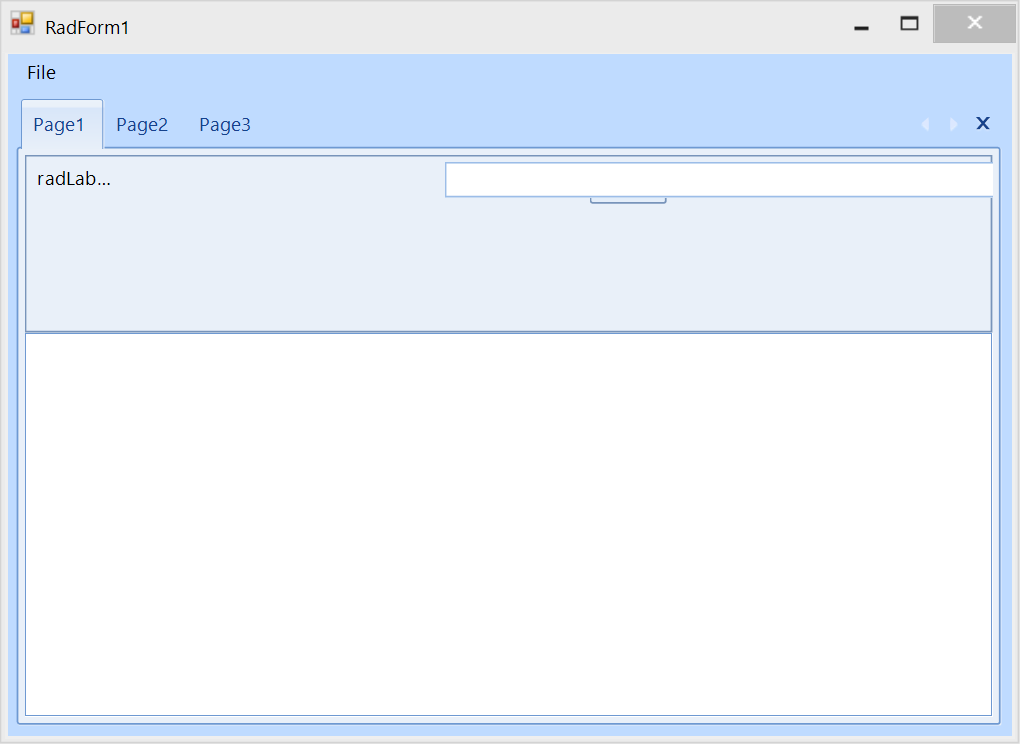
Once you switch to the first page which contains exactly the same UserControl, the layout is not correct:
Declined
Last Updated:
26 Jan 2022 10:57
by ADMIN

ADMIN
Created by:
Hristo
Comments:
1
Category:
PageView
Type:
Bug Report
How to reproduce: check the attached project:

Workaround: when the form is opened in the designer make sure that all pages are made visible at least ones so the controls are initialized, before attempting to access collection editors via properties window
Declined
Last Updated:
25 Aug 2016 11:25
by ADMIN

ADMIN
Created by:
Dimitar
Comments:
3
Category:
PageView
Type:
Bug Report
Declined
Last Updated:
04 Feb 2015 12:03
by ADMIN
ADMIN
Created by:
Dimitar
Comments:
1
Category:
PageView
Type:
Bug Report
To reproduce:
- Add RadpageView to a form and build the application.
- Merge the assemblies with .NET Reactor
- Run the new exe file.
Declined
Last Updated:
19 Aug 2026 13:50
by ADMIN
ADMIN
Created by:
Dimitar
Comments:
1
Category:
PageView
Type:
Bug Report
To reproduce:
- Add PageView to a form and set its Dock property to fill.
- Add single page and set its AutoScroll property to true.
- Add some controls and make sure that a scrollbar will appear.
- Start the application and scroll to the bottom.
- Maximize the form. You will notice that the scrollbar position is wrong.

 Workaround:
protected override void WndProc(ref Message m)
{
    if (m.Msg == 0x0112)
    {
        if (m.WParam == new IntPtr(0xF030))
        {
            this.radPageView1.SelectedPage.AutoScrollPosition = this.radPageView1.AutoScrollPosition;
        }
    }
    base.WndProc(ref m);
}
Declined
Last Updated:
19 Aug 2026 13:41
by ADMIN

ADMIN
Created by:
Stefan
Comments:
1
Category:
PageView
Type:
Bug Report
Workaround:
            RadPageViewExplorerBarElement exElement = radPageView2.ViewElement as RadPageViewExplorerBarElement;
            exElement.ItemSize = new Size(200, 100);
Declined
Last Updated:
24 Jun 2015 12:19
by ADMIN
ADMIN
Created by:
Stefan
Comments:
1
Category:
PageView
Type:
Bug Report
To reproduce:
- Implement the example from this page http://www.telerik.com/help/winforms/pageview-how-to-editing-page-tabs.html.
- Set the page text to empty string and click on another page.


Workaround:
subscribe to the editor's element RadPropertyChanging event:
void element_RadPropertyChanging(object sender, RadPropertyChangingEventArgs args)
{
    if (args.Property == RadElement.ContainsFocusProperty)
    {
        if (!(bool)args.NewValue)
        {
            args.Cancel = true;
        }
    }
}
Declined
Last Updated:
20 Feb 2014 15:23
by ADMIN
ADMIN
Created by:
Boryana
Comments:
1
Category:
PageView
Type:
Feature Request
Add a Visible property to RadPageView Pages for all modes
Declined
Last Updated:
23 Jul 2014 16:23
by ADMIN
ADMIN
Created by:
Stefan
Comments:
1
Category:
PageView
Type:
Bug Report
FIX. RadPageView when color blending is added, the control flickers.
Declined
Last Updated:
20 Jul 2016 09:12
by ADMIN
ADMIN
Created by:
Boryana
Comments:
4
Category:
PageView
Type:
Feature Request
This feature request refers to RadPageView in Strip ViewMode, which supports a multi-line StripElement. Thus StripItems will appear in different lines.
Declined
Last Updated:
23 Mar 2026 13:58
by ADMIN
ADMIN
Created by:
Nikolay
Comments:
1
Category:
PageView
Type:
Bug Report
Under specific circumstances and in Windows 2008 Server environment the RadTabStrip internally used in RadDock does not get a proper size.

Workaround:
bool performLayout = false;

protected override void OnSizeChanged(EventArgs e)
{
    base.OnSizeChanged(e);

    if (this.WindowState == FormWindowState.Minimized)
    {
        this.performLayout = true;
    }

    else if (this.performLayout)
    {
        //reset padding to force bounds update
        this.Padding = new Padding(1);
        this.Padding = Padding.Empty;
        this.performLayout = false;
    }
}

Basically, you need to override the OnSizeChanged method of the main form and first set and then reset its Padding when the it goes from Minimized to another state. This will trigger that internal layout mechanisms of our controls and you will get the RadGridView shown as expected.
Declined
Last Updated:
23 Apr 2014 12:56
by ADMIN
ADMIN
Created by:
Martin Vasilev
Comments:
1
Category:
PageView
Type:
Feature Request
Add scroll to a PanelBarGroupElement functionality