

I've tested this with both Telerik.WinControls.UI.RadForm and Telerik.WinControls.UI.RadRibbonForm
Telerik.WinControls.UI.RadForm works fine! Telerik.WinControls.UI.RadRibbonForm fails to bubble up Keys.Up, Keys.Down, Keys.Left and Keys.Right
Steps:
Create new WinForms project (I'm using .net 4.7.2)
Add Telerik extensions.
Add a Form (Windows Form default .Name = "Form1"), RadForm (default .Name = "RadForm1") and RadRibbonForm
You can use any Theme or default. Makes no difference.
Set all three form's .KeyPreview = True
Add this method to each form:
Private Sub form_KeyDown(sender As Object, e As KeyEventArgs) Handles Me.KeyDown
If e.KeyCode = Keys.Up Then
If My.Computer.Keyboard.ShiftKeyDown Then
MsgBox("Shift Up")
Else
MsgBox("Up!")
End If
End If
End Sub
Set your Startup Form = Form1 (The Windows Form) and click Start.
hit your UP-Arrow key. You'll get the MsgBox "Up!"
Hold shift+UP-Arrow and you'll get "Shift Up"
The above is True for Winforms AND RadForm but RadRibbonForm does this:
Set your Startup Form = radribbonform and click Start
Hit your UP-Arrow and you'll get...nothing. The event never gets raised.
Hold your shift+UP-Arrow and you'll get....nothing because the event does not fire when you hit any of the arrow keys.

RadMessageBox(form) is a telerik replacement for the System.Windows.Forms.MessageBox.
MessageBox has a parameter MessageBoxOptions.DefaultDesktopOnly which makes it (surprisingly) topmost. RadMessageBox does not have this option.
I have a scenario where the RadMessageBox is hidden by a total different application when shown. So I need to make it topmost.
Can you add some kind op RadMessageBoxOptions to make it topmost?
at Telerik.Windows.Pdf.Documents.Fixed.FormatProviders.Old.Pdf.PdfElementToFixedElementTranslator.CreateFormField(PdfContentManager contentManager, FormFieldNodeOld terminalFormField)
at Telerik.Windows.Pdf.Documents.Fixed.FormatProviders.Old.Pdf.PdfElementToFixedElementTranslator.CreateWidgetAnnotation(WidgetOld source, PdfFormatProvider provider)
at Telerik.Windows.Pdf.Documents.Fixed.FormatProviders.Old.Pdf.PdfElementToFixedElementTranslator.CreateAnnotation(AnnotationOld source, PdfFormatProvider provider)
at Telerik.Windows.Pdf.Documents.Fixed.FormatProviders.Pdf.PdfFormatProvider.CopyAnnotationsFromPageSource(PageOld source, AnnotationCollection annotations)
at Telerik.Windows.Pdf.Documents.Fixed.FormatProviders.Pdf.PdfFormatProvider.LoadPageAnnotations(RadFixedPage page)
at Telerik.Windows.Pdf.Documents.Fixed.Model.RadFixedPage.LoadAnnotations()
at Telerik.Windows.Pdf.Documents.Fixed.Model.Internal.RadFixedPageInternal.Arrange()
at Telerik.Windows.Pdf.Documents.Fixed.FormatProviders.Old.Pdf.PdfReader.PageContentLoader.Telerik.Windows.Pdf.Documents.Fixed.FormatProviders.Old.Pdf.PdfReader.IPageContentLoader.LoadPageContent(RadFixedPage page)
at Telerik.Windows.Pdf.Documents.Fixed.FormatProviders.Old.Pdf.PdfReader.PagesCacheManager.BeginUsingPageContent(RadFixedPage page)
at Telerik.WinControls.UI.RadFixedPageElement.Attach(RadFixedPage data, Object context)
at Telerik.WinControls.UI.RadFixedPageElement..ctor(RadFixedPage page, RadPdfViewerElement owner)
at Telerik.WinControls.UI.RadPdfViewerElement.CreatePageElement(RadFixedPage data, Object context)
at Telerik.WinControls.UI.FixedPageElementProvider.CreateElement(RadFixedPage data, Object context)
at Telerik.WinControls.UI.BaseVirtualizedElementProvider`1.GetElement(T data, Object context)
at Telerik.WinControls.UI.BaseVirtualizedContainer`1.UpdateElement(Int32 position, T data)
at Telerik.WinControls.UI.BaseVirtualizedContainer`1.MeasureElements()
at Telerik.WinControls.PdfViewer.PdfViewerStackContainer.MeasureElements()
at Telerik.WinControls.UI.BaseVirtualizedContainer`1.MeasureOverride(SizeF availableSize)
at Telerik.WinControls.RadElement.MeasureCore(SizeF availableSize)
at Telerik.WinControls.RadElement.Measure(SizeF availableSize)
at Telerik.WinControls.UI.ScrollViewElement`1.MeasureViewElement(SizeF availableSize)
at Telerik.WinControls.UI.ScrollViewElement`1.MeasureView(SizeF availableSize)
at Telerik.WinControls.UI.ScrollViewElement`1.MeasureOverride(SizeF availableSize)
at Telerik.WinControls.UI.VirtualizedScrollPanel`2.MeasureOverride(SizeF availableSize)
at Telerik.WinControls.UI.RadPdfViewerElement.MeasureOverride(SizeF availableSize)
at Telerik.WinControls.RadElement.MeasureCore(SizeF availableSize)
at Telerik.WinControls.RadElement.Measure(SizeF availableSize)
at Telerik.WinControls.Layouts.ContextLayoutManager.UpdateLayout()
at Telerik.WinControls.Layouts.ContextLayoutManager.UpdateLayoutCallback(ILayoutManager manager)

Using specifically Win11 Compact DARK theme has additional space compared to the Win11 Compact LIGHT theme. See the pictures.
- On Light theme there are 4 pixels between the form border and the top border of a tab.
- On Dark theme there are 12 pixels between the form border and the top border of a tab.
In my opinion the dark theme has a wrong height here and the light theme is correct, especially compared to other themes, even Office 2019 for example.
Light theme:

Dark theme:

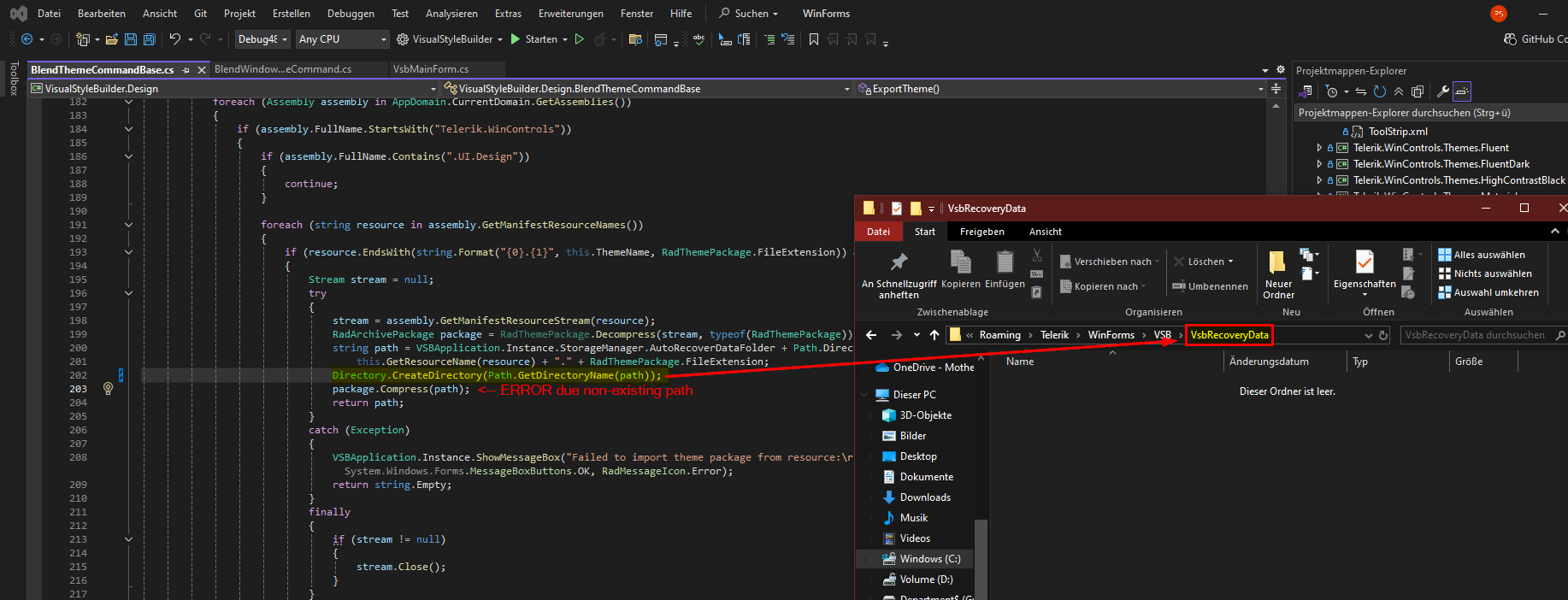
In the Visual Theme Builder (fresh installed Telerik UI for WinForms) you'll get an error because the directory "VbsRecoveryData" seems to be missing. Creating the directory before "package.Compress(path)" fixes this for me.
Hello,
We encountered problems with configuration of the toolbox in Visual Studio 2022 when out-of-proc designer is active.
More information about the usage and reason for the out-of-proc designer: https://github.com/dotnet/winforms/blob/main/docs/designer/designer-selection.md
Tested environment:
- Visual Studio 2022
- .NET Framework 4.7.1
- 32-bit application
- Windows 11 Pro
- Telerik UI For Winforms 2025.2.520.462
When trying to add a rad control from the toolbox the error in attachment occurs.
Workaround:
- Disable the out-of-proc designer in the project file:
<UseWinFormsOutOfProcDesigner>False</UseWinFormsOutOfProcDesigner>

Contrary to Telerik.WinControls.UI.Barcode.QRCode, Telerik.WinControls.UI.Barcode.Symbology.QRCode creates invalid (unscannable) QR-Codes if the message contains umlauts when using ECIMode.UTF8.
We are using Symbology.QRCode, because we use it in columns of a RadGridView.
I've attached two example QR-Codes of the value "Bär", one using Barcode.QRCode, and the other one using Barcode.Symbology.QRCode.
Note: I have one scanner that can scan some of the Barcode.Symbology QR-Codes with umlauts.

(This request may be specific to VS solutions which produce only DLLs, and not to ones which create a .exe.)
At the moment, the default behaviour for everything else in my VS project is to not produce warnings unless something might be wrong, which I may need to action.
WinForms,as of the latest release (2025) is the only thing which produces warning messages where there is not problem, which is not very tidy. I only want to see things in the build output which need my attention, defintely not 'happy' messages, or warnings which are not needed.
Currently, for each project in my solution, I get a message like:
1> [Telerik and Kendo UI Licensing]
1> Valid Telerik UI for WinForms license found. Make sure the main application also references Telerik.Licensing when using a class library.
...but I have a valid licence, and everything is OK. No action is needed.
Your support suggested adding...
<TelerikLicensingVerbosity>quiet</TelerikLicensingVerbosity>
...to each project in my solution, but that still produces the above build message.
A polite solution would be to turn-off ALL such warning messages, and let me switch them ON when needed. Preferably via a setting somewhere, not by editing the VS project file, which means unloading, editing the project file, and realoading each of many projects.
(Visual Studio 2026, not currently an option in the drop-down below)
There is a big problem with Telerik controls when using national resource files. Switching from one language to another and again sometimes destroys the user interface. It especially concerns RadCheckBox control. Text, tooltip and probably other properties from one control appear in other control etc. I think it can be a general problem because I also noticed that sometimes Image from one RadButton control appears in other button.
I prepared a set of images which show how it happended in my case. Switching from Default language to Polish language and again and then adding and removing new RadCheckBox completly destroyed user interface in my sample UserControl. This new RadCheckbox was created as a copy of existing RadCheckBox what may be a clue.
I also attached VS2019 project with my sample UserControl.
Best regards,
Andrzej
Team,
we did not get any help from public forums,
we are expecting in 2026Q1,
so please handle it, https://feedback.telerik.com/winforms/1700973-radfiledialogs-selecting-large-number-of-files-is-very-slow
Team,
we did not get any help from public forum,
we are expecting in 2026 Q1,
RadControl: Incorrect Font scaling after DPI switch runtime
team,
we did not get any help from public forum,
already we commited our stack holders will resolve in 2026 Q1, so please close ASAP.
RadFileDialogs: Selecting Large Number of Files is Very Slow
team,
we did not get any help from public forum,
already we commited our stack holders will resolve in 2026 Q1, so please close ASAP.

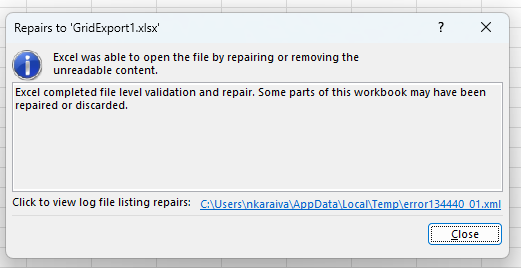
The content is exported correctly, but the following error occurs:

Hi support,
I think I found an issue with the default behavior of Telerik UI for Winforms on a HighDPI PerMonitorV2 configuration.
The application works correctly and resizes well if moved between screen with different Font Scalings.
However, if the user changes the main screen to one with a different scaling, the application is strangely taking the change into account and would also not come back to its original state.
Attached is a GIF showing the problem and the project. The application on run on screen 3 being main display at 100% FontScale. If I pass Screen 1, the main display (which is 125% font scaled), the icons of the app are made larger (for no reason), going back to screen 1 being the main screen, will not restore the icon to the correct size, unless you make parts of the application being redrawn.
I've a more related question but it's more complex and I won't be able to provide a project for this, so I'm just trying here ;) In our real application (not this test one), when setting PerMonitorV2 mode, we need to have RadControl.EnableRadAutoScale set to false for the controls to resize correctly when changing monitors whereas this [test] application needs it to be let it set to true to kind of do the same thing ?! Any idea on where the difference can come from ?
Thanks & regards,
Benjamin Foucher
.jpg)
But next time we open the form, it's unchecked, because setting to Indeterminate before setting IsThreeState to true is ignored.
1. Create clean WinForms .NET Framework project.
2. Add Telerik UI for WinForms 2026.2.520.462.
3. Create BaseForm : RadForm.
4. Add RadStatusStrip to BaseForm.
5. Create inherited form RadForm1 : BaseForm.
6. Open inherited form in Visual Studio designer.
7. Designer crashes with NullReferenceException in Telerik.WinControls.UI.Design.RadControlDesigner.OnSetCursor.
8. Remove/comment RadStatusStrip from BaseForm.Designer.cs.
9. Designer opens successfully.
Sample project attached.
Title
KeyNotFoundException in DefaultAppearanceProvider.TryGetCurrentAnnotationAppearances when loading PDF with FreeText/Widget annotation containing invalid "/AP << /N 0 0 R >>" reference (likely macOS Preview-authored)
Product / Version
- Product: Telerik UI for WPF — RadPdfViewer / PdfProcessing (Telerik.Windows.Documents.Fixed.dll)
- Version: 2022.1.217.40
- Platform: .NET Framework 4.x, WPF, Windows
Summary
Loading a PDF containing an annotation with a broken appearance reference (/AP << /N 0 0 R >> — an indirect reference to object 0, which is reserved/invalid per the PDF spec) throws an unhandled KeyNotFoundException deep inside the rendering pipeline when the affected page is scrolled into view. This crashes the hosting WPF application, since the exception originates inside WPF's layout/render callback (OnRender) rather than during the initial PdfFormatProvider.Import() call, so it cannot be caught by application-level try/catch around import.
I found this appears to match a previously reported and fixed issue: "PdfViewer: KeyNotFoundException is thrown when loading a document with Free Text Annotation," fixed in Release 2024.3.924. I'd like confirmation this is the same root cause and whether 2024.3.924+ resolves it, or if this is a distinct case given the specific /N 0 0 R malformation I've isolated.
Steps to Reproduce
- Load the attached PDF (page containing the annotation object shown below) into
RadPdfViewerviaPdfFormatProvider.Import()withImportSettings = PdfImportSettings.ReadOnDemand. - Assign the resulting
RadFixedDocumenttoRadPdfViewer.Document. - Scroll to the page containing the affected annotation.
- Exception is thrown during WPF's render pass, not during import.
Full Stack Trace
System.Collections.Generic.KeyNotFoundException: The given key was not present in the dictionary.
   at System.ThrowHelper.ThrowKeyNotFoundException()
   at System.Collections.Generic.Dictionary`2.get_Item(TKey key)
   at Telerik.Windows.Documents.Fixed.Model.Annotations.MultiStateAppearances.get_Item(String stateName)
   at Telerik.Windows.Documents.Fixed.Utilities.Rendering.Annotations.DefaultAppearanceProvider.TryGetCurrentAnnotationAppearances(Annotation annotation, SingleStateAppearances& singleStateAppearances)
   at Telerik.Windows.Documents.Fixed.Utilities.Rendering.Annotations.DefaultAppearanceProvider.TryProvideAppearanceOverride(Annotation annotation, AnnotationAppearanceMode annotationAppearanceMode, FormSource& formSource)
   at Telerik.Windows.Documents.Fixed.Utilities.Rendering.Annotations.BaseAppearanceProvider.TryProvideAppearance(Annotation annotation, AnnotationAppearanceMode annotationAppearanceMode, FormSource& appearance)
   at Telerik.Windows.Documents.Fixed.Utilities.Rendering.Annotations.BaseAppearanceProvider.TryProvideAppearance(Annotation annotation, AnnotationAppearanceMode annotationAppearanceMode, FormSource& appearance)
   at Telerik.Windows.Documents.Fixed.Utilities.Rendering.FixedPageContentRenderingHelper.RenderNormalAnnotationAppearance(IFixedContentRenderer renderer, Annotation annotation)
   at Telerik.Windows.Documents.Fixed.UI.AnnotationAppearancesCanvas.DrawAppearance(DrawingContext drawingContext)
   at Telerik.Windows.Documents.Fixed.UI.AnnotationAppearancesCanvas.OnRender(DrawingContext dc)
   at System.Windows.UIElement.Arrange(Rect finalRect)
   at System.Windows.Controls.Canvas.ArrangeOverride(Size arrangeSize)
   at System.Windows.FrameworkElement.ArrangeCore(Rect finalRect)
   at System.Windows.UIElement.Arrange(Rect finalRect)
   at System.Windows.ContextLayoutManager.UpdateLayout()
   at System.Windows.ContextLayoutManager.UpdateLayoutCallback(Object arg)
   at System.Windows.Media.MediaContext.FireInvokeOnRenderCallbacks()
   at System.Windows.Media.MediaContext.RenderMessageHandlerCore(Object resizedCompositionTarget)
   at System.Windows.Media.MediaContext.RenderMessageHandler(Object resizedCompositionTarget)
Root Cause (identified via hex inspection of the source PDF)
The offending annotation object in the PDF:
181 0 obj
<< /AP << /N 0 0 R >>
   /M (D:20231128120931Z00'00')
   /Rect [ 67.664 412.788 527.774 446.2222 ]
   /AAPL:SFF true
   /F 4
   /DA (//Menlo-Regular 14 Tf 0 g)
   /AAPL:AKExtras
   << /AAPL:AKPDFAnnotationDictionary
      << /AP << /N 0 0 R >>
         ...
/AP << /N 0 0 R >>is an indirect reference to object number 0, which is reserved by the PDF spec (head of the free-object list) and never resolves to a real object.- The
/AAPL:SFF,/AAPL:AKExtras,/AAPL:AKPDFAnnotationDictionarykeys indicate this annotation was written by macOS Preview.app (Apple's proprietary annotation/markup extensions), consistent with a document that was signed or markup-annotated on a Mac before being distributed. DefaultAppearanceProvider.TryGetCurrentAnnotationAppearancesdoes:
singleStateAppearances = appearances[appearances.CurrentState];with no existence/null check before indexing — when CurrentState doesn't resolve to a valid key (because the backing /N reference was never a valid object), this throws KeyNotFoundException uncaught.
Impact
This exception occurs during WPF's internal render callback, outside the call stack of the code that calls PdfFormatProvider.Import(), so it cannot be caught by a standard try/catch around import/load. It surfaces as a DispatcherUnhandledException on the UI thread and, without an application-level workaround, crashes the hosting application entirely.
What I'm asking Telerik to confirm
- Is this the same root cause as the "KeyNotFoundException when loading document with Free Text Annotation" issue fixed in 2024.3.924, or a distinct case specific to the
/N 0 0 Rinvalid-reference pattern? - Can you confirm 2024.3.924+ (or ideally your current latest) resolves this specific
/N 0 0 Rmalformation, not just the FreeText-annotation case? - Is there a supported, non-reflection-based public API to validate/sanitize an annotation's appearance state before rendering, so we can defensively filter malformed annotations without waiting for a full version upgrade? (We are currently working around this via reflection into internal
Appearances/MultiStateAppearancesmembers, which is fragile across versions.) - Since
TryGetCurrentAnnotationAppearancesalready has "Try" in its name implying safe failure, could this be hardened with aTryGetValueinstead of the indexer, to fail gracefully rather than throw, for any similarly malformed future document?