

Consider adding support for CSS breakpoing / media queries in ThemeBuilder.
https://developer.mozilla.org/en-US/docs/Web/CSS/CSS_media_queries/Using_media_queries
https://www.w3schools.com/howto/howto_css_media_query_breakpoints.asp
This will enable users to create response design directly within the ThemeBuilder application.
Requested through t.1682156

Hello,
I'm building my first .net9+ Blazor Hybrid + Web app. I can see that theming is going to be a problem between the Blazor Web UI theme and the native app areas that use App.xaml resources. I'd like to request/suggest that theme builder can take a theme which is typically exported in CSS and also have the option to generate the App.xaml resources so my app native or using Web UI share a common theme.
Thank you.

Expose additional styling templates for a Grid component that uses stacked columns (a.k.a. as stacked display mode):
https://www.telerik.com/blazor-ui/documentation/components/grid/columns/stacked
https://demos.telerik.com/kendo-ui/grid/stacked-display-mode
https://www.telerik.com/kendo-angular-ui/components/grid/styling-and-appearance/stacked-layout-mode

My projects in Themebuilder breaks whenever I try to change the font size!
Steps to reproduce the error:
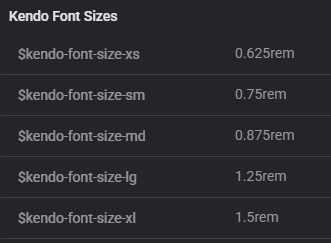
- Create a new project (Font icons, Q4 2025 latest, Bootstrap)
- Click on "Project setting".
- Click on "Metrics".
- Change:
- $kendo-font-size-md: 0.875rem
- $kendo-font-size-sm: 0.75rem
- $kendo-font-size-xs: 0.625rem
- Close project settings.
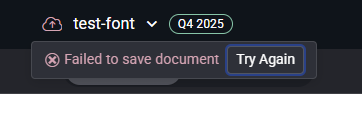
- Now the project is broken.
- Crash in javascript console:
Uncaught _P: There are errors in SASS and it cannot be compiled to CSS.
PATCH https://themebuilderapp.telerik.com/api/v1/projects/6928717ab857146bc01d9a2e/variables 500 (Internal Server Error) - The project cannot be saved:
- Crash in javascript console:
- It is no longer possible to load the project. The same error appears in the console as shown above.
- If I export the metadata from this broken project from the Dashboard and import it into a new project, that project also breaks. I have attached the metadata.

Please help!
Modern CSS supports nesting. This would seem to be a good way to cut down on the overall size of the export file.
Are there any plans to update ThemeBuilder to support CSS nesting?
Ex.
Instead of this...
.fk-daterangepicker .k-input-suffix,
.fk-daterangepicker .k-input-prefix {
  cursor: pointer;
  &:hover {
  background-color: var(--kendo-color-primary-subtle-hover);
  }
}
I have to define this set of styles like this...
.fk-daterangepicker .k-input-suffix,
.fk-daterangepicker .k-input-prefix {
  cursor: pointer;
}
.fk-daterangepicker .k-input-suffix:hover,
.fk-daterangepicker .k-input-prefix:hover {
  background-color: var(--kendo-color-primary-subtle-hover);
}
Repeating this pattern over an entire design system adds a lot of extra text...
Hey,
I am working with selfmade tokens imported from Figma to Themebuilder. I would like to edit multiple tokens in Themebuilder. E.g. batch edit all token names at once. Is there a way to do that currently? Or something planed like a multiselect in the settings window for tokens?
Thanks
Alex
Hey,
I want to add an Opacity Token but am only left with the option to write a % value manually.
Can you please add the option to select a token inside of a components Opacity Selection?
Greetings
Alex
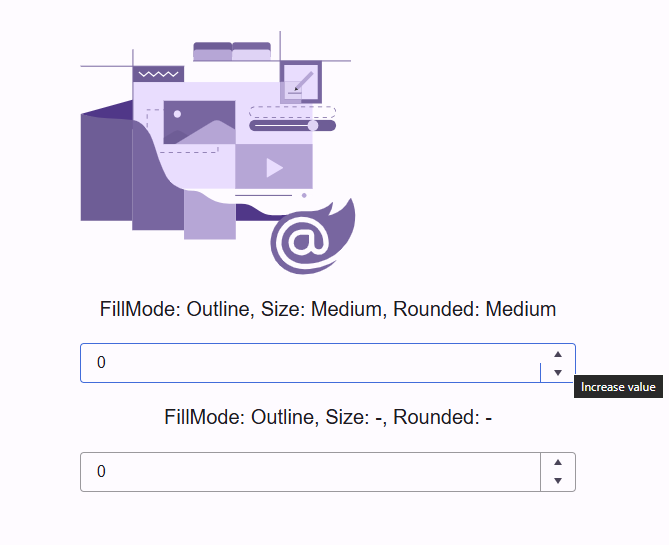
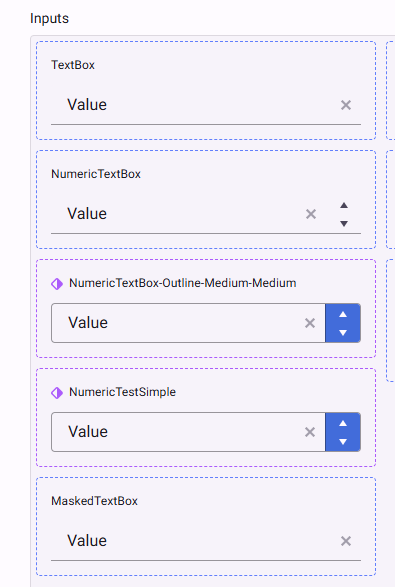
I am having difficulty to theme the NumericTextBox in outline mode. Theme builder shows correctly the themed component, with some difficulties... it seems that I need to set everything up multiple time in order for the tool to store the new values.
When I use the exported theme in a Blazor application, the outline numeric textbox is not able to theme the spinner buttons (up and down) and they default to base color, whitish in light themes, and loose borders when hovering over it. I am attaching the output css from theme builder.
In theme builder I see the following
The AI can successfully apply Figma exported variables at the global level, but it is unable to apply them at the component level. Instead, it prompts for explicit hex color values rather than using the exported variable references.
Expected Behavior:
AI should recognize and apply exported Figma variables at both global and component levels.
Actual Behavior:
Global variables are applied correctly, but component-level variables are not recognized, and the AI requests hex codes instead of using the variable tokens.

Hi there
I noticed that the timeline component isn't available in ThemeBuilder, and I wanted to share that we'd really love to be able to style it through the tool if possible.
Thanks so much for considering this!Cheers,
Davy