I'm using VS 2022, the demo reporting (Telerik_Reporting_2026_Q1_20_0_26_211). When using the "Telerik Report 2026 Q1 Wizard", I select the following
- "Table Wizard"
- Current Data Sources
- Add New Data Sources
- Select "Object Data Sources
- I select my Assembly and data object.
- I select the Data source Member
See attach file when I finish the wizard.

This regularly raises flags during security audits.
Essentially users can create data in the system that will appear in a cell of the report, and execute as a macro and allow running custom code on the computers of anyone who opens the xls or xlsx file.
Currently there is a setting to protect Telerik's exports CSV exports ("FormulaPrefix")
https://docs.telerik.com/reporting/doc-output/configure-the-export-formats/csv-device-information-settings
The same setting should be introduced for Excel (xls & xlsx) exports.
It should be another parameter of the xls/xlsx export extensions

If a table-based item (Table, List, Crosstab) does not fit in a single page and needs to occupy more than one page, its bottom border is not drawn on the first page and its top border is not drawn on the second (subsequent) page. This behavior is by design and its purpose is to help the users visually distinguish the table as a single item. The table has only one top and bottom border and they are displayed at the beginning and at the end of the table, regardless how many pages the table actually occupies.
Since users might find this confusing, a table should have a property controlling this behavior. The default state of the property will preserve the current rendering. If the user explicitly sets the property, then the table will draw its top and bottom borders on every page it occupies.
If the HTML5 Report Viewer gets hidden on renderingBegin(e, args) event and shown on renderingEnd(e, args) event, its toolbar is shown, but the contents are still invisible.
Code snippet that demonstrates the issue:
$("#reportViewer1")
    .telerik_ReportViewer({
		... initialization script goes here
        renderingBegin: function (e, args) {
           $("#reportViewer1").hide();
        },
        renderingEnd: function (e, args) {
           $("#reportViewer1").show();
        }
    });
Hello,
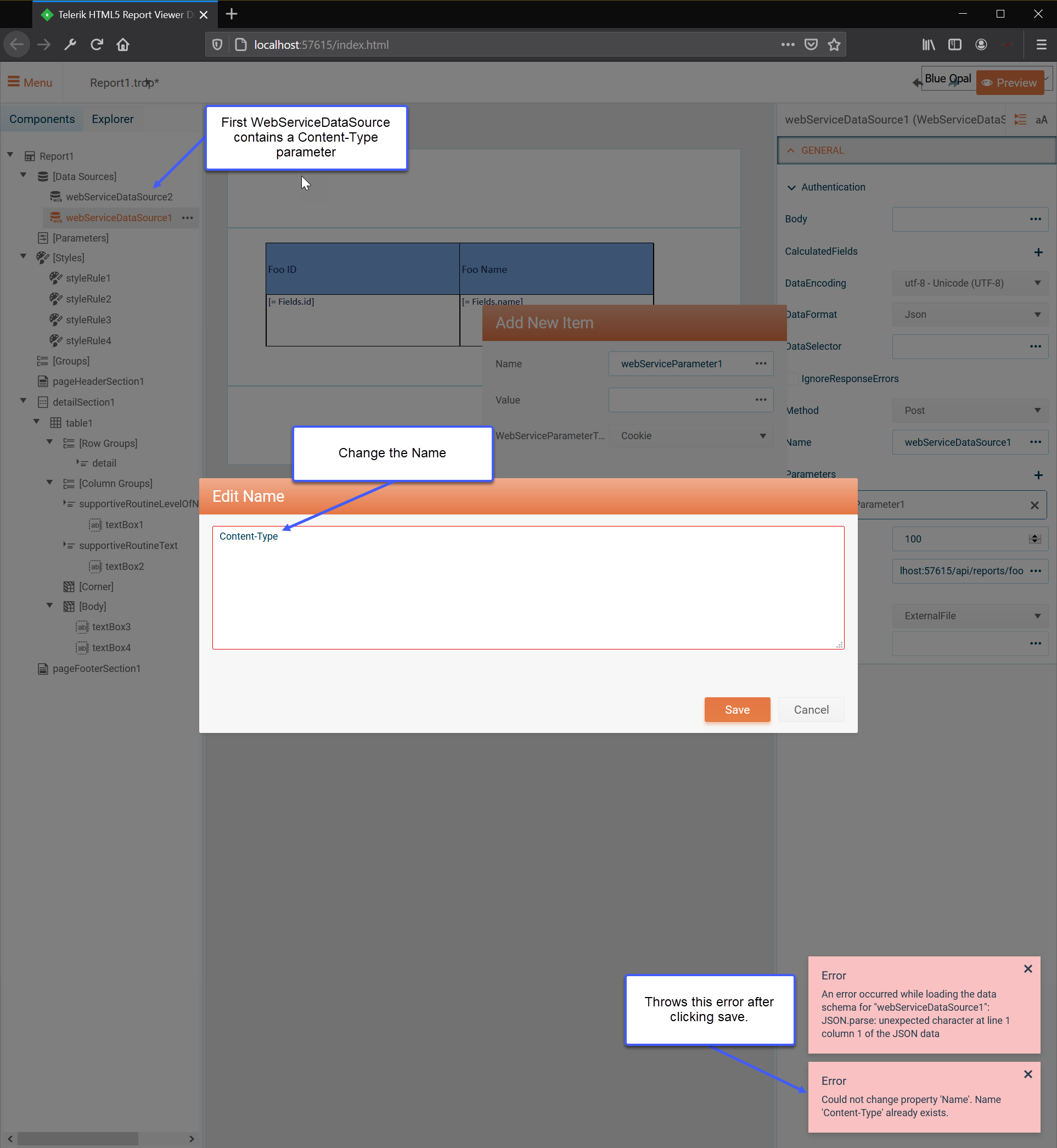
I currently have a WebServiceDataSource in my report using a POST Method, a Body and a Parameter for Content-Type.
However, if I try to add a second WebServiceDataSource with a Content-Type parameter it throws an error saying that the Name already exists.
See the following screenshot for a visual reference.