

The problem is not getting the error via Dot Net programming, but the complete layout destruction of the report as a result of the fact that a picture (in our case a thumbnail of a provider) is unavailable. Catching the report error is not an option. It is too complicated and even if we succeed  in obtaining the error, it will be very complicated to remove the unavailable url on the fly and re-render the report again.

This seems to be a "known issue" for about 8 years!

My question: Is it possible to keep the remaining report "intact" if such an error occurs? This shouldn't be too difficult for the development team..

When merging the ReportViewer's WPF theme dictionaries from the DLL in App.xaml, the VS2019 Designer fails due to a problem with a ZoomComboBoxStyle definition.
This causes all Telerik UI for WPF control's styles fail to load in the Visual Studio designer.
WORKAROUND
Instead of App.xaml, merge the ReportViewer's theme dictionary closer to the control.
For example in the ReportViewer's direct parent:
<Grid><Grid.Resources>
<ResourceDictionary>
<ResourceDictionary.MergedDictionaries>
<!-- Moved from app.xaml -->
<ResourceDictionary Source="/Telerik.ReportViewer.Wpf.Themes;component/Themes/Summer/Telerik.ReportViewer.Wpf.xaml" />
</ResourceDictionary.MergedDictionaries>
</ResourceDictionary>
</Grid.Resources>
<tr:ReportViewer x:Name="ReportViewer1" ReportSource="{Binding CurrentReport}" />
</Grid>

When you try to send the report through the SendMailMessage functionality but an exception is thrown, the report will disappear. If you click on Refresh and try again with fake data, the exception will be thrown but the report will remain. If you prefer to refresh it automatically, you can use the error event:
var viewer = $("#reportViewer1")
.telerik_ReportViewer({
    serviceUrl: "api/reports/",
    reportSource: {
        report: "Report Catalog.trdp",
    },
    error: function (e, args) {
        console.log("This event handler will be called after a page of the report is ready.");
        console.log("The error message is: " + args);
        viewer.refreshReport();
    },
    viewMode: telerikReportViewer.ViewModes.INTERACTIVE,
    scaleMode: telerikReportViewer.ScaleModes.SPECIFIC,
    scale: 1.0,
    enableAccessibility: false,
    sendEmail: { enabled: true }
}).data("telerik_ReportViewer");
.jpg)
As in Ticket with ID 1440072 requested we are looking for a funktionallity to send Reports via E-Mails with the WPF ReportViewer. As only the HTML-5 ReportViewer currently supports the E-Mail sending we would request the feature for WPF as well.
Best Regards,
Martin

The print functionality cannot be used in Google Chrome 77.0.3865.75 (lastest update). The following error is displayed in the console of the browser: Resource interpreted as Document but transferred with MIME type application/pdf.
As an alternative, you can use other web browsers for printing.
When a date is set as a report parameter in the HTML5 viewer, it formats the parameter as a JSON date using a timezone. Where no time is specified this results in a time part added to the date when received at the server. This is a problem, especially for browser in a negative offset zone, e.g. US, where upon the date goes to the previous day. Please add support for parameter types of date, where no time is present and no conversion is done anywhere.

in our solution, we store the trdx reports designed with Standalone Designer as xml strings in our database,
and render them to pdf in the background services by using Telerik.Reporting.XmlSerialization.ReportXmlSerializer.Deserialize
the new web based designer would be a good addon to integrate report design directly into the appliciation.
but the current preview version of webreportdesigner needs to be configured with a FileStorage.
it is possible to override the GetReport and SaveReport functions in a custom ReportDesignerController and load the report from a string (db in our case),
but since the ReportJsonSerializer is an iternal class, it is not possible to create a json response and send it to the webeditor.
so it would be helpfull, either to make the ReportJsonSerializer a public class so it can be used to convert the report manally to json, or extend the
whole thing to load the reports from strings directly.
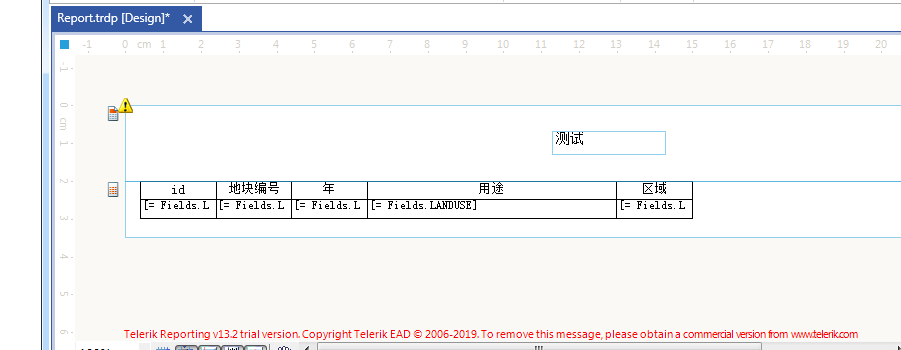
i down last new version r3 2019 sp1 trial, create Simple example for binding table
eg:
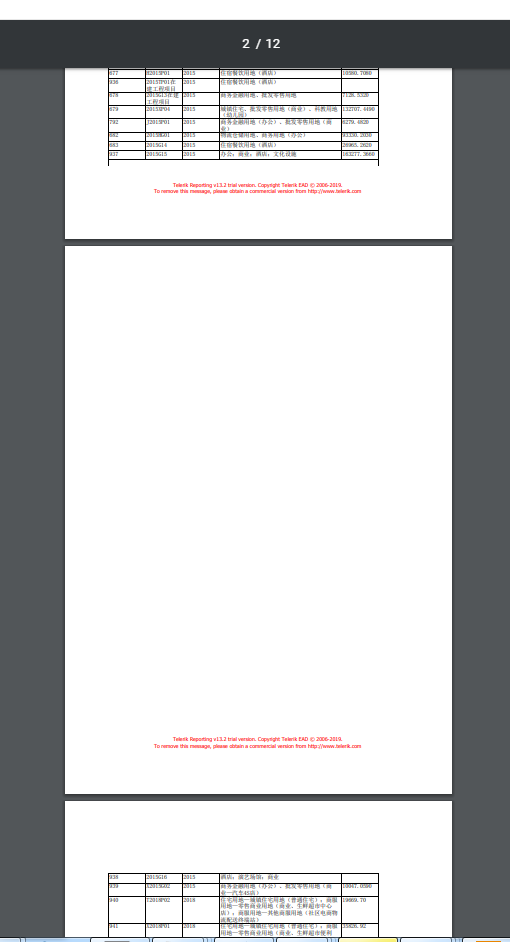
reporting design tool render result:

We are using a background image in our report. We noticed that on the Mac, the graphs were rendering very small when exporting to PowerPoint.
I found this thread that said to set the ‘UseMetafile’ rendering device setting to False. After doing so, it fixed the graph issue but then broke the background image, for both Windows and Mac PowerPoint. The background image is now very small.