


Standalone Report Designer is not localized when the trdp file is opened. The localization only takes effect when the executable file is started first and then the report is opened.
Reproducible in R2 2020 14.1.20.513

It would be good if the table headers can be frozen. This can be really useful in case of a big report which is displayed on a single page.

For conditional sorting I use a formula like this:
=IIF(Parameters.SortBy.Value = 1, Fields.id,
 IIF(Parameters.SortBy.Value = 2, Fields.name, Fields.value))
This works perfect.
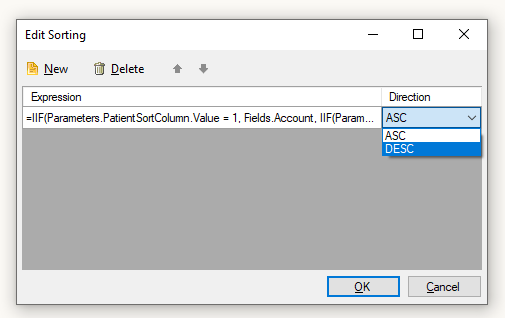
Now I would like to do the same with the sortings direction! Something like:
=IIF(Parameters.SortOrder.Value = NULL, ASC, IIF(Parameters.SortOrder.Value >= 0, ASC, DESC))
Sadly, the Direction-Field/Dropdown does not support formulas.

I have encountered this problem numerous times but I will list one of them.  When printing a weekly schedule in the format of a calendar, the days of the week print top to bottom when the desired layout should be L to R.

We have resorted to various hacks to get this to work, but this is another feature of ***(which we are converting from) that is not supported in Telerik Reporting.

It would be nice if there was an OPTION to flow L to R as opposed to Top to Bottom.
Hello,
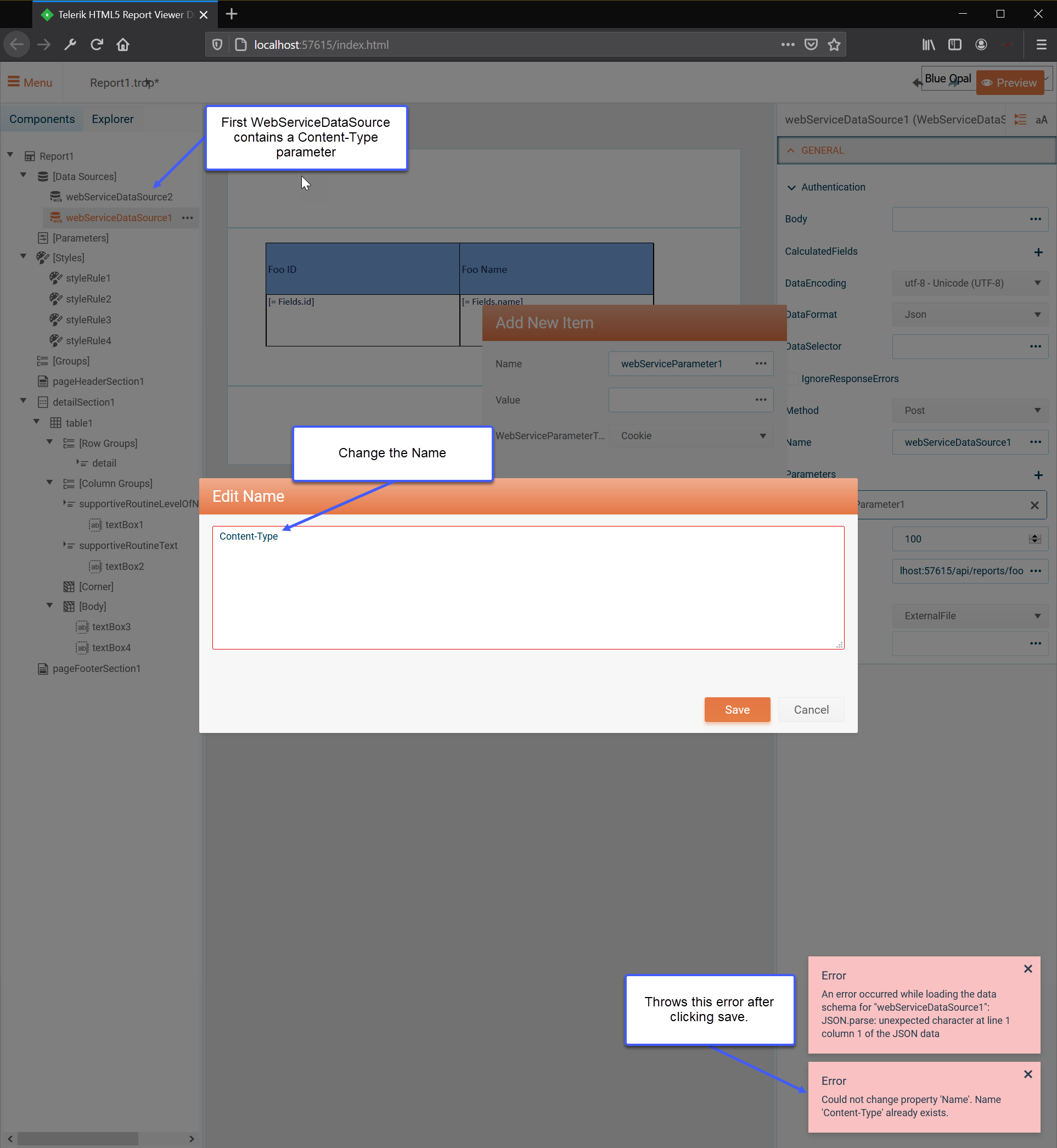
I currently have a WebServiceDataSource in my report using a POST Method, a Body and a Parameter for Content-Type.
However, if I try to add a second WebServiceDataSource with a Content-Type parameter it throws an error saying that the Name already exists.
See the following screenshot for a visual reference.
We display data inside an HtmlTextBox that was entered using the RadEditor. It would be great if the Reporting HtmlTextBox could be brought much closer or even in line with tag support as the editor. We are frequently running into issues with uncommon tags (that we strip out for the HtmlTextBox) and also with spacing being different. We work around the issues we have, but continuing increased tag support or auto stripping of unsupported tags would be very appreciated.
If during the report rendering stage, one or more of the required entities in the File storage were removed/deleted by third-party software, it will prevent the report from finishing the rendering and throws a NullRefereceException:
System.NullReferenceException: Object reference not set to an instance of an object.at Telerik.Reporting.Services.Engine.Document.AddClientToolTipsResource(IList toolTips)
at Telerik.Reporting.Services.Engine.Document.FinishRendering(ReportRendererResult result)
at Telerik.Reporting.Services.Engine.ReportEngine.RenderReportDocument(String pendingRenderingId)
at Telerik.Reporting.Services.Engine.TaskQueue.WorkerThread.ProcessItems()
at Telerik.Reporting.Services.Engine.TaskQueue.WorkerThread.ThreadProc()
at System.Threading.ExecutionContext.RunInternal(ExecutionContext executionContext, ContextCallback callback, Object state, Boolean preserveSyncCtx)
at System.Threading.ExecutionContext.Run(ExecutionContext executionContext, ContextCallback callback, Object state, Boolean preserveSyncCtx)
at System.Threading.ExecutionContext.Run(ExecutionContext executionContext, ContextCallback callback, Object state)
at System.Threading.ThreadHelper.ThreadStart()]
Hi Telerik Team,
We are having report parameters up to 30. For better UX we need to group parameters into sections. Please add this feature.
Attached is an example of what we want to achieve.
In Visual Studio Report Designer Preview, Use https://play.google.com/store/apps/details?id=com.teacapps.barcodescanner and other apps to scan the barcode(such as attachment Visual Studio Report Designer Preview.png), but after exporting the PDF, The first barcode scan is correct, the result of the second barcode scan is the content of the first barcode(such as attachment Exported PDF.png), Attachment BugDemo.zip is my project, How can I fix this problem, thanks.
Sometimes the following unexpected behavior can be observed with the WinForms report viewer.
Steps to reproduce:
1. Run the WinForms application;
2. Select a value for the parameter and click on Preview.
The window's size is decreased.
The Telerik.ReportViewer.Wpf NuGet package does not contain all the dependent UI for WPF assemblies. I cannot use the UI for WPF NuGet packages without also having a license.
It would be nice if the WPF Report Viewer NuGet package included all the dependent UI for WPF assemblies.
It would be good a maintain the scroll position on the parent page while navigating back from a drill-through report (using the back button of the report viewer) specially if the parent page contains a vertical scrollbar. This would enhance the user experience and eliminate the need to scroll back to the original position.
When displaying a report in the WPF Report Viewer, with a TextBox in the page Footer, using the Expression:
= Format("Page: {0} of {1}", PageNumber("groupPerson", Fields.PersonId), PageCount("groupPerson", Fields.PersonId))The whole report is displayed and printed correctly.
When a single page is printed, for example: Page 3 of 5, using the Print Dialog, the page number is incorrectly printed as: Page 3 of 1