

There is nothing really pro outside visual controls for reactJs to many source to many projects could be amazing if telerik create this full set including the report viewer
Our team is in the process of converting Crystal Reports documents over to Telerik Reporting and one of Crystal Reports advantages over Telerik Reporting was the ability to create custom fields with Crystal or Visual Basic Syntax, including the declaration of variables. Lack of variables and a few common constructs can make simple expressions overly complex.
One of the more common use cases for us is formatting text differently based on one or more other values. Without the ability to write if/elseif/else blocks we wind up with nested ternary statements which can be are hard to read and maintain.
While we can write user functions that seems impractical for long term maintenance and support. It would be very helpful if we could create expressions using C# directly in the Report Designer and have the embedded within the report itself.
See my initial request for something similar in the forms here: https://www.telerik.com/forums/feature-request-if-elseif-else-and-or-switch-statement-support-in-expressions

As I outlined in my Issue with the Cross-section Item post to the forums, the current implementation of the cross-section item carries the following limitation:
The Cross-section item uses the report's data context and cannot be evaluated against detail or group data. The processing engine produces a single instance per each Cross-section item in the report definition, therefore its style or visibility cannot be changed based on data fields.
For invoice (or sales order) style reports this places a severe limitation on the complexity of the report.
One of my current projects requires me to create a report layout that can be run for multiple invoices from multiple customers, where each customer has their own unique set of flags that control what information is included on their invoices for each line item of the invoice.
My current version of this report works great when it is run for a single invoice or invoices from a single customer (or from customers who use the exact same set of print flags) by binding the visibility and begin/end margin values of the lines that start in the groupHeader section, cross through the detailSection, before finally terminating in the groupFooter section.
This can be seen clearly in the 2 attached invoices, one with lots of columns of information (called: Invoice with lots of detail columns.png), and another where the customer has been configured with all the additional information toggled off (called: Invoice with minimal detail columns.png).
Unfortunately, because of the cross-section item's current limitation, when I run the report for both invoices the lines attributes/visibility are set based on the customer flags of the "first" invoice in the group, and do not get reset for subsequent invoices. This can be seen in the attached file: Behavior when including both invoices.png.
I understand that if a cross-section item begins/ends in a page/report header/footer, then having it's attributes change based on group-specific data would be less than ideal. But when the line beginning and end points are restricted to a group header and footer, as it always would be for a report layout used for multiple invoices or sales orders, then having that line's attributes change based on the data is the only way to use this functionality for these types of complex reports.
NOTE: While there is a workaround using the attributes/visibility of detail columns, vertical lines in the detail section, and their associated headers and totals textboxes in the groupHeader and groupFooter, it results in an unprofessionial looking report because of the difficulty in getting the variable border and detail vertical lines to line up precisely (and it is very time-consuming to try to implement).
SUMMARY:
Changing the Cross-section item implementation to allow it's data context to be evaluated against detail or group data when the line's terminators are restricted to groupHeader/Footers would allow for its use in more complicated report layouts.
BTW: interally, we refer to these reports as Mighty Morphing Invoice Reports™!!!
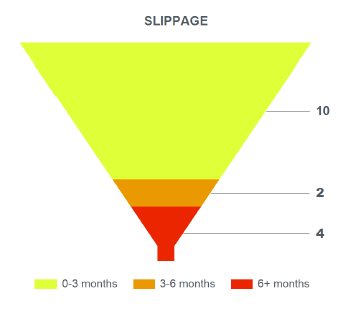
It would be really great if there is a Funnel chart.
We are trying to visualize the quantitative slippage in tasks assignment in a given month-range.
We did it very well in SSRS Reporting and as we migrate to Telerik Reporting, we can't quite figure out how to present it.


It would be great if you could make the border of the stand alone report designer visible. It's hard enough to see and grab thin gray lines but Report Designer borders become invisible. Below is a screen shot of the report designer in front of my Telerik Reporting program folder:

When a report includes drill-down item(s), the report is run again each time the user expands a drill down item. This is apparent in the demo at https://demos.telerik.com/reporting/product-sales
I would like to see all of the drill-down data generated and delivered with the initial report, but collapsed and awaiting inspection.
Perhaps this would be an attribute of the drill-down element (pre-fetch versus re-run) so that developers can choose the most appropriate experience for their users / conserve server resources.

If any schema other than dbo is used, the report viewer throws the following error:
Error registering the viewer with the service
Could not find stored procedure sp_tr_GetString
I've run into a problem when using a Combo Box for a Multi-Select Parameter. The issue is that if the user selected values then clicks the preview button, while the dropdown list is still displayed, the parameter is not set before the report is generated.
I would prefer to use the combo box to set the parameters, but this will be an issue for the users. If I click elsewhere on the report or just re-run the report the parameters are set properly. This does not occur with the Listbox functionality.
.jpg)
First, we need the ability to have the controls in a Page Header Band to Grow/Shrink based on their contents.
Second, the Page Header Band also needs the ability to Grow/Shrink based the first Condition and any other Conditional Formatting settings of controls with in that band.
This is request becuase of the design of the Report Header Band and how it is designed for Multi Column Reports.  The Report Header Band does all what I am asking for, however, in a Multi Column Report, it's only the size of the column width, which is a problem for some of our reports.  We need it to be the entire page width.  Some suggests to create PAGE BOOKS seems a bit complicated to do for such a simple request.  I have been using different report writes in my 25+ years of programming, and Telerik Reports is the first one that I have used, that has these limitations..
OnGetDocument and OnCreateDocument can be overridden in the ASP.NET Web API ReportsController to modify the report documents as explained in the KB Modify exported report document prior to serving it to the viewer client.
In ASP.NET Core this is not possible as OnGetDocument and OnCreateDocument don't exist.