

Visual Studio 2022, Telerik Reporting 2025 Q2, Visual Studio Designer, C# code, running VS as admin, VS version is Microsoft Visual Studio Professional 2022 (64-bit) - Current Version 17.14.13 (August 2025)
A few days ago, the data explorer window stopped functioning, while it seems to be around the same time of the last VS update, I'm not 100% sure. The data explorer window just does not populate at all, appears to not update the screen at all (so you see whatever was there). I have tried system restarts, repair install on Telerik Reporting, closed the data explorer window and opened it again, searched for possible answers - nothing. I can run the report in Preview so the data connection is fine. Attached is a screenshot of when I open the Data Explorer - as you can see while the data explorer window shows, the contents is what was there previously. If I leave it open and restart VS the window comes up all white. This is happening for all reports (14 in this project).
Only VS extensions installed are AWS Tookit and Telerik.
VS is not showing any errors in the output window, the option for "Show output from", at least initially, has no entries for Telerik

I have updated to version 19.2.25.813 of Reporting, and when I try to build a project that has Reporting references, I get the following warnings:
Telerik and Kendo UI Licensing warning TKL102: Your current license has expired and is not valid for Telerik Document Processing Libraries version 2025.2.807.20.
There are no Telerik Document Processing dependencies in my project, but I still get the warning.

I’m using Telerik.Reporting v19.1.25.521 to generate PDF files. After upgrading the Telerik.Licensing NuGet package to version 1.6.16, all SVG files stopped rendering in the output.
Reverting back to the previous version resolves the issue. I also tested the latest available version (1.6.21), but the problem still persists.

When using the "Close"/"Close All" options when a report has unsaved modifcations, a warning is shown, but you are forced to save the report or close the window/tab to leave definition file unmodified.
A "close and discard changes" option is helpful and convenient - one can cancel some edits without hoping that a bunch of "Ctrl - Z" presses will clear everything, refer to one report without concern about accidental modifcations (can be editing others), etc.

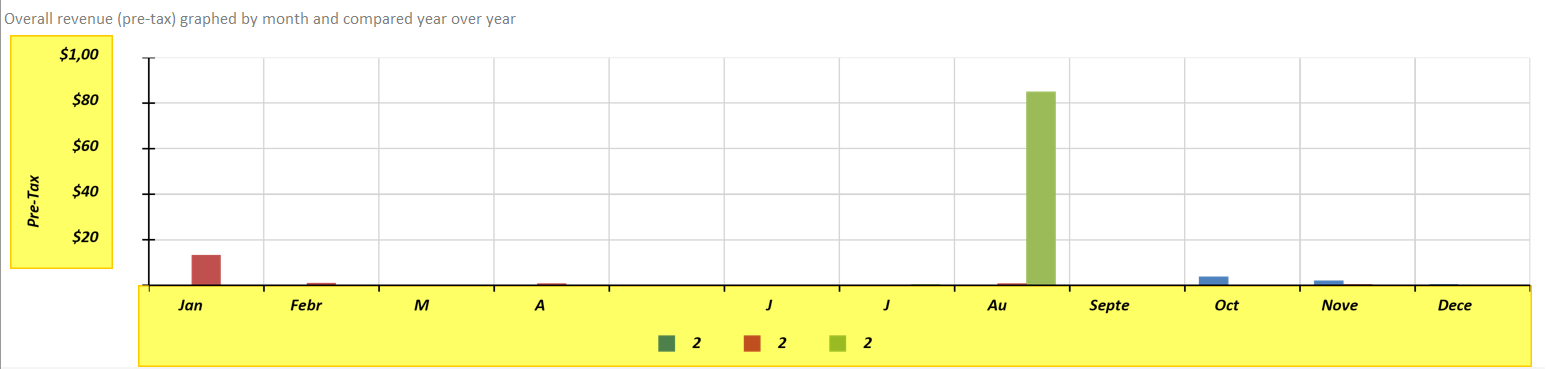
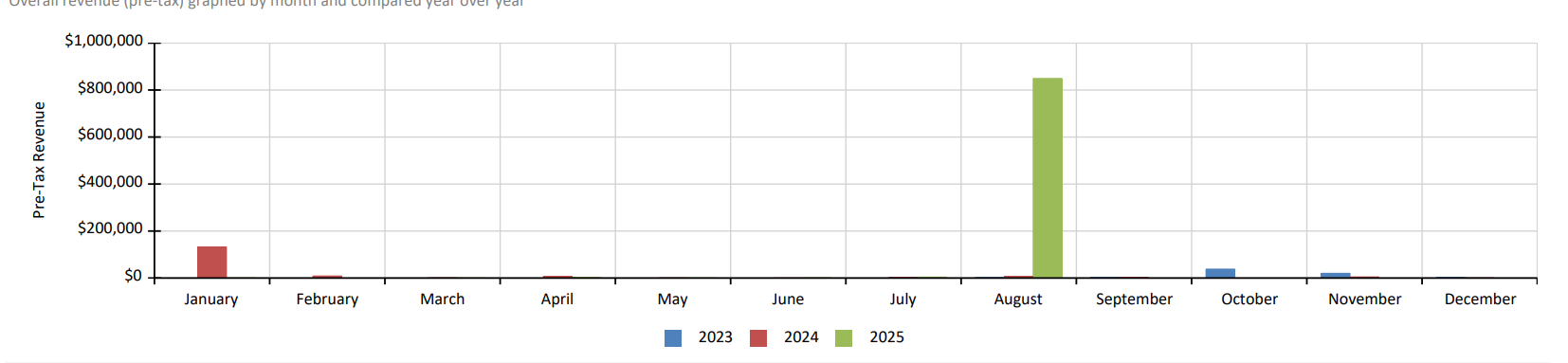
Graphs do not render captions and labels properly when exporting to Excel, Word, or Powerpoint. The problem appears to be worse using Skia on Linux, but the problem is present with GDI rendering as well. Worth noting that PDF export works properly.
Here is an example report exported to Excel via a Linux Azure Web App and below that is the exact same report from the same environment as PDF:
Here is that same report as a PDF (which mirrors how it looks in the HTML5 viewer):

I run an ASP.NET Core application that has the functionality to export reports into PDFs in an Azure environment.
There is no way to install additional fonts on Azure so I provide the fonts used in my reports via the "privateFonts" element of the Reporting configuration.
This works for the most part, the font is embedded in the produced PDFs but if I have a textbox with a large text, the text may be cut off when using the Skia engine.
I tested running my application in Docker, I copied the needed fonts in the usr/share/fonts directory of the Docker Linux container, and tried exporting again.
When exporting from Docker, with the fonts installed in the container, the text is not cut off. It seems that there is an issue when the fonts are provided as private fonts.
When exporting a report to Excel with the UseExtendedFormatting parameter set to False, the Standard DateTime Format Strings are hard coded as custom formats in the generated XLS/XLSX document.
The custom formats correspond to the current regional settings or, if the report is rendered with a specific culture, the default date format strings for the selected culture.

This bug has been reintroduced in 2025 Q3: https://feedback.telerik.com/reporting/1671864-2024-q4-pdf-rendering-made-text-extraction-impossible
I use the font Roboto in a TextBox rotated vertically. The last character of the content is cut in the design time of the Standalone Report Designer. In Preview and when exporting to PDF, the content is displayed as expected.
Here is a link to a video showing the issue - https://somup.com/cTQjid8GRH
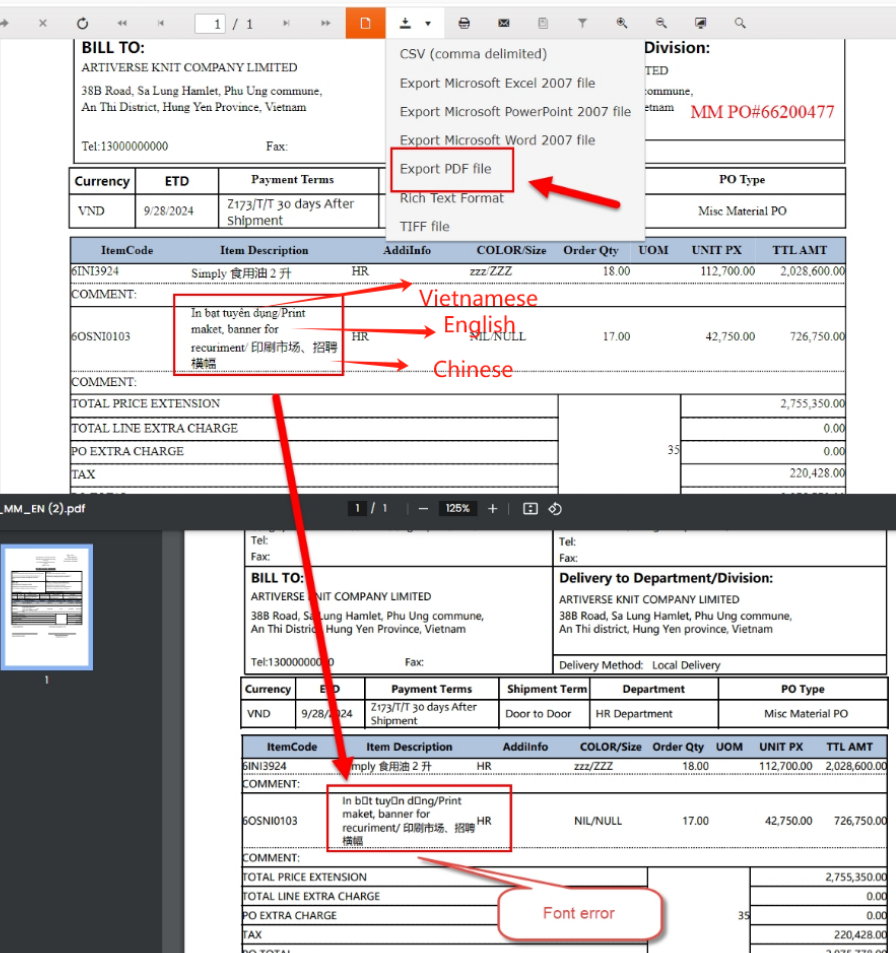
in this page, there are 3 languages. Vietnamese, English, Chinese, it display Vietnamese Messy code when download PDF.
pls hlep, thanks.

I am using the HTML5-based report viewer while connecting to a Report Server. However, the responses from the Report Server have a status code of 409 with the following error message:
Thе endpoint "Resources" is currently not accessible.
I am running the designer with the flag --roll-forward LatestMajor still getting an error in wizard when we try and open cs report
"Ensure that restore has run and that you have included 'net8.0' in the TargetFrameworks for your project."
We'd like to have a settable property on the web designer and report viewer which takes a function which returns an access token.
This way a new access token can be requested by the designer/viewer when the current one expires.
This is usually used in the following way:
- Implement a function with signature "string GetAccessToken()"
- Set that function to the property AccessTokenProvider of the designer/viewer
- Designer/Viewer wants to make a request and fetches and caches the access token
- Designer/Viewer uses that access token until it hits a 401 upon which
- The Cached access token is cleared
- A new Access token is fetched from AccessTokenProvider and then cached
- Retry the request with the new access token
- Should the retry also fail return the failure
Should the above be to specific/inflexible:
Instead of caching the access token, call AccessTokenProvider for every fetch but also provide an additional parameter with the "reason" for the call, so the implementer of AccessTokenProvider can decide themselves when to return a cached AccessToken or generate a new one.
Currently, the VS item templates, and the documentation suggest using app.UseEndpoints for route registration in ASP.NET Core.
It would be better to use top-level route registrations like app.MapControllers() and app.MapControllerRoute() directly.

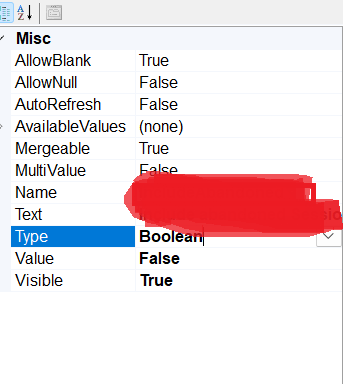
this type filteration controllers not displaying in report (version - 18.0.24.130)
Hi Team,
Currently, the DatabaseCacheConfigurator.exe tool seems to be Windows-only. Can you please compile this to be cross platform compatible? I am on macOS and cannot use any Windows tooling.
Thank you,
Frank