I have an image set to the checkbox through the CheckedImage property. When I export the report to Excel using the Skia graphics engine, the image is not present at all, or cut off.
The same issue is not present in the GDI engine or with the PictureBox item.
I have a simple report with two TextBoxes in the detail section. In one of them, the content wraps as it doesn't fit, and in the other, it doesn't.
When I export to Excel (XLSX), under each detail section, there is an empty row.
When I left only the TextBox with the wrapping content, there were no empty rows in the Excel file.
I load multiple variants of the Segoe UI font as private fonts in my application:
			<!-- Segoe UI -->
			<add fontFamily="Segoe UI" path="Fonts\SegoeUI\segoeui.ttf" fontStyle="Regular" />
			<add fontFamily="Segoe UI" path="Fonts\SegoeUI\seguisb.ttf" fontStyle="Semibold" />
This leads to issues, as there is no "Semibold" option in the System.Drawing.FontStyle enum.
The workaround that can be used to avoid this problem is to use unique font family names. For example
			<add fontFamily="Segoe UI" path="Fonts\SegoeUI\segoeui.ttf"  />
			<add fontFamily="Segoe UI Semibold" path="Fonts\SegoeUI\seguisb.ttf"  />
I have a report where I have placed a bunch of textbox items at the bottom of the page header that I use as headers for my data that I display in the detail section.
When I run the report in a Docker Linux container, where the Skia graphics engine is used, the items at the bottom edge disappear when rendering the report in the web report viewer(HTML5 Interactive) rendering.
The issue does not occur when I render the report with the "PRINT_PREVIEW" viewMode setting or when I use GDI+..
The provided URI should instead be only the relative URI that I have set on the action.
This results in the text being cut off at the end despite there being available space in the item. On the other hand, the issue is not present when the font is resolved normally.
I have a Website ASP.NET project, and I am trying to implement the Reporting REST Service in it. To do that, I have tried to install the Telerik.Reporting.Services.WebApi package to my solution. However, when I attempt that, I get the following error:
The package 'Telerik.Reporting.Services.WebApi' tried to add a framework reference to 'System.Web.Http' which was not found in the GAC. This is possibly a bug in the package. Please contact the package owners for assistance.
Cannot find assembly 'System.Web.Http'.
It seems that the package requires that the System.Web.Http.dll assembly is available in the GAC, otherwise, the package cannot be installed.
The workaround to be able to install the package is to manually install the assembly to the GAC, or paste it in C:\Program Files (x86)\Reference Assemblies\Microsoft\Framework\.NETFramework\v4.8.

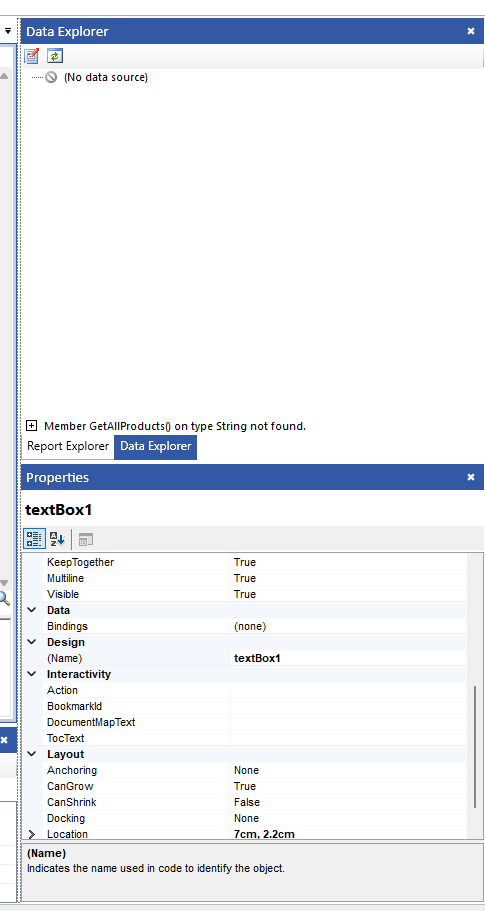
I'm getting an error in Telerik Report Designer (Data Explorer): "Member x on type String not found"
The version is: 19.3.25.1119
Steps to Reproduce:
- Open SRD.NET.
- Configure the Assembly References through the SRD.NET UI to include a DLL.
- Open an existing report file.
- Observation: The Data Explorer tool window is populated correctly, showing all fields and methods as expected.
- Close Telerik Report Designer.
- Re-open Telerik Report Designer.
- Verify that the Assembly References are still correctly configured (they are).
- Open the same report file.
- The Data Explorer is not populated. Instead, it throws an error:
Please note the spelling error in the k-notificaiton-error class name. Should be k-notification-error:
<div class="trv-parameter-error k-notification k-notificaiton-error" style="">
<span class="k-notification-status k-icon k-i-x-outline"></span>
<span class="trv-parameter-error-message k-notification-content">Parameter value cannot be empty.</span>
</div>
Because of this, error messages are rendered with incorrect color (should be red):
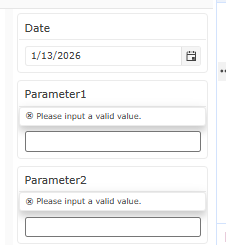
This also triggers multiple requests without an instance ID and document ID, resulting in 404 Not Found responses.
We are experiencing issues with Telerik Reporting related to RTL text (culture 'ar-JO') rendering, as outlined below:
- Text wrapping is not working correctly within the HTML5 Report Viewer. The text seems to overflow the TextBox.
- When exporting to PDF, the text exceeds its boundaries, does not wrap as expected, and in some cases is cut off.
Using Blazor native reporting component. Our underlying email sending service requires that Subject is not blank, however the UI does not validate the Subject field.
Need to be able to validate that Subject is not blank when user attempts to submit email form.
Currently, the GetDesignerResource endpoint of the Web Report Designer service is case-insensitive, which can lead to issues if the URL is made lowercase at some point, such as by a URL rewrite rule, or similar scenarios.
For example, the following reference to the Web Report Designer script will load return the file:
<script src="api/reportdesigner/designerresources/js/webReportDesigner"></script>But if lowercase is used, for example, like this:
<script src="api/reportdesigner/designerresources/js/webreportdesigner"></script>The request will return a 404(Not Found) response.
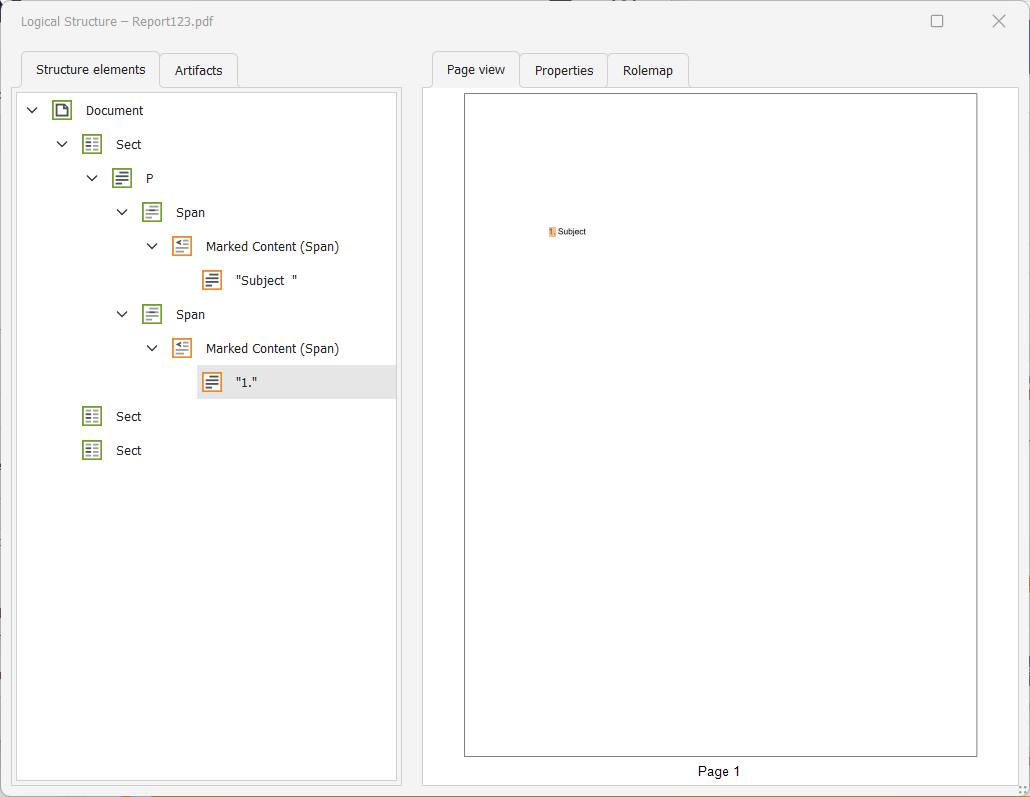
I have a report with an HtmlTextBox item, which contains an ordered list(<ol>). When I export this report to PDF, and inspect the logical tree of the document with a tool like the PDF Accessibility Checker, I can see that the span with the text is inserted above the number.
As a result, when I read the document with a screen-reading tool like Adobe's "Read Out Loud" feature or NVDA, the text is read before the current number in the list, which I find unexpected.

Some of the Web Report Designer pop-up messages are not localizable. For example, the message about trying to access a report that does not exist on the server:

Currently, Telerik Reporting has a dependency on Microsoft.Data.SqlClient version="5.2.2".
This version may cause build failure when restoring packages due to locked package files.
See the following dotnet issue for more information about the problem: dotnet/SqlClient#2464
My report has a Text Watermark as part of the PageSettings, and is configured for Accessibility. The report contains a Page Header and Page Footer. In the Page Footer, there are two TextBoxes.
When I generate an accessible PDF with Telerik Reporting and use the Adobe Reader > Read Out Loud functionality, it doesn't read the content of the second TextBox in the Page Footer.